Microsoft-identity-web: Reset Password Policy is using implicit flow by default, not authorisation code
I have an app with sign in/up and reset password, and I want it to use authorisation code flow. I do this by setting the response type to code. Here is my configuration:
"AzureAdB2C": {
    "Instance": "<instance>",
    "ClientId": <myid>,
    "ClientSecret": <secret>
    "Domain": "<domain>",
    "TenantId": <myid>
    "CallbackPath": "/signin-oidc",
    "ResponseType": "code",
    "Scope" : ["openid", "profile", <applicationid>],
    "SignUpSignInPolicyId" : "B2C_1_signupsignin1",
    "ResetPasswordPolicyId" : "B2C_1_passwordreset"
  },
The sign in flow is using authorisation code flow, however when I run the reset password flow, id_token is being added to the response type parameter (I am not sure what is adding it) and since my application does not allow implicit flow, I get the following error:
OpenIdConnectProtocolException: Message contains error: 'unauthorized_client', error_description: 'AADB2C90057: The provided application is not configured to allow the 'OAuth' Implicit flow.
My Startup code
services.AddAuthentication(OpenIdConnectDefaults.AuthenticationScheme)
                .AddMicrosoftWebApp(options =>
                {
                    Configuration.Bind("AzureAdB2C", options);
                    options.Events.OnRemoteFailure = context =>
                    {
                        context.HandleResponse();
                        if (context.Failure is OpenIdConnectProtocolException &&
                            context.Failure.Message.Contains("AADB2C90118"))
                        {
                            context.Response.Redirect("/resetPassword");
                        }
                        else
                        {
                            throw context.Failure;
                        }

                        return Task.FromResult(0);
                    };
                }, cookieOptions => { cookieOptions.ExpireTimeSpan = sessionInfo.Duration; });
and the reset password endpoint
[HttpGet("/resetPassword")]
        public IActionResult ResetPassword()
        {
            var properties = new AuthenticationProperties { RedirectUri = Url.Content("~/") };
            properties.Items["policy"] = "B2C_1_passwordreset";
            return Challenge(properties, OpenIdConnectDefaults.AuthenticationScheme);
        }
Any ideas on what is happening?
 AshTappin
All 20 comments
I have debugged it further and the issue lies in AzureADB2COpenIDConnectEventHandlers
public Task OnRedirectToIdentityProvider(RedirectContext context)
    {
      string defaultUserFlow = this.Options.DefaultUserFlow;
      string str;
      if (context.Properties.Items.TryGetValue("policy", out str) && !string.IsNullOrEmpty(str) && !string.Equals(str, defaultUserFlow, StringComparison.OrdinalIgnoreCase))
      {
        context.ProtocolMessage.IssuerAddress = this.BuildIssuerAddress(context, defaultUserFlow, str);
        context.Properties.Items.Remove("policy");
        context.ProtocolMessage.ResponseType = this.Options.HasClientCredentials ? "code id_token" : "id_token";
      }
      return Task.CompletedTask;
    }
If the policy is not the default one, i.e. sign in/ up and I set a client secret so I have client credentials, then the response type is set to code id_token. Why is this? If I have configured the response type to be code then should it just use that?
AshTappin
on 1 Sep 2020
@AshTappin This is an issue with the portal, you will need to check id_token, not access_token, just checking id_token does not enable implicit flow. B2C needs to have the id_token. We'll add some documentation to explain this. It's pretty confusing.
 jennyf19
on 1 Sep 2020
jennyf19
on 1 Sep 2020
@jennyf19 Where do I configure it to just check id_token ? Is it somewhere in the portal? Realised I have created an application in "Applications (Legacy)" so I might not be seeing some options.
AshTappin
on 2 Sep 2020
I have created an application the "new way" with this
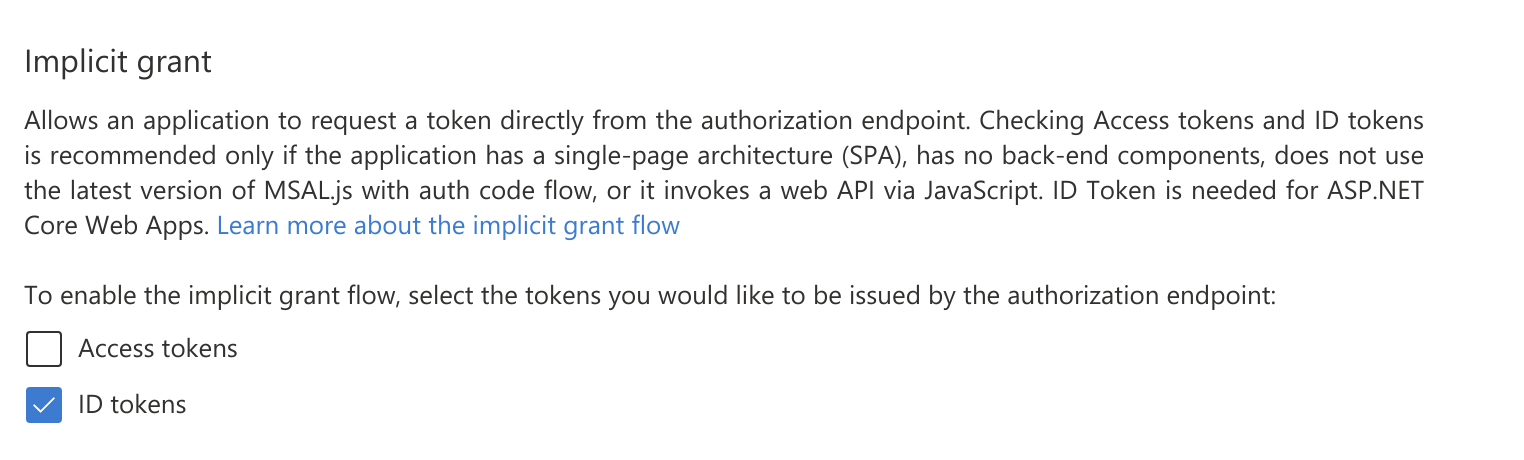
But I am still getting the same 'AADB2C90057: The provided application is not configured to allow the 'OAuth' Implicit flow. error when I reset password.
Any other ideas?
AshTappin
on 2 Sep 2020
@AshTappin which version are you using of microsoft identity web? You'll want to be on the latest.
Can you run the policy in the portal directly? Does it work there?
jennyf19
on 2 Sep 2020
@jennyf19 I am using 0.3.1-preview and when I run from the portal directly, I get a Exception: OpenIdConnectAuthenticationHandler: message.State is null or empty. after I reset the password. It gets further than the previous error and I notice the response_type parameter is just code rather than code and id_token.
AshTappin
on 2 Sep 2020
@AshTappin that's interesting. it should work directly in the portal.
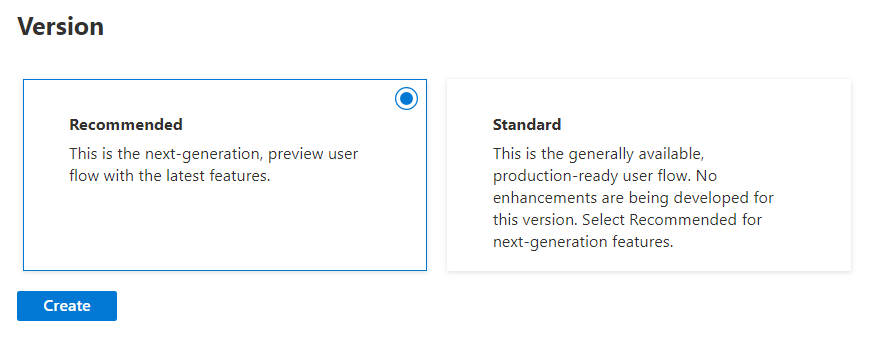
Which one did you select?
jennyf19
on 2 Sep 2020
I selected the "Standard" option. I'll give the "Recommended" option a go.
AshTappin
on 2 Sep 2020
I still get the same Exception: OpenIdConnectAuthenticationHandler: message.State is null or empty. error with the 'Recommended' option
AshTappin
on 2 Sep 2020
thanks for the update. i'll try to find someone from B2C to help. What is your tenant name?
jennyf19
on 2 Sep 2020
Thanks! It is moneycorpcfxd.onmicrosoft.com
AshTappin
on 2 Sep 2020
@AshTappin Can you share your run now link?
jennyf19
on 2 Sep 2020
It seems like implicit flow fails, unless you select both access token and id token. Could you try this?

This will give you a run now link with id_token in it (implicit flow).
I will check if this is a bug on our side.
 ktsakas
on 3 Sep 2020
ktsakas
on 3 Sep 2020
Thanks @ktsakas we will sync w/someone from B2C
jennyf19
on 3 Sep 2020
Thanks @ktsakas . But what if I wanted to reset password using authorisation code flow? Is that not possible? Can I only use implicit flow?
AshTappin
on 4 Sep 2020
@AshTappin sorry, i didn't see this before.
this shouldn't impact the authorization code flow because at the start of the auth code flow, once the user hits "sign-in", they will get directed to AAD B2C and AAD B2C will present them with the sign-in dialogue. This is where the user can hit "password reset". so there should be no problem here. If there is, let me know.
@ktsakas can you clarify something, because implicit flow should only happen if the AT is checked, but not the Id_token. Customers should be able to only check id_token to just get the Id_token back. Because @AshTappin is not a SPA (single page app), so we don't want the AT in the response from the auth code. Does that make sense? happy to take it offline as well.
going to close this, but tag me if you have further questions or something is not clear.
jennyf19
on 18 Sep 2020
@jennyf19 Does this mean,to use authorization code flow for resetting password, the user needs to be signed in already? Therefore, if I was to implement a Forgotten Password flow, I can only use implicit grant ? At the moment, I can only get reset password to work if I select "Access Tokens" (not "ID tokens) i.e. enabling implicit flow.
AshTappin
on 21 Sep 2020
@AshTappin you are right, the user does not need to be signed-in, because that wouldn't make sense if they don't know their password or want to reset it. I think this is just an issue in the portal, asking for you to check "access tokens", but it should not. @ktsakas should we open an issue w/the b2c portal UI for this?
jennyf19
on 21 Sep 2020
To clarify the limitation: In Azure AD B2C, the oauth2AllowImplicitFlow (corresponding to the access token checkbox) controls whether Azure AD B2C token service will accept requests with either access token (and or) id token implicitly. So “access token” checkbox acts as if it controls both checkboxes in practice. The service team is aware if this, but there are no ETA on when they will fix this behavior
 jmprieur
on 16 Dec 2020
jmprieur
on 16 Dec 2020
Related issues
 CalamityLorenzo
·
3Comments
CalamityLorenzo
·
3Comments
 saddamhossain
·
3Comments
saddamhossain
·
3Comments
 luismanez
·
4Comments
jennyf19
·
4Comments
luismanez
·
4Comments
jennyf19
·
4Comments
 pmaytak
·
3Comments
pmaytak
·
3Comments