Microsoft-identity-web: [Bug] Token Cache not persisting all tokens when API calls downstream API
Which version of Microsoft Identity Web are you using?
Microsoft Identity Web 1.4.1
Microsoft.Identity.Client 4.7.1
Where is the issue?
- Web app
- [ ] Sign-in users
- [x] Sign-in users and call web APIs
- Web API
- [x] Protected web APIs (validating tokens)
- [ ] Protected web APIs (validating scopes)
- [x] Protected web APIs call downstream web APIs
- Token cache serialization
- [ ] In-memory caches
- [ ] Session caches
- [x] Distributed caches
- Other (please describe)
Is this a new or an existing app?
This is an experiment for a new app (if we succeed)
Repro
This is a long story, but please, bear with me, as I think is interesting enough.
I’m working with Microsoft Identity Web and MSAL (latest versions), using the Distributed token cache, configured to SQL Server DB. So I’ve seen this is how the data is stored:

So I realized that the Key used is the User Id + TenantId, which led me to ask “what is store in the Value column when a client app is calling multiple APIs?? (you have multiple tokens for the same User + Tenant)”. As far as I’ve seen debugging the code, the Value is a Byte array with json content like (removed some fields for clarity):
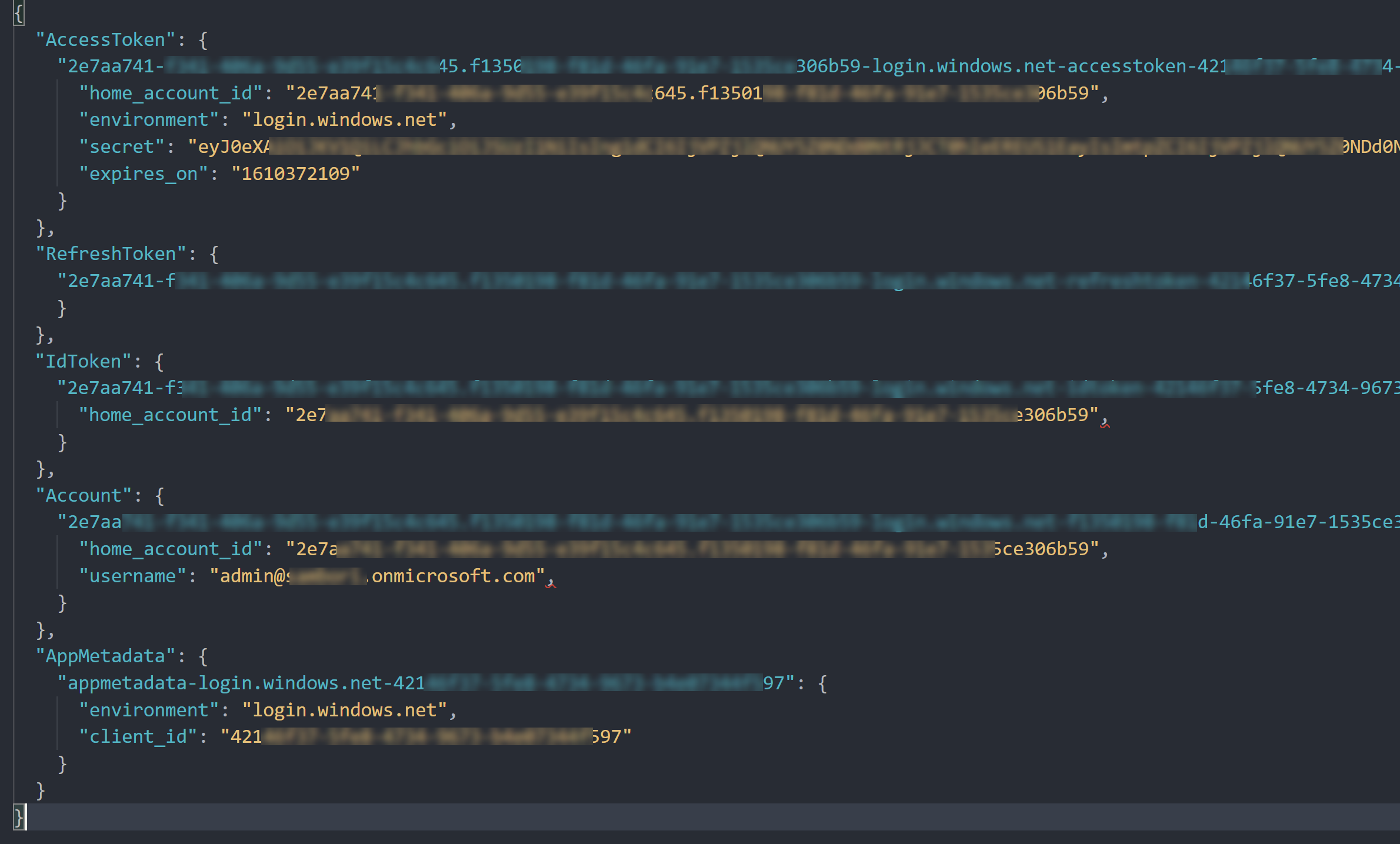
AccessToken, RefreshToken, etc are Dictionaries, where the Key contains different fields like userid, tenant, clientid and so on, so is clear that, when calling multiple APIs, the different Tokens are stored there, as the Key will be unique having the ClientId, etc.
Am I right at this point?
However, my scenario is:
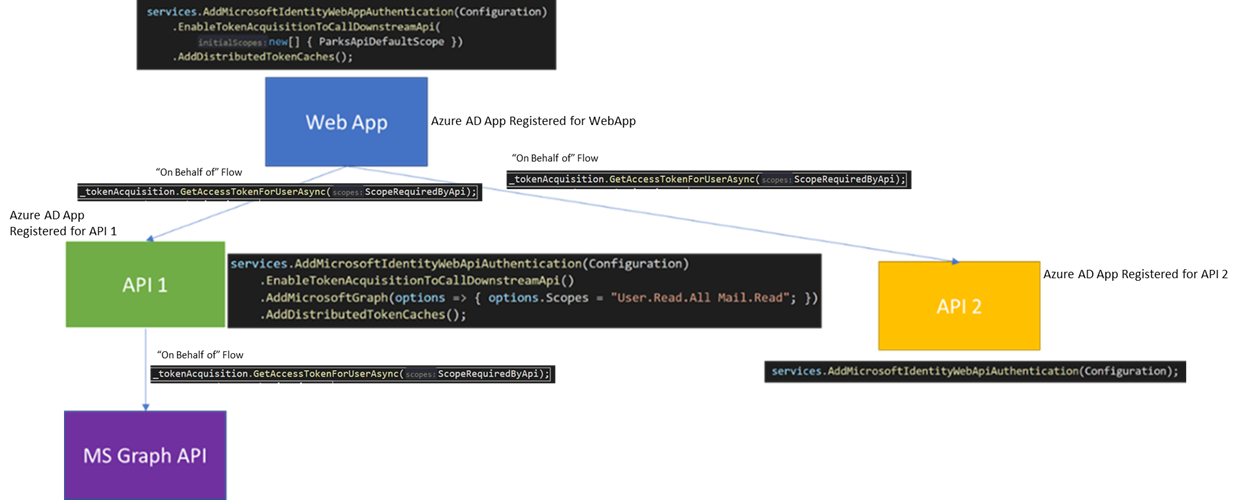
The Access tokens obtained by the WebApp, to call API 1 and API 2, are stored in the DB (I can see 2 entries in the AccessToken dictionary, in the previous JSON data), however, the Token obtained by API 1 to Call Graph API, is not stored in the DB (there is not a 3rd entry in the AccessToken dictionary).
Is this expected?
It´s weird, cos apparently the Token cache that MSAL has in its internal memory, is actually storing that token. In other words, while the App is running in Visual Studio, once the API 1 obtains a token for Graph, the next calls from webapp->API 1->Graph, no calls are done to AAD, and the 2 tokens are extracted from MSAL internal Cache, but the Token from API 1 to Graph, is not persisted in the DB, so if I stop VS, and re-run again, when the WebApp calls API 1, the first jump, the token is from Cache, but the 2nd jump (API 1 to Graph), it requires a roundtrip to AAD (user assertion), and then, the next calls, the token API 1->Graph is in MSAL internal memory until I stop VS.
Am I missing something? Is this behavior expected, or the token from API 1 to Graph, should be also stored in SQL Cache?
Expected behavior
All tokens available in MSAL internal memory cache are persisted to SQL DB.
Actual behavior
The token for API 1 to call Graph API, is not persisted in DB.
THANKS!
/cc @jmprieur
 luismanez
All 4 comments
@luismanez
Yes you are right for the first part
Do you use the same SQL database for all your applications?
Microsoft.Identity.Web maintains, for OBO, one cache per user. The key is the SuggestedCacheKey member of the argument in TokenCacheNotificationArgs, and this key depends on several criteria (see the XML comment).
In the case of OBO (API1 calls Graph), the cache key is the hash of token used to call API1, which is why you won't see it in the database entry for homeAccountId (tenantID+userID) as is the case for the web App calling API1 or API2.
So it should be persisted, but with a different key.
 jmprieur
on 13 Jan 2021
jmprieur
on 13 Jan 2021
Thanks @jmprieur, you´re absolutely right!! just realised about that other record in the table with that "weird" ID!! I didn´t do it before as I thought it was some internal stuff from any .net core middleware... sorry.
Before closing the issue, one last question. I´m using the same DB and Table for Distributed token cache for all the apps in my scenario (webapp, api1, api2)... is this a bad approach? A different DB per App sounds like a bad idea if we think in Azure costs, but I could create a specific Table per App, if that´s a best practice.
luismanez
on 13 Jan 2021
Thanks for the update, @luismanez
Using the same db / table is probably ok. I guess you'd need to see if the table could be the bottleneck, but we don't have anybody complaining so far.
jmprieur
on 13 Jan 2021
Thanks @jmprieur really appreciate it. Hope it helps others to understand better how the Token cache works. Closing the non-issue XD
luismanez
on 13 Jan 2021
Related issues
 Cholo981
·
3Comments
Cholo981
·
3Comments
 adriannasui
·
5Comments
adriannasui
·
5Comments
 mia01
·
4Comments
mia01
·
4Comments
 jennyf19
·
5Comments
jennyf19
·
4Comments
jennyf19
·
5Comments
jennyf19
·
4Comments