Microsoft-authentication-library-for-dotnet: Exception using sign in with Apple
Which Version of MSAL are you using ?
Note that to get help, you need to run the latest version. Preview version are also ok.
For ADAL, please log issues to https://github.com/AzureAD/azure-activedirectory-library-for-dotnet
4.5.1
Platform
xamarin iOS
What authentication flow has the issue?
- Desktop / Mobile
- [ ] Interactive
- [ ] Integrated Windows Auth
- [X] Username Password
- [ ] Device code flow (browserless)
Other? - please describe;
Is this a new or existing app?
This app is in production and I am trying to add Apple as an Identity provider in B2C
Repro
I have created a custom policy in Azure B2C following the tutorial:
https://docs.microsoft.com/en-us/azure/active-directory-b2c/active-directory-b2c-get-started-custom#register-identity-experience-framework-applications
I then added an Identity provider for apple based on the following example:
https://techcommunity.microsoft.com/t5/Azure-Developer-Community-Blog/quot-Sign-In-with-Apple-quot-Custom-Policy-for-Azure-AD-B2C/ba-p/766575
Everything works really well in Android and on iPad and I am able to log in with my Apple account no problem. But on iPhone (ios 13 and ios 12) I am getting an error
ErrorCode: server_error
Microsoft.Identity.Client.MsalServiceException: AADB2C90289: We encountered an error connecting to the identity provider. Please try again later.
Correlation ID: b68ebf8f-e059-4ae4-8274-3058e115bd25
Timestamp: 2019-10-07 14:48:05
My app loads up my policy, I tap on my Sign In With Apple button, the Apple Webpage displays and I enter my credentials. Everything appears to be working and then this exception is thrown.
Is there some way I can find out more information on what this error means and why it would be appearing on iOS?
I have redirect URLs setup on the Apple Developer Console redirecting to "https://tenant.b2clogin.com/tenant.onmicrosoft.com/oauth2/authresp"
My Apple Login provider in my custom policy looks like:
<ClaimsProvider>
    <Domain>Apple</Domain>
      <DisplayName>Apple</DisplayName>
      <TechnicalProfiles>
        <TechnicalProfile Id="AppleID">
          <DisplayName>Sign in with Apple</DisplayName>
          <Protocol Name="OpenIdConnect" />
          <Metadata>
            <Item Key="client_id">com.XXXXX.B2CSignInService</Item>
            <Item Key="UsePolicyInRedirectUri">0</Item>
            <Item Key="METADATA">https://XXXXXXXXXXX.azurewebsites.net/api/signinwithapple/.well-known/openid-configuration</Item>
            <Item Key="response_types">code</Item>
            <Item Key="scope">email</Item>
            <Item Key="response_mode">form_post</Item>
            <Item Key="HttpBinding">POST</Item>
          </Metadata>
          <CryptographicKeys>
            <Key Id="client_secret" StorageReferenceId="B2C_1A_AppleIDAppSecret" />
          </CryptographicKeys>
          <InputClaims>
            <InputClaim ClaimTypeReferenceId="email" PartnerClaimType="login_hint" />
          </InputClaims>
          <OutputClaims>
            <OutputClaim ClaimTypeReferenceId="authenticationSource" DefaultValue="socialIdpAuthentication" />
            <OutputClaim ClaimTypeReferenceId="identityProvider" PartnerClaimType="iss" />
            <OutputClaim ClaimTypeReferenceId="issuerUserId" PartnerClaimType="sub" />
            <OutputClaim ClaimTypeReferenceId="displayName" PartnerClaimType="sub" />
            <OutputClaim ClaimTypeReferenceId="givenName" PartnerClaimType="given_name" />
            <OutputClaim ClaimTypeReferenceId="surName" PartnerClaimType="family_name" />
            <OutputClaim ClaimTypeReferenceId="email" />
          </OutputClaims>
          <OutputClaimsTransformations>
            <OutputClaimsTransformation ReferenceId="CreateRandomUPNUserName" />
            <OutputClaimsTransformation ReferenceId="CreateUserPrincipalName" />
            <OutputClaimsTransformation ReferenceId="CreateAlternativeSecurityId" />
            <OutputClaimsTransformation ReferenceId="CreateSubjectClaimFromAlternativeSecurityId" />
          </OutputClaimsTransformations>
          <UseTechnicalProfileForSessionManagement ReferenceId="SM-SocialLogin" />
        </TechnicalProfile>
      </TechnicalProfiles>
    </ClaimsProvider>

  </ClaimsProviders>
Expected behavior
Login works the same on both Android and iOS.
Actual behavior
Exception is thrown on iOS (iPadOS is fine).
 WilliamWatterson86
All 55 comments
@WilliamWatterson86 Are you using system browser (default) or embedded webview? There is a known issue w/system browser on iOS 13 w/MSAL.NET. The fix will go out in our next release (end of week).
Also...can you share the documentation you are using to set up the Apple IdP?
 jennyf19
on 7 Oct 2019
jennyf19
on 7 Oct 2019
@jennyf19 - thanks for your quick reply.
I am currently trying it inside the embedded webview - haven't tried it with the default system browser.
I originally used this example for setting up the apple idp when I was trying it out with userflows:
https://github.com/azure-ad-b2c/samples/tree/master/policies/sign-in-with-apple
But since the apple login page showed the app logo, and talking to MS support they advised I needed to use custom policies so I could add identity providers for both my apps (and show the different icons). So I followed the MS docs for creating a custom policy:
https://docs.microsoft.com/en-us/azure/active-directory-b2c/active-directory-b2c-get-started-custom#register-identity-experience-framework-applications
And then I added an Apple provider based on the following: (I did not do anything to do with Home realm discovery as this sample talks about)
https://techcommunity.microsoft.com/t5/Azure-Developer-Community-Blog/quot-Sign-In-with-Apple-quot-Custom-Policy-for-Azure-AD-B2C/ba-p/766575
WilliamWatterson86
on 7 Oct 2019
@WilliamWatterson86 thanks for the additional info, very helpful. I'm not an expert at custom policies, and I know there can be a lot of issues there with the configuration, but interesting it's working on most devices and not mobile.
@valnav @vigunase - please see the above...are there any additional information or insights you can provide? I'll look into this more, I don't believe we have Apple IpD configured for our test tenant... :/
jennyf19
on 7 Oct 2019
@jennyf19 thanks.
Tried building the code on a Mac here with Xcode 10 on it instead and switched to use the system browser. I get a bit further with it.
On iOS 13 when I tap the Login With Apple button on my login page the user gets an iOS system pop up asking do you want to login (rather than redirecting to the Apple login page). If I select use a different Apple account on this pop up and enter my email address and password on the Apple login page that appears I can get logged in. But if on the system popup I tap “confirm” I just get an empty webpage with the url appleid.apple.com. So it looks like it dosent redirect back.
I get the same result using the custom policy or user flow. The user flow tutorial for Apple idp uses the open Id connect option. URL below
https://github.com/azure-ad-b2c/samples/tree/master/policies/sign-in-with-apple
WilliamWatterson86
on 7 Oct 2019
Thanks again @WilliamWatterson86 ...will see if we can repro on our end.
jennyf19
on 7 Oct 2019
@jennyf19 - I have spent the last two days on this and some more information for you :)
Some of the info I provided above were red herrings - so I have a full description below of what the issue is. It seems it is more of a B2C in general issue and nothing to do with the MSAL library.
As I mentioned, we have two apps. I have got one of them working well with the custom policy. I can log in on iOS (all versions including the system popup), iPadOS, Android no problem.
The config for this app is as follows:
Apple Developer Config
- Configure app in Apple Developer Portal to allow Sign in With Apple
- Add a service identifier in the Apple Developer Portal linking to the app with the following redirect URL: https://{tenant name}.b2clogin.com/{tenant name}.onmicrosoft.com/oauth2/authresp
- Add a new Key in the Apple Developer Portal for the service
I followed the tutorial for getting custom policies working so I have a number of XML policy files created:
- TrustFrameworkBase
- TrustFrameworkExtensions
- SignUpOrSignIn
- ProfileEdit
- PasswordReset
I generated a token (for the client secret) using the Key downloaded from the Apple Developer Portal and created a Policy Key.
For the apple login I have the following section added into the TrustFrameworkExtensions policy xml:
<ClaimsProvider>
    <Domain>Apple</Domain>
      <DisplayName>Apple</DisplayName>
      <TechnicalProfiles>
        <TechnicalProfile Id="AppleID">
          <DisplayName>Sign in with Apple</DisplayName>
          <Protocol Name="OpenIdConnect" />
          <Metadata>
            <Item Key="client_id">com.B2C.XXXXXXX</Item>
            <Item Key="UsePolicyInRedirectUri">0</Item>
            <Item Key="METADATA">https://XXXXXXXX.azurewebsites.net/api/signinwithapple/.well-known/openid-configuration</Item>
            <Item Key="response_types">code</Item>
            <Item Key="scope">email</Item>
            <Item Key="response_mode">form_post</Item>
            <Item Key="HttpBinding">POST</Item>
          </Metadata>
          <CryptographicKeys>
            <Key Id="client_secret" StorageReferenceId="B2C_1A_XXXXXXXXl" />
          </CryptographicKeys>
          <InputClaims>
            <InputClaim ClaimTypeReferenceId="email" PartnerClaimType="login_hint" />
          </InputClaims>
          <OutputClaims>
            <OutputClaim ClaimTypeReferenceId="authenticationSource" DefaultValue="socialIdpAuthentication" />
            <OutputClaim ClaimTypeReferenceId="identityProvider" PartnerClaimType="iss" />
            <OutputClaim ClaimTypeReferenceId="issuerUserId" PartnerClaimType="sub" />
            <OutputClaim ClaimTypeReferenceId="displayName" PartnerClaimType="sub" />
            <OutputClaim ClaimTypeReferenceId="givenName" PartnerClaimType="given_name" />
            <OutputClaim ClaimTypeReferenceId="surName" PartnerClaimType="family_name" />
            <OutputClaim ClaimTypeReferenceId="email" />
          </OutputClaims>
          <OutputClaimsTransformations>
            <OutputClaimsTransformation ReferenceId="CreateRandomUPNUserName" />
            <OutputClaimsTransformation ReferenceId="CreateUserPrincipalName" />
            <OutputClaimsTransformation ReferenceId="CreateAlternativeSecurityId" />
            <OutputClaimsTransformation ReferenceId="CreateSubjectClaimFromAlternativeSecurityId" />
          </OutputClaimsTransformations>
          <UseTechnicalProfileForSessionManagement ReferenceId="SM-SocialLogin" />
        </TechnicalProfile>
      </TechnicalProfiles>
    </ClaimsProvider>
I have also added the Apple Exchange button on to the signup signin policy.
I followed the exact same steps for our second app (so I configured the app in the Apple Developer portal, and uploaded another 5 policies for it).
When I try to login, I tap on the “Sign in with Apple” button, everything looks good, I can see my second app icon. I enter the user name and password and tap next. Then I get the error
ErrorCode: server_error
Microsoft.Identity.Client.MsalServiceException: AADB2C90289: We encountered an error connecting to the identity provider. Please try again later.
Correlation ID: b68ebf8f-e059-4ae4-8274-3058e115bd25
Timestamp: 2019-10-07 14:48:05
I had originally thought this was only on mobile (on iOS) – but it actually happens on the browser when testing the policy too – all browsers and devices work for App 1 – all browsers and devices fail for App 2. (It seems I made the mistake of testing app 1 everywhere else but on iOS - so sorry if I wasted your time)
The reason I am using custom policies is because I can only add one OpenIDConnect Idp when using user flow. But it seems like even the custom policies have issues with the same idp provider. If I delete all the configuration for the first app, the second app starts working – so it is def a problem with having more than one.
I have raised an issue with MS regarding this and will wait to see what they say. Thanks for looking into it too (sorry if I wasted some of your time). Will let you know what they say.
WilliamWatterson86
on 9 Oct 2019
@WilliamWatterson86 so interesting...thanks for the update. Let us know if you need a contact w/B2C...and not a waste of time, here to help if we can. :)
jennyf19
on 9 Oct 2019
@WilliamWatterson86 - @vigunase ([email protected]) from B2C is a custom policy expert...she would like you to email her and she will help you with the AppleID issue. Thanks!
jennyf19
on 9 Oct 2019
Amazing! Thanks @jennyf19 !
WilliamWatterson86
on 9 Oct 2019
@jennyf19 - I finally got my issue resolved. I can now log in using apple on both apps by following the document attached.
Azure AD B2C - Sign in with Apple Custom Policy Doc.pdf
However on iOS 13, sign in with Apple only works using the built in webview. Using the default system browser hangs on a white browser window.
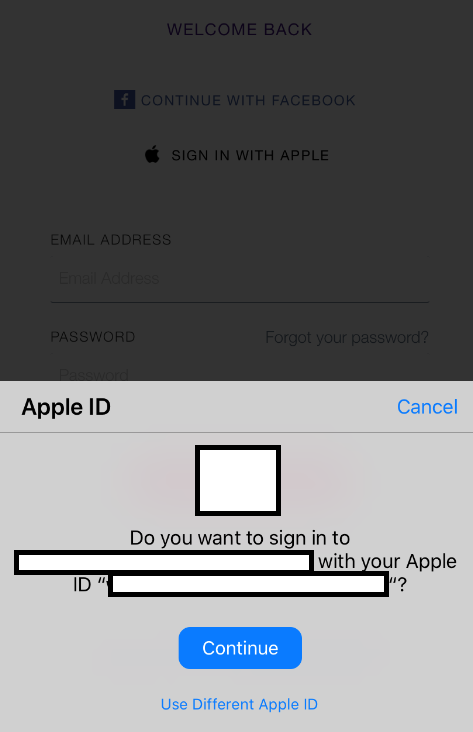
On iOS 13, sign in with Apple shows the following system popup rather than redirecting to the Apple website. So it seems the issue is when it tries to return from this. Its all good when using the webview, but just returns to the blank webpage using the system browser. When you tap on the "Use Different Apple ID" it redirects to the apple webpage to enter in the username and password and that works too. Its just from this popup is the issue.
Its not a critical issue as I am happy to use the webview for iOS. But would be great if there was something that could be done about the system browser one. Not sure if you want to open a new issue for this one?
WilliamWatterson86
on 30 Oct 2019
@WilliamWatterson86 are you on the latest version of msal (4.5.1)?
jennyf19
on 30 Oct 2019
@jennyf19 - yep 4.5.1
WilliamWatterson86
on 30 Oct 2019
@WilliamWatterson86 do you have a repro you can share?
jennyf19
on 30 Oct 2019
@jennyf19 I can make you one and send it privately (don’t really want to post the tenant etc on here). Is that any use? Have you an email or something I could send it to? I won’t be able to make a sample app until Monday.
WilliamWatterson86
on 30 Oct 2019
@WilliamWatterson86 that works -> [email protected] you can also send a link to repro if that's easier. thanks.
jennyf19
on 30 Oct 2019
@jennyf19 - I have sent you an email with a sample app showing my issue. Hope this helps! :)
WilliamWatterson86
on 4 Nov 2019
@WilliamWatterson86 thank you. received.
jennyf19
on 4 Nov 2019
@WilliamWatterson86 just following up on this, as we've been discussing via email. I have opened a new issue to track the current issue w/system browser, as it is separate from this one you originally opened.
jennyf19
on 6 Nov 2019
I am having this same issue... any updates?
 mtanml
on 13 Dec 2019
mtanml
on 13 Dec 2019
@mtanml what's your specific issue? If w/the redirect back from Apple, please 👍 the above linked issue.
jennyf19
on 13 Dec 2019
@jennyf19 I'm having the original issue reported above:
ErrorCode: server_error
Microsoft.Identity.Client.MsalServiceException: AADB2C90289: We encountered an error connecting to the identity provider. Please try again later.
This occurs after completing Apple's two factor authentication. I am using the embedded browser:
AuthenticationResult ar = await App.PCA.AcquireTokenInteractive(App.Scopes)
.WithAccount(Utils.GetAccountByPolicy(accounts, App.PolicySignUpSignIn))
.WithParentActivityOrWindow(App.ParentActivityOrWindow)
.WithUseEmbeddedWebView(true)
.ExecuteAsync();
But I'm only able to use Microsoft Identity Client v4.4 due to build issues in DevOps with higher versions.
Thanks
mtanml
on 13 Dec 2019
@mtanml are you able to get a correlation id for a failed request? You can get one by running the MSAL logs
jennyf19
on 14 Dec 2019
@jennyf19 here you go: 554dda6c-8425-4b6b-b518-50978594810e
Thank you!
mtanml
on 14 Dec 2019
Hi @jennyf19 , have you had a chance to look into this yet? Thanks
mtanml
on 23 Dec 2019
@mtanml sorry for the delay. I will need a more recent correlation Id and we are still trying to secure test accounts to try this out. Will hopefully have some update soon. Thanks for your patience.
jennyf19
on 9 Jan 2020
Hi @jennyf19 ! Here's a brand new Correlation ID: f29f2952-848c-4d68-885a-f13c705e5b63
And we are now on MSAL version 4.7.1
Thanks!
mtanml
on 9 Jan 2020
@mtanml Thanks for your patience. Based on the B2C logs, looks like the .well-known configuration endpoint is not correct, and returning a 404.
Which authority are you using and are you using .WithB2CAuthority()?
jennyf19
on 9 Jan 2020
@jennyf19 here's our authority configs:
            AuthorityBase = $"https://login.microsoftonline.com/tfp/{Tenant}/";
            Authority = $"{AuthorityBase}{PolicySignUpSignIn}";
            AuthorityResetPassword = $"{AuthorityBase}{PolicyResetPassword}";

            App.PCA = PublicClientApplicationBuilder.Create(ClientID)
                .WithB2CAuthority(Authority)
                .WithIosKeychainSecurityGroup(BundleName)
                .WithRedirectUri($"msal{ClientID}://auth")
                .WithLogging(Log, Microsoft.Identity.Client.LogLevel.Info, true)
                .Build();
@mtanml What's your tenant? and could you send me logs? [email protected]
jennyf19
on 9 Jan 2020
I'm getting the same exception as well: _Microsoft.Identity.Client.MsalServiceException: AADB2C90289: We encountered an error connecting to the identity provider. Please try again later._
I am not using custom policies though and verified that I'm using a signed JWT.
I see this in the audit logs:
_Activity Status
Status : UnknownFutureValue
Reason : We encountered an error connecting to the identity provider. Please try again later._
 mirogrg1
on 30 Jan 2020
mirogrg1
on 30 Jan 2020
@mirogrg1 Thanks...Are you getting this error when authenticating using the passcode option? Can you provide a correlation id with a failed request?
jennyf19
on 30 Jan 2020
I get the error when authenticating with user id and password. Latest correlation id is 533c15ad-0cda-4572-9f88-e34db8caa4a2
mirogrg1
on 30 Jan 2020
@jkdouglas can you help @mirogrg1 and @mtanml with the IdP issues? thanks so much.
jennyf19
on 30 Jan 2020
Hi @mirogrg1 and @mtanml
Could you both reach out to me via email? [email protected]
I would like to review the steps you took to connect to Apple and just make sure that the things are configured properly, and you properly generated the JWT to be used as the client secret.
 jkdouglas
on 30 Jan 2020
jkdouglas
on 30 Jan 2020
@WilliamWatterson86 I think we're having a similar issue, and have followed the instructions you mentioned to create a custom policy in Azure which works fine (when we test using jwt in the portal).
However, when using the policy with msal in the app, when we click on "Sign in with Apple", there's an error:
"invalid_request" and "invalid redirect_uri" in the sign-in page (this is running on a simulator from VS for Mac)
(I think our msal configuration is the same as suggested in the thread above)
I think this might be because in Azure we set up the redirect uri as:
"https://yourtenant.b2clogin.com/yourtenant.onmicrosoft.com/oauth2/authresp" (in line with the instructions),
but the msal library is setting the redirect to "msal[appId]://auth" which isn't registered with the sign-in App Service we registered with Apple.
Did you get the same problem initially, or know the solution for this?
I think it's the final problem now of linking up msal in our app to the Azure custom policy, which is working ok independently. (Also msal is working in our app for the other providers in our custom policy, e.g. AD, Microsoft)
 kevcrooks
on 26 Feb 2020
kevcrooks
on 26 Feb 2020
@kevcrooks For the reply URL on the Apple side, did you update it to your actual tenant info? If your tenant name was contoso.onmicrosoft.com you would use as the reply url: contoso.b2clogin.com/contoso.onmicrosoft.com/oauth2/authresp
Let me know if this resolves your issue.
jkdouglas
on 26 Feb 2020
@kevcrooks For the reply URL on the Apple side, did you update it to your actual tenant info? If your tenant name was contoso.onmicrosoft.com you would use as the reply url: contoso.b2clogin.com/contoso.onmicrosoft.com/oauth2/authresp
Let me know if this resolves your issue.
@jkdouglas thank you for the quick reply, yes I think the reply URL on the Apple side is correct. After setting up the custom policy, I was able to test the sign-in flow from our Portal, and this works ok, and returns the correct token after signing in.
It's only when using the same flow in our existing msal setup that I get the "invalid redirect_uri" error, and I thought this may be because msal sets up a different redirect_uri when setting up the PCA details?
kevcrooks
on 26 Feb 2020
@kevcrooks - have you tried configuring the redirect uri via .WithRedirectUri ? You may have to play with using an embedded browser / system browser WithUserEmbeddedWebUi(true) because I am not sure the default system browser can get back to your ios app if it isn't in the correct format...
 bgavrilMS
on 26 Feb 2020
bgavrilMS
on 26 Feb 2020
@kevcrooks - have you tried configuring the redirect uri via
.WithRedirectUri? You may have to play with using an embedded browser / system browserWithUserEmbeddedWebUi(true)because I am not sure the default system browser can get back to your ios app if it isn't in the correct format...
@bgavrilMS yes we currently have the following setup for msal in our app:
PublicClientApplicationBuilder.Create([Portal App ID])
            .WithB2CAuthority("https://login.microsoftonline.com/tfp/[Tenant].onmicrosoft.com/[Policy]")
            .WithIosKeychainSecurityGroup("[Bundle ID]")
            .WithRedirectUri("msal[Portal App Id]://auth")
            .Build()
We call this as:
pca.AcquireTokenInteractive(scopes)
            .WithUseEmbeddedWebView(true)
            .WithParentActivityOrWindow(null)
            .ExecuteAsync()
where the [Portal App Id] is set up in Azure for "Mobile and Desktop Applications" and the redirect uri of the app is the same: msal[Portal App Id]://auth
I am wondering if it could be a problem linking with this Portal app (since for testing in the Portal, we use a dedicated jwt test app, as suggested here during the custom policy setup: https://docs.microsoft.com/en-gb/azure/active-directory-b2c/tutorial-register-applications?tabs=applications)
kevcrooks
on 26 Feb 2020
I've looked in to this again now having just posted and compared our msal implementation to the sample code here:
I think the issue is that our msal library was still using the outdated "login.microsoftonline.com" instead of "[tenant].b2clogin.com".
Having changed this across, the login appears to work now for our UWP app, so I will test again on iOS, and hopefully will be fixed. I'll post here if not - thank you for all the quick replies!
kevcrooks
on 26 Feb 2020
The issue is fixed in iOS 13.4. See linked issue for more details ->
"The original issue was an Apple bug and was caused by a race condition between Apple ID extension returning result and ASWebAuthenticationSession response handling (webkit was getting cancelled error -999)."
jennyf19
on 3 Apr 2020
I'm getting the same exception as well, Kindly help;
The issue clearly is when using multiple apps. Can't get more than one app to work. If I make one work then the other one will break with this exception.
Microsoft.Identity.Client.MsalServiceException:
AADB2C90289: We encountered an error connecting to the identity provider. Please try again later.
Correlation ID: 18012cae-fff9-4860-88f5-d2fd863466d4
More Detail:
MSAL.Xamarin.iOS.4.17.0.0.MsalServiceException:
ErrorCode: server_error
Microsoft.Identity.Client.MsalServiceException: AADB2C90289: We encountered an error connecting to the identity provider. Please try again later.
Correlation ID: 18012cae-fff9-4860-88f5-d2fd863466d4
Timestamp: 2020-08-03 20:23:54Z
at Microsoft.Identity.Client.Internal.AuthCodeRequestComponent.VerifyAuthorizationResult (Microsoft.Identity.Client.UI.AuthorizationResult authorizationResult, System.String originalState) [0x000f4] in <7947183ece5641aeafbe279109f4072b>:0
at Microsoft.Identity.Client.Internal.AuthCodeRequestComponent.FetchAuthCodeAndPkceInternalAsync (Microsoft.Identity.Client.UI.IWebUI webUi, System.Threading.CancellationToken cancellationToken) [0x00165] in <7947183ece5641aeafbe279109f4072b>:0
at Microsoft.Identity.Client.Internal.AuthCodeRequestComponent.FetchAuthCodeAndPkceVerifierAsync (System.Threading.CancellationToken cancellationToken) [0x0007d] in <7947183ece5641aeafbe279109f4072b>:0
at Microsoft.Identity.Client.Internal.Requests.InteractiveRequest.GetTokenResponseAsync (System.Threading.CancellationToken cancellationToken) [0x00178] in <7947183ece5641aeafbe279109f4072b>:0
at Microsoft.Identity.Client.Internal.Requests.InteractiveRequest.ExecuteAsync (System.Threading.CancellationToken cancellationToken) [0x000fa] in <7947183ece5641aeafbe279109f4072b>:0
at Microsoft.Identity.Client.Internal.Requests.RequestBase.RunAsync (System.Threading.CancellationToken cancellationToken) [0x001dd] in <7947183ece5641aeafbe279109f4072b>:0
at Microsoft.Identity.Client.ApiConfig.Executors.PublicClientExecutor.ExecuteAsync (Microsoft.Identity.Client.ApiConfig.Parameters.AcquireTokenCommonParameters commonParameters, Microsoft.Identity.Client.ApiConfig.Parameters.AcquireTokenInteractiveParameters interactiveParameters, System.Threading.CancellationToken cancellationToken) [0x000d6] in <7947183ece5641aeafbe279109f4072b>:0
at SignInInteractively () [0x00113] in AzureAuthentication.cs:139
StatusCode: 0
ResponseBody:
Headers: }
 anandthirumala
on 3 Aug 2020
anandthirumala
on 3 Aug 2020
@anandthirumala are you on >= iOS 13.4?
Can you include the full MSAL logs please?
Can you explain more what you mean by one app works, but the other doesn't. thx.
jennyf19
on 3 Aug 2020
I am using IOS 13.6.
I am try to test this on android as well, due to same b2c url.
@anandthirumala are you on >= iOS 13.4?
Can you include the full MSAL logs please?
Can you explain more what you mean by one app works, but the other doesn't. thx.
anandthirumala
on 4 Aug 2020
@anandthirumala you can push the logs to a .txt file or use whatever the iOS default uses.
How does your acquire token call look? Apple Sign-In is still in preview w/B2C, so it might be faster to contact Josh ([email protected]) and he can take a look at your config.
jennyf19
on 4 Aug 2020
I'm having exactly the same issue as @anandthirumala and I'm also getting the same error when I'm testing using b2c portal. I already tried multiple ways to connect Apple to B2C and I find documentation misleading. First I was following this example https://github.com/azure-ad-b2c/samples/tree/master/policies/sign-in-with-apple and I've got the same error, then I was following the custom policy way as described in the PDF above and I had the same result. @jennyf19 should I contact Josh by email too?
Error: server_error
AADB2C90289: We encountered an error connecting to the identity provider. Please try again later.
Correlation ID: f5d10d63-a641-4eef-844c-1e7b55a544d6
Timestamp: 2020-08-10 07:02:19Z
 anpin
on 10 Aug 2020
anpin
on 10 Aug 2020
@anpin yes, please contact him directly...thank you!
jennyf19
on 10 Aug 2020
@jennyf19 Hello, I am also experiencing the same error, after trying the same ways as @anpin above. AADB2C90289: We encountered an error connecting to the identity provider. Please try again later. This is even with just testing the Custom Policy from the B2C Portal itself. Any advice? Should I try to contact Josh as well?
 philip-young
on 11 Aug 2020
philip-young
on 11 Aug 2020
Hi all - Please shoot me an email with this info:
1) How are you setting up the connection to Apple? (screenshot of built in custom OIDC or custom policy technical profile)
2) Are you using the right info to generate the secret? Apple Team ID, Apple Service ID, Apple certificate key
3) How are you generating the client secret?
We can start with that info and then troubleshoot from there. Thanks!
jkdouglas
on 11 Aug 2020
Thanks @jkdouglas !!
jennyf19
on 11 Aug 2020
My issue was in the generated client secret. I was using a .net code from one of the samples and @jkdouglas pointed out that I should try to use JS script as in the pdf above which worked like a charm
anpin
on 12 Aug 2020
Thanks for the update @anpin
jennyf19
on 12 Aug 2020
My app also started experiencing the above issue without any prior changes to code or configuration:
_AADB2C90289: We encountered an error connecting to the identity provider. Please try again later.
Correlation ID: 527ec55a-07f2-4385-8cc7-831968fc5806_
I am able to see the above error while testing the policy from Azure Portal.
mirogrg1
on 17 Aug 2020
My app also started experiencing the above issue without any prior changes to code or configuration:
_AADB2C90289: We encountered an error connecting to the identity provider. Please try again later. Correlation ID: 527ec55a-07f2-4385-8cc7-831968fc5806_I am able to see the above error while testing the policy from Azure Portal.
Apple only allows the client secret to be valid for a max of 180 days. Could it be your client secret expired and you need to generate a new one?
jkdouglas
on 17 Aug 2020
My app also started experiencing the above issue without any prior changes to code or configuration:
_AADB2C90289: We encountered an error connecting to the identity provider. Please try again later. Correlation ID: 527ec55a-07f2-4385-8cc7-831968fc5806_
I am able to see the above error while testing the policy from Azure Portal.Apple only allows the client secret to be valid for a max of 180 days. Could it be your client secret expired and you need to generate a new one?
Yes, that may have been it although I don't remember when exactly I generated the secret. It is working now after generating a new client secret. Thanks for the guidance @jkdouglas.
mirogrg1
on 18 Aug 2020
Related issues
 yhvicey
·
3Comments
jennyf19
·
5Comments
yhvicey
·
3Comments
jennyf19
·
5Comments
 msminski
·
6Comments
msminski
·
6Comments
 trwalke
·
4Comments
trwalke
·
4Comments
 geoffreygeslin
·
4Comments
geoffreygeslin
·
4Comments
Most helpful comment
Hi all - Please shoot me an email with this info:
1) How are you setting up the connection to Apple? (screenshot of built in custom OIDC or custom policy technical profile)
2) Are you using the right info to generate the secret? Apple Team ID, Apple Service ID, Apple certificate key
3) How are you generating the client secret?
We can start with that info and then troubleshoot from there. Thanks!