Microk8s: 1.19 High cpu usage when idle (twice than 1.18)
Helo, I am trying to set up microk8s cluster on Vultr. I tried very different settings and found that Microk8s 1.19 consumes much more cpu usage and memory than 1.18. Microk8s 1.19 when idle consistently consumes about 25% cpu usage and 860M mem usage. However, Microk8s 1.18 consumes only 10~15% cpu usage and 590M mem usage on average. Is this normal?
I attached microk8s inspect result tarballs (on 1.18 machine, and on 1.19 machine)
inspection-report-1-1.19.tar.gz
inspection-report-2-1.18.tar.gz
 qbx2
qbx2
All 4 comments
I observed this as well. I completely uninstalled 1.19 and installed 1.18 and my issue went away. Sorry I could not give an inspection report: my master was so hosed microk8s inspect would hang indefinitely.
One discrepancy between my 1.19 install is that I did it using Ansible's snap module, and I enabled these features on every device (not just the master) before adding them to the cluster:
dnsdashboardregistryhelm3
The problem seemed to start when I joined nodes to the cluster. There did not seem to be an issue when the master was by itself. The problem also seemed to get considerably worse each time I added a node. I got to four worker nodes in the cluster before another one could not be added (the API request to join the cluster would time out).
The cluster is composed of six Raspberry Pi 4 modules, four of which have 8 GB memory. Two have 2 GB of memory. The master is one of the 2 GB nodes. Looking at the master, the memory usage seemed fine; it seemed to be only a CPU issue. cgroups was enabled on all nodes.
@qbx2 Did your issue have any similarities with mine?
 JonathanWilbur
on 17 Nov 2020
JonathanWilbur
on 17 Nov 2020
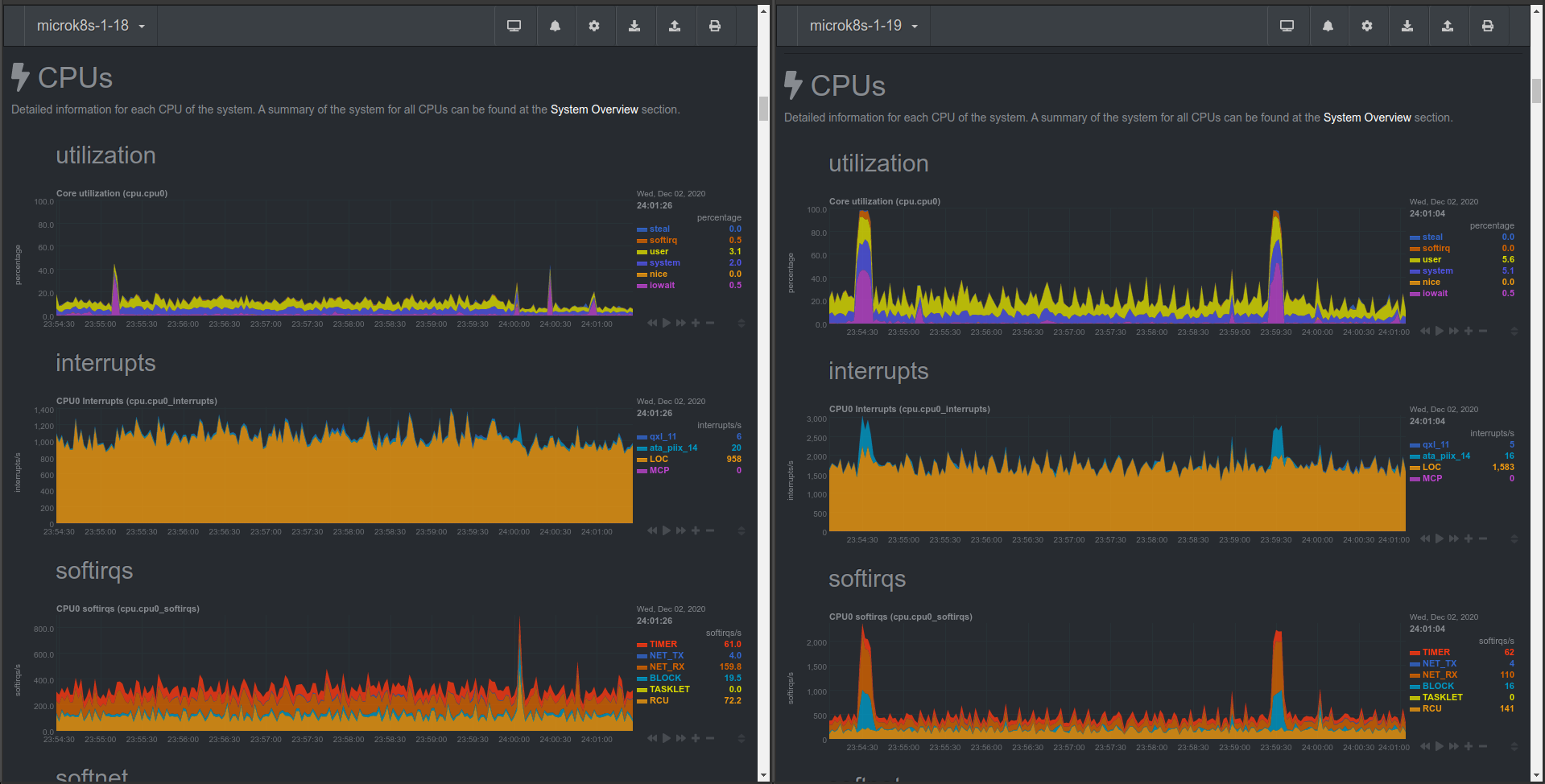
Short comparison of 1.18 and 1.19 versions...
Both VMs are running on the same host in the same time. The details of VMs:
- RAM: 2Gi
- vCPU: 1
- OS: Ubuntu 20.04.1 LTS (mini.iso)
The compared microk8s versions:
- v1.18.9
- v1.19.3-34+a56971609ff35a
The exactly same manifests (svc, pod, pvc, pv) are created on both VMs. Nginx is serving a static html file.
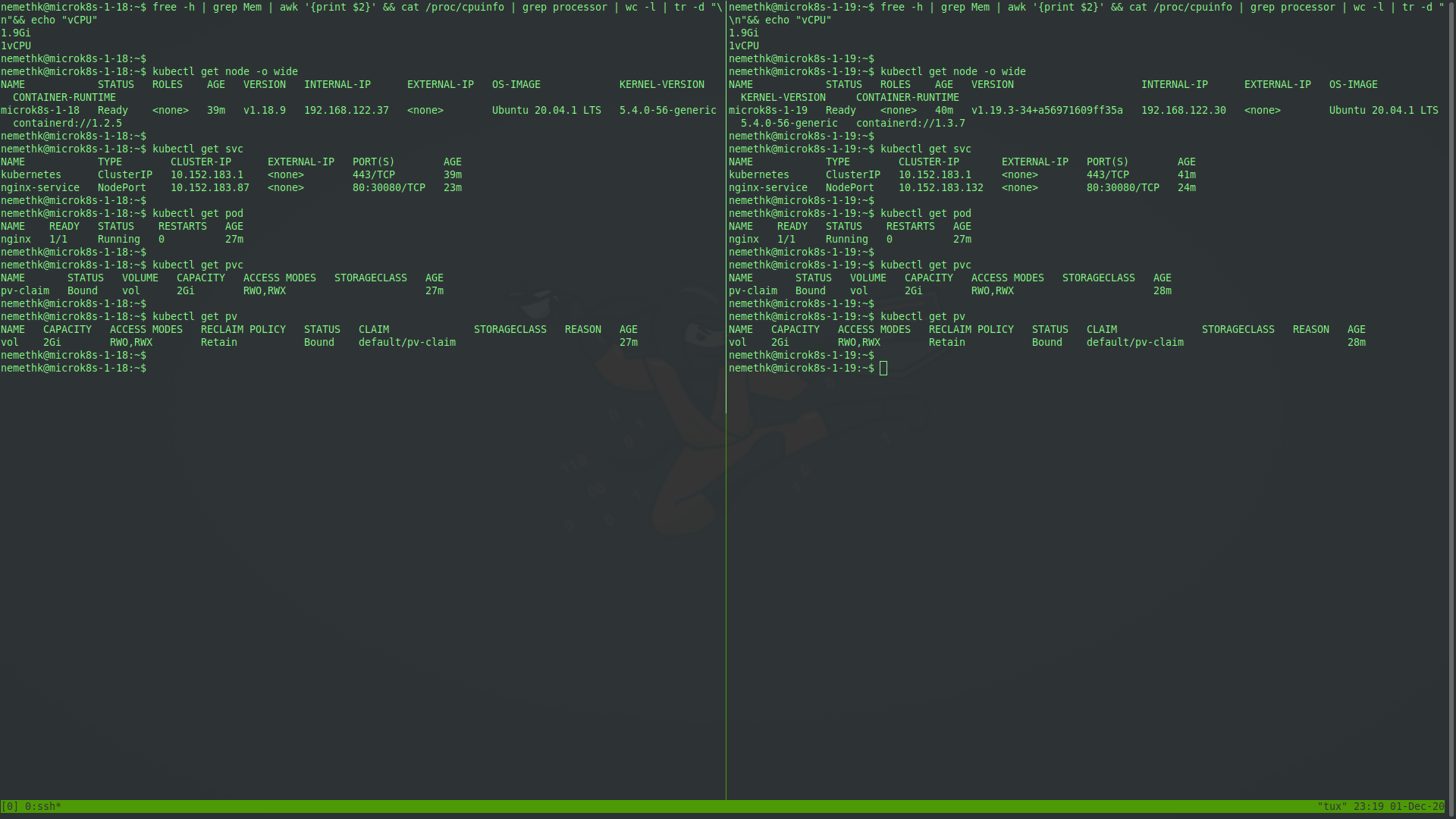
Based on htop the memory and cpu usage of version 1.19 is significantly higher.
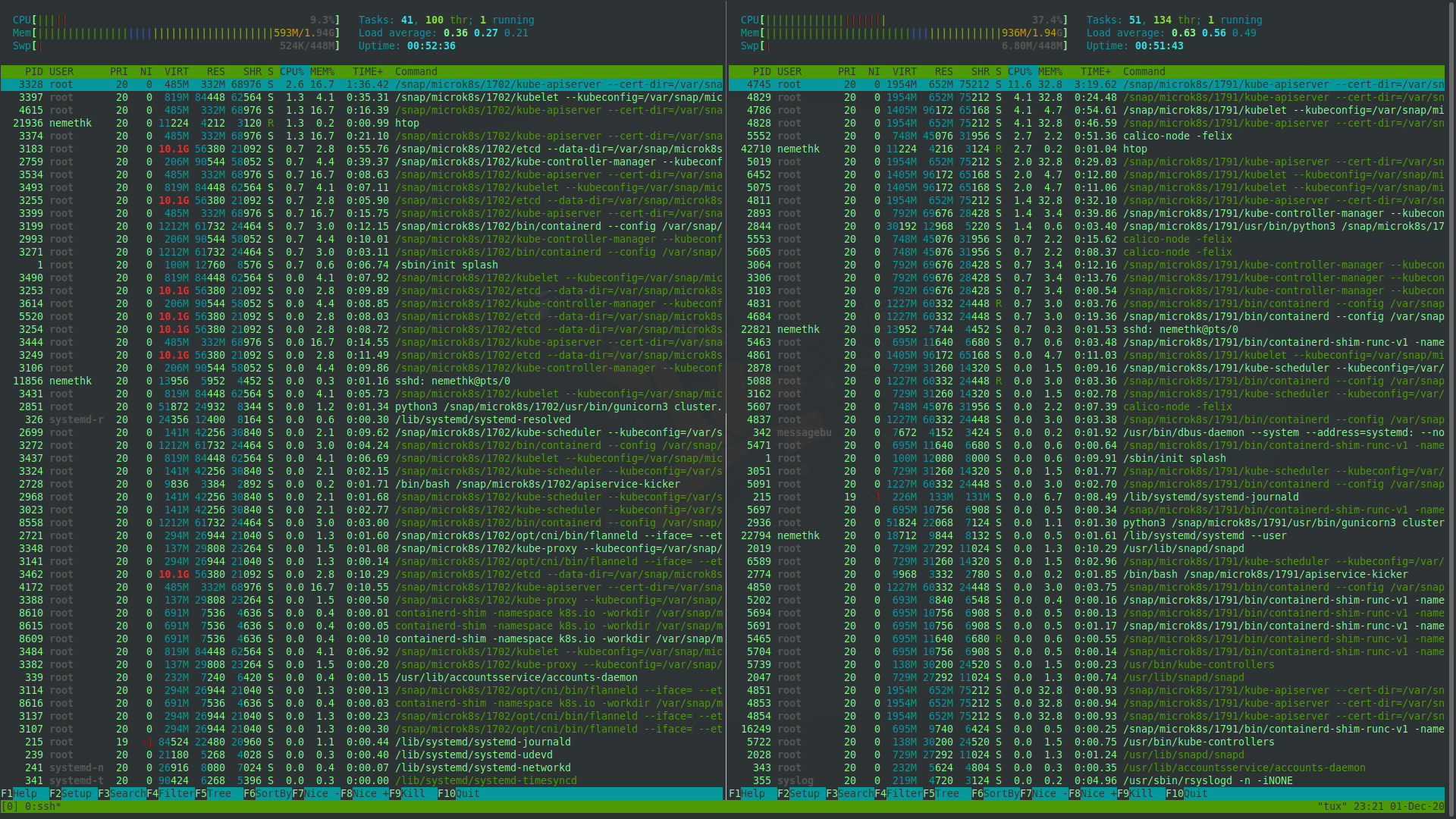
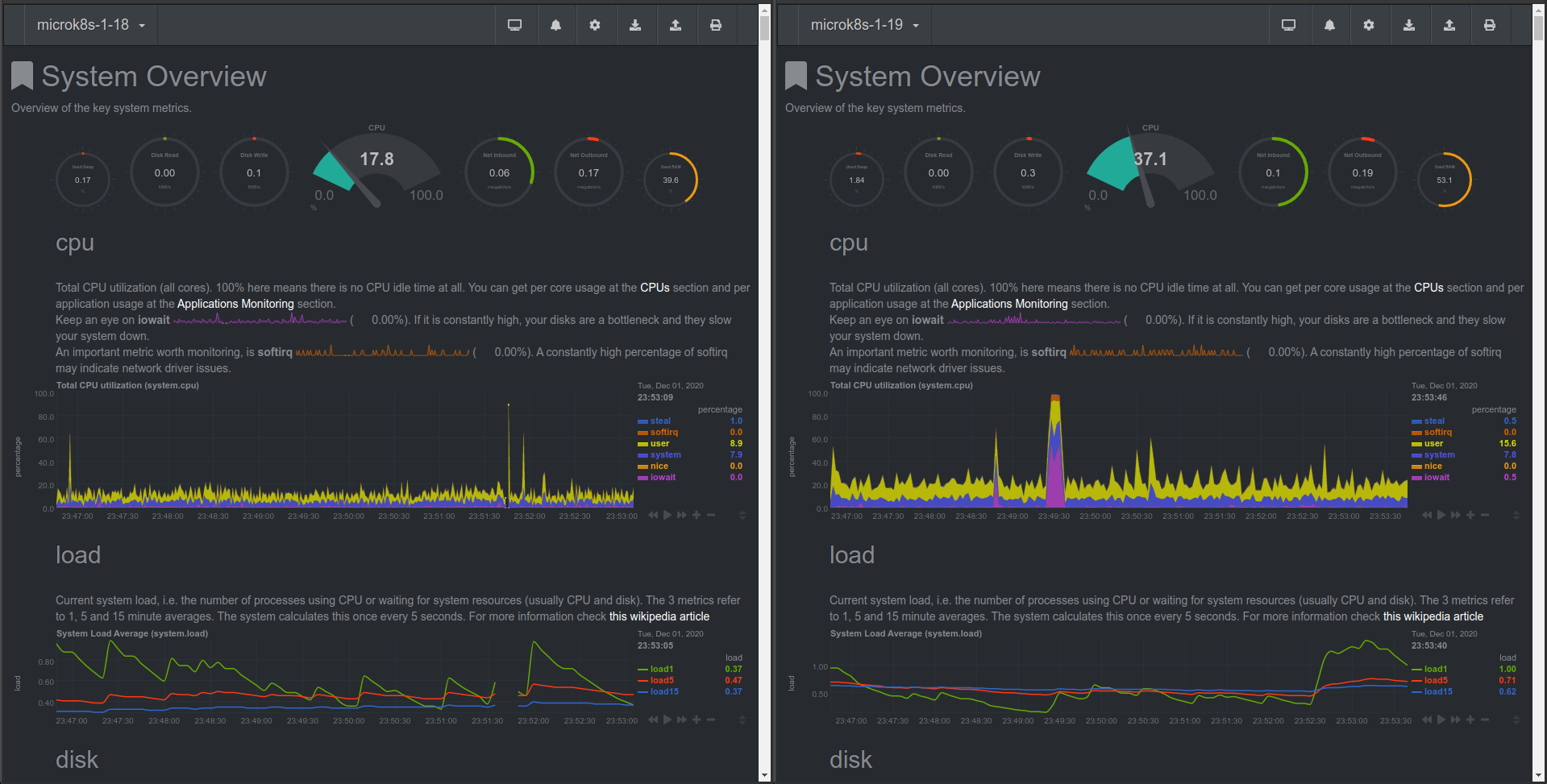
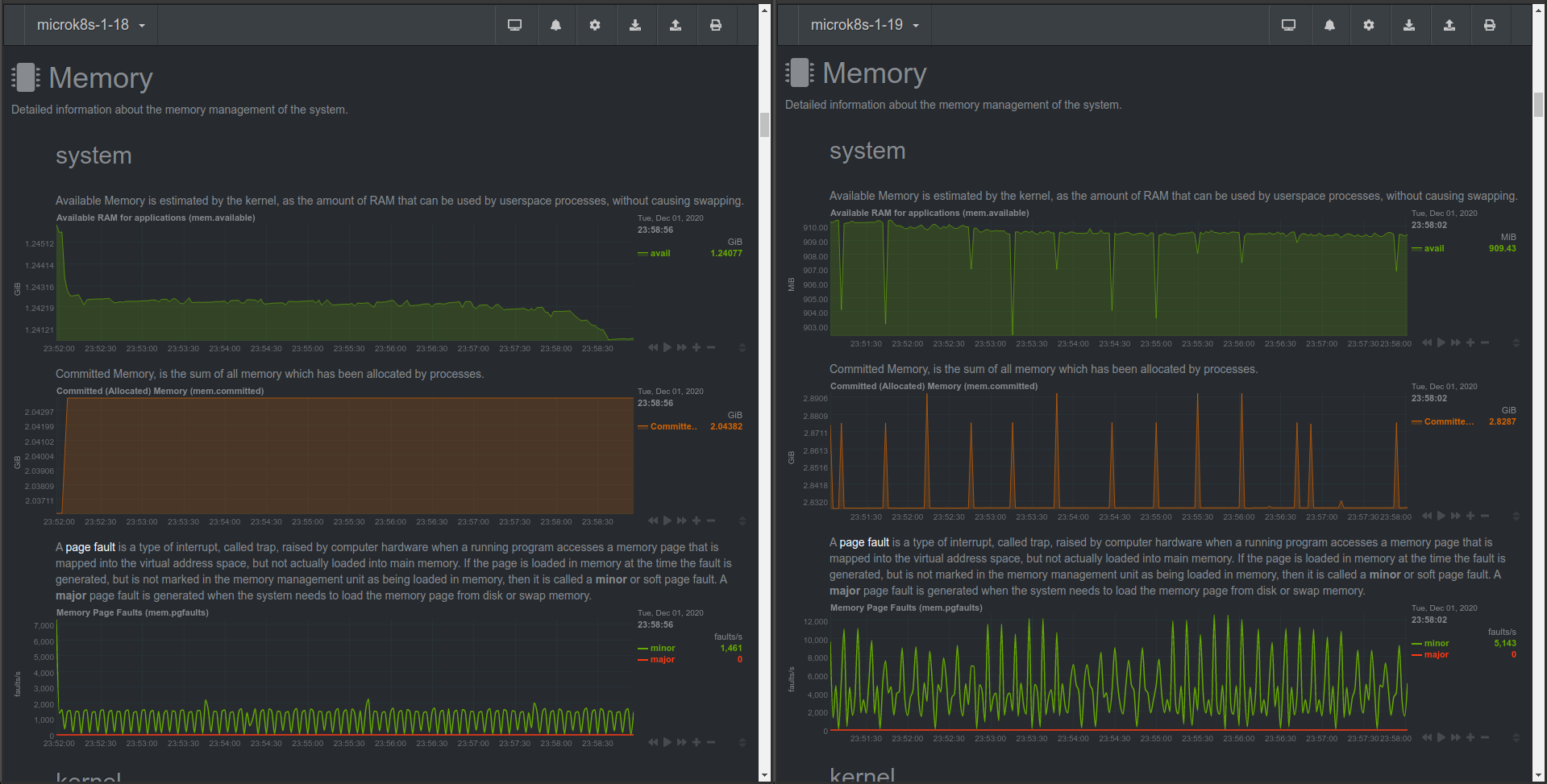
Data visualisation with Netdata
Overview:
Memory:
CPU:
 nemethk
on 2 Dec 2020
nemethk
on 2 Dec 2020
Short comparison of 1.18 and 1.19 versions...
Both VMs are running on the same host in the same time. The details of VMs:
- RAM: 2Gi
- vCPU: 1
- OS: Ubuntu 20.04.1 LTS (mini.iso)
The compared microk8s versions:
- v1.18.9
- v1.19.3-34+a56971609ff35a
The exactly same manifests (svc, pod, pvc, pv) are created on both VMs. Nginx is serving a static html file.
Based on
htopthe memory and cpu usage of version 1.19 is significantly higher.
Data visualisation with Netdata
Overview:
Memory:
CPU:
yepp, I have similar issue/problem as @nemethk and others ...
 alfonzso
on 2 Dec 2020
alfonzso
on 2 Dec 2020
Seems to be the same with 1.20 as well.
 Xachman
on 27 Dec 2020
Xachman
on 27 Dec 2020
Related issues
 carmine
·
3Comments
carmine
·
3Comments
 xrpn
·
4Comments
xrpn
·
4Comments
 tvansteenburgh
·
6Comments
carmine
·
4Comments
tvansteenburgh
·
6Comments
carmine
·
4Comments
 jareks
·
3Comments
jareks
·
3Comments
Most helpful comment
yepp, I have similar issue/problem as @nemethk and others ...