Microk8s: exposing service not working outside a vm
Using multipass to launch a vm.
With the vm launched launched, and access to it's shell, I do the following (roughly):
sudo snap install microk8s --classic --beta
microk8s.enable dns dashboard
alias kubectl=microk8s.kubectl
kubectl run echoserver --image=gcr.io/google_containers/echoserver:1.4 --port=8080 --replicas=2
kubectl expose deployment echoserver --type=NodePort
kubectl describe services/echoserver     # get its assigned nodeport
lynx http://localhost:<nodeport>   ## this works
from outside the vm
- chrome:
http://<vm_ip_addr>:<nodeport> - this fails
But, back in the VM
sudo iptables -P FORWARD ACCEPT
Now I can access from outside VM - chrome: http://<vm_ip_addr>:<nodeport>
There's a related bug in github - https://github.com/kubernetes/kubernetes/issues/58908 - but this was closed, at it seemed that there was a networking configuration issue, or something like that.
 carmine
All 3 comments
Its not a bug!
You missed something!
You should specify the Pod Port, the Target Port, the External IP and you should set type to ClusterIP.
kubectl expose deployment echoserver --port 8080 --target-port 80 --external-ip 192.168.214.130 --type ClusterIP
external-ip is the IP of the whole VM that MicroK8S is running on. target-port is the port of the Deployment / Pods that you want to expose and port is the port of external ip you want to expose.
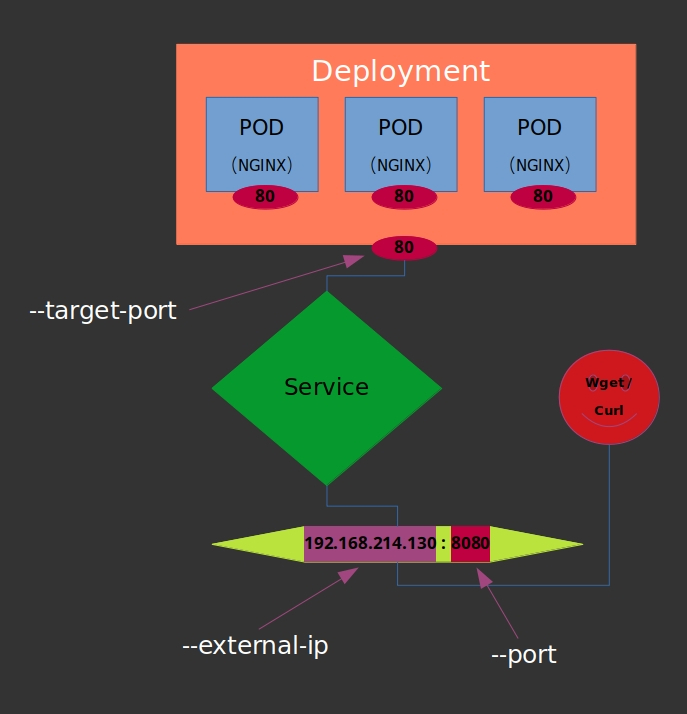
 amir3code
on 19 Aug 2019
amir3code
on 19 Aug 2019
Experienced the same issue in microk8s stable/1.14 on Ubuntu 18 and Amazon Linux 2.
With microk8s stable/1.15, verified that services exposed on NodePort or ClusterIP with --external-ip work as expected and are accessible from external sources.
 aiankoulski
on 17 Oct 2019
aiankoulski
on 17 Oct 2019
The "Experience MicroK8s" is misleading at least for macOS users, as it tells you to run:
ubuntu@juju-c42409-default-0:~$ sudo microk8s kubectl expose deployment nginx --port 80 --target-port 80 --selector app=nginx --type ClusterIP --name nginx
...while in fact you should also check the vm IP with:
gdubicki@mac ~ $ multipass list
Name                    State             IPv4             Image
microk8s-vm             Running           192.168.64.2     Ubuntu 18.04 LTS
...and add --external-ip 192.168.64.2 to the command.
Then of course you should curl 192.168.64.2.
 gdubicki
on 18 Jul 2020
gdubicki
on 18 Jul 2020
Related issues
 tvansteenburgh
·
6Comments
tvansteenburgh
·
6Comments
 xrpn
·
4Comments
xrpn
·
4Comments
 edsiper
·
5Comments
edsiper
·
5Comments
 mthaddon
·
5Comments
mthaddon
·
5Comments
 avarf
·
5Comments
avarf
·
5Comments
Most helpful comment
Its not a bug!
You missed something!
You should specify the
Pod Port, theTarget Port, theExternal IPand you should settypetoClusterIP.external-ipis the IP of the whole VM that MicroK8S is running on.target-portis the port of the Deployment / Pods that you want to expose andportis the port of external ip you want to expose.