Metrics-server: unable to fetch metrics from API: the server could not find the requested resource (get pods.metrics.k8s.io)
Hello, I have installed locally with minikube the metric server and it worked like a charm!
But when I try to install it on my servers it doesn't seem to work. It's like my hpa doesn't see it at all.
What I did:
1- Init My cluster
2- Use Weave as my CNI
3- Join a node
4- Install the metric server by cloning and kubectl create -f deploy/1.8+
5- Create a deployment for nginx
6- Create a hpa
I get this error with kubectl describe hpa
Warning  FailedComputeMetricsReplicas  23m (x13 over 29m)  horizontal-pod-autoscaler  failed to get cpu utilization: unable to get metrics for resource cpu: unable to fetch metrics from API: the server could not find the requested resource (get pods.metrics.k8s.io)
  Warning  FailedGetResourceMetric       19m (x21 over 29m)  horizontal-pod-autoscaler  unable to get metrics for resource cpu: unable to fetch metrics from API: the server could not find the requested resource (get pods.metrics.k8s.io)
  Warning  FailedComputeMetricsReplicas  7m (x13 over 13m)   horizontal-pod-autoscaler  failed to get cpu utilization: unable to get metrics for resource cpu: unable to fetch metrics from API: the server could not find the requested resource (get pods.metrics.k8s.io)
  Warning  FailedGetResourceMetric       3m (x21 over 13m)   horizontal-pod-autoscaler  unable to get metrics for resource cpu: unable to fetch metrics from API: the server could not find the requested resource (get pods.metrics.k8s.io)
I am using Kubernetes 1.9.3
The Metric Server Seems to be running okay:
I0228 21:26:58.367749       1 heapster.go:72] Metrics Server version v0.2.1
I0228 21:26:58.368133       1 configs.go:61] Using Kubernetes client with master "https://10.96.0.1:443" and version
I0228 21:26:58.368155       1 configs.go:62] Using kubelet port 10255
I0228 21:26:58.369592       1 heapster.go:128] Starting with Metric Sink
I0228 21:26:58.900975       1 serving.go:308] Generated self-signed cert (apiserver.local.config/certificates/apiserver.crt, apiserver.local.config/certificates/apiserver.key)
I0228 21:26:59.394026       1 heapster.go:101] Starting Heapster API server...
[restful] 2018/02/28 21:26:59 log.go:33: [restful/swagger] listing is available at https:///swaggerapi
[restful] 2018/02/28 21:26:59 log.go:33: [restful/swagger] https:///swaggerui/ is mapped to folder /swagger-ui/
I0228 21:26:59.395431       1 serve.go:85] Serving securely on 0.0.0.0:443
 devopsop
All 17 comments
is the API working normally? What happens if you do kubectl get --raw /apis/metrics.k8s.io/v1beta1?
 DirectXMan12
on 1 Mar 2018
DirectXMan12
on 1 Mar 2018
When I run kubectl get --raw /apis/metrics.k8s.io/v1beta1
I get Error from server (NotFound): the server could not find the requested resource
But I also see error msgs in the api-server : available_controller.go:295] v1beta1.metrics.k8s.io failed with: Get https://10.99.202.234:443: net/http: request canceled while waiting for connection (Client.Timeout exceeded while awaiting headers)
I also have to mention that I have those env variables:
http_proxy=someproxy
https_proxy=someproxy
no_proxy= $NO_PROXY,127.0.0.1,masterNodeIP,node1IPlocalhost,master,host1,host2
devopsop
on 1 Mar 2018
Fixed by removing all the proxy env variable from kube-apiserver manifest
devopsop
on 1 Mar 2018
@DirectXMan12 :what is the output of below command-
kubectl get --raw /apis/metrics.k8s.io/v1beta1
is it 403 forbidden
 yashubh
on 23 Mar 2018
yashubh
on 23 Mar 2018
现在解决了吗?
 fengjian1585
on 9 Apr 2018
fengjian1585
on 9 Apr 2018
I met the same issue, any solution ?
 shenshouer
on 26 Apr 2018
shenshouer
on 26 Apr 2018
It worked for me when set --horizontal-pod-autoscaler-use-rest-clients=false at kube-controller-manager-amd64
shenshouer
on 26 Apr 2018
@shenshouer can you please show where exactly should I add this --horizontal-pod-autoscaler-use-rest-clients=false in /etc/kubernetes/manifests/kube-controller-manager.yaml file ??
 cthakar
on 14 May 2018
cthakar
on 14 May 2018
@cthakar you can refer to the image below for adding the flag --horizontal-pod-autoscaler-use-rest-clients=false in /etc/kubernetes/manifests/kube-controller-manager.yaml file
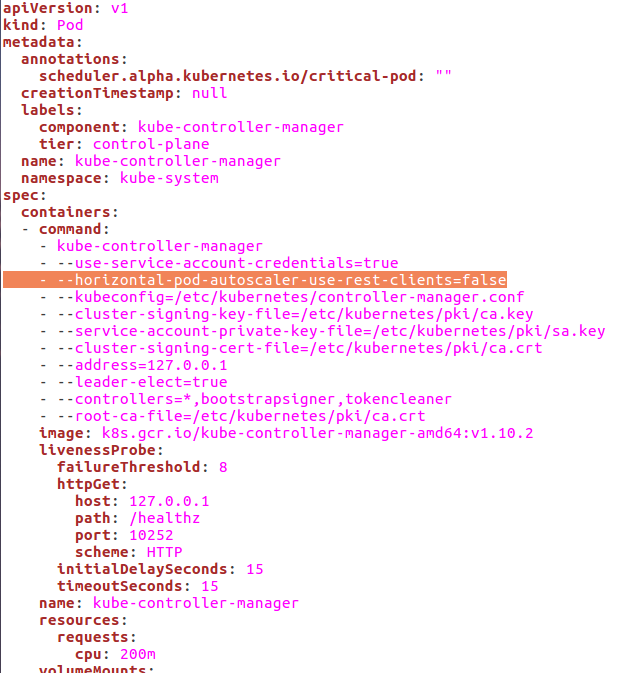
You can also use metric server instead of setting this flag in kube-controller-manager.yaml. The correct method is using the metrics server.
Clone the repo and run
- kubectl create -f deploy/1.8+/
After that delete your hpa and again autoscale it
 yadavkkumar
on 24 May 2018
yadavkkumar
on 24 May 2018
@DirectXMan12 :what is the output of below command-
kubectl get --raw /apis/metrics.k8s.io/v1beta1
is it 403 forbidden
and fix it ?
 wawa0210
on 9 Nov 2018
wawa0210
on 9 Nov 2018
Your metric-server add on is disabled by default. Check it using
$ minikube addons list
If its disabled, you will see something like metrics-server: disabled
Enable it using
$minikube addons enable metrics-server
After that delete and recreate your HPA.
 smmansoor
on 12 Nov 2018
smmansoor
on 12 Nov 2018
@shenshouer using --horizontal-pod-autoscaler-use-rest-clients=false is deprecated, and slated for removal.
@wawa0210 that sounds like something isn't set up right with your cluster auth, potentially.
DirectXMan12
on 13 Nov 2018
i have the same issue , current CPU utilization shows unknown, i am really got struck with this step as the horizontal auto scale is not working, please suggest to resolve
kubectl get --raw /apis/metrics.k8s.io/v1beta1 gives below
root:/podsyaml# kubectl get --raw /apis/metrics.k8s.io/v1beta1
{"kind":"APIResourceList","apiVersion":"v1","groupVersion":"metrics.k8s.io/v1beta1","resources":[{"name":"nodes","singularName":"","namespaced":false,"kind":"NodeMetrics","verbs":["get","list"]},{"name":"pods","singularName":"","namespaced":true,"kind":"PodMetrics","verbs":["get","list"]}]}
 AnandKarhtik
on 9 Dec 2018
AnandKarhtik
on 9 Dec 2018
If you are using kops, edit the cluster using kops edit cluster and add below line
spec:
    kubeControllerManager:
        horizontalPodAutoscalerUseRestClients: false
update the cluster using kops and check the file /etc/kubernetes/manifests/kube-controller-manager.manifest from master node if it got reflected or not, then redeploy your hpa
 shishirms
on 14 Dec 2018
shishirms
on 14 Dec 2018
Your metric-server add on is disabled by default. Check it using
$ minikube addons list
If its disabled, you will see something like metrics-server: disabled
Enable it using
$minikube addons enable metrics-serverAfter that delete and recreate your HPA.
This method worked for me. I was using minikube which did not have metrics-server enabled. I enabled it, waited a few minutes for the pod to start up then re-created my HPA. It is now showing proper CPU and scaling!
 Azeraeth
on 28 Dec 2018
Azeraeth
on 28 Dec 2018
I had the same issue. This solved my problem: https://stackoverflow.com/q/54106725/2291510
 olereidar
on 14 Jan 2019
olereidar
on 14 Jan 2019
I had the same issue with Minikube on macOS, using the default Docker driver. I got it to work by using @yadavkkumar's tip. But in the case of Minikube, you just need to start it like this:
$ minikube start --extra-config=controller-manager.horizontal-pod-autoscaler-use-rest-clients=false
 otherguy
on 11 Nov 2020
otherguy
on 11 Nov 2020
Related issues
 kyriefly
·
3Comments
kyriefly
·
3Comments
 Sh4d1
·
6Comments
Sh4d1
·
6Comments
 floryut
·
8Comments
floryut
·
8Comments
 godomainz
·
6Comments
godomainz
·
6Comments
 bianchi2
·
6Comments
bianchi2
·
6Comments
Most helpful comment
现在解决了吗?