Metabase: App fails on w/postgresql after migrating to 0.30
After upgrading to 0.30 I'm seeing this error in console on Heroku:
Aug 09, 2018 6:50:02 AM org.postgresql.core.v3.ConnectionFactoryImpl log
WARNING: SQLException occurred while connecting to ec2-54-76-233-110.eu-west-1.compute.amazonaws.com:5432
org.postgresql.util.PSQLException: FATAL: no pg_hba.conf entry for host "...", user "...", database "....", SSL off
I've checked and MB_DB_CONNECTION_URI does contain the ?sslmode=require.. string by adding this to the startup script:
echo "Using this MB_DB_CONNECTION_URI: ${MB_DB_CONNECTION_URI}"
Running the migrations tool manually, I get the following output (notice the SSL off in last line):
08-09 06:49:21 INFO metabase.util :: Loading Metabase...
08-09 06:49:31 INFO util.encryption :: Saved credentials encryption is ENABLED for this Metabase instance. 🔐
For more information, see https://www.metabase.com/docs/latest/operations-guide/start.html#encrypting-your-database-connection-details-at-rest
08-09 06:49:42 INFO metabase.core :: Starting Metabase in STANDALONE mode
08-09 06:49:42 INFO metabase.core :: Launching Embedded Jetty Webserver with config:
 {:port 44749}

08-09 06:49:42 INFO metabase.core :: Starting Metabase version v0.30.0 (04836dc release-0.30.0) ...
08-09 06:49:42 INFO metabase.core :: System timezone is 'GMT' ...
WARNING: any? already refers to: #'clojure.core/any? in namespace: monger.collection, being replaced by: #'monger.collection/any?
08-09 06:49:45 INFO metabase.core :: Setting up and migrating Metabase DB. Please sit tight, this may take a minute...
08-09 06:49:45 INFO metabase.db :: Verifying postgres Database Connection ...
08-09 06:49:48 INFO metabase.db :: Verify Database Connection ...  ✅
08-09 06:49:48 INFO metabase.db :: Running Database Migrations...
08-09 06:49:48 INFO metabase.db :: Setting up Liquibase...
08-09 06:49:48 INFO metabase.db :: Liquibase is ready.
08-09 06:49:48 INFO metabase.db :: Checking if Database has unrun migrations...
08-09 06:50:01 INFO metabase.db :: Database Migrations Current ...  ✅
com.mchange.v2.cfg.DelayedLogItem [ level -> FINE, text -> "The configuration file for resource identifier 'hocon:/reference,/application,/c3p0,/' could not be found. Skipping.", exception -> null]
08-09 06:50:01 INFO db.migrations :: Running all necessary data migrations, this may take a minute.
08-09 06:50:02 INFO db.migrations :: Finished running data migrations.
08-09 06:50:02 INFO metabase.events :: Starting events listener: metabase.events.notifications 👂
08-09 06:50:02 INFO metabase.events :: Starting events listener: metabase.events.metabot-lifecycle 👂
08-09 06:50:02 INFO metabase.events :: Starting events listener: metabase.events.dependencies 👂
08-09 06:50:02 INFO metabase.events :: Starting events listener: metabase.events.activity-feed 👂
08-09 06:50:02 INFO metabase.events :: Starting events listener: metabase.events.last-login 👂
08-09 06:50:02 INFO metabase.events :: Starting events listener: metabase.events.revision 👂
08-09 06:50:02 INFO metabase.events :: Starting events listener: metabase.events.sync-database 👂
08-09 06:50:02 INFO metabase.events :: Starting events listener: metabase.events.view-log 👂
08-09 06:50:02 INFO metabase.events :: Starting events listener: metabase.events.driver-notifications 👂
Aug 09, 2018 6:50:02 AM org.postgresql.core.v3.ConnectionFactoryImpl log
WARNING: SQLException occurred while connecting to ....
org.postgresql.util.PSQLException: FATAL: no pg_hba.conf entry for host "...", user "....", database "...", SSL off
 pfeiffer
All 43 comments
I am having similar problems running metabase v0.30 with PostgreSQL -> I'm running on Azure though.
I'll try get some logs when I'm back at a pc.
 redbeardcr
on 9 Aug 2018
redbeardcr
on 9 Aug 2018
is ec2-54-76-233-110.eu-west-1.compute.amazonaws.com your application database or the a database you're using Metabase on?
MB_DB_CONNECTION_URI has nothing to do with database connections.
 salsakran
on 10 Aug 2018
salsakran
on 10 Aug 2018
I'm having a similar issue on azure. I'm getting the error org.postgresql.util.PSQLException: FATAL: SSL connection is required. Please specify SSL options and retry. despite having the MB_DB_CONNECTION_URI with the options ssl=true&sslfactory=org.postgresql.ssl.NonValidatingFactory
 pdiniz13
on 10 Aug 2018
pdiniz13
on 10 Aug 2018
The ec2-54-76-233-110.eu-west-1.compute.amazonaws.com is the application database. Eg. not a connected data source. The redacted username and password etc. is also corresponding to the application database.
pfeiffer
on 10 Aug 2018
My error on Azure is coming out the same as @pdiniz13, though I tried with both:
MB_DB_CONNECTION_URI with the options ssl=true&sslfactory=org.postgresql.ssl.NonValidatingFactory
and
MB_DB_CONNECTION_URI with the options ssl=true
(this second one is how v0.29.3 seems to work in my Azure
redbeardcr
on 10 Aug 2018
I've spent the morning trying to reproduce this issue and I haven't been able to. Can you provide your PostgreSQL and JDK version information? Also, in addition to username, password, ssl and sslfactory, are there any other connection parameters you are supplying? The full MB_DB_CONNECTION_URI (user/password scrubbed :smile:) might help as well.
 senior
on 10 Aug 2018
senior
on 10 Aug 2018
Sure!
Docker image: metabase/metabase:latest (as of yesterday)
Postgresql 10.3.
JVM - the one in the docker image
Metabase: 04836dc release-0.30.0
MB_DB_CONNECTION_URI: postgres://...:[email protected]:5432/...?ssl=true&sslmode=require&sslfactory=org.postgresql.ssl.NonValidatingFactory
No problems connecting whatsoever in 0.29, so something must have changed between 0.29 and 0.30.
More logs:
2018-08-10T16:42:16.663949+00:00 app[web.1]: Aug 10, 2018 4:42:16 PM org.postgresql.core.v3.ConnectionFactoryImpl log
2018-08-10T16:42:16.663953+00:00 app[web.1]: WARNING: SQLException occurred while connecting to ec2-54-76-233-110.eu-west-1.compute.amazonaws.com:5432
2018-08-10T16:42:16.663957+00:00 app[web.1]: org.postgresql.util.PSQLException: FATAL: no pg_hba.conf entry for host "app-server IP", user "...", database "...", SSL off
2018-08-10T16:42:16.663958+00:00 app[web.1]:    at org.postgresql.core.v3.ConnectionFactoryImpl.doAuthentication(ConnectionFactoryImpl.java:473)
2018-08-10T16:42:16.663960+00:00 app[web.1]:    at org.postgresql.core.v3.ConnectionFactoryImpl.openConnectionImpl(ConnectionFactoryImpl.java:205)
2018-08-10T16:42:16.663962+00:00 app[web.1]:    at org.postgresql.core.ConnectionFactory.openConnection(ConnectionFactory.java:49)
2018-08-10T16:42:16.663963+00:00 app[web.1]:    at org.postgresql.jdbc.PgConnection.<init>(PgConnection.java:195)
2018-08-10T16:42:16.663966+00:00 app[web.1]:    at org.postgresql.Driver.makeConnection(Driver.java:452)
2018-08-10T16:42:16.663967+00:00 app[web.1]:    at org.postgresql.Driver.connect(Driver.java:254)
2018-08-10T16:42:16.663968+00:00 app[web.1]:    at com.mchange.v2.c3p0.DriverManagerDataSource.getConnection(DriverManagerDataSource.java:135)
2018-08-10T16:42:16.663970+00:00 app[web.1]:    at com.mchange.v2.c3p0.WrapperConnectionPoolDataSource.getPooledConnection(WrapperConnectionPoolDataSource.java:182)
2018-08-10T16:42:16.663971+00:00 app[web.1]:    at com.mchange.v2.c3p0.WrapperConnectionPoolDataSource.getPooledConnection(WrapperConnectionPoolDataSource.java:171)
2018-08-10T16:42:16.663974+00:00 app[web.1]:    at com.mchange.v2.c3p0.impl.C3P0PooledConnectionPool$1PooledConnectionResourcePoolManager.acquireResource(C3P0PooledConnectionPool.java:137)
2018-08-10T16:42:16.663975+00:00 app[web.1]:    at com.mchange.v2.resourcepool.BasicResourcePool.doAcquire(BasicResourcePool.java:1014)
2018-08-10T16:42:16.663976+00:00 app[web.1]:    at com.mchange.v2.resourcepool.BasicResourcePool.access$800(BasicResourcePool.java:32)
2018-08-10T16:42:16.663978+00:00 app[web.1]:    at com.mchange.v2.resourcepool.BasicResourcePool$AcquireTask.run(BasicResourcePool.java:1810)
2018-08-10T16:42:16.663979+00:00 app[web.1]:    at com.mchange.v2.async.ThreadPoolAsynchronousRunner$PoolThread.run(ThreadPoolAsynchronousRunner.java:696)
2018-08-10T16:42:16.663981+00:00 app[web.1]:

... snip ...

2018-08-10T16:42:21+00:00 app[postgres.7005]: [DATABASE] [9-1]  sql_error_code = 28000 FATAL:  no pg_hba.conf entry for host "app-server IP", user "...", database "...", SSL off
2018-08-10T16:42:21+00:00 app[postgres.7006]: [DATABASE] [9-1]  sql_error_code = 28000 FATAL:  no pg_hba.conf entry for host "app-server IP", user "...", database "...", SSL off
2018-08-10T16:42:21+00:00 app[postgres.7007]: [DATABASE] [9-1]  sql_error_code = 28000 FATAL:  no pg_hba.conf entry for host "app-server IP", user "...", database "...", SSL off
Hi,
PostgreSQL version: 9.6
In the docker image
MB_DB_CONNECTION_URI: postgresql://servername.database.azure.com:5432/metabase?user=name@name&password=123456&ssl=true
Other application parameters:
- MB_DB_DBNAME: metabase
- MB_ENCRYPTION_SECRET_KEY
Thanks
redbeardcr
on 10 Aug 2018
My error is identical to @pfeiffer and same versions. The url postgres://azure_db_url/dbname?user=user@azure_db&password=password&ssl=true&sslfactory=org.postgresql.ssl.NonValidatingFactory
pdiniz13
on 10 Aug 2018
Hey everyone, can you try doing &sslmode=require?
 camsaul
on 10 Aug 2018
camsaul
on 10 Aug 2018
@camsaul tried with that and still getting the same error
pdiniz13
on 10 Aug 2018
@senior so it seems it's trying to connect with SSL off, which is failing because the server requires SSL, even though it is supposed to be connecting with SSL on
camsaul
on 10 Aug 2018
It's strange though because when I specify those options locally
MB_DB_CONNECTION_URI='postgres://cam@localhost:5432/metabase?sslmode=require&sslfactory=org.postgresql.ssl.NonValidatingFactory&ssl=true' \
  lein run
my server fails to start because the local server doesn't support SSL. So it's definitely trying to connect for me locally with SSL.
camsaul
on 10 Aug 2018
@camsaul, just like @pdiniz13 &sslmode=require hasn't made any difference.
redbeardcr
on 10 Aug 2018
Weird.
I was able to connect to an external Postgres database with SSL just now using MB_DB_CONNECTION_URI without problems. This one was on RDS tho.
camsaul
on 10 Aug 2018
I was just able to connect to a Heroku DB too without issues. It failed with the same error message if I didn't include the ssl params. As soon as I included them it worked fine.
camsaul
on 10 Aug 2018
Actually it seems all I need to do is add ?ssl=true to the end of the Heroku DB URI and it works
Is that new? I thought it used to include that
camsaul
on 10 Aug 2018
Maybe this is relevant?
https://devcenter.heroku.com/articles/heroku-postgresql#heroku-postgres-ssl
https://devcenter.heroku.com/articles/heroku-postgresql#connecting-in-java
Sounds like they want you to manually add sslmode=require to the connection string
camsaul
on 10 Aug 2018
The other thing that's changed is that we upgraded the Postgres JDBC driver from 42.1.4.jre7 to 42.2.2
camsaul
on 10 Aug 2018
This works fine for me
MB_DB_CONNECTION_URI='postgres://USER:PASSWORD@HOST:5432/DB_NAME?ssl=true' java -jar metabase.jar
Perhaps it's something with the Docker image?
camsaul
on 10 Aug 2018
Got it to work with the Docker image too 😳
docker run -d -p 3000:3000 --name metabase \
  -e 'MB_DB_URI="postgres://USER:PASSWORD@HOST:5432/DB_NAME?ssl=true"' \
  metabase/metabase
@camsaul are you running metabase version 0.30 because it was working on previous versions
pdiniz13
on 10 Aug 2018
Yeah, everything I've tried has been with 0.30.0. Both with Postgres 9.x and 10.x.
I was just able to deploy to Heroku successfully too.
camsaul
on 10 Aug 2018
One thing that might be relevant: we try to automatically set MB_DB_CONNECTION_URI if a Heroku DATABASE_URL is set. We automatically add the ssl params to the connection string unless there are already params present. But, we haven't touched this code in two years, so not sure why it wouldn't work now.
Here's the relevant part of the ./bin/start script:
# Heroku Postgres
if [ "$DATABASE_URL" ]; then
    if [[ $string == *"?"* ]]; then
        # if DATABASE_URL already has a query string don't mess with it
        export MB_DB_CONNECTION_URI="$DATABASE_URL"
    else
        # otherwise add the SSL parameters to ensure upgraded databases work on Heroku
        export MB_DB_CONNECTION_URI="$DATABASE_URL?ssl=true&sslmode=require&sslfactory=org.postgresql.ssl.NonValidatingFactory"
    fi
fi
I've changed my MB_DB_CONNECTION_URI on Azure to this format: MB_DB_CONNECTION_URI='postgres://USER:PASSWORD@HOST:5432/DB_NAME?ssl=true and it is now working for me.
Metabase is showing me the setup screen though, it looks like my data hasn't persisted. I'm going to roll my db back a few days and try again.
redbeardcr
on 11 Aug 2018
I tried with just ?ssl=true and still getting errors:
could not accept SSL connection: sslv3 alert certificate unknown
pfeiffer
on 11 Aug 2018
@redbeardcr Do you have any more info? It looks like the difference between your two connection strings is username/password via connection parameters vs. USER:PASS@HOST. From what I've seen we should parse those similarly.
senior
on 13 Aug 2018
@pfeiffer You will see that certificate error if the client (Metabase) doesn't trust the certificate of the database server. You'll get this if you are using a self signed certificate on the database server. More information on that is here. At the bottom it talks about adding sslfactory=org.postgresql.ssl.NonValidatingFactory which skips that validation check.
senior
on 13 Aug 2018
@redbeardcr @pfeiffer @pdiniz13 I'm stumped by this issue. @camsaul and I have both tried to recreate it and have not been able to. The changes in this area have been pretty minimal. There are enough layers in between providing the connection string and connecting to PostgreSQL that we might be missing something. One thing that could help isolate the issue is building and running Metabase using this branch. That branch has the v0.30.0 released code, but reverts the PostgreSQL JDBC driver upgrade that was included in that release. I have looked at the changelog and some of the related PRs in the driver. It doesn't seem like any of their changes would cause this, but it would be good to verify. If someone that can recreate the issue could verify that the issue is still present (or not present) that would be helpful.
senior
on 13 Aug 2018
@senior I tried it with both USER:PASS@HOST and passing user and password as query string args and it worked for me both ways
camsaul
on 13 Aug 2018
@redbeardcr how did u format the user because azure requires the user to include the the dbname as part of the username postgres://USER@DBNAME:PASSWORD@HOST breaks earlier for me since it messes with the format. If i remove the dbname from the username it throws the azure format error where it asks for the dbname in the username. I've had a similar issue with azure's ssl and the mysql node package https://social.msdn.microsoft.com/Forums/en-US/c8fedbcc-909d-41ce-8c72-0374f76fdf82/cannot-connect-from-nodejs?forum=AzureDatabaseforMySQL. Something similar could be happening here since you've changed the JDBC driver. Have either one of u @senior or @camsaul have either one of you tried running this against an azure postgres database? @senior do you have a docker container which has the 0.30 code without the JDBC driver. Last time I tried to build one myself it didn't work out very well.
pdiniz13
on 13 Aug 2018
@pdiniz13 I just created a docker container from that branch, it's tagged as version-30-with-old-pg-jdbc https://hub.docker.com/r/metabase/metabase-head/tags/
I have not tested against Azure, just locally and with AWS RDS.
senior
on 14 Aug 2018
@senior I tried it with the docket container and still got the same error.
Aug 13, 2018 11:26:08 PM org.postgresql.Driver connect
SEVERE: Connection error:
org.postgresql.util.PSQLException: FATAL: SSL connection is required. Please specify SSL options and retry.
    at org.postgresql.core.v3.ConnectionFactoryImpl.doAuthentication(ConnectionFactoryImpl.java:438)
    at org.postgresql.core.v3.ConnectionFactoryImpl.openConnectionImpl(ConnectionFactoryImpl.java:222)
    at org.postgresql.core.ConnectionFactory.openConnection(ConnectionFactory.java:49)
    at org.postgresql.jdbc.PgConnection.<init>(PgConnection.java:194)
    at org.postgresql.Driver.makeConnection(Driver.java:450)
    at org.postgresql.Driver.connect(Driver.java:252)
    at com.mchange.v2.c3p0.DriverManagerDataSource.getConnection(DriverManagerDataSource.java:135)
    at com.mchange.v2.c3p0.WrapperConnectionPoolDataSource.getPooledConnection(WrapperConnectionPoolDataSource.java:182)
    at com.mchange.v2.c3p0.WrapperConnectionPoolDataSource.getPooledConnection(WrapperConnectionPoolDataSource.java:171)
    at com.mchange.v2.c3p0.impl.C3P0PooledConnectionPool$1PooledConnectionResourcePoolManager.acquireResource(C3P0PooledConnectionPool.java:137)
    at com.mchange.v2.resourcepool.BasicResourcePool.doAcquire(BasicResourcePool.java:1014)
    at com.mchange.v2.resourcepool.BasicResourcePool.access$800(BasicResourcePool.java:32)
    at com.mchange.v2.resourcepool.BasicResourcePool$AcquireTask.run(BasicResourcePool.java:1810)
    at com.mchange.v2.async.ThreadPoolAsynchronousRunner$PoolThread.run(ThreadPoolAsynchronousRunner.java:696)
On Heroku, I rolled back to 0.29 and Metabase successfully connects to the Heroku Postgresql. Will try with the 0.30 with old pg jdbc later.
pfeiffer
on 14 Aug 2018
I see exactly the same error messages as in the original post. I'm using an in postgres sql server (Not Heroku).
MB_DB_CONNECTION_URI=postgres://TheApp:xxxxx@hostname:5433/lusus_metabase_app_database?ssl=true&sslfactory=org.postgresql.ssl.NonValidatingFactory
I can connect to the psql correctly with same credentials
psql (10.4, server 9.5.0)
SSL connection (protocol: TLSv1.2, cipher: ECDHE-RSA-AES256-GCM-SHA384, bits: 256, compression: off)
I tried with version-30-with-old-pg-jdbc; it was not any better.
 eladeyal-intel
on 16 Aug 2018
eladeyal-intel
on 16 Aug 2018
I was able to restore my database to a state which works with 0.29.3 and when trying to use 0.30.0 it fails as before. I reverted the DB from backup and executed "migrate force" and it seems, to the untrained eye, that it stops unexpectedtly. I attach the log with some debug information.
logm.txt
I executed the schema updates for the migrations manually and tried again. Still no luck, see updated log here:
t2.txt
It's on our dev server so I can run it with more debug info if needed - but please provide explicit instructions on how to do that. And if you want me to try a debug build then I need a jar file.
@camsaul ?
eladeyal-intel
on 18 Aug 2018
@camsaul @senior I've done some further researching of this issue and I do not think it's a JDBC issue, but rather a migration issue. I am truly baffled by this:
I've been able to run both 0.29, 0.30 and 0.30.1 with a newly provisioned postgres sql server on Heroku. It connects fine with the ssl=true&sslmode=require&sslfactory=... options, as you've probably also experienced.
On the fresh 0.30.1 installation, I setup a test user and everything works as expected. I then copied (using pg:copy) our previous database (which did not work on 0.30 and 0.30.1) to the new provisioned database, and now it seems to work(!). However, some of the data seems corrupted, eg. users are assigned the same group multiple times (same color is same user):
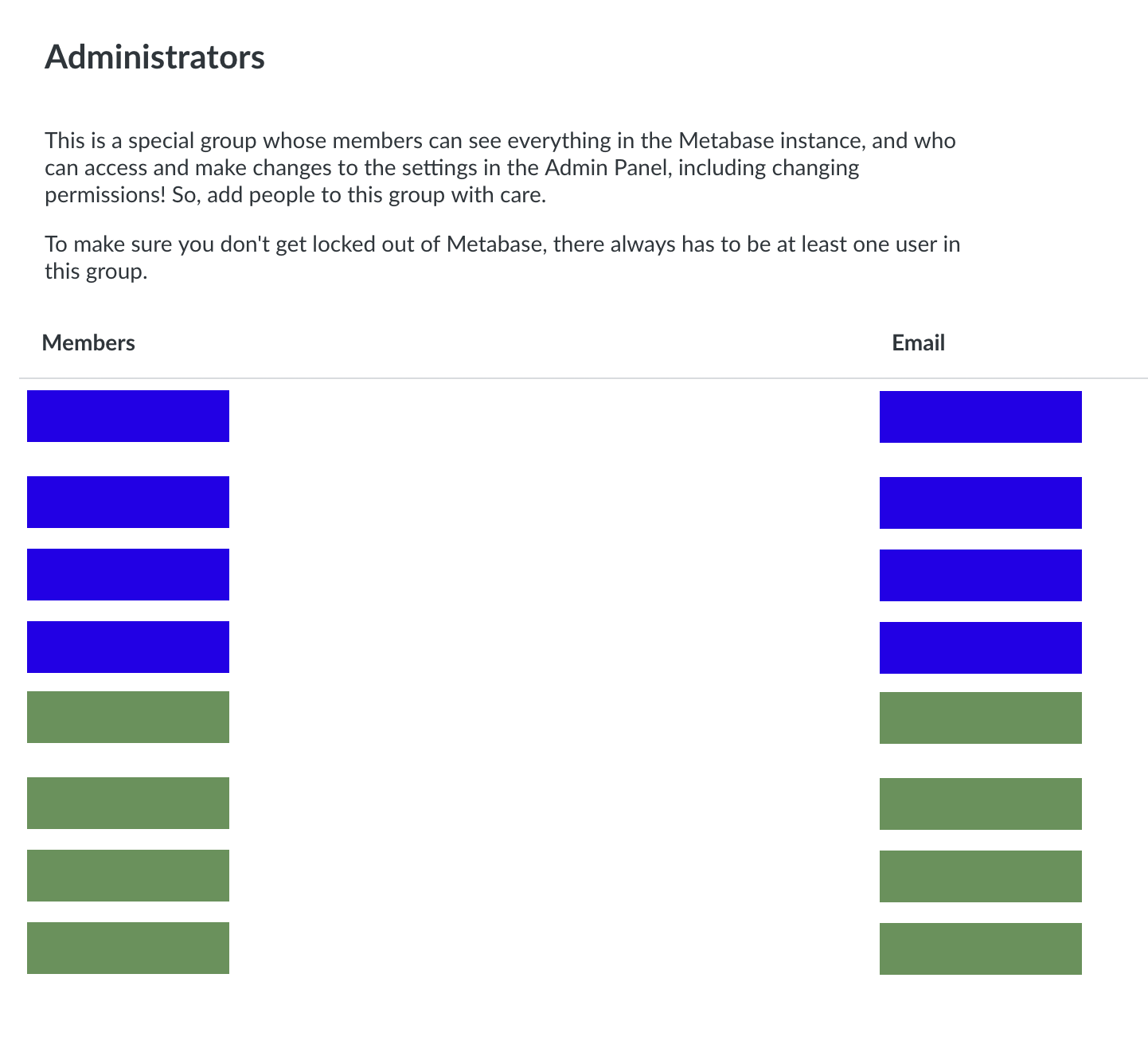
And also our data sources have been multiplied:

As well as Migrated Dashboards:
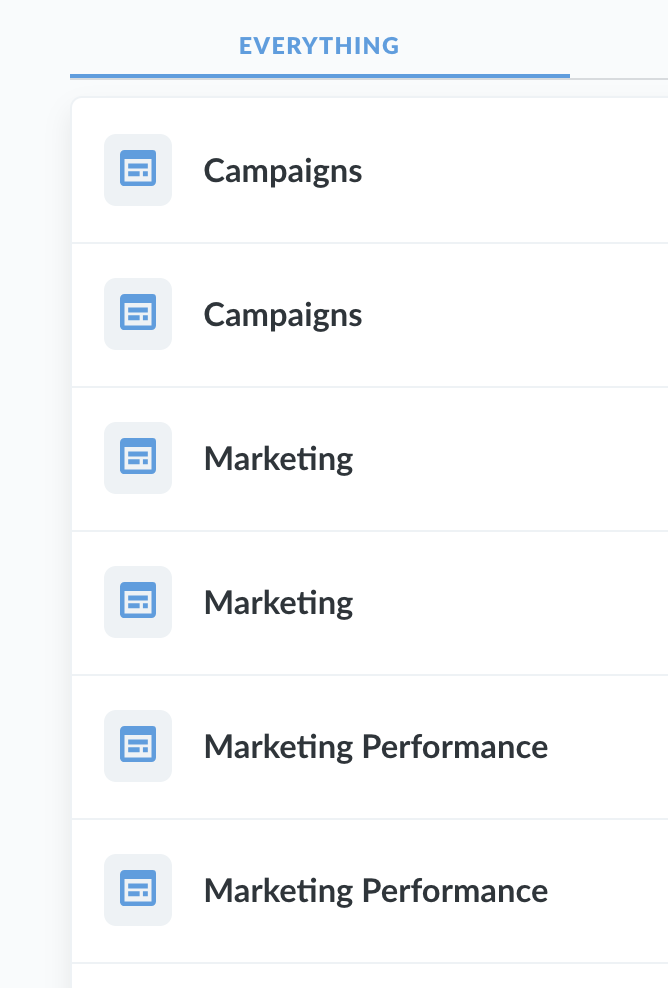
They are listed twice, but with the same ID (eg both "Campaigns" rows goes to the same URL, eg. /dashboards/42). Looking in Network Inspector, I see that the backend returns the records, so it's a backend issue and not UI issue:
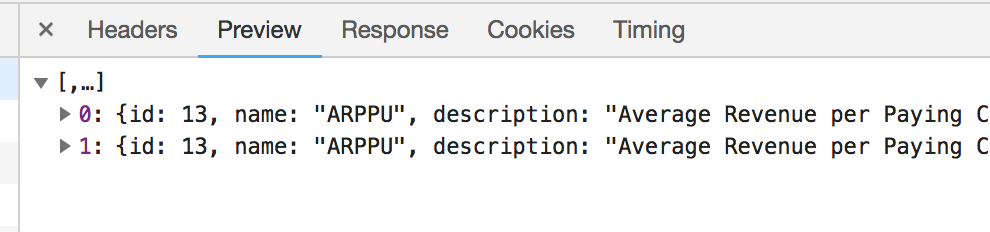
While we can access metabase now, it's a big mess with all the duplicated dashboards, questions and data sources.
Not sure if this helps pinpointing the issue, but it is probably not the JDBC version but something else.
pfeiffer
on 22 Aug 2018
Anybody on this? I'd love to start using all the new features of 0.30!
 doodlebro
on 28 Aug 2018
doodlebro
on 28 Aug 2018
I've seen this as well. I configured SSL and upgraded to 0.30.2 at the same time. Once I set the connection string properly, I stopped getting the error referencing pg_hba.conf and started getting the below error. It prevents metabase from starting. It appears JobStoreTX is the issue in this case.
09-12 23:26:49 [1mINFO metabase.core[0m :: Starting Metabase version v0.30.2 (8902333 release-0.30.2) ...
09-12 23:26:49 [1mINFO metabase.core[0m :: System timezone is 'UTC' ...
09-12 23:26:53 [1mINFO metabase.core[0m :: Setting up and migrating Metabase DB. Please sit tight, this may take a minute...
09-12 23:26:53 [1mINFO metabase.db[0m :: [36mVerifying postgres Database Connection ...[0m
09-12 23:26:53 [1mINFO metabase.db[0m :: Verify Database Connection ... ✅
09-12 23:26:53 [1mINFO metabase.db[0m :: Running Database Migrations...
09-12 23:26:53 [1mINFO metabase.db[0m :: Setting up Liquibase...
09-12 23:26:53 [1mINFO metabase.db[0m :: Liquibase is ready.
09-12 23:26:53 [1mINFO metabase.db[0m :: Checking if Database has unrun migrations...
09-12 23:26:59 [1mINFO metabase.db[0m :: Database Migrations Current ... ✅
09-12 23:27:00 [1mINFO db.migrations[0m :: Running all necessary data migrations, this may take a minute.
09-12 23:27:00 [1mINFO db.migrations[0m :: Finished running data migrations.
09-12 23:27:00 [1mINFO metabase.events[0m :: Starting events listener: [34mmetabase.events.notifications[0m 👂
09-12 23:27:00 [1mINFO metabase.events[0m :: Starting events listener: [34mmetabase.events.metabot-lifecycle[0m 👂
09-12 23:27:00 [1mINFO metabase.events[0m :: Starting events listener: [34mmetabase.events.dependencies[0m 👂
09-12 23:27:00 [1mINFO metabase.events[0m :: Starting events listener: [34mmetabase.events.activity-feed[0m 👂
09-12 23:27:00 [1mINFO metabase.events[0m :: Starting events listener: [34mmetabase.events.last-login[0m 👂
09-12 23:27:00 [1mINFO metabase.events[0m :: Starting events listener: [34mmetabase.events.revision[0m 👂
09-12 23:27:00 [1mINFO metabase.events[0m :: Starting events listener: [34mmetabase.events.sync-database[0m 👂
09-12 23:27:00 [1mINFO metabase.events[0m :: Starting events listener: [34mmetabase.events.view-log[0m 👂
09-12 23:27:00 [1mINFO metabase.events[0m :: Starting events listener: [34mmetabase.events.driver-notifications[0m 👂
09-12 23:27:30 [1mERROR jdbcjobstore.JobStoreTX[0m :: ClusterManager: Error managing cluster: Failed to obtain DB connection from data source 'db': java.sql.SQLException: Connections could not be acquired from the underlying database!
org.quartz.JobPersistenceException: Failed to obtain DB connection from data source 'db': java.sql.SQLException: Connections could not be acquired from the underlying database! [See nested exception: java.sql.SQLException: Connections could not be acquired from the underlying database!]
at org.quartz.impl.jdbcjobstore.JobStoreSupport.getConnection(JobStoreSupport.java:767)
at org.quartz.impl.jdbcjobstore.JobStoreTX.getNonManagedTXConnection(JobStoreTX.java:71)
at org.quartz.impl.jdbcjobstore.JobStoreSupport.doCheckin(JobStoreSupport.java:3232)
at org.quartz.impl.jdbcjobstore.JobStoreSupport$ClusterManager.manage(JobStoreSupport.java:3857)
at org.quartz.impl.jdbcjobstore.JobStoreSupport$ClusterManager.initialize(JobStoreSupport.java:3842)
at org.quartz.impl.jdbcjobstore.JobStoreSupport.schedulerStarted(JobStoreSupport.java:678)
at org.quartz.core.QuartzScheduler.start(QuartzScheduler.java:526)
at org.quartz.impl.StdScheduler.start(StdScheduler.java:143)
at clojurewerkz.quartzite.scheduler$start.invokeStatic(scheduler.clj:31)
at clojurewerkz.quartzite.scheduler$start.invoke(scheduler.clj:27)
at metabase.task$start_scheduler_BANG_.invokeStatic(task.clj:79)
at metabase.task$start_scheduler_BANG_.invoke(task.clj:72)
at metabase.core$init_BANG_.invokeStatic(core.clj:173)
at metabase.core$init_BANG_.invoke(core.clj:138)
at metabase.core$start_normally.invokeStatic(core.clj:245)
at metabase.core$start_normally.invoke(core.clj:239)
at metabase.core$_main.invokeStatic(core.clj:265)
at metabase.core$_main.doInvoke(core.clj:260)
at clojure.lang.RestFn.invoke(RestFn.java:397)
at clojure.lang.AFn.applyToHelper(AFn.java:152)
at clojure.lang.RestFn.applyTo(RestFn.java:132)
at metabase.core.main(Unknown Source)
 zvickery
on 13 Sep 2018
zvickery
on 13 Sep 2018
I am setting up a new setup for metabase on AWS EB. running metabase 0.30.3..
I have the MB_DB_CONNECTION_URI setup with postgres://<user>:<pass>@<hostname>:5432/<db_name>?ssl=true&sslmode=require&sslfactory=org.postgresql.ssl.NonValidatingFactory
And when I pull locks from the EB docker container it just shows this over and over.
org.postgresql.util.PSQLException: FATAL: no pg_hba.conf entry for host "<internal_ip>", user "<user>", database "<db_name>", SSL off
(note the SSL off!)
Now what is interesting is that it DOES connect one-time on initial startup to create and migrate the DB (as my database has tables from metabase in it)
09-14 22:18:11 INFO metabase.core :: Setting up and migrating Metabase DB. Please sit tight, this may take a minute...
09-14 22:18:11 INFO metabase.db :: Verifying postgres Database Connection ...
09-14 22:18:11 INFO metabase.db :: Verify Database Connection ...  <U+2705>
09-14 22:18:11 INFO metabase.db :: Running Database Migrations...
09-14 22:18:11 INFO metabase.db :: Setting up Liquibase...
09-14 22:18:11 INFO metabase.db :: Liquibase is ready.
09-14 22:18:11 INFO metabase.db :: Checking if Database has unrun migrations...
09-14 22:18:16 INFO metabase.db :: Database Migrations Current ...  <U+2705>
com.mchange.v2.cfg.DelayedLogItem [ level -> FINE, text -> "The configuration file for resource identifier 'hocon:/reference,/application,/c3p0,/' could not be found. Skipping.", exception -> null]
09-14 22:18:17 INFO db.migrations :: Running all necessary data migrations, this may take a minute.
09-14 22:18:17 INFO db.migrations :: Finished running data migrations.
but then right when it tries to create the connection factory after that is when it seems to forget about SSL.
Sep 14, 2018 10:18:17 PM org.postgresql.core.v3.ConnectionFactoryImpl log
WARNING: SQLException occurred while connecting to <host>:5432
org.postgresql.util.PSQLException: FATAL: no pg_hba.conf entry for host "<internal_ip>", user "<user>", database "<db_name>", SSL off
        at org.postgresql.core.v3.ConnectionFactoryImpl.doAuthentication(ConnectionFactoryImpl.java:473)
        at org.postgresql.core.v3.ConnectionFactoryImpl.openConnectionImpl(ConnectionFactoryImpl.java:205)
        at org.postgresql.core.ConnectionFactory.openConnection(ConnectionFactory.java:49)
        at org.postgresql.jdbc.PgConnection.<init>(PgConnection.java:195)
        at org.postgresql.Driver.makeConnection(Driver.java:452)
        at org.postgresql.Driver.connect(Driver.java:254)
        at com.mchange.v2.c3p0.DriverManagerDataSource.getConnection(DriverManagerDataSource.java:135)
        at com.mchange.v2.c3p0.WrapperConnectionPoolDataSource.getPooledConnection(WrapperConnectionPoolDataSource.java:182)
        at com.mchange.v2.c3p0.WrapperConnectionPoolDataSource.getPooledConnection(WrapperConnectionPoolDataSource.java:171)
        at com.mchange.v2.c3p0.impl.C3P0PooledConnectionPool$1PooledConnectionResourcePoolManager.acquireResource(C3P0PooledConnectionPool.java:137)
        at com.mchange.v2.resourcepool.BasicResourcePool.doAcquire(BasicResourcePool.java:1014)
        at com.mchange.v2.resourcepool.BasicResourcePool.access$800(BasicResourcePool.java:32)
        at com.mchange.v2.resourcepool.BasicResourcePool$AcquireTask.run(BasicResourcePool.java:1810)
        at com.mchange.v2.async.ThreadPoolAsynchronousRunner$PoolThread.run(ThreadPoolAsynchronousRunner.java:696)
 urkle
on 15 Sep 2018
urkle
on 15 Sep 2018
Hi,
I face the "SSL Fatal error" when I try to install a new metabase with Postgre on Azure as database.
My complete configuration:
- metabase on Docker (deploy on a kubernetes cluster using helm chart) v0.30.X image from Docker Hub
- Postgres as a service on azure, SSL is activated on database.
So I use the URI like "postgresql://host:port/database?user=toto@toto&password=xxxxxx&ssl=true&sslmode=require" to connect to the database.
What I have noticed during the installation:
- metabase succeed the "migration/installation" process and the metabase tables are created in the postgres schema
- after during the start of the metabase I face the issue "FATAL: SSL connection is required. Please specify SSL options and retry."
looks like metabase don't use the same connection string for installation and run.
Very strange. After some investigation I have try to re-install the metabase using version v0.29.3 and all looks ok.
Hope can help to solve the SSL issue
 bduterte
on 27 Sep 2018
bduterte
on 27 Sep 2018
this is fixed in #8598 and seems like no one's commented since that PR
salsakran
on 5 Aug 2019
Related issues
 AllanCochrane
·
56Comments
AllanCochrane
·
56Comments
 key88sf
·
43Comments
key88sf
·
43Comments
 hopsoft
·
53Comments
hopsoft
·
53Comments
 chadbean
·
42Comments
chadbean
·
42Comments
 joklee
·
52Comments
joklee
·
52Comments
Most helpful comment
Anybody on this? I'd love to start using all the new features of 0.30!