Messagekit: How to hide keyboard when tap on messagesCollectionView on 3.4.2
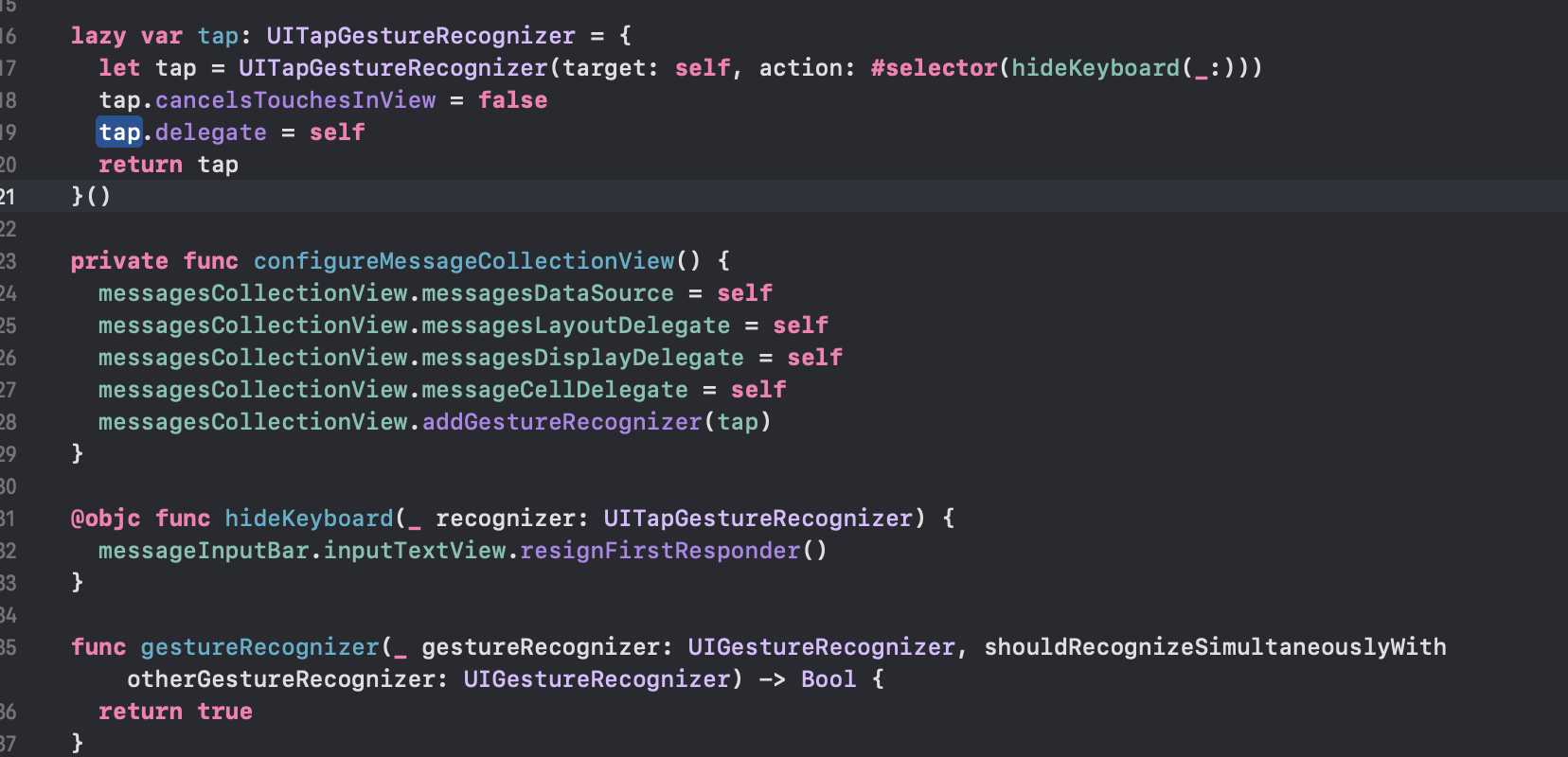
I add a UITapGestureRecognizer into messagesCollectionView in my custom viewcontroller which extends MessagesViewController.
I also return true in delegate method of UIGestureRecognizerDelegate.
 func gestureRecognizer(_ gestureRecognizer: UIGestureRecognizer, shouldRecognizeSimultaneouslyWith otherGestureRecognizer: UIGestureRecognizer) -> Bool {`
    return true
 }
The above method is called but my selector method of above tap gesture is not called.
Here is my code:
- Version of MessageKit: 3.4.2
 ldt25290
All 7 comments
The same question, solutions, that you gave earlier, don't work in 3.4.2
 s-reshetnikov
on 11 Nov 2020
s-reshetnikov
on 11 Nov 2020
This issue has been marked as stale because it has not had recent activity. It will be closed if no further activity occurs.
![stale[bot] picture](https://avatars.githubusercontent.com/in/1724?v=4&s=40) stale[bot]
on 26 Nov 2020
stale[bot]
on 26 Nov 2020
i use 3.1.0 also cannot hide keyboard when tap on
 WineKai
on 30 Nov 2020
WineKai
on 30 Nov 2020
This issue has been marked as stale because it has not had recent activity. It will be closed if no further activity occurs.
stale[bot]
on 19 Dec 2020
You can leverage the existing gesture recognizer method in MessagesCollectionView by creating your own custom class that inherits MessagesCollectionView. Add a simple delegate and you can detect any taps in messagesCollectionView without interrupting the MessageCellDelegate methods.
protocol MessagesCollectionViewDelegate: AnyObject {
    func didTap()
}

class ChatMessagesCollectionView: MessagesCollectionView {
    weak var messagesCollectionViewDelegate: MessagesCollectionViewDelegate?

    override func handleTapGesture(_ gesture: UIGestureRecognizer) {
        super.handleTapGesture(gesture) // Required for MessageCellDelegate methods to work
        messagesCollectionViewDelegate?.didTap()
    }
}
Now just implement the delegate method in your MessagesViewController and hide the keyboard when the delegate is triggered.
class ChatMessagesViewController: MessagesViewController {
    override func viewDidLoad() {
        self.messagesCollectionView = ChatMessagesCollectionView()
        (self.messagesCollectionView as? ChatMessagesCollectionView)?.messagesCollectionViewDelegate = self
        super.viewDidLoad()
    }
}

extension ChatMessagesViewController: MessagesCollectionViewDelegate {
    func didTap() {
        self.messageInputBar.inputTextView.resignFirstResponder()
    }
}
 jd014
on 20 Dec 2020
jd014
on 20 Dec 2020
extension YourMessageVC: MessageCellDelegate {
func didTapBackgroud(in cell: MessageCollectionViewCell) {
self.messageInputBar.inputTextView.resignFirstResponder()
}
}
 le-hu-dev
on 3 Feb 2021
le-hu-dev
on 3 Feb 2021
Examples above should work 👍
 martinpucik
on 27 Feb 2021
martinpucik
on 27 Feb 2021
Related issues
 JulienLevallois
·
4Comments
JulienLevallois
·
4Comments
 NiklasWilson
·
4Comments
NiklasWilson
·
4Comments
 ahmedwasil
·
3Comments
ahmedwasil
·
3Comments
 anandatswayam
·
4Comments
anandatswayam
·
4Comments
 bilaalrashid
·
3Comments
bilaalrashid
·
3Comments