Messagekit: Sending images: images overlap with messageInputBar
I have gotten sending images to work! However, there remains a problem... When I send the image, for some reason the message input bar overlaps w/ the sent image and it distorts my messageCollectionView. Any ideas for how to fix?
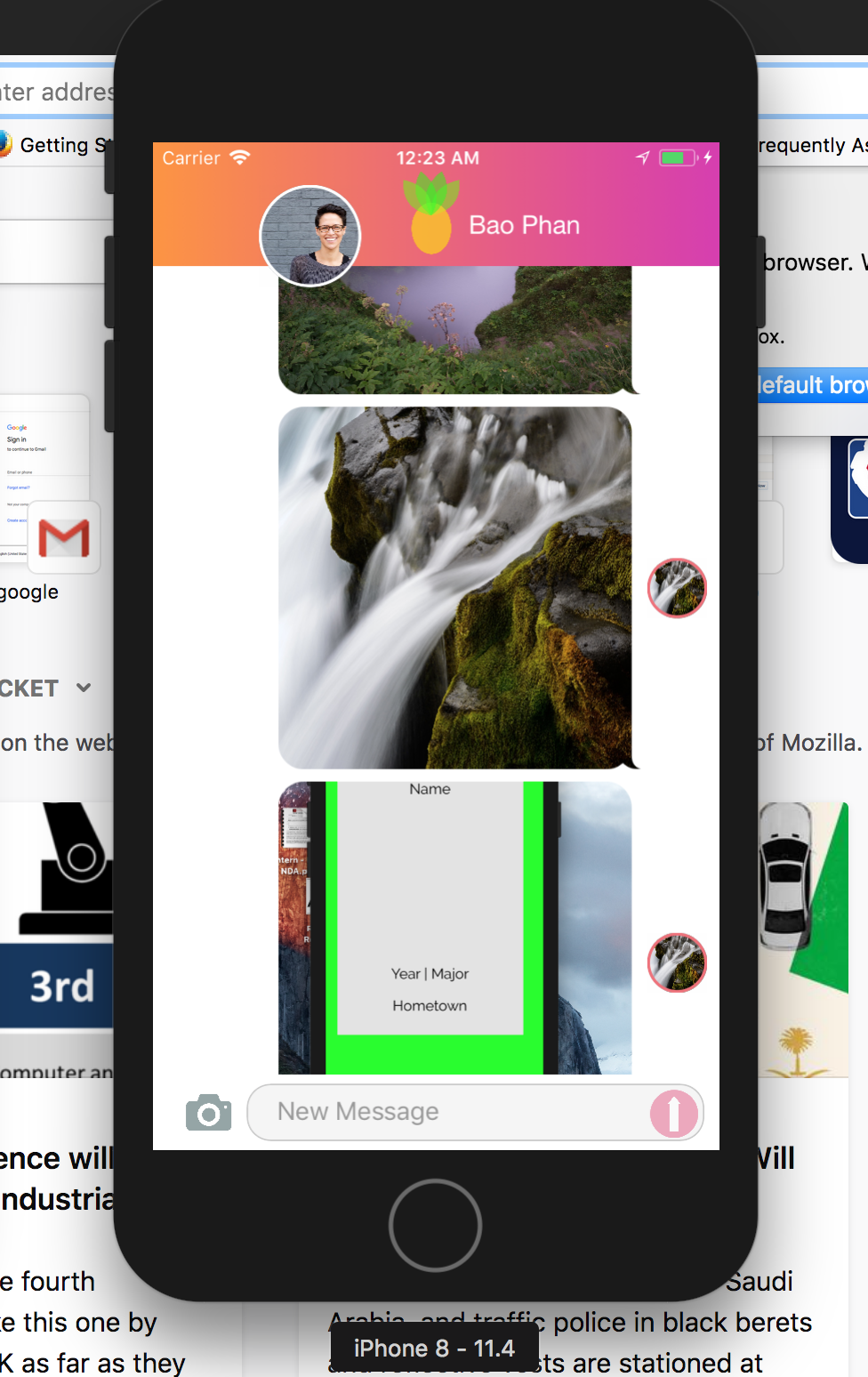
 asaplee
All 18 comments
@asaplee I think this bug could be fixed in the upcoming version, MessageKit 1.1.0
 SD10
on 15 Aug 2018
SD10
on 15 Aug 2018
Ah- ok. @SD10 any idea when this version will be out?
asaplee
on 15 Aug 2018
I found a way to solve this issue by adding these lines of code to my viewWillAppear method
messageCollectionViewBottomInset = keyboardOffsetFrame.height
messagesCollectionView.scrollToBottom()`
So whenever another view controller is presented it hides the inputAccessoryView which affects the collectionView bottom inset and isn't restored when the presented view is dismissed. So this was how i fixed it.
Although you don't have to call
messagesCollectionView.scrollToBottom()`
 tobitech
on 27 Aug 2018
tobitech
on 27 Aug 2018
This issue has been marked as stale because it has not had recent activity. It will be closed if no further activity occurs.
![stale[bot] picture](https://avatars.githubusercontent.com/in/1724?v=4&s=40) stale[bot]
on 10 Sep 2018
stale[bot]
on 10 Sep 2018
This issue has been auto-closed because there hasn't been any activity for at least 21 days. However, we really appreciate your contribution, so thank you for that! 🙏 Also, feel free to open a new issue if you still experience this problem 👍.
stale[bot]
on 17 Sep 2018
Still present on 2.0.0 (it makes totally unusable the image message).
 MarcoYMD
on 10 Dec 2018
MarcoYMD
on 10 Dec 2018
@Nem2s are you using any other kind of keyboard manager? Such as IQKeyboardManager?
 nathantannar4
on 11 Dec 2018
nathantannar4
on 11 Dec 2018
@Nem2s are you using any other kind of keyboard manager? Such as
IQKeyboardManager?
Nope, followed the basic implementation of the chatViewController. It works great with text messsages but whenever I try to insert an image the messageList is not scrolling anymore and the list is cropped on the bottom.
Wrapper class
````
class ChatContainerVC: UIViewController, NavbarDelegate, ChatDelegate {
let messagesViewController = ChatVC()
var navBar: NavBarChat!
var delegate: ImagePickerDelegate!
````
override func viewDidLayoutSubviews() {
        super.viewDidLayoutSubviews()
        if navBar == nil {
            self.navBar = NavBarChat(vc: self, isBackBtnGrey: false, hasRightBtn: true, theFrame: CGRect(
                    x: 0.0,
                    y: 0.0,
                    width: self.view.frame.width,
                    height: NavBar.defaultHeight
            ))
            self.navBar.delegate = self
            self.view.addSubview(self.navBar)
        }
        self.messagesViewController.view.frame = CGRect(x: 0, y: NavBar.defaultHeight, width: view.bounds.width, height: view.bounds.height - NavBar.defaultHeight)
    }
ChatVC
func insertMessage(_ message: Message) {
        DispatchQueue.main.async {
            self.messageList.append(message)
            self.messagesCollectionView.performBatchUpdates({
                self.messagesCollectionView.insertSections([self.messageList.count - 1])
                if self.messageList.count >= 2 {
                    self.messagesCollectionView.reloadSections([self.messageList.count - 2])
                }
            }, completion: { (finished: Bool) in
                if self.isLastSectionVisible() == true {
                    print(self.messagesCollectionView.contentSize.height)
                    self.messagesCollectionView.scrollToBottom(animated: true)
                }
            })
        }
@Nem2s I see it's a container. Are you adding your ChatVC as a child view controller anywhere? You should see the embedded example I have if your unsure of what I'm speaking of.
Sent with GitHawk
nathantannar4
on 12 Dec 2018
@Nem2s I see it's a container. Are you adding your ChatVC as a child view controller anywhere? You should see the embedded example I have if your unsure of what I'm speaking of.
Sent with GitHawk
Apologise, I forgot to mention those lines:
* ChatContainerVC class*
```
override func viewDidLoad() {
        super.viewDidLoad()
        /// Add the
ConversationViewController` as a child view controller
messagesViewController.willMove(toParent: self)
self.addChild(messagesViewController)
view.addSubview(messagesViewController.view)
messagesViewController.didMove(toParent: self)
messagesViewController.delegate = self
messagesViewController.parentVC = self
}
````
//Required for the `MessageInputBar` to be visible
    override var canBecomeFirstResponder: Bool {
        return messagesViewController.canBecomeFirstResponder && !isImagePickerShowed
    }

    //Required for the `MessageInputBar` to be visible
    override var inputAccessoryView: UIView? {
        if !isImagePickerShowed {
            return messagesViewController.inputAccessoryView
        } else {
            return nil
        }
    }
Is there something wrong with the configuration of the child viewController?
MarcoYMD
on 12 Dec 2018
Ok, I thought this was fixed but I'll take another look using only image messages.
Sent with GitHawk
nathantannar4
on 12 Dec 2018
@Nem2s are you using 2.0? I cannot reproduce this in the example.
Sent with GitHawk
nathantannar4
on 16 Dec 2018
How are you setting the frame of the chat VC?
Sent with GitHawk
nathantannar4
on 16 Dec 2018
How are you setting the frame of the chat VC?
Sent with GitHawk
Sorry for the late reply I have been off for few days. Anyway this is the code to set the frame of the viewController:
override func viewDidLoad() {
        super.viewDidLoad()
       ...
        self.messagesViewController.view.frame = CGRect(x: 0, y: NavBar.defaultHeight, width: view.bounds.width, height: view.bounds.height - NavBar.defaultHeight)
    }
where messageViewController is instance of ChatVC
MarcoYMD
on 18 Dec 2018
@Nem2s are you using 2.0? I cannot reproduce this in the example.
Sent with GitHawk
Yes sir, I'm using the latest version from Cocoapods.
It's really weird because the bubble is scrolled correctly with text but when i put an image it scrolls down but the bottom margin is not set on top of the inputbar but on top of the scrollview behind. Like in the image below:

MarcoYMD
on 18 Dec 2018
@nathantannar4 is there any news about that?
MarcoYMD
on 7 Jan 2019
@Nem2s I have no way of really debugging this for you. I ran the example with only images and did not have this problem.
I suspect it has something to do with the way your laying out the VC as a child VC. Look at the example project I have for the embedded example. Make sure your not adjusting the top/bottom inset of the MessagesCollectionView as well.
Sent with GitHawk
nathantannar4
on 7 Jan 2019
I was running into the same issue, so I noticed this bug is related when I presented a new controller to pick an image after dismiss the pick Image view the layout and keyboard event broke, I used present as Modally and is working for me,
`
      picker.modalPresentationStyle = UIModalPresentationStyle.overCurrentContext
      picker.modalTransitionStyle = UIModalTransitionStyle.crossDissolve

      self.present(picker, animated: true, completion: nil)

     //hide the input  and after pick the image make the input visible
     self.messageInputBar.isHidden = true
`
 victors1681
on 22 Jun 2020
victors1681
on 22 Jun 2020
Related issues
 brandon-haugen
·
3Comments
brandon-haugen
·
3Comments
 anandatswayam
·
4Comments
anandatswayam
·
4Comments
 Leon12345679
·
3Comments
Leon12345679
·
3Comments
 NiklasWilson
·
4Comments
NiklasWilson
·
4Comments
 emmanuelay
·
3Comments
emmanuelay
·
3Comments