Messagekit: Japanese Emoji are not displayed.
For example. Enter the following.
Ꮚ˘̴͈́ꈊ˘̴͈̀Ꮚ⋆✩
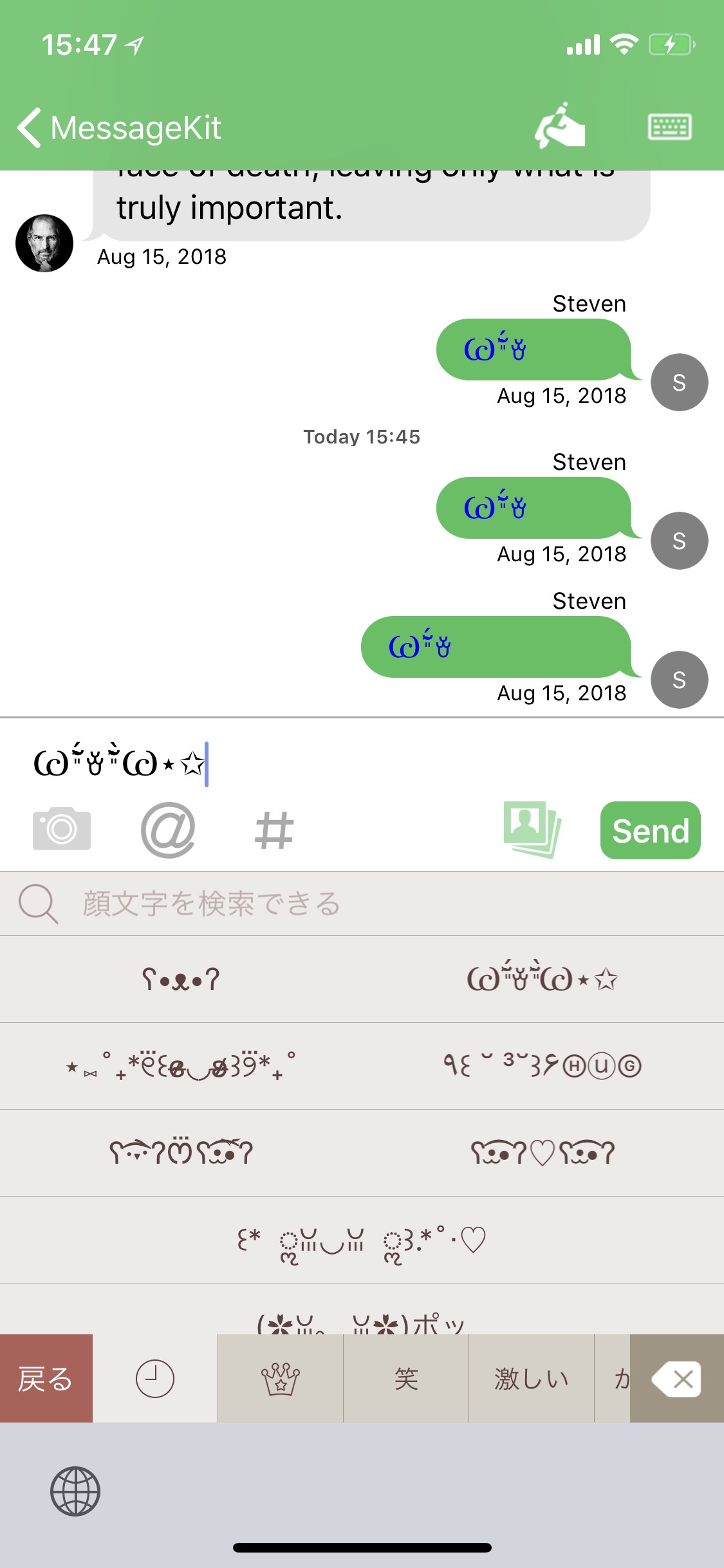
It not displayed from the middle.
I used example app.
MessageKit Version
1.0.0
iOS Version
11.4.1
Swift Version
4.1.2
Device
iPhone X
 yokochi
All 6 comments
@nathantannar4 Any idea on this one?
 SD10
on 15 Aug 2018
SD10
on 15 Aug 2018
No idea, can you try using NSAttributedString?
Sent with GitHawk
 nathantannar4
on 15 Aug 2018
nathantannar4
on 15 Aug 2018
I also see something similar in https://github.com/MessageKit/MessageKit/issues/812. Maybe 1.1 will resolve it. Not sure what's happening
SD10
on 15 Aug 2018
@SD10 It's totaly a weird issue. In ConversationViewCOntroller.swift Replacing;
let attributedText = NSAttributedString(string: text, attributes: [.font: UIFont.systemFont(ofSize: 18), .foregroundColor: UIColor.blue])
with
let font = UIFont.systemFont(ofSize: 18)
let attributedText = NSAttributedString(string: text, attributes: [.font: UIFont(name: font.fontName, size: 18), .foregroundColor: UIColor.blue])
solves the issue. Also, I have tried with other fonts as well. It all works with UIFont(name: font.fontName, size: 18)
 gungorbasa
on 2 Sep 2018
gungorbasa
on 2 Sep 2018
Closing since fixed by #1 Made a mistake, the PR is still living on a fork.
 kinoroy
on 19 Feb 2020
kinoroy
on 19 Feb 2020
I confirmed https://github.com/yokochi/MessageKit/pull/1 does fix the issue. Maybe @yokochi can submit a PR?
 gomfucius
on 6 Apr 2020
gomfucius
on 6 Apr 2020
Related issues
 JulienLevallois
·
4Comments
JulienLevallois
·
4Comments
 emmanuelay
·
3Comments
emmanuelay
·
3Comments
 yspreen
·
3Comments
yspreen
·
3Comments
 Leon12345679
·
3Comments
Leon12345679
·
3Comments
 bilaalrashid
·
3Comments
bilaalrashid
·
3Comments
Most helpful comment
@SD10 It's totaly a weird issue. In
ConversationViewCOntroller.swiftReplacing;with
solves the issue. Also, I have tried with other fonts as well. It all works with
UIFont(name: font.fontName, size: 18)