Messagekit: MessagesCollectionView bottom inset is below MessageInputBar in PageViewController with NavigationController's isTranslucent property set to false
Hi all,
I am currently using MessageKit as my chat controller and I have a problem setting it. I am using the MessagesViewController inside a PageViewController allowing users to swipe through the chat. However, I have an issue, I cannot adjust the bottom contentInset for the messagesCollectionView since it frequently changes. I have looked for a solution for about 2 days and cannot figure out how to do. Apart from the PageViewController the MessagesViewController works as expected. The top inset is configurable but the bottom is not. Also, my navigationController's isTranslucent property is set to false and when I set it to true again it works as expected. I have checked the source code and nothing seems to be wrong, however, handleKeyboardDidChange func in MessagesViewController+Keyboard.swift doesn't seem the be called since it adjusts the bottom inset of the messagesCollectionView. Hope you can help me out. Maybe it is a silly question forgive me I am still developing myself.
Bottom Inset Below MessageInputBar

Expected

 korelhayrullah
All 12 comments
I have seen this in my own projects and it is due to the UIPageViewController which when improperly used can interfere with the automated content inset adjustment. The inset is determined by the frame.size of the UIViewController so make sure you are not placing your tabbar over the view but rather on top of the view. Does that make sense?
Sent with GitHawk
 nathantannar4
on 3 Jul 2018
nathantannar4
on 3 Jul 2018
I am having difficulties understanding "so make sure you are not placing your tabbar over the view but rather on top of the view". Can you be more open? I am new on iOS :/
korelhayrullah
on 3 Jul 2018
When you layout your views. Don't have the tabbar overlapping the MessageViewController view
Sent with GitHawk
nathantannar4
on 3 Jul 2018
I have checked all the conditions and there weren't any overlapping views causing the automated content inset adjustment to cause failure. I dug a little bit into the code and found that in MessagesViewController+Keyboard.swift in the function handleKeyboardDidChangeState(_ notification:) the newBottomInset value becomes negative. The keyboardEndFrame.minY is returning a higher value than the view.frame.height causing it to be negative and then the bottom inset to be set falsely. In my opinion, the newBottomInset should be calculated as follows: let newBottomInset = keyboardEndFrame.height - iPhoneXBottomInset in which sets the bottom inset as expected regardless the situation I am using the MessagesViewController. I have tested it on different devices and it was working as expected. It may be revised. Besides that, the ability to add an intended bottom inset property can be added. Thank you for your replies, it really helped me out. 💃
korelhayrullah
on 3 Jul 2018
@korelhayrullah I don't have much spare time to review this but thanks for conveying your issues. I'll take into consideration allowing users to have more control over the inset in case they need to override
 SD10
on 4 Jul 2018
SD10
on 4 Jul 2018
I'm having the same issue when using adding MessagesViewController as child view controller. Don't know how to solve it...
 ranhsd
on 9 Jul 2018
ranhsd
on 9 Jul 2018
How much off is the bottom inset for you @ranhsd? That would be a good place to help me start looking. This is one of the trickiest parts of the library. Unfortunately, the inset is working for my current company's view controller setup -- but I'm always looking to improve if I can
SD10
on 9 Jul 2018
Hi @SD10 I open a new issue about it in #755
The problem is that the MessageInputBar hides the collection view content and I cannot scroll to bottom and see the messages in there because it stuck
You can understand it from this image:
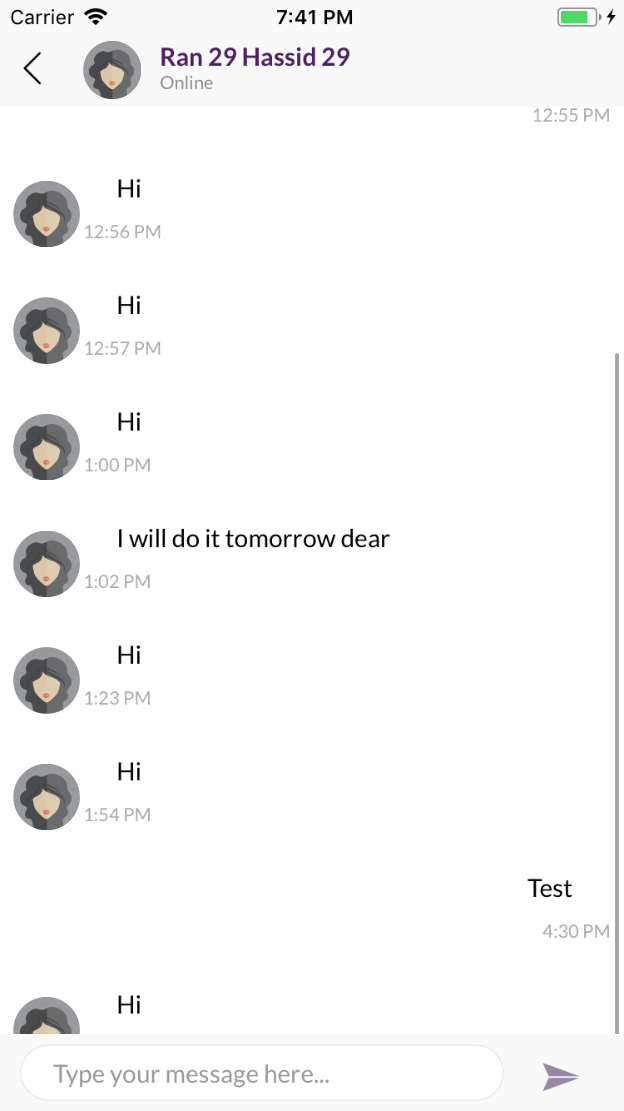
In this image I stretch the scroll in order to see the item at the bottom but I cannot normally scroll to it... In 0.13.5 it works for me
ranhsd
on 9 Jul 2018
I will look into fixing this as it seems many are using it as a child view controller
Sent with GitHawk
nathantannar4
on 9 Jul 2018
755
Sent with GitHawk
nathantannar4
on 9 Jul 2018
Thanks @nathantannar4
ranhsd
on 9 Jul 2018
Set extendedLayoutIncludesOpaqueBars = false in your controller
SD10
on 20 Jul 2018
Related issues
 bilaalrashid
·
3Comments
bilaalrashid
·
3Comments
 mlequeux
·
3Comments
mlequeux
·
3Comments
 Leon12345679
·
3Comments
Leon12345679
·
3Comments
 JulienLevallois
·
4Comments
JulienLevallois
·
4Comments
 pawankmrai
·
3Comments
pawankmrai
·
3Comments
Most helpful comment
@korelhayrullah I don't have much spare time to review this but thanks for conveying your issues. I'll take into consideration allowing users to have more control over the inset in case they need to override