Messagekit: Remove Avatar view for outcoming message and remove date
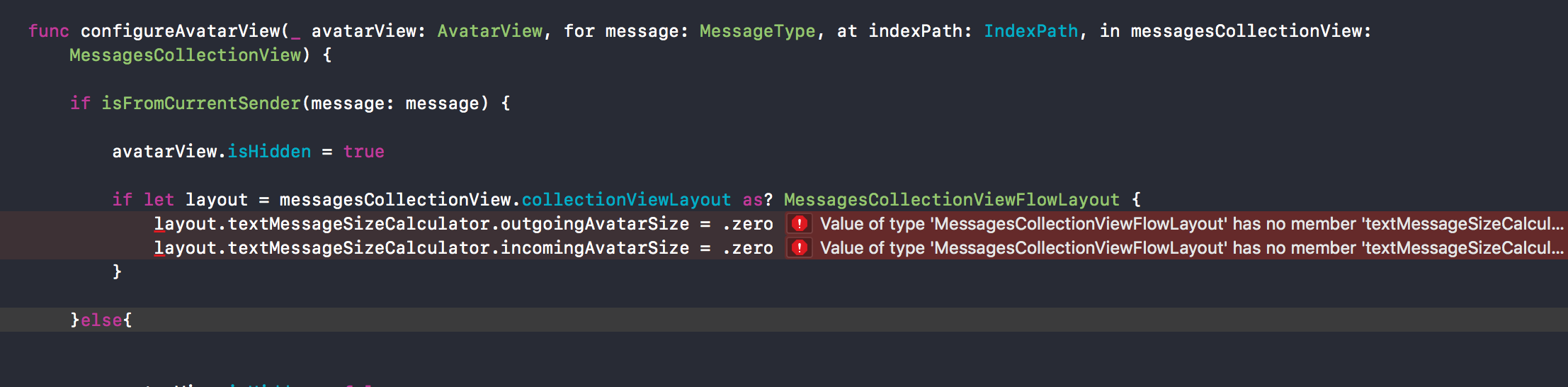
Hi! I want to remove avatar view for outcoming message and i want to personalize each date under cells or remove it because its too much.
How can i do this ?
 JulienLevallois
All 6 comments
@JulienLevallois About the AvatarView please check out https://github.com/MessageKit/MessageKit/blob/master/Documentation/FAQs.md
For modifying one of the cell's labels you can set a different text in one of the MessagesDataSource methods:
func cellTopLabelAttributedText(for message: MessageType, at indexPath: IndexPath) -> NSAttributedString?

func messageTopLabelAttributedText(for message: MessageType, at indexPath: IndexPath) -> NSAttributedString?

func messageBottomLabelAttributedText(for message: MessageType, at indexPath: IndexPath) -> NSAttributedString?
 SD10
on 6 May 2018
SD10
on 6 May 2018
JulienLevallois
on 6 May 2018
And also i wanted to know, whats the frequence of the date in the middle of the screen ? Each new hour ?
JulienLevallois
on 6 May 2018
@JulienLevallois You must use the last release "1.0.0-beta.1"
 adri4silva
on 14 May 2018
adri4silva
on 14 May 2018
This issue has been marked as stale because it has not had recent activity. It will be closed if no further activity occurs.
![stale[bot] picture](https://avatars.githubusercontent.com/in/1724?v=4&s=40) stale[bot]
on 14 Jun 2018
stale[bot]
on 14 Jun 2018
This issue has been auto-closed because there hasn't been any activity for at least 21 days. However, we really appreciate your contribution, so thank you for that! 🙏 Also, feel free to open a new issue if you still experience this problem 👍.
stale[bot]
on 21 Jun 2018
Related issues
JulienLevallois
·
4Comments
 bilaalrashid
·
3Comments
bilaalrashid
·
3Comments
 anandatswayam
·
4Comments
anandatswayam
·
4Comments
 Leon12345679
·
3Comments
Leon12345679
·
3Comments
 nitrag
·
3Comments
nitrag
·
3Comments
Most helpful comment
@JulienLevallois About the
AvatarViewplease check out https://github.com/MessageKit/MessageKit/blob/master/Documentation/FAQs.mdFor modifying one of the cell's labels you can set a different text in one of the
MessagesDataSourcemethods: