Messagekit: MessageInputBar overlaps the bottom tabBar
General Information
Embedding MessageViewController in a tab bar controller causes the MessageInputBar to hide the bottom tab bar controller.
MessageKit Version: 0.11.0
iOS Version(s): 11.0.1 - 11.2
Swift Version: 4.0
Devices/Simulators: iPhone SE, 8, X
Reproducible in ChatExample? (Yes/No): No
What happened?
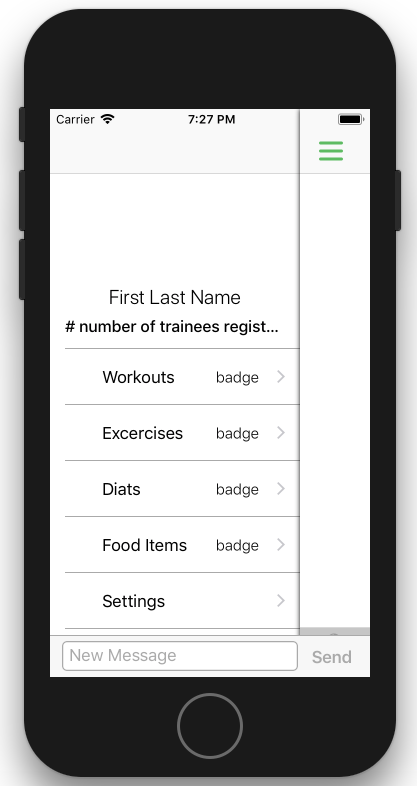
As describe, using the controller as part of an embedded controller in a tab bar controller causes the messageInputBar to overlap the tab bar. This is shown in the image below:

It seams to be an architecture issue as the MessageInputBar is above all other views and is not part of the MessageViewController. This can be seen in an implementation of a side bar menu (scroll view). The MessageInputBar does not move together with the container holding the MessageViewController.
What did you expect to happen?
I would expect the MessageInputBar to be a sub view of the MessageViewController below the collection view. The views constraints should be to the bottom guide so that if the view is not embedded than the MessageInputBar would be attached to the bottom of the controller, but if any tab bars are present, the MessageInputBar would automatically be attached to its top.
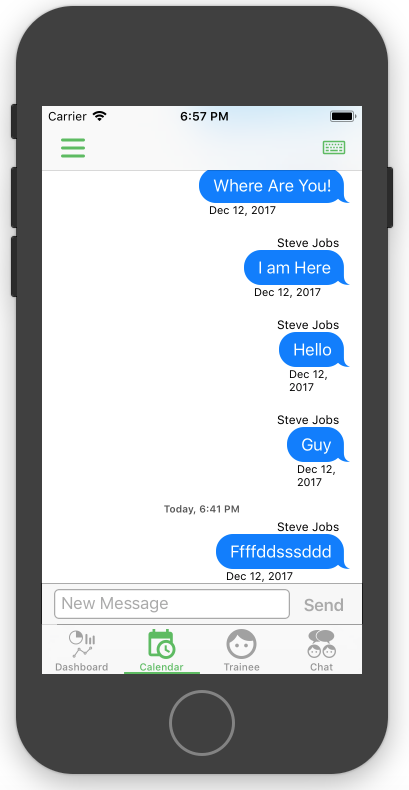
Furthermore, having the MessageInputBar part of the MessageViewController will allow implementation of a side menu as the MessageInputBar will move together with the container.
 KidronGuy
All 42 comments
Thanks for writing up this issue @KidronGuy! We're pretty limited because the MessageInputBar is the inputAccessoryView. JSQMessagesViewController struggled with this in https://github.com/jessesquires/JSQMessagesViewController/issues/1661 as well. I'm not sure this is something we can support without removing the MessageInputBar from the inputAccessoryView and managing it manually. And that's not something I really want to do 😞
From a UI perspective, I'm not sure if having a UITabBar under the MessageInputBar is a good design decision. It's better to capitalize on the full real estate of a chat screen
 SD10
on 12 Dec 2017
SD10
on 12 Dec 2017
Thanks for the quick response @SD10. Sounds like I'm going to capitalise the full real estate of the chat screen, at least for now. :wink:
KidronGuy
on 12 Dec 2017
@KidronGuy I want to keep this open because it's a request to support a new feature 👍
SD10
on 12 Dec 2017
For some reason for me, I can't for the life of me to even show the messageInputBar at all. For some reason when I call calculateIntrinsicContentSize on the messageInputBar I get a Size: (0.0, 42.0). I get everything else to show though.
I understand that maybe UITabBar isn't the best layout option but I'd still like to see the input box even if layout is messed up.
EDIT: Okay, so it shows the keyboard if default selected item in the UITabBar shown is the Chat. So solved that issue. I guess a different issue is the messageInputBar doesn't show if it isn't the default selected item.
 jdriselvato
on 13 Dec 2017
jdriselvato
on 13 Dec 2017
Remember InputAccessoryViews are only shown when the view controller controller it belongs to is the first responder
Sent with GitHawk
 nathantannar4
on 13 Dec 2017
nathantannar4
on 13 Dec 2017
Hi,
How would you suggest we handle this on an iPad with a Split View Controller in a Tab Bar Controller?
I have a messaging layout very similar to Messages on iPad. However, in Messages, the input bar is only present on the View Controller that has the actual conversation, not the list of conversations.
Any suggestions?
 brianb7590
on 22 Dec 2017
brianb7590
on 22 Dec 2017
@brianb7590 Does the issue you're having seem related to #296? I haven't had time to work on support for the iPad
SD10
on 22 Dec 2017
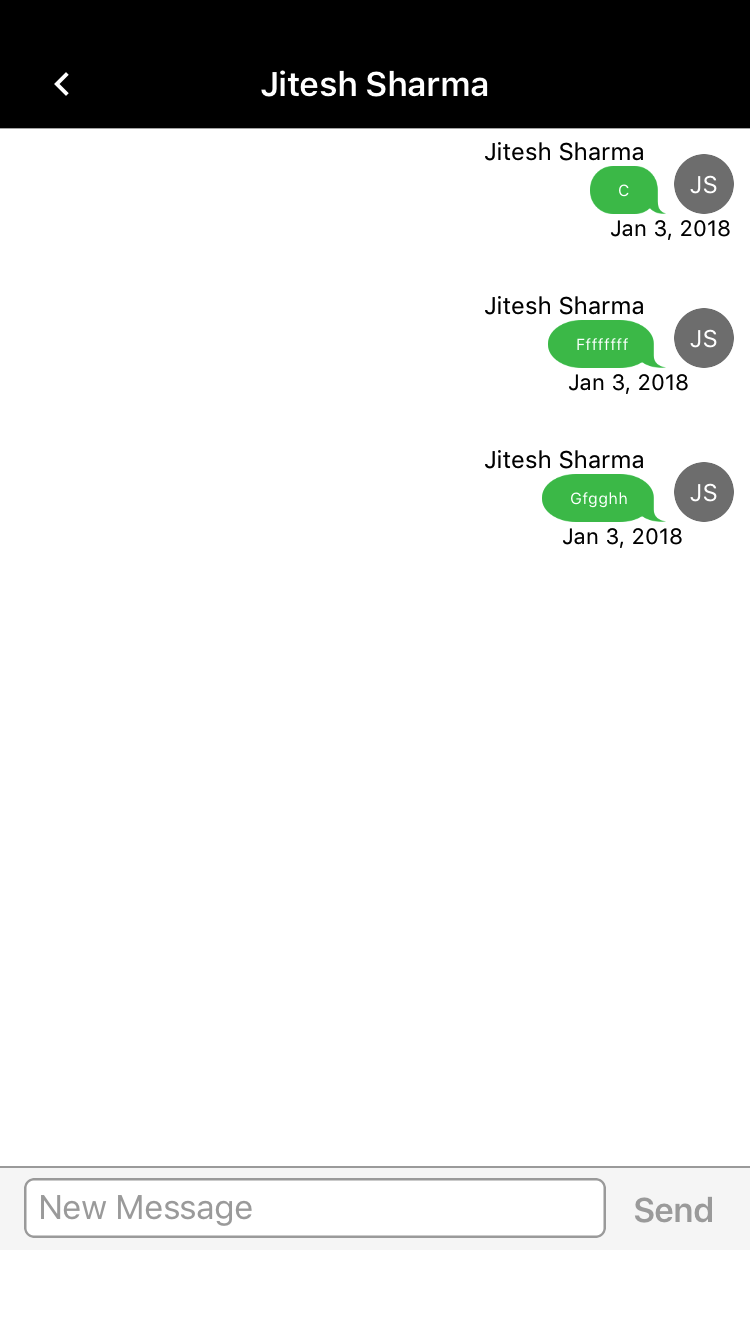
we are using Tabbar in my app, but at the time of opening conversation view controller we are hiding the tabbar and using full screen. we are facing the issue in bottom message Accessory view. what we are facing like when we enter any text in it and scroll down the bottom view then its working fi9 but when we are not enter any single character and scroll down the Accessory view then its lift slightly up (taking tabbar space at the bottom of accessary inputview). please see the screenshot below
 jitesh-sharma
on 3 Jan 2018
jitesh-sharma
on 3 Jan 2018
jitesh-sharma
on 3 Jan 2018
Boy if there is an update on how to use this with a TabBar, I would love the update. Awesome library!
 justdan0227
on 9 Jan 2018
justdan0227
on 9 Jan 2018
I use it with a tab bar and it works. What issue are you facing?
Sent with GitHawk
nathantannar4
on 9 Jan 2018
Well I'm doing this in StoryBoard and want it as the 4th controller. So I created a blank viewcontroller and then gave it the class of my ChatViewController which looks like
class Chat2ViewController: MessagesViewController. The Message Layout is just fine, however there is no input bar (imagine its under the tab bar?) and the navigation controller that I have at the top of the other 3 viewcontrollers does not show in my Chat2ViewController even though its does in SB. How did you get around this?
justdan0227
on 9 Jan 2018
Hmm if you can’t see it, are you using custom view controller containers? I just have a tab bar controller holding 5 navigation controllers. One has a root being an InboxViewController and when a cell is tapped I push the MessagesViewController. MessageInputBar is an input accessory view so it’s not held in the view itself so it should if anything overlap any content not be hidden behind it.
Maybe message me on slack
nathantannar4
on 10 Jan 2018
oh so you are not putting the MessageViewController inside a tabbar view controller, you are pushing it on top of the tabbar controller right? I may have to do the same but was hoping I could have the messageViewController as one of the tabBar viewControllers.
justdan0227
on 10 Jan 2018
I was hoping I could build the MessageViewController inside of Interface Builder because I have a requirement that I have to place a timer at the top of the chat window to show the elapsed time in the chat and then when the chat is closed, save the amount of time in chat, returning them to the tabViewController that initiated the chat. Again know I can do it with a push of the MessageViewController was just trying to not have to push a view on top of the tabBar just to get it to work.
justdan0227
on 10 Jan 2018
Ah I see. I think as pointed out earlier in this thread having a messages controller as one of the tab bar controllers in considered poor UX. You want the chat to take up the most real estate. Nevertheless remember that the MessagesViewController has to be the first responder for the input accessory view to appear
nathantannar4
on 10 Jan 2018
I was hoping I could build the MessageViewController inside of Interface Builder because I have a requirement that I have to place a timer at the top of the chat window to show the elapsed time
@justdan0227 Off topic: You can also overlay the timer view on top of the MessagesCollectionView and shift the top inset of the collection view down by the height of the view
SD10
on 10 Jan 2018
Yeah I was going to play around with that however didn't know what that would do to the accessory view. trying it.
justdan0227
on 10 Jan 2018
@jitesh-sharma I am having the same issue. Have you found a way to fix it?
Edit: Also, when there is text and you scroll down the MessageInputBar, it sort of bounces down too far but then bounces back to the right position. Not a major issue but is an issue non the less. If I need to create another bug report for this i will, unless it is something simple that we just need to do to fix it.
This is the output every time this issue happens, not sure if it is related.
[View] First responder warning: '<MessageKit.InputTextView: 0x10983a200; baseClass = UITextView; frame = (0 0; 291 28); text = ''; clipsToBounds = YES; gestureRecognizers = <NSArray: 0x1c8240600>; layer = <CALayer: 0x1c802b1c0>; contentOffset: {0, 0}; contentSize: {110.66666666666667, 26}; adjustedContentInset: {0, 0, 0, 0}>' rejected resignFirstResponder when being removed from hierarchy
[UIWindow endDisablingInterfaceAutorotationAnimated:] called on <UITextEffectsWindow: 0x106826800; frame = (0 0; 375 812); opaque = NO; autoresize = W+H; layer = <UIWindowLayer: 0x1cc02b140>> without matching -beginDisablingInterfaceAutorotation. Ignoring.
 zanesc
on 17 Jan 2018
zanesc
on 17 Jan 2018
I had to just open up a new view controller and put it ontop of the the tabbar views. Not what I really wanted but works. (So in my tabview I have a button that then opens up the MessageKit viewcontroller and then goes back. Again not really what I wanted but works for now until we figure how to do it differently)
justdan0227
on 17 Jan 2018
@zanesc if there is bad behavior unrelated to this issue, please open another issue so that we can address it
Sent with GitHawk
SD10
on 17 Jan 2018
IMO, the only way fix this really is to stop relying on the inputAcessoryView for constraining the keyboard. That could have far more drawbacks than disallowing this UI style.
Sent with GitHawk
SD10
on 17 Jan 2018
@jitesh-sharma @SD10 I figured out what the issue for the incorrect positioning/jumping of the inputTextView. It seems to be a conflict with IQKeyboardManager. I have disabled IQKeyboardManager and it now works as expected.
zanesc
on 17 Jan 2018
I know this is "Closed" however I still have the issue that when I open view on top of my tab bar the Message Window still shows part of the tab bar like in the original post. Whats the correct way to open up the messageview once a button has been pressed in one of the tab bar controllers in such a way that the input bar and collectionview take up the entire screen and the tab bar does not show trough (agian like the original post of this thread).
justdan0227
on 14 Feb 2018
I do self.tabBarController!.tabBar.isHidden = true in viewWillAppear() then self.tabBarController!.tabBar.isHidden = false in viewWillDisappear() to hide/show the TabBar when going in and out of my MessageViewController.
brianb7590
on 14 Feb 2018
Yep that works Brian. Thanks!
justdan0227
on 14 Feb 2018
this solution self.tabBarController!.tabBar.isHidden not worked for me. I do not know what to do anymore, do you have any other solutions?

 andre991
on 15 Feb 2018
andre991
on 15 Feb 2018
You may want to try using the hidesBottomBarWhenPushed property
SD10
on 15 Feb 2018
@SD10 yes I tried this, tried the isHidden, and also activate the under bottom, none worked: /
andre991
on 15 Feb 2018
How are you initializing the input bar in the viewdidload of your controller? No what are the properties you are setting. (standard like the sample?) Are you doing anything in the extensions?
Mine are:
messagesCollectionView.messagesDataSource = self
        messagesCollectionView.messagesLayoutDelegate = self
        messagesCollectionView.messagesDisplayDelegate = self
        messagesCollectionView.messageCellDelegate = self
        messageInputBar.delegate = self
        messageInputBar.backgroundView.frame = CGRect(x: 0, y: 0, width: view.frame.size.width, height: 100)

        messageInputBar.sendButton.tintColor = UIColor(red: 69/255, green: 193/255, blue: 89/255, alpha: 1)
        scrollsToBottomOnKeybordBeginsEditing = true // default false
        maintainPositionOnKeyboardFrameChanged = true // default false
@justdan0227 Yes, in ViewDidLoad equal the example. No Extensions.
andre991
on 15 Feb 2018
I experience the same issues as @andre991 plus im not using any tabBar on my App. Do you have any solution for this already?
 basilmariano
on 17 Apr 2018
basilmariano
on 17 Apr 2018
If you are using IQKeyboardManager on your project you need to disable it in the MessageViewControllerClass child
IQKeyboardManager.sharedManager().disabledDistanceHandlingClasses.append(MessageViewControllerClass.self)
basilmariano
on 18 Apr 2018
I'm using IQKeyboardManager with a TabBar and adding this actually solved my issue:
IQKeyboardManager.shared().disabledDistanceHandlingClasses.add(ChatView.self)
Thanks @basilmariano
jdriselvato
on 18 Apr 2018
Found a workaround by shifting toolbar frame by bottomSpacing = tabbar height:
- (void) layoutSubviews {
    [super layoutSubviews];
    CGRect origFrame = self.frame;
    origFrame.origin.y = _keyboardIsVisible ? 0 : -self.bottomSpacing;
    self.frame = origFrame;
}
Strangely it works well in JSQMessagesInputToolbar, but it's lost after animations if I do this in UIView that wraps toolbar, or maybe I'm missing something..
 Luten
on 1 Jun 2018
Luten
on 1 Jun 2018
@KidronGuy
https://github.com/MessageKit/MessageKit/issues/399#issue-281476188
Is there a sample code for this?
 soushu
on 7 Sep 2018
soushu
on 7 Sep 2018
I am having same issue in iPhone too. MessageViewController is subclassed in a container view with tab bar hidden. Let me know if anyone finds any solution. Although messageCollectionView is my first responder.
 simform-solutions
on 9 Jan 2019
simform-solutions
on 9 Jan 2019
@simformsolutions please keep the discussion for your issue in #737. It's more relevant as you are hiding your tab bar..
Sent with GitHawk
nathantannar4
on 9 Jan 2019
Solved this in JSQ long time ago, I guess there is no one who has resolved this yet?
 SebastianBO
on 30 Jan 2019
SebastianBO
on 30 Jan 2019
I use it with a tab bar and it works. What issue are you facing?
Sent with GitHawk
How did you fix it?
 podilivinay
on 10 Apr 2019
podilivinay
on 10 Apr 2019
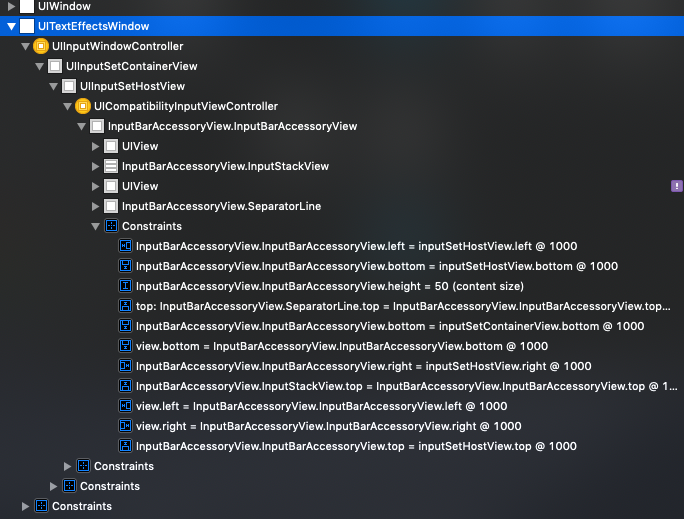
Hello fellows, i have similar issue with it. I don't know that it is really reason but i suspect this UITextEffectsWindow. I closed MessagesViewController and it deallocated but UITextEffectsWindow isn't removed from hierarchy. I put an image below about it. I don't know but there may be a reference somewhere.
 yavuzaytekin
on 16 Sep 2020
yavuzaytekin
on 16 Sep 2020
Hello! It's a good library and I also need MessageKit to work with tabBar. I found this example how to not cover tabBar by chat inputView https://github.com/iAmrMohamed/AMKeyboardFrameTracker . And now it's hard to decide for me how easy to adopt this solution to MessageKit
 dvasileuski
on 19 Oct 2020
dvasileuski
on 19 Oct 2020
Related issues
 bilaalrashid
·
3Comments
bilaalrashid
·
3Comments
 omaralbeik
·
4Comments
omaralbeik
·
4Comments
 yspreen
·
3Comments
yspreen
·
3Comments
 anandatswayam
·
4Comments
anandatswayam
·
4Comments
 Leon12345679
·
3Comments
Leon12345679
·
3Comments
Most helpful comment
If you are using IQKeyboardManager on your project you need to disable it in the MessageViewControllerClass child
IQKeyboardManager.sharedManager().disabledDistanceHandlingClasses.append(MessageViewControllerClass.self)