Meshcentral: AMT ACM Certificates and Setup.bin Questions
Hi,
I know this question has been asked before but I am still unsure if I have the the final setup correct when using AMT ACM and have few questions.
My current environment is running:
Windows Server 2019 Standard
nodeVersion: v14.15.1
meshVersion: 0.7.72
I have updated the config.json to include the vPro certificates purchased from Go Daddy.
"amtAcmActivation": {
                "log": "amtactivation.log",
                "certs": {
                    "MeshCentralCert": {
                        "certfiles": [
                            "domain.crt",
                            "GDSC.crt",
                            "GDRC.crt",
                            "GDCC.crt"
                        ],
                        "keyfile": "meshcentralcert.key"
                    }
                }
            }
I have restarted MeshCentral for the changes to take affect and gone into the console tab to run amtacm and can see two certificates. The first certificate being linked our domain (eg. domain.com) and the second * seems to be generate by meshcentral? Is that correct? Or should the second certificate be also linked our domain as well?

I then create the setup.bin file by clicking on ACM link and have Intel AMT set to Fully Automatic.

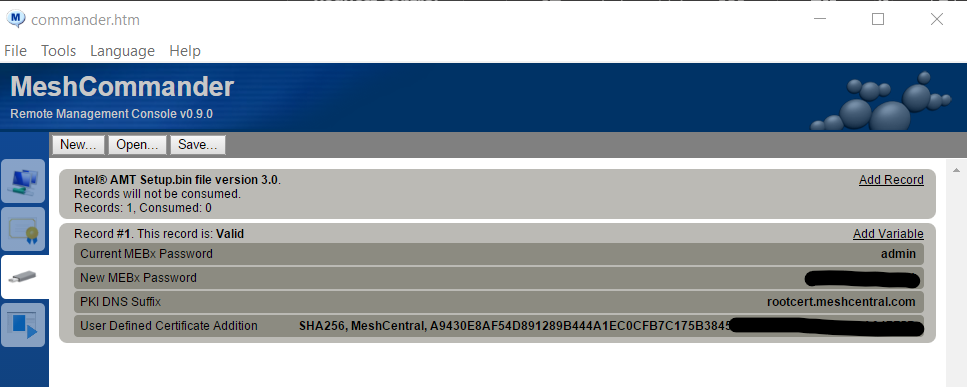
Upon checked the setup.bin file in MeshCommander I noticed that it sets the PKI DNS Suffix to rootcert.meshcentral.com and the User Defined Certificate Addition certificate to the second certificate in shown in the console when running amtacm. Once again should these be linked to our domain and not the certificates generated by meshcentral?
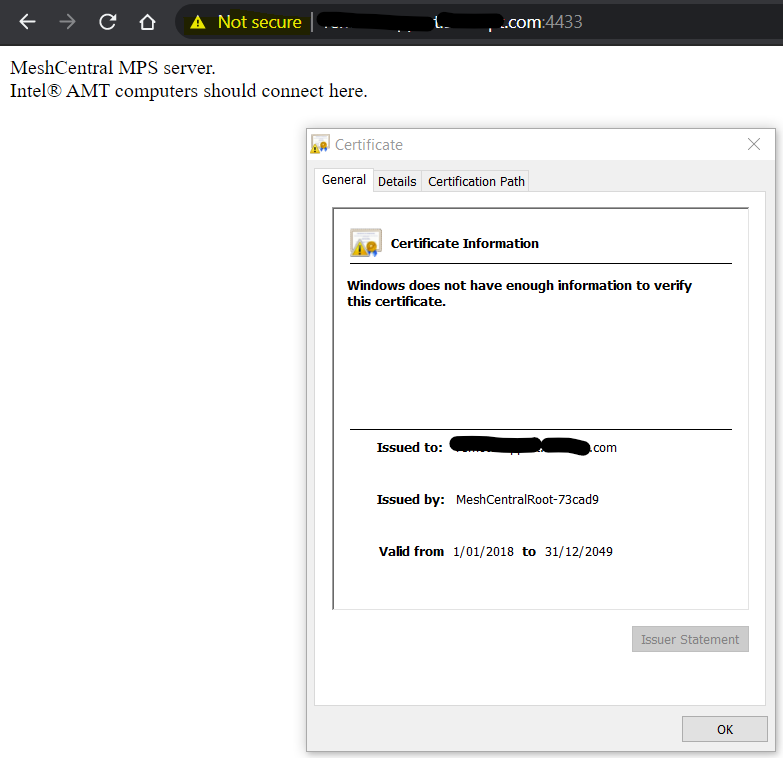
Also when going to mysite.domain.com:4433 the site is loading but receives a message that the connection is not secure as it is using another meshcentral certificate. Is this correct as the rest of the site loads using out domain certificate?
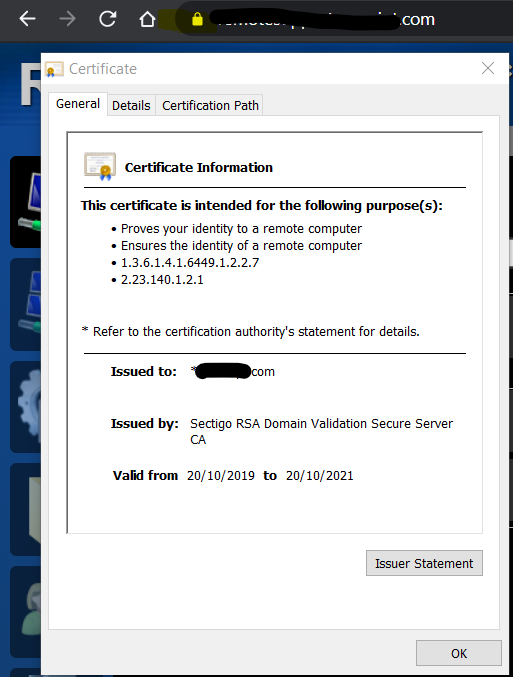
I understand there are a lot of questions wrapped into one but would like to get the configuration of our out of band device correct as they will be in remote locations. I hope that all makes sense.
I appreciate the time you have spent creating and supporting this amazing software.
Thank you for your time.
 SurrounDTech
All 2 comments
Hi. All good questions. Let me take a first shot at it and don't hesitate to ask more questions.
On the "star" certificate. By default, MeshCentral will create a ACM activation root certificate, you see it as the * certificate when you type "amtacm". If that certificate root hash is found to be in any AMT device, MeshCentral will generate a leaf activation certificate to match any DNS name and attempt to activate. So, when you create a setup.bin file, it will put that root hash with some random DNS name. When you setup that USB key into any AMT device, the root and DNS name will be added and MeshCentral will perform ACM activation on it. You do not need to buy any certificate for this to work.
On your purchase of a AMT activation certificate. Ok, given the point above, why ever buy a certificate? Well, if you buy an official activation certificate for a given DNS name, you can load the certificate into MeshCentral like you did and put that DNS name in your DHCP server (option 15, the local network DNS name). Then, plug the local Ethernet port that is managed by AMT to the DHCP server and MeshCentral should see that AMT detected it's connected on a local network with your DNS name and it has a certificate that matches this. It should perform ACM activation automatically. So, you buy a certificate so you don't have to use the USB key (setup.bin). This said, the DHCP activation does not work with WIFI, only local Ethernet.
On the topic of the CIRA (MPS) server on port 4433. Your MeshCentral server will generate a TLS certificate for the MPS server that is long standing. In this case, valid until year 2049 (and can move that date forward in the future). This is important since, unlike the TLS certificate on port 443 that you change every year, the CIRA certificate should be more long term. MeshCentral will take the private root of the MPS TLS cert and load that up in all Intel AMT devices. So, AMT will connect back to the server on port 4433 and trust it's connected to the correct server. It's much safer this way, you can update your TLS certificate on port 443 as you want without having to worry about Intel AMT. This said, it's normal the browser will not trust the TLS cert on port 4433. Basically, TLS cert on 4433 should only be trusted by your AMT devices.
Hope that made sense. If not, let me know.
Ylian
 Ylianst
on 25 Feb 2021
Ylianst
on 25 Feb 2021
Thanks for your reply Ylian, this has definitely helped with understanding the process.
SurrounDTech
on 25 Feb 2021
Related issues
 haxmachine
·
3Comments
haxmachine
·
3Comments
 MailYouLater
·
4Comments
MailYouLater
·
4Comments
 coolwormgit
·
3Comments
coolwormgit
·
3Comments
 petervanv
·
3Comments
MailYouLater
·
3Comments
petervanv
·
3Comments
MailYouLater
·
3Comments