Meshcentral: Feature Request - Programmable Video Conference button on the device "General" tab
I know that there is a video chat feature in Meshcentral for video chats between account holders already. I wanted this button to be programmable through the config.json so that I could input a URL of my own into that config. My company runs it's own Jitsi Meet server for video conferencing and it would be really nice to initiate a video conference which opens a URL on both sides (much like the chat does) to get a conference moving. To make it work with Jitsi meet all that is needed is the domain name and a randomly generated room name. E.g. https://meet.jitsi.com/
I'm not looking for anything really fancy. Just a button I can program a domain name into and it will randomly generate an alphanumeric string at the end of the domain name just like this https://programmable.domain.name/
 LPJon
LPJon
All 39 comments
Oh, this is an interesting request. Could we just replace the existing chat button with the alternative system? The MeshCentral UI would be the same, but just popup a different messaging system. What length should be alpha numeric random string be?
 Ylianst
on 4 Feb 2021
Ylianst
on 4 Feb 2021
Oh, this is an interesting request. Could we just replace the existing chat button with the alternative system? The MeshCentral UI would be the same, but just popup a different messaging system. What length should be alpha numeric random string be?
I suppose you could replace the existing chat button if that makes things easier. Is it possible to create a popup to select like "Standard" or "Video" when you click on the chat button only when this option is enabled without much effort? If not, and/or for simplicity, right now you could just replace the existing chat button. Jitsi Meet does have it's own chat window as well. The alpha numeric string should not be less than 32 characters for security reasons in my opinion. However, any room in Jitsi Meet can be secured with a password once its created as well so...use your best judgement and whatever works easiest.
NOTE: Our Jitsi Meet server is secured with a username and password requirement before a video meet can be created. I'm concerned that if a vendor or someone needs to chat they will not be able to because we don't setup usernames for everyone. Retaining both options would be nice but can be developed later.
QUESTION: Could you change ONLY the chat button under the "General" tab but leave the chat button in the "Desktop" tab alone...if so that would be perfect! Nothing else would be needed for this option.
LPJon
on 4 Feb 2021
Working on it now.
Ylianst
on 5 Feb 2021
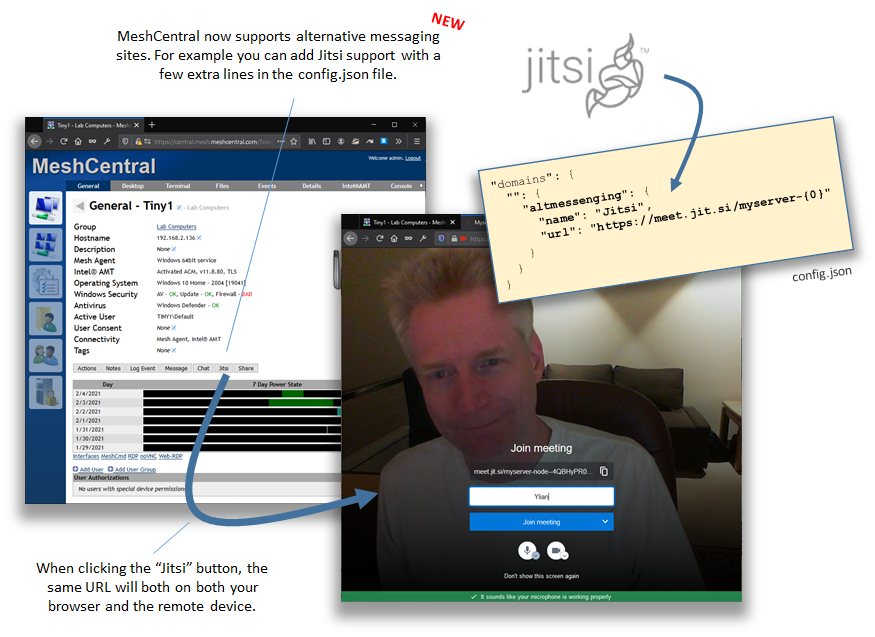
Just published MeshCentral v0.7.63 with support for this. In the domain section of the config.json, add this for example:
      "altmessenging": {
        "name": "Jitsi",
        "url": "https://meet.jit.si/myserver-{0}"
      }
Should add a new button in the device and user tabs. Instead of a random value, I use the target nodeid or userid... but willing to add random. Let me know if that works.
Ylianst
on 5 Feb 2021
@Ylianst You are awesome sir! This is working perfectly and is exactly what I wanted in terms of native security. PERFECT!
I also wanted to make you aware that is same button could also be used for public file storage off of MeshCentral. For instance with NextCloud. Do you think it would be worth doing this again for that type of added feature? If so, what about adding an array feature that lets you specify multiple buttons that allow URL input on the config side of MeshCentral? Let me know what you think.
Ok....but I have one other little tidbit that somehow I overlooked in my request. Since this works off of URLs, Jitsi is very well supported on phones and tablets, could you have it push the URL to the android agents as well? Right now the "Chat" will do this but not this new button.
Side Security Note: I could see how you may not want to do this, and that is fine if you don't, but when this URL is opened by a android device you still have to activate the cam and mic before you can use them through the mobile browser.
LPJon
on 7 Feb 2021
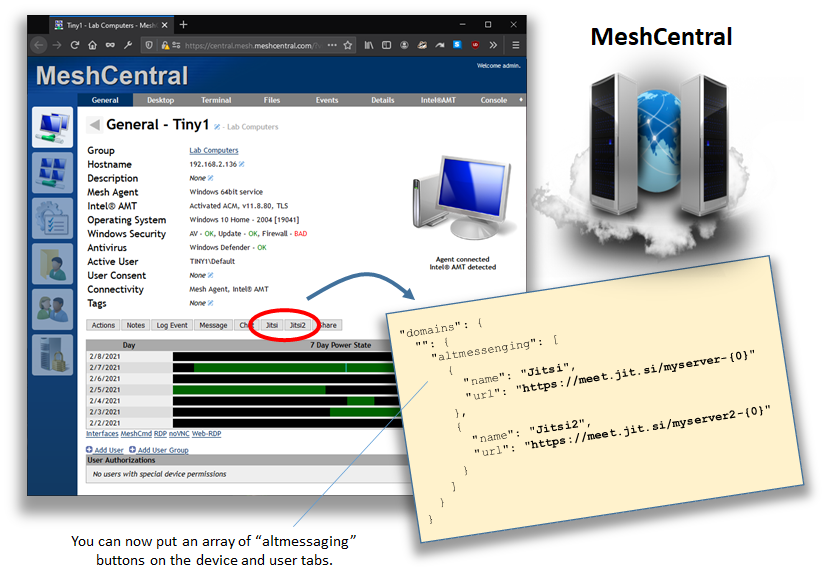
Just added support for an array in "altmessenging", this will be in MeshCentral v0.7.66. Once published, let me know if that works for you. The old "altmessenging" config.json also works if you have one button.
Ylianst
on 9 Feb 2021
@Ylianst I can't get the array type setting to parse when starting MeshCentral up. When I use the old style setting I get a button but is says "undefined" and doesn't do anything when you click on it.
LPJon
on 9 Feb 2021
@Ylianst Extra Info...I run this in a vm instance and always snapshot before upgrades. I can confirm that upgrading from v0.7.63 to v0.7.66 breaks the button entirely with no figuration changes. I tried the new config formatting for the array with just one button defined and that won't parse (MeshCentral fails it's startup process). Neither will 2 buttons defined in the array. Let me know if there is anything I can do to futher help you.
LPJon
on 9 Feb 2021
Not sure what is going on. Just took a look at this. I am running latest v0.7.66 and with one button it works for me with this:
"altmessenging": { "name": "Jitsi", "url": "https://meet.jit.si/myserver-{0}" },
For two buttons, works for me with this:
      "altmessenging": [
        {
          "name": "Jitsi",
          "url": "https://meet.jit.si/myserver-{0}"
        },
        {
          "name": "Jitsi2",
          "url": "https://meet.jit.si/myserver2-{0}"
        }
      ],
Obviously, the config.json must be valid JSON so don't forget the trailing comma at the end if it's not the last element.
On my config.json, I have it like this and change the underscore to test each situation...
      "_altmessenging": { "name": "Jitsi", "url": "https://meet.jit.si/myserver-{0}" },
      "altmessenging": [
        {
          "name": "Jitsi",
          "url": "https://meet.jit.si/myserver-{0}"
        },
        {
          "name": "Jitsi2",
          "url": "https://meet.jit.si/myserver2-{0}"
        }
      ],
If MeshCentral does not start up, I am going to guess the config.json is not valid JSON. You can use a JSON Lint tool to find the problem.
Ylianst
on 9 Feb 2021
@Ylianst In my config attempt before I was using {} instead of [] for the open close of the array. This DID cause an invalid JSON which is why it wouldn't parse. After test applying both methods above I still always only have a single button that says "undefined" on it. I'm using MongoDB...could that be affecting this? Previously I did try to create two of theses buttons with the same config entry just done twice. Could this have caused the issue?
LPJon
on 9 Feb 2021
Database will not make a difference, I use MongoDB on my development machine myself. By any chance, are you sure you don't have another: "altmessenging" somewhere else in your config.json? If you have two values with the same name, only one of the two will work.
I will check to see if I can replicate this, but if you can post your config.json with XXXXX for any private information, that would help.
Ylianst
on 9 Feb 2021
{
  "$schema": "http://info.meshcentral.com/downloads/meshcentral-config-schema.json",
  "__comment1__": "This is a simple configuration file, all values and sections that start with underscore (_) are ignored. Edit a section and remove the _ in front of the name. Refer to the user's guide for details.",
  "__comment2__": "See node_modules/meshcentral/sample-config-advanced.json for a more advanced example.",
  "settings": {
    "MongoDb": "XXXXXXXXXXXXXXXXX",
    "cert": "XXXXXXXXXXX",
    "_WANonly": true,
    "_LANonly": true,
    "sessionKey": "XXXXXXXXXXX",
    "port": XXXX,
    "aliasPort": XXX,
    "redirPort": XXX,
    "tlsOffload": "XXXXXXXXXXXXX",
    "trustedProxy": "XXXXXXXXXXXXXX",
    "WebRTC": XXXX,
    "_noagentupdate": true,
    "_ignoreagenthashcheck": true,
    "maxInvalidLogin": {
      "time": XXXXXX,
      "count": XXXX,
      "coolofftime": XXXXXXX
     },
    "desktopMultiplex" : true
  },
  "domains": {
    "": {
      "title": "",
      "title2": "",
      "minify": true,
      "SessionTime": XXXXXXX,
      "_newAccounts": true,
      "_userNameIsEmail": true,
      "force2factor":true,
      "titlepicture": "XXXXXXXXXX.png",
      "welcomePicture": "XXXXXXX.png",
      "_welcomeText": "",
      "_footer": "",
      "mstsc": true,
      "_guestDeviceSharing" : false,
      "certUrl": "XXXXXXXXXXXXXXXXXXXXXXXXXXXXXXXXXXXXXX",
      "meshMessengerTitle": "Messenger chat with {0} from Laptop Pitstop",
      "meshMessengerPicture": "XXXXXXXXXXXXXXX.png",
      "myServer": {
        "Backup": true,
        "Restore": true,
        "Upgrade": true,
        "ErrorLog": true,
        "Console": true,
        "Trace": true
      },
      "altmessenging": {
        "name": "XXXXXXXXXXXXXXXXXXXX",
        "url": "https://XXXXXXXXXXXXXXXXXXXXX/videocall-{0}"
      },
      "agentCustomization": {
        "displayName": "XXXXXXXXXXXXXXXXXXXXXXXXX",
        "description": "XXXXXXXXXXXXXXXXXXXXXXXXXXXXXXXXXX",
        "companyName": "XXXXXXXXXXXXXXX",
        "serviceName": "XXXXXXXXXXXXXXXXXX",
        "fileName": "XXXXXXXXXXXXXXXX"
      },
      "notificationMessages": {
        "title": "XXXXXXXXXXXXXXXXXXXXX",
        "desktop": "XXXXXXXXXXXXXXXXXXXXXXXXXX",
        "terminal": "XXXXXXXXXXXXXXXXXXXXXXXXXXXX",
        "files": "XXXXXXXXXXXXXXXXXXXXXXXXX"
      },
      "consentMessages": {
        "title": "XXXXXXXXXXXXXXXXXXXXXXXXX",
        "desktop": "XXXXXXXXXXXXXXXXXXXXXXXX",
        "terminal": "XXXXXXXXXXXXXXXXXXXXXXXXXXXXXXXXXXXXXX",
        "files": "XXXXXXXXXXXXXXXXXXXXXXXXXXXXXXXXXX"
      },
      "MaxInvalidLogin": {
      "time": XXXX,
      "count": XXXX,
      "coolofftime": XXXXXX
      },
      "desktopPrivacyBarText": "XXXXXXXXXXXXXXXXXXXXXXXXXXXXXXXXXXXXXX",
      "terminal": {
        "linuxshell": "login"
      }
   }
  },
  "_letsencrypt": {
    "__comment__": "Requires NodeJS 8.x or better, Go to https://letsdebug.net/ first before trying Let's Encrypt.",
    "email": "[email protected]",
    "names": "myserver.mydomain.com",
    "production": true
  },
  "smtp": {
    "host": "XXXXXXXXXXXXXXXXXXX",
    "port": XXXXXX,
    "from": "XXXXXXXXXXXXXXXXX",
    "user": "XXXXXXXXXXXXXXXXXXXXXXX",
    "pass": "XXXXXXXXXXXXXXXXXXXXXXX",
    "tls": false,
    "___tlscertcheck__": "When set to false, the TLS certificate of the SMTP server is not checked.",
    "tlscertcheck": true,
    "__tlsstrict__": "When set to true, TLS cypher setup is more limited, SSLv2 and SSLv3 are not allowed.",
    "tlsstrict": true
  }
@Ylianst That contains the old "altmessenging" setting but it still fails in the v0.7.66 update with an "undefined" button.
LPJon
on 9 Feb 2021
I am stumped. One way this could happen is that you have a new server but your browser is getting the old web pages (?!?!) or the other way around.
One way to debug this. Add ?trace=1 or &trace=1 to the URL, open the browser console window and refresh the page. You should see a "RECV" with the action "serverinfo". In it, there is "altmessaging" that should be an array of buttons with name and URL. It should be an array regardless if you have one or many buttons and how you configured it in config.json.
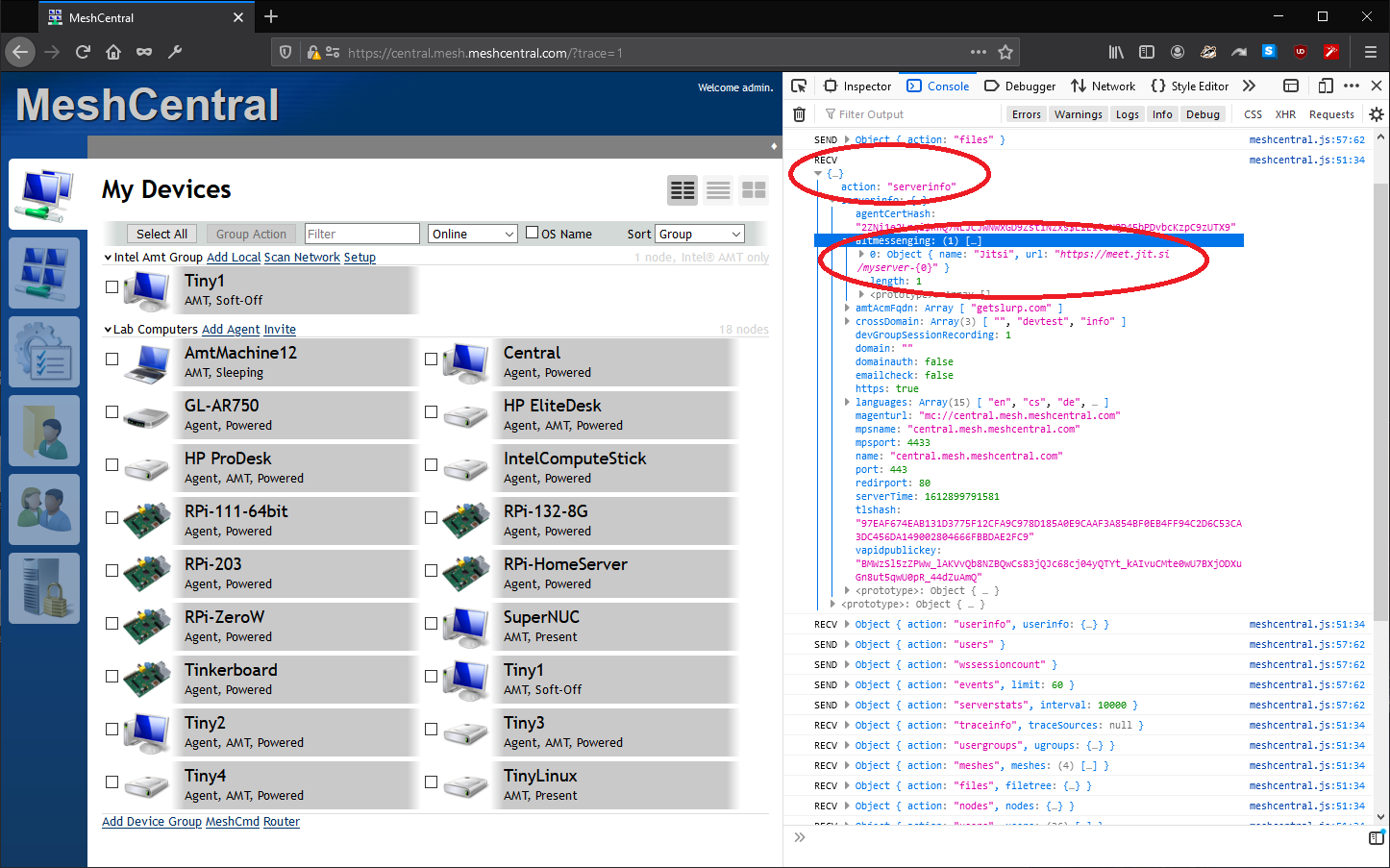
What you see there will tell us if the problem is on the server side or browser side.
Ylianst
on 9 Feb 2021
Also, if you edit "node_modules/meshcentral/meshuser.js" you should find these lines about line 462:
            if ((parent.parent.config.domains[domain.id].amtacmactivation != null) && (parent.parent.config.domains[domain.id].amtacmactivation.acmmatch != null)) {
                var matchingDomains = [];
                for (var i in parent.parent.config.domains[domain.id].amtacmactivation.acmmatch) {
                    var cn = parent.parent.config.domains[domain.id].amtacmactivation.acmmatch[i].cn;
                    if ((cn != '*') && (matchingDomains.indexOf(cn) == -1)) { matchingDomains.push(cn); }
                }
                if (matchingDomains.length > 0) { serverinfo.amtAcmFqdn = matchingDomains; }
            }
---->        if ((typeof domain.altmessenging == 'object') && (typeof domain.altmessenging.name == 'string') && (typeof domain.altmessenging.url == 'string')) { serverinfo.altmessenging = [{ name: domain.altmessenging.name, url: domain.altmessenging.url }]; }
---->        if (Array.isArray(domain.altmessenging)) { serverinfo.altmessenging = []; for (var i in domain.altmessenging) { if ((typeof domain.altmessenging[i] == 'object') && (typeof domain.altmessenging[i].name == 'string') && (typeof domain.altmessenging[i].url == 'string')) { serverinfo.altmessenging.push({ name: domain.altmessenging[i].name, url: domain.altmessenging[i].url }); } } }
            serverinfo.https = true;
            serverinfo.redirport = args.redirport;
            if (parent.parent.webpush != null) { serverinfo.vapidpublickey = parent.parent.webpush.vapidPublicKey; } // Web push public key
The two lines with arrows are the important ones. If you don't have that, running old server.
Ylianst
on 9 Feb 2021
@Ylianst I am seeing what you are seeing.

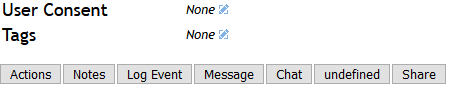
and I'm seeing this in the Content Security Policy under Console in my browser..
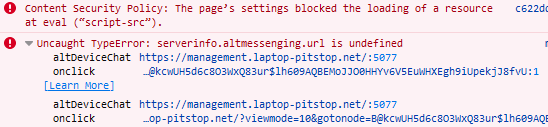
LPJon
on 9 Feb 2021
Also, if you edit "node_modules/meshcentral/meshuser.js" you should find these lines about line 462:
            if ((parent.parent.config.domains[domain.id].amtacmactivation != null) && (parent.parent.config.domains[domain.id].amtacmactivation.acmmatch != null)) {
                var matchingDomains = [];
                for (var i in parent.parent.config.domains[domain.id].amtacmactivation.acmmatch) {
                    var cn = parent.parent.config.domains[domain.id].amtacmactivation.acmmatch[i].cn;
                    if ((cn != '*') && (matchingDomains.indexOf(cn) == -1)) { matchingDomains.push(cn); }
                }
                if (matchingDomains.length > 0) { serverinfo.amtAcmFqdn = matchingDomains; }
            }
---->        if ((typeof domain.altmessenging == 'object') && (typeof domain.altmessenging.name == 'string') && (typeof domain.altmessenging.url == 'string')) { serverinfo.altmessenging = [{ name: domain.altmessenging.name, url: domain.altmessenging.url }]; }
---->        if (Array.isArray(domain.altmessenging)) { serverinfo.altmessenging = []; for (var i in domain.altmessenging) { if ((typeof domain.altmessenging[i] == 'object') && (typeof domain.altmessenging[i].name == 'string') && (typeof domain.altmessenging[i].url == 'string')) { serverinfo.altmessenging.push({ name: domain.altmessenging[i].name, url: domain.altmessenging[i].url }); } } }
            serverinfo.https = true;
            serverinfo.redirport = args.redirport;
            if (parent.parent.webpush != null) { serverinfo.vapidpublickey = parent.parent.webpush.vapidPublicKey; } // Web push public key
The two lines with arrows are the important ones. If you don't have that, running old server.
I do have these lines and it appears that it is making it to my browser. It seams this might be related to the CSP. Funny thing, I'm not using a CSP other than what your server is implementing. It does implement it own right?
LPJon
on 9 Feb 2021
Ok, your server is correct and you have an old web page. If you search the web page source, you should never find:
altmessenging.url
However, you should find two instances of:
altmessenging[i].url
Any way your customizing your web pages using "meshcentral-web" and have an old version?
Ylianst
on 9 Feb 2021
Ok, your server is correct and you have an old web page. If you search the web page source, you should never find:
altmessenging.urlHowever, you should find two instances of:
altmessenging[i].urlAny way your customizing your web pages using "meshcentral-web" and have an old version?
Not sure what you mean by "meshcentral-web". I am using the web interface to do the update if that's what you are asking.....
LPJon
on 9 Feb 2021
It's like the web pages in node_modules/meshcentral/views are the old versions... not sure how that can happen.
Ylianst
on 9 Feb 2021
It's like the web pages in
node_modules/meshcentral/viewsare the old versions... not sure how that can happen.
are you saying that altmessenging[i].url is what should be displayed in the console or in the meshuser.js?
LPJon
on 9 Feb 2021
In the file node_modules/meshcentral/views/default.handlebars you should find altmessenging[i].url
Also, when you browse to your web site, in the browser right click and select "View Source" and you should also find altmessenging[i].url.
If you find altmessenging.url, the web page is old.
The server side, like meshuser.js is ok, you got the right version.
Ylianst
on 9 Feb 2021
In the file
node_modules/meshcentral/views/default.handlebarsyou should findaltmessenging[i].urlAlso, when you browse to your web site, in the browser right click and select "View Source" and you should also find
altmessenging[i].url.If you find
altmessenging.url, the web page is old.The server side, like
meshuser.jsis ok, you got the right version.
I did what you just said and your are right! It's an old page...showing altmessenging.url . Here is an image showing that file was updated.
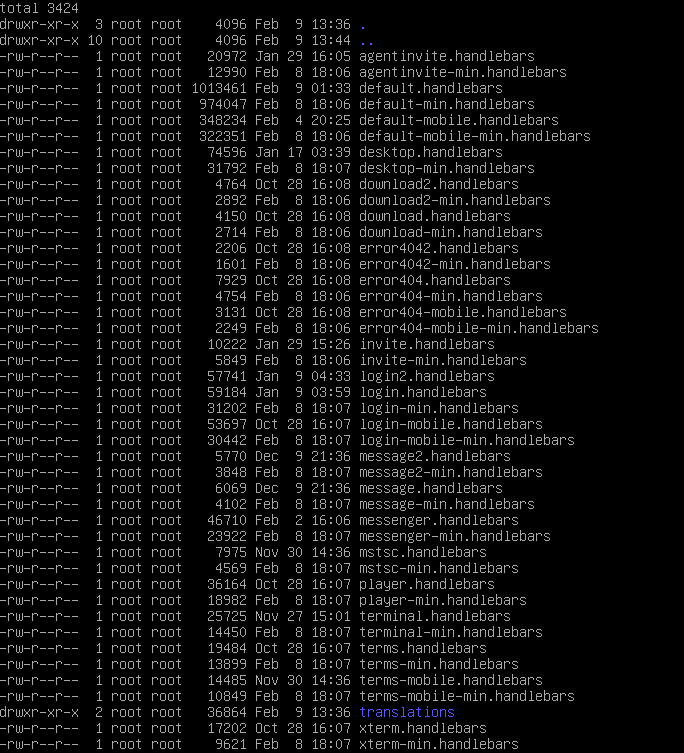
I will manually edit and see if that fixes this issue.
LPJon
on 9 Feb 2021
What version of the server are you using?
Ylianst
on 9 Feb 2021
What version of the server are you using?
v0.7.66
LPJon
on 9 Feb 2021
In the file
node_modules/meshcentral/views/default.handlebarsyou should findaltmessenging[i].url
In this file I am actually seeing altmessenging[i].url and altmessenging.url is no where to be found.
LPJon
on 9 Feb 2021
I just did npm install [email protected] and looked at the node_modules/meshcentral/views/default.handlebars and it's correct, does not have altmessenging.url in it. You may need to rename your "node_modules" to "node_modules_bak" and install again.
Ylianst
on 9 Feb 2021
Ok, so there is a problem between your server and the browser!??!?! The server has the new file, but the browser is getting the old one?
Ylianst
on 9 Feb 2021
I will give it a try.....
Ok, so there is a problem between your server and the browser!??!?! The server has the new file, but the browser is getting the old one?
That is what it looks like. I don't have any caching going. My browser is setup to clear everything on close for testing reasons. This shouldn't be happening. I will try your reinstall and see what happens....
LPJon
on 9 Feb 2021
Very odd. default.handlebars is a dynamic web page that is generated by the server each time, so it can't be cached. Something weird is going on.
Ylianst
on 9 Feb 2021
Very odd. default.handlebars is a dynamic web page that is generated by the server each time, so it can't be cached. Something weird is going on.
Just did the re-install. Had no effect.....it still persists.
LPJon
on 9 Feb 2021
Ok... are you running a second server somewhere? :)
Ylianst
on 9 Feb 2021
Oh! I see the problem. The minified pages are not updated!!! Remove "minify": true and try again.
Ylianst
on 9 Feb 2021
I will fix this in the next version. Your using 'default-min.handlebars'. Also, the minification system on my side it not working. I will take a look at this. Pages should be much smaller.
Ylianst
on 9 Feb 2021
Oh! I see the problem. The minified pages are not updated!!! Remove "minify": true and try again.
That's 100% correct! I now have the buttons working! Thank you sir....I'll be looking out for that update.
LPJon
on 9 Feb 2021
Thanks for your patience, with the next update you should be able to turn on minification again.
Ylianst
on 9 Feb 2021
Thanks for your patience, with the next update you should be able to turn on minification again.
Are you kidding.....I love doing this! Sounds good...I'll give it a try again on the next update and let you know...
LPJon
on 9 Feb 2021
@Ylianst I can confirm that minify is now working with the this feature now. Closing this request. Thanks again for adding this feature.
LPJon
on 10 Feb 2021
@Ylianst @LPJon
That is awesome, thanks. Works a treat with jitsi.
Are there other placeholders besides {0} available for the url? I do see a use case where I would need it to be alphanumeric only (maybe including _ ) and no longer than 24 characters ...
 baikal
on 27 Feb 2021
baikal
on 27 Feb 2021
Related issues
 MailYouLater
·
4Comments
MailYouLater
·
4Comments
 petervanv
·
3Comments
petervanv
·
3Comments
 M1CK431
·
3Comments
M1CK431
·
3Comments
 Julien-asv
·
3Comments
petervanv
·
3Comments
Julien-asv
·
3Comments
petervanv
·
3Comments
Most helpful comment
Just published MeshCentral v0.7.63 with support for this. In the domain section of the config.json, add this for example:
Should add a new button in the device and user tabs. Instead of a random value, I use the target nodeid or userid... but willing to add random. Let me know if that works.