Meshcentral: websocket 500 and otpsecret fail
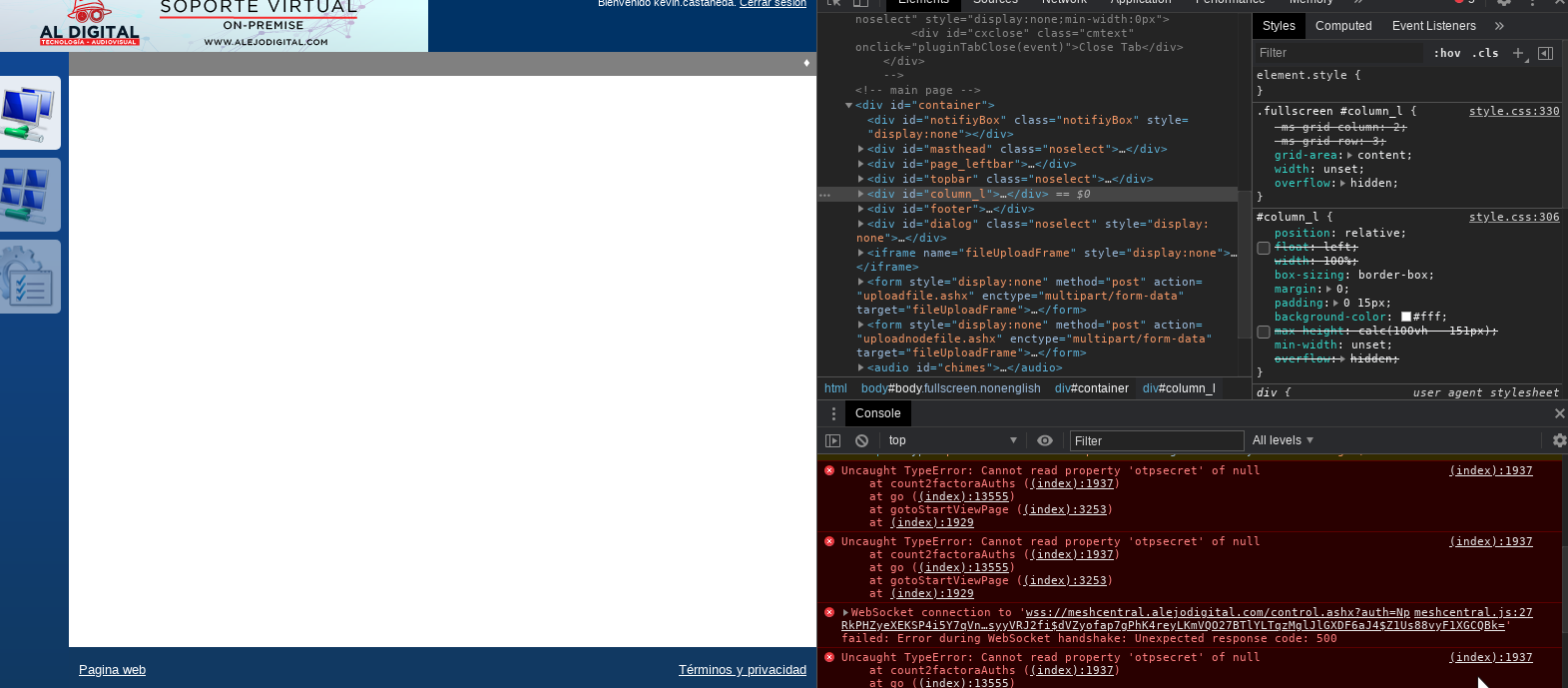
Hi. I have made the move of my server, it restored the configuration but I have the following error:
Config json:
"Port": 8081,
"AliasPort":443,
"RedirPort": 8082,
If I load it from port 8081 if it loads the page but does not show connected agents.
apache config:
ServerName meshcentral.alejodigital.com
ErrorLog /var/log/apache2/error_mesh_ssl.log
LogFormat "%h %l %u %t \"%r\" %>s %b \"%{Referer}i\" \"%{User-Agent}i\"" combined
CustomLog /var/log/apache2/access_mesh_ssl.log combined
SSLEngine on
RewriteEngine on
RewriteCond %{HTTP:Upgrade} websocket [NC]
RewriteCond %{HTTP:Connection} upgrade [NC]
RewriteRule . "ws://127.0.0.1:8081%{REQUEST_URI}" [P]
ProxyPass / http://127.0.0.1:8081/ connectiontimeout=86400 timeout=30
ProxyPassReverse / http://127.0.0.1:8081/
ProxyPreserveHost On
SSLEngine on
SSLCertificateFile /etc/letsencrypt/live/meshcentral.alejodigital.com/fullchain.pem
SSLCertificateKeyFile /etc/letsencrypt/live/meshcentral.alejodigital.com/privkey.pem
Include /etc/letsencrypt/options-ssl-apache.conf

 mrkacg1
All 5 comments
It looks like the main problem is that the web socket it not connecting with error 500. You can look at section 16 of the MeshCentral User's Guide for an example on how to configure NGINX. I would expect your NGINX config to have these lines:
# Allows websockets over HTTPS.
proxy_set_header Upgrade $http_upgrade;
proxy_set_header Connection "upgrade";
I made a change to the web application to get around the "otpsectet" error, but that is not the root cause. Let me know if that helps.
 Ylianst
on 28 Dec 2020
Ylianst
on 28 Dec 2020
@mrkacg1 - sorry for off topic and question not related to current issue, but how did you managed to add picture to the top of your page when you logged in?

Thanks.
 vitko-bg
on 29 Dec 2020
vitko-bg
on 29 Dec 2020
For the picture on the title bar, create a 450x66 PNG file and place it in "meshcentral-data". Then in the domain section of the config.json, add this line:
"titlePicture": "mybanner.png",
Then restart the server. You can see an example of a more advanced config.json here.
Ylianst
on 29 Dec 2020
@Ylianst
Hello, thank you very much for the information. I work with apache and I solved with these commands.
a2enmod proxy_wstunnel
a2enmod proxy_http
mrkacg1
on 29 Dec 2020
Thanks @Ylianst !!! "titlePicture": "mybanner.png" is working as expected.
I had this option but commented, did not know what it is doing :) But now all is fine. Thanks again!!!
vitko-bg
on 29 Dec 2020
Related issues
 hellofaduck
·
3Comments
hellofaduck
·
3Comments
 robclay
·
3Comments
robclay
·
3Comments
 guerby
·
3Comments
guerby
·
3Comments
 petervanv
·
3Comments
petervanv
·
3Comments
 vish84
·
3Comments
vish84
·
3Comments
Most helpful comment
For the picture on the title bar, create a 450x66 PNG file and place it in "meshcentral-data". Then in the domain section of the config.json, add this line:
Then restart the server. You can see an example of a more advanced config.json here.