Meshcentral: Windows terminal doesn't work when laptop on battery
mesh: 0.7.24 on ubuntu 20.04
agent: windows 10 v2004, Commit Hash: cd6353ac289e8e480041e58229c9eb9f74edf939
this one is for @krayon007 I believe.
It appears the mesh windows agent calls schtasks.exe to create/launch/delete the task to launch terminal, which by default creates task with the "Start the task only if the computer is on AC power" checked.
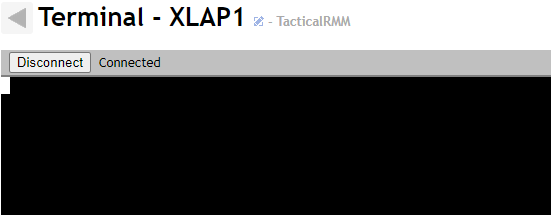
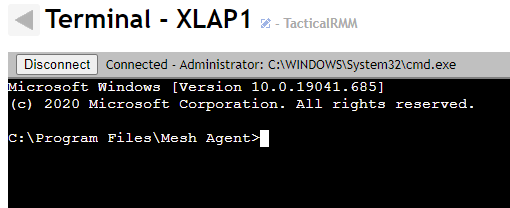
Windows will not actually launch the task even if its called manually if this box is checked and the computer is not on ac, even though in task scheduled it will show that it has been already ran.
I had this issue in a software i develop, and had to create the task using the win32 api instead of schtasks.exe.
There doesn't appear to be a command line arg to set the default for AC power when using schtasks, can only be done via win32 api or by creating the task using XML.
Laptop on battery:
Immediately after plugging in power cord:
 wh1te909
All 4 comments
Interesting, thanks for the heads up... A quick google shows that I may be able to switch out SCHTASKS and use powershell instead, which provides a AllowStartIfOnBatteries property on the New-ScheduledTaskSettingsSet object. I'll take a look at it over the holidays.
 krayon007
on 25 Dec 2020
krayon007
on 25 Dec 2020
Update on this: Bryan has been working on this one and looks like it will be fixing in a future update.
 Ylianst
on 5 Jan 2021
Ylianst
on 5 Jan 2021
Yes, I have a fix implemented and tested. It will be in the next agent update. Since powershell support for tasks is not present in older version of windows, I found a different solution that seems to work on all versions of windows... I continue to use SCHTASK to create the task, but before I start the task, I use the windows COM API to set the flags to allow starting on battery power. I originally tried to use the COM API to create the task itself instead of using SCHTASKS, but the COM API seemed to always require a password being specified otherwise the creation would fail, so that was a non-starter.
krayon007
on 5 Jan 2021
it's working :)
wh1te909
on 28 Jan 2021
Related issues
 MailYouLater
·
3Comments
MailYouLater
·
4Comments
MailYouLater
·
3Comments
MailYouLater
·
4Comments
 Julien-asv
·
3Comments
Julien-asv
·
3Comments
 petervanv
·
3Comments
petervanv
·
3Comments
 haxmachine
·
3Comments
haxmachine
·
3Comments
Most helpful comment
Yes, I have a fix implemented and tested. It will be in the next agent update. Since powershell support for tasks is not present in older version of windows, I found a different solution that seems to work on all versions of windows... I continue to use SCHTASK to create the task, but before I start the task, I use the windows COM API to set the flags to allow starting on battery power. I originally tried to use the COM API to create the task itself instead of using SCHTASKS, but the COM API seemed to always require a password being specified otherwise the creation would fail, so that was a non-starter.