Meshcentral: Unable to upgrade version
A few days ago I performed a new installation followed by proper backup's recovery, from then on all seems good except the upgrade feature: tried many times via CLI and via GUI, version remains the start-up one (0.6.72)...any ideas? :disappointed:
Thanks!
 amenolo
All 12 comments
Take a look at #1938 and let me know if that helps.
 Ylianst
on 6 Nov 2020
Ylianst
on 6 Nov 2020
That command returns
root@mesh:/opt# npm dist-tag ls meshcentral
latest: 0.6.79
stable: 0.5.81
which matches GUI output
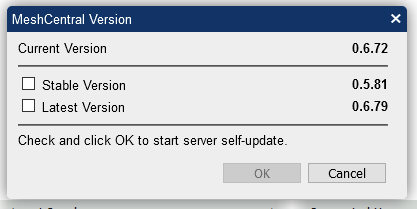
Systemd log seems good:
Nov 05 22:37:08 mesh node[19269]: MeshCentral HTTP server running on port 8081, alias port 443.
Nov 05 22:47:09 mesh node[19269]: Starting self upgrade...
Nov 05 22:47:11 mesh node[19269]: Update completed...
Nov 05 22:47:14 mesh node[19269]: MeshCentral HTTP redirection server running on port 8082.
Nov 05 22:47:14 mesh node[19269]: MeshCentral v0.6.72, WAN mode, Production mode.
I can't see any error around, really...maybe my mistake...
Wondering if it might have something to do with the fact that now is running in a LXC (privileged) instead of a classic VM...
amenolo
on 6 Nov 2020
I see. Looks like NPM is working for you. The next issue is that for the self-update to work, MeshCentral needs to have permissions to write it's own files. This is not the greatest as far as security. If you run MeshCentral as a user that has limited privileges, it's great for security but the self-update will not work just like your reporting. This is normal and expected.
If you are in this situation, I would probably keep it like this and keep your server running with restricted permissions and perform the server update manually. Something like:
systemctl stop meshcentral
mv node_modules node_modules_backup
npm install meshcentral
systemctl start meshcentral
You can make yourself a shell script to automate this and you login with higher permissions and do this from time to time. This also has the benefit that if something goes wrong, you can put the old "node_modules" back and go back to a known good version.
Hope that makes sense.
Ylianst
on 6 Nov 2020
If you run MeshCentral as a user that has limited privileges (...)
MC instance is running as root (as was before) so definitely not my case, sorry for not making this clear earlier...
Anyway I just took a shot at your hint but oddly enough the version still did not upgrade and only removing all files and restarting at all from scratch did the trick...
I will take a look at next upgrade and I'll give you further feedbacks.
Thanks!
amenolo
on 6 Nov 2020
I just published MeshCentral v0.6.80 so you can try now. Very curious. Let me know what you see on this one.
Ylianst
on 7 Nov 2020
No luck, same weird behavior...I'm going to perform some other cross tests...
UPDATE
Fresh install under a classic VM (usual Debian 10 just installed and updated) - in fact same scenario as in the past when everything used to work fine - led to same issue: first run went of course OK (using some older version as starting point) then upgrade via GUI or CLI silently failed.
At that point I slightly changed approach: what if I would have forced also upgrading to specific version (i.e. npm install [email protected])...? Well...that way it works!
Does that ring a bell perhaps? I don't really get what I'm still missing here... :confused:
amenolo
on 7 Nov 2020
So, you are saying that if you type:
npm dist-tag ls meshcentral
You see the latest version, but if you install using
npm install meshcentral
You get the old version. If you type:
npm install [email protected]
You get the expected latest version? Seems like a weird bug with NPM. You can do npm help and look at clearing the NPM cache or you are in some location in the world that has a server with older versions. Not sure. If you are right, I should be specifying the version when doing a "latest" update.
Ylianst
on 7 Nov 2020
Ok, starting with MeshCentral v0.6.81 the self-update system will always specify the exact version in the npm install command. So you need to update once more manually and after that it should (hopefully) work better.
Up to now, if you selected "latest" it would call npm install meshcentral with no version number. v0.6.81 is out now. Once v0.6.82 comes out next, let me know if that works.
Ylianst
on 7 Nov 2020
So, you are saying that (...)
Correct!
Seems like a weird bug with NPM (...)
Not really sure about any assumption here since I'm facing a "mint condition" scenario i.e. OS and packages installed from scratch.
On the other hand - despite not being such a frequent nodejs user - I really can't remember ever had this issue with npm install before (MC itself was fine, indeed), issue which after further testing in my test VM in fact seems to affect nodejs programs globally...
starting with MeshCentral v0.6.81 the self-update system will always specify the exact version in the npm install command
Much appreciate your willingness and yet...still wondering how's that no one else - you first - doesn't seem affected by such a weird sudden issue which moreover seems to be reproducible and replicable in my scenario at least...I'm missing something...
amenolo
on 7 Nov 2020
I have see a case where I would publish a new version on NPM and very quickly try to update my servers. It would show the updated version on the UI, but would not update to the latest until I specified the version just like you report. However, this would only last a few minutes until NPM servers updated. It seems like you have a permanent case of this. In any case, if you select latest and it shows a specific version, it's normal the server would request the version you selected, so this is a good change.
Ylianst
on 7 Nov 2020
The next issue is that for the self-update to work, MeshCentral needs to have permissions to write it's own files. This is not the greatest as far as security. If you run MeshCentral as a user that has limited privileges, it's great for security but the self-update will not work just like your reporting. This is normal and expected.
@Ylianst I ran into this issue last year and eventually tracked the cause of the issue down to NPM requiring a user to have a home directory for caching package downloads and version infos in ~/.npm. Just for reference, this is my hardened systemd file for MeshCentral and the self-update feature works fine with it:
[Unit]
Description=MeshCentral
Documentation=https://www.meshcommander.com/meshcentral2
Requires=mongod.service
After=mongod.service network.target

StartLimitIntervalSec=14400
StartLimitBurst=10

[Service]
Restart=on-abnormal

Type=simple

User=meshcentral
Group=meshcentral

Environment="NODE_ENV=production"

ExecStart=/usr/bin/node /opt/meshcentral/node_modules/meshcentral

KillMode=control-group
KillSignal=SIGINT
TimeoutStopSec=60s

LimitNOFILE=infinity
LimitNPROC=512

CapabilityBoundingSet=
LockPersonality=true
MemoryDenyWriteExecute=false
NoNewPrivileges=true
PrivateDevices=true
PrivateNetwork=false
PrivateTmp=true
PrivateUsers=true
ProtectControlGroups=yes
ProtectHome=true
ProtectKernelModules=yes
ProtectKernelTunables=yes
ProtectSystem=strict
ReadWritePaths=/opt/meshcentral
RemoveIPC=true
RestrictAddressFamilies=~AF_PACKET
RestrictRealtime=true
SystemCallArchitectures=native
UMask=0077

[Install]
WantedBy=multi-user.target
whalehub@pdh:~# grep meshcentral /etc/passwd
meshcentral:x:502:502::/opt/meshcentral/meshcentral-home:/usr/sbin/nologin
 whalehub
on 8 Nov 2020
whalehub
on 8 Nov 2020
Meanwhile...upgrade from 0.6.81 to 0.6.84 done flawless via GUI 👍
Much appreciated @whalehub 's post too.
amenolo
on 11 Nov 2020
Related issues
 petervanv
·
3Comments
petervanv
·
3Comments
 coolwormgit
·
3Comments
whalehub
·
3Comments
coolwormgit
·
3Comments
whalehub
·
3Comments
 M1CK431
·
3Comments
M1CK431
·
3Comments
 hellofaduck
·
3Comments
hellofaduck
·
3Comments