Meshcentral: New Intel® AMT handling starting with MeshCentral v0.6.66
If anyone has been using MeshCentral with Intel®AMT, you will notice that starting with v0.6.66, there are many changes. First, there is a new AMT Manager module in MeshCentral that performs a lot of tasks like activation, configuration and pulling data from Intel AMT. Basically, MeshCentral now has a full WSMAN stack to talk to Intel AMT and a lot of code to use it.

The older system of setting up Client Initiated Remove Access (CIRA) using the .mescript files is gone and now automated thru the MeshAgent. The new system is also a lot more secure as each Intel AMT machine is setup online using it's own unique credentials, etc.
When going into a device group, you can click the "Intel® AMT" option to set that policy you want all the devices in that device group to have in regards to Intel AMT. A new option it "Fully Automatic". When selected, MeshCentral will just take care of everything including setting up CIRA, TLS, KVM, etc.

If your using Intel AMT in an "agent-less" device group. That is, your not installing the MeshAgent and just using Intel AMT, there is a new version of "MeshCMD" that allows you to configure a remote device. You need to download the latest version of MeshCMD for this to work and the "Setup" link will give you the exact command you need to run. MeshCMD will open a tunnel to MeshCentral and the server will do all the work to get things setup.

Questions and feedback on this new system is much welcome.
 Ylianst
All 10 comments
Just uploaded a YouTube demonstration video on the new Intel AMT activation and configuration system.
Ylianst
on 27 Oct 2020
Hi Ylian, I just watched your video and updated my server to 0.6.66 to try out this new Intel AMT feature. But I can't seem to get it working? I will say, right up front, I know very little about Intel AMT (as I'm mostly an AMD system builder) but I do have a number of servers and other devices that do have it. So I'd like to use it. When I set the policy to Fully Automatic and apply that I do see the Intel AMT status change. But it only changes to something like 'Activated CCM, v9.0.2'. I'd prefer ACM as these are servers and no one is ever logged in to them. But, apart from that, even though it says it's activated as CCM I can't seem to actually use any of the AMT features. When I view the device and go to Desktop the HW Connect button is greyed out. Under the IntelAMT tab the Connect button is also greyed out.
On some other devices I am seeing 'Activated ACM, v12.0.6, No Credentials' as the status.
Some of these are devices I did try to get Intel AMT working on with earlier versions of MeshCentral but was never able to do so. So maybe I'm missing something? I do have port 4433 open and directed to my MeshCentral server.
This isn't anything urgent but is something I'd like to figure out- especially considering the KVM feature it can provide for access servers (and being able to remotely power them on, etc).
 PathfinderNetworks
on 27 Oct 2020
PathfinderNetworks
on 27 Oct 2020
Also wanted to add- I did find two devices (both Dell desktops) that are showing 'CIRA' in the device descriptor. These two are allowing me to use the HWConnect button and are showing Intel AMT data under the IntelAMT tab. So I know the ports and server are working correctly.
But these two devices, even though it let's me connect to them, are also in CCM mode. That said, even in CCM it does appear that I can perform power functions through AMT? If so, then that would be acceptable if I could get the other devices to work the same way. As mentioned, I think the other devices that have the greyed out HWConnect button (and aren't showing CIRA in the descriptor) are devices I tried to get IntelAMT working on quite a while back with previous versions of MeshCentral.
PathfinderNetworks
on 27 Oct 2020
Thanks for the report.
I am working on ACM activation now and may have something ready as early as tomorrow. For ACM, you will need buy a special CA certificate or format a USB key in "FAT", put a special "setup.bin" file generated by your MeshCentral server on the USB key, boot the remote computer with the KEY key and hit "Y" when prompted. This will add your MeshCentral server root cert into AMT and allow your server to activate to ACM.
Your correct that with CCM, you can't hardware KVM into the computer without the 6 digit consent code, but you can see the computer's power state even when sleeping/soft-off and can perform power operations. Even without ACM, I am going to do my best to pull as much value out of CCM as I can, power state and power operations to start. With v0.6.66, you can do hit the "Actions" button and select "Wake", MeshCentral will use Intel AMT wake over the Internet.
For computers with "No Credentials", hit the icon next to that message and enter the username/password for the device. Username is generally "admin". If it's correct that warning will go away at some point. I will need to check, if I don't re-test the password immediately, I need to fix MeshCentral to do that.
For CIRA, if the remote computer is behind an HTTP proxy or a firewall that blocks all outbound ports except 80/443, the connection may not work. Newer Intel AMT (I think 10 or higher) support HTTP proxy and I will add support for that in future MeshCentral versions. The MeshAgent knows what proxy it successfully used to connect to your server, so I can use that to configure AMT correctly.
Also, the remote computer needs to be connected on the network using the "managed" Ethernet port (the one Intel AMT is connected to).
Basically, probably best to leave it to "Fully Automatic" and let me work on improving the server to handle more cases and/or indicate the problems. Thanks for reporting your initial results, your the first one to report back on this.
Ylianst
on 27 Oct 2020
Ylianst,
I updated Intel AMT to be Fully Automatic on a remote group. (MeshCentral is installed on a linux server on it's own in the cloud.) I see a new ACM option on the group:
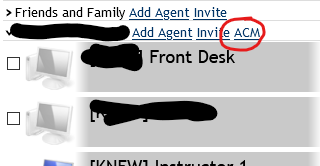
The ACM asks me for an old password and a new one. Not sure what the old password would be,
Did I need to add any settings in the config.json?
Will you detail out and perhaps make a demo video on how to make the USB key mentioned earlier if that's what is the next step needed?
Thanks again!
 robclay
on 28 Oct 2020
robclay
on 28 Oct 2020
Ha, I will need to document this a lot more. You are not required to use Intel AMT in ACM mode. If your machines are already in ACM or they have been activated into CCM, you can just stay put. The main limitation with CCM mode is that you can't KVM into the remote machine without the local using reading a 6 digit code.
If you want to move to ACM, you need to create a setup.bin file, put in the a USB key and boot the Intel AMT computer on that key. To work, you need to give the old and new MEBx password, that is the password you use to access MEBx when you hit CTRL-P at boot and login. By default the password is "admin" and you need to change it. If it's already set to something, just use the same password for the old and new to the one you set.
In any case, I will get writing up documentation on this topic and doing videos. The software is certainly way ahead of documentation right now.
Ylianst
on 28 Oct 2020
I guess now is as good a time as any to finally fix my AMT issues. I have machines that I manually configured AMT and using MeshCommander can connect, control, etc.
I'd love to get that integration into meshcentral. In the past I uploaded the cira script and it never checked in. I just updated to the latest code, changed the group, provided my password, can see in the agent page that it's configured, tls, ACM, etc - and HWConnect is grayed out and the AMT tab says disconnected.
How do I start troubleshooting this?
Of note the MC server is remote from the machines and MeshCommander is local.
 MordyT
on 30 Oct 2020
MordyT
on 30 Oct 2020
@MordyT I will be writing up a document on MeshCentral and Intel AMT. It's a complex topic and I don't wait to get into the details here, but hopefully I will have a document that covers the details and debugging.
Ylianst
on 3 Nov 2020
I'm using v0.6.90,
I've followed the steps above (Fully Automatic, Entered Configured iAMT Passwords) but some devices don't change i.e.
Not Activated (Pre), v6.0.3
Activated ACM, v9.0.31
vs
Activated ACM, v9.0.31, TLS
Activated CCM, v11.8.50, TLS
Activated ACM, v7.1.13, TLS
^Where TLS was not activated previously. (CCM had been a Not Activated (Pre) device, 1st ACM (v9) had the iAMT password changed and Mesh Commander could connect locally (Network), 2nd ACM (v7) is local network manually configured and has CIRA.
It would be nice part of the documentation if there was a flow chart / diagram of the steps iAMT activation and what benefits you attain at each. Also if this is only applicable from iAMT versions...
i.e.
Not Activated = No remote access
Activated ACM = Password Configured &....
Activated CCM TLS =
Activated ACM TLS =
,etc.
 b8two
on 19 Nov 2020
b8two
on 19 Nov 2020
Hi, Ylianst! I'm using meshcentral in our environment. During COVID-19 it really helps us to maintain all devices in the office alive. We using only Intel AMT without meshagent. And we active AMT on all desktops manually. Before this update, all worked perfectly, but now it is big problem to connect to any desktops. If I'm using Intel AMT tab and click on Connect button, it tooks more than 2-3 minutes to show all items. Remote desktops doesn't work at all - it always in Setup mode. If I'm trying to add new PC to the group at determine status of Intel AMT very long (more than 5-10 minutes) and works the same as with added PCs before.
Can you help me to investigate this and what do you need for it from my side.
PS. With latest version I could connect to some hosts. But not for all and not every attempt.
 canabizio
on 4 Feb 2021
canabizio
on 4 Feb 2021
Related issues
 penguinthingie
·
4Comments
penguinthingie
·
4Comments
 nroach44
·
3Comments
nroach44
·
3Comments
 MailYouLater
·
4Comments
MailYouLater
·
4Comments
 coolwormgit
·
3Comments
coolwormgit
·
3Comments
 whalehub
·
3Comments
whalehub
·
3Comments
Most helpful comment
Just uploaded a YouTube demonstration video on the new Intel AMT activation and configuration system.