Meshcentral: Feature - Hardware Key as single factor auth
It looks like you can setup webauthn/FIDO2 as a 2 factor auth and it works great. Can we set this up as a single factor. similar how nextcloud does it.
 johnnyq
All 6 comments
O_o NextCloud changed their cost model again... Wow, I remember when it used to be free for all... NOT ANY MORE!
Can you give me a little insight into how this would work from the security standpoint? I am interested to see if it removes the user input access level and can still be secure enough for say Enterprise level. I have explored RFID, SmartCard, Proximity, Fido2, Crypto keys, and even Biometrics for this kind of a solution. However I was unable to clear security screenings for customers rigid requirements due to HIPPA and DoD related requirements in interfacing security measures and protocols.
I would really like to take the human out of the equation if possible also, this would help for the Ai that is in the development works to assume the risks and take the controls over.
Thanks,
SomeGuru
 SomeGuru
on 22 Oct 2020
SomeGuru
on 22 Oct 2020
I'm not familiar with how NextCloud does it, and perhaps Ylian isn't either, so it may be best to elaborate a bit. I'm imagining it isn't fully single-factor. Maybe it has a "remember this device" type deal when you log in the first time, and allows you to subsequently use the hardware key to log in, much like Bank of America and other banking apps do on the phone. E.g. you're first required to enter your password, but then can choose to use biometric for subsequent logins. 5 failures in a row or so and it requires the password again, which restarts the process.
Does that sound like what you're looking for versus a straight single-factor login?
 ryanblenis
on 22 Oct 2020
ryanblenis
on 22 Oct 2020
I'm not sure how Nextcloud does it either but @johnnyq might be referring to passwordless login which has become more popular in recent months & years:
- https://en.wikipedia.org/wiki/Passwordless_authentication
- https://www.microsoft.com/en-au/security/business/identity/passwordless
- https://auth0.com/docs/connections/passwordless
Whether it's strictly passwordless (and hence requires enrollment of the single factor), or maybe it's like @ryanblenis describes where there's still a password for initial renolment...?
 cgb
on 23 Oct 2020
cgb
on 23 Oct 2020
Good request. I am familiar with this and purchased a few months back a Yubikey that had a PIN on it to support exactly this usage. Microsoft services also use this too. I don't know if it's the same for NextCloud, but you need a recent USB key with the PIN for this to work.
 Ylianst
on 23 Oct 2020
Ylianst
on 23 Oct 2020
Basically the way it works is you
- Click Log in with a device
- Enter Username
- Click Log in
- then the browser asks you for the hardware key then you are in
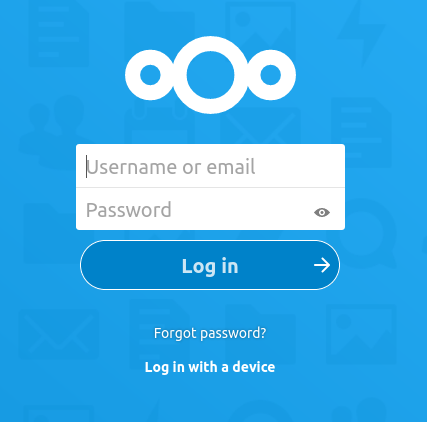
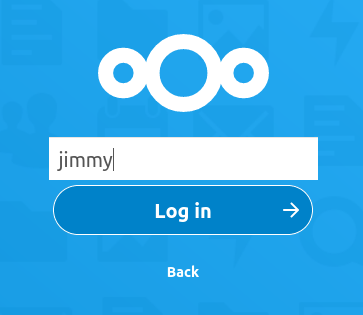
Totally Passwordless
You still have to register the hardware device before you can use passwordless login. So your initial account will have a password.
johnnyq
on 24 Oct 2020
Got it. I will work on that when I get a chance. I am a bit swamped on getting v0.6.66 out the door.
Ylianst
on 24 Oct 2020
Related issues
 hellofaduck
·
3Comments
hellofaduck
·
3Comments
 MailYouLater
·
3Comments
MailYouLater
·
3Comments
 vish84
·
3Comments
vish84
·
3Comments
 nroach44
·
3Comments
nroach44
·
3Comments
 penguinthingie
·
4Comments
penguinthingie
·
4Comments