Meshcentral: Wish List: Client managed access
Hello All,
My company provides IT services for our clients, and Mesh Central is perfect for unattended access. However, there are many times where clients want to be in control of remote access, so that no one can access without their permission. I know that we can turn on access permissions and notification bar, but because this option remains within our control, the client is still basically at our mercy. Therefore I would like to suggest 2 options:
- A client managed install where the app remains visible in the system tray, and gives a little pop-up notification in the tray area when a remote user logs in. This notification should also disappear when the user logs out, and the client should at all times be able to disconnect the remote user. Needless to say, we should not be able to change this option on our end, so it would probably require 2 different client install files - one for unattended, and the other for client managed.
- A token system where the remote Mesh user can generate a token number, which is then provided to the client. The client then enters this number in the tray application, and this immediately gives the remote Mesh user access to the client computer, regardless of whether or not that machine has been assigned to that user's device or user group. This would be valid for the current session only.
Please let me know if this makes sense to you guys. It would make an otherwise perfect system so much better for us. As it stands, our more paranoid clients manually disable the mesh agent service on their machines and only enable when they wish to permit access.
 trentdavis
All 7 comments
A token system where the remote Mesh user can generate a token number, which is then provided to the client. The client then enters this number in the tray application, and this immediately gives the remote Mesh user access to the client computer, regardless of whether or not that machine has been assigned to that user's device or user group. This would be valid for the current session only.
Looks like your request is to have something similar to AnyDesk, if an access code can be generated when starting MeshAgent downloaded from let's say invitation link - then I support you in this 👍 It would be a great option on client request just to type code from client's screen in MC and to provide a remote help.
Really would like to have this option also - for oneoff remote sessions it would be great.
 vitko-bg
on 7 Oct 2020
vitko-bg
on 7 Oct 2020
I made a tray icon app some time ago:
https://github.com/yomono/Meshcentral-TrayMesh
and I was actually working on the second point (a connection ID like teamviwer or AnyDesk), but the project is stuck because of my lack of time.
I really like seeing that Ylianst assigned this to himself.. He always come up with better solutions that you expect :D
 yomono
on 10 Oct 2020
yomono
on 10 Oct 2020
@yomono yes I know your tray app, I am using it :) there some problems with it, but I know that I now stable version. I would be great to have it as a build in to MA as an option
vitko-bg
on 10 Oct 2020
Bryan and I have something coming in this area, hopefully announce this week. I need to look more into Meshcentral-TrayMesh because it's built cross platform in a new way I am completely unfamiliar with. MeshCentral router is built in C# and I would gladly switch to something else that would be more cross-platform.
 Ylianst
on 10 Oct 2020
Ylianst
on 10 Oct 2020
Bryan and I have something coming in this area, hopefully announce this week. I need to look more into Meshcentral-TrayMesh because it's built cross platform in a new way I am completely unfamiliar with. MeshCentral router is built in C# and I would gladly switch to something else that would be more cross-platform.
About the traymesh code:
1- Is a Pascal based language, so is very simple to read. Even with no previous knowledge, if you read it you will understand what is going on
2- It can be done multiplatform in just one code. I did it in separated codes because I didn't planed well at the time. But is as simple as using {#IFDEF UNIX} and {#IFDEF WINDOWS} labels.
That being said: I don't think you should base anything official on my code, adding a new language and complexity to the current project. To be honest, my code is extremely simple, using just a tray icon, and a few VERY simple checks (like reading lines from the regedit), a button for stopping / starting the sevice.. and thats it..
I can wait for the news this week!!!
yomono
on 11 Oct 2020
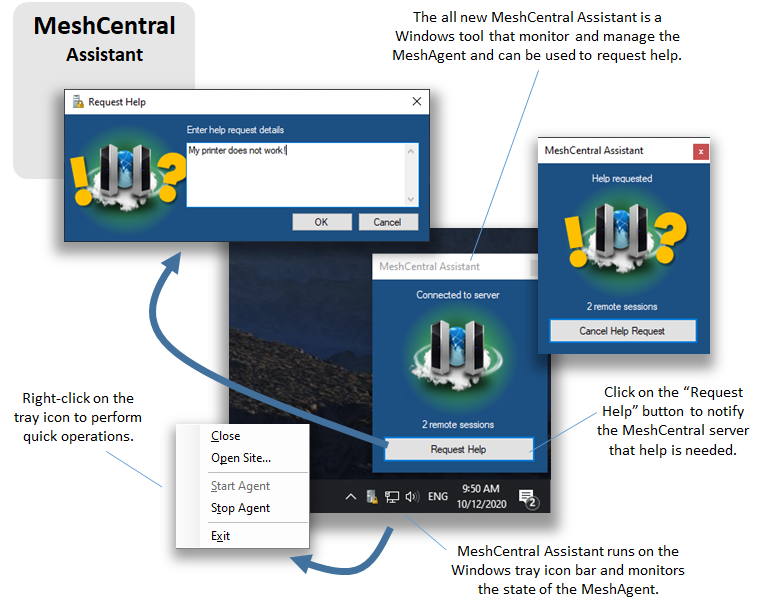
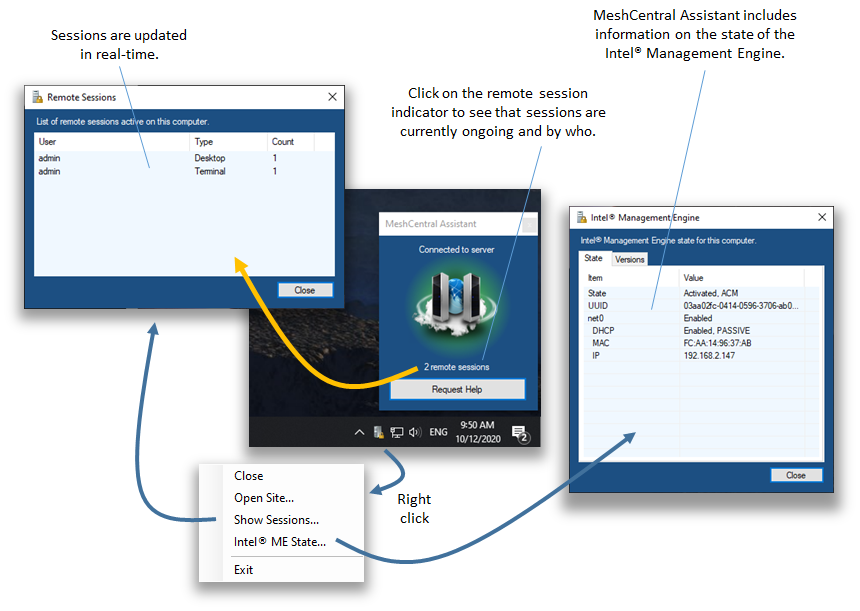
As seen on Twitter, if you update to MeshCentral v0.6.61 you can now try the new MeshCentral Assistant. It's a Windows only try icon tool that displays the state of agent, you can look at active remote sessions and ask for help. I would like to get feedback on this tool. Feel free to open a new issue specific to MeshCentral Assistant and let me know what you think. The tool is not yet included in MeshCentral, so you need to get it as a separate download for now.
Ylianst
on 13 Oct 2020
Hi everyone,
I've finally _just_ gotten my server updated so that I could try this! My observations are as follows:
- Of course, the assistant runs manually for now. I'm assuming that eventually it will be part of the agent installer.
- It monitors the agent connections nicely, and allows the user to see who is connected to what.
- When I clicked the "Request Help" button, nothing happened. I expected to see a popup somewhere on the remote admin side, but I didn't see anything.
- For real security, the assistant needs to pop-up when the remote agent connects, and wait for the user to grant access. Access should not be permitted unless granted, and it would be nice if there is some visible icon or light on the taskbar that shows when a remote user is connected and when they disconnect.
- Of course this is all for client-initiated service requests. For administration of our own networks, the current method is perfect!
Looking forward to getting this as part of the standard MeshCentral package, and thanks for all the hard work!
-Trent Davis
trentdavis
on 28 Oct 2020
Related issues
 LPJon
·
3Comments
LPJon
·
3Comments
 darryl-h
·
3Comments
darryl-h
·
3Comments
 haxmachine
·
3Comments
haxmachine
·
3Comments
 M1CK431
·
3Comments
M1CK431
·
3Comments
 robclay
·
3Comments
robclay
·
3Comments
Most helpful comment
As seen on Twitter, if you update to MeshCentral v0.6.61 you can now try the new MeshCentral Assistant. It's a Windows only try icon tool that displays the state of agent, you can look at active remote sessions and ask for help. I would like to get feedback on this tool. Feel free to open a new issue specific to MeshCentral Assistant and let me know what you think. The tool is not yet included in MeshCentral, so you need to get it as a separate download for now.