Meshcentral: Keyboard mapping if not QWERTY
Hi,
I've finally find time to test in multiple condition our keyboard issues with MeshCentral agent when using desktop sharing.
We are using AZERTY keyboard disposition so are our users and when we connect to there desktop with MeshCental we have some strokes who doesn't work and some others who are inverted.
For example :
- ^ ¨ ù % : / ! § ° ) ] < > produce nothing
- $ or £ send SHIFT
- * send F3
- ; or . send respectively $ and £
If we configure the agent in QWERTY and our computer stay in AZERTY it's the same
If we configure the agent in AZERTY and our computer in QWERTY it's the same.
If we configure the agent in QWERTY and our computer in QWERTY all is fine.
Does someone else have the issue ?
D.
 Tomatoschewps
All 12 comments
I've been using MC in production since February 2019 and we have it deployed on roughly 300 client PCs in France.
I would like to add some information for debugging purposes:
- special characters not working from Firefox (Windows)
- Chrome on Windows working as expected, but Chrome or Firefox on Linux (OpenSUSE 15.2 x64, Gnome3) make it impossible to type special characters even if using AZERTY on both sides
Possible solution would be to add a user defined "keyboard mapping" option which could be set to a default "automatic" setting but also allow the user to choose his/her setting (eg: Automatic, FR-FR, FR-CA, EN-GB, EN-US, DE-DE, etc...).
Correct me if I'm wrong, but I think MC tries to guess the keyboard mapping based on what the web browser tells it.
This can be a problem when the user chooses to use Firefox (EN-GB) on Windows (EN-GB) with a french AZERTY keyboard.
In any case, big thanks to the devs as MC has been invaluable to our team and clients during the COVID-19 pandemic.
 Bamoka
on 16 Aug 2020
Bamoka
on 16 Aug 2020
HI !
I have the same issue.
I have an ita keyboard qwerty.
When try to use @ symbol returned is dot (.).
So i try other keyboard char to test, and all char near alphabetic char are strange, return every time dor or other.
Try testing with standard Logitech.
Thanks
 master-itermar
on 31 Aug 2020
master-itermar
on 31 Aug 2020
Hello,
I have the same concern at home.
AZERTY keyboard on Linux
0.6.53
Ubuntu 20.04 + Firefox it's the same.
Ubuntu 20.04 + Chromium all is fine.
Thank you
 laboiteajb
on 30 Sep 2020
laboiteajb
on 30 Sep 2020
Hi @Ylianst ,
It's becoming really hard to work with meshcentral because of this ...
To type password, url, ...
Can you please look at it ?
Thanks
D.
Tomatoschewps
on 13 Nov 2020
I have a working prototype where I resolved these keyboard issues. I'm creating a new agent command for the server to use, becuase I don't want to accidentally break multi-key sequences, because of the underlying windows syscall I'm using is slightly different. We're thinking of having the UI have a selectable option for keyboard layout, which the agent will use to translate the virtual keycodes. We trying to see if we can have the browser report what the keyboard layout is on the browser side, so that we can make it more seamless. So far I tested with fr-be, and verified the translation works when I specify the layout in my syscall to inject the keypress... Just a few browser side kinks to work out... But it should be relatively soon... (So far it will be windows only on the agent side, as I haven't looked at keyboard layouts for xorg yet, but I'll get to that)
 krayon007
on 15 Nov 2020
krayon007
on 15 Nov 2020
This is great news krayon007. Thank you for the effort you put into this issue. I'd be happy to help you beta test if need be.
Our installed OS ranges from Windows server 2003 (non production) to 2019. And clients from Win7 SP1 to Win10 v2004. Some QWERTY (EN-US) and most AZERTY (FR-FR).
Bamoka
on 15 Nov 2020
Hi @krayon007
Really great news !
As Bamoka, we can beta test it if you need 👍
We have mainly w10 and w2012r2 to 2019 and we use exclusively fr-fr on both sides.
Tomatoschewps
on 16 Nov 2020
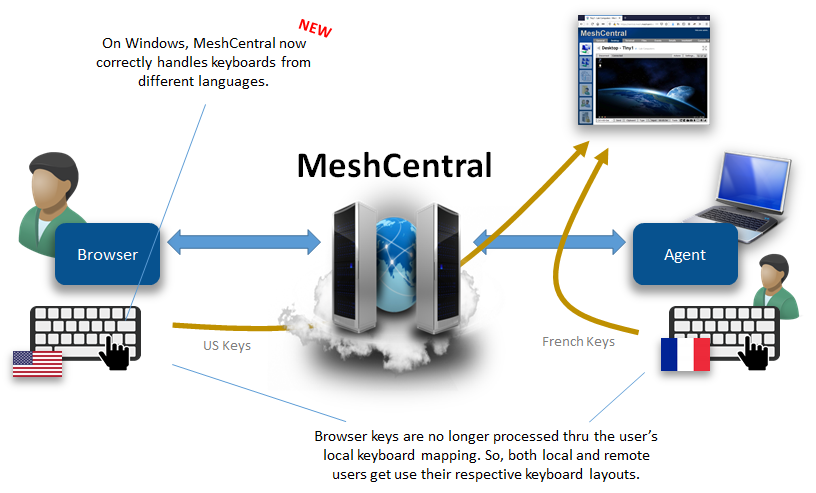
MeshCentral v0.6.93 was published with correct keyboard handling on Windows. Bryan is working on doing the same for other platforms (Linux, macOS, FreeBSD). Let us know if it works.
 Ylianst
on 18 Nov 2020
Ylianst
on 18 Nov 2020
This is brilliant! We even have a shiny new diagram to show our technicians.
I'll update the server tomorrow and run a few tests. Merci beaucoup!
Bamoka
on 19 Nov 2020
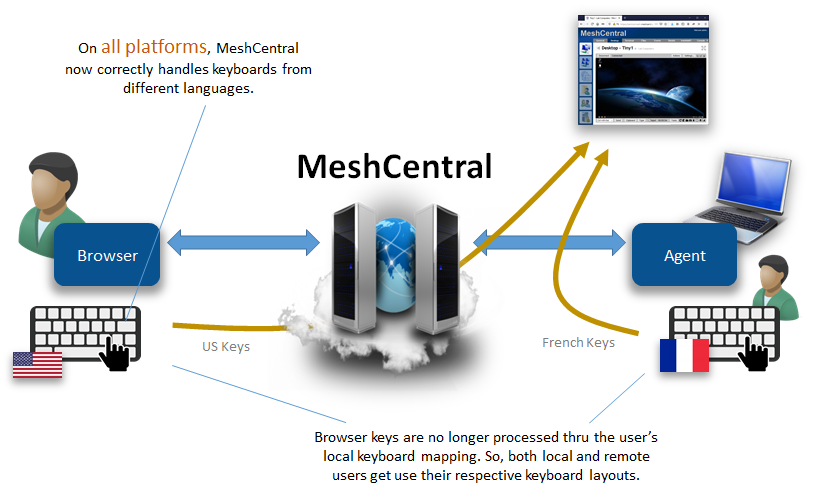
We just published v0.6.95. This version supports international keyboards on all the remaining platforms, macOS, Linux, and FreeBSD.
krayon007
on 19 Nov 2020
Exactly! Now all platforms.
Ylianst
on 19 Nov 2020
That's ... Amazing !!
My collegues are pleased 👍
I'm the owner of this issue so i'm going to close it. Feel free to add comments if you need ^^
Tomatoschewps
on 19 Nov 2020
Related issues
 whalehub
·
3Comments
whalehub
·
3Comments
 penguinthingie
·
4Comments
penguinthingie
·
4Comments
 unguzov
·
3Comments
unguzov
·
3Comments
 robclay
·
3Comments
robclay
·
3Comments
 nroach44
·
3Comments
nroach44
·
3Comments
Most helpful comment
We just published v0.6.95. This version supports international keyboards on all the remaining platforms, macOS, Linux, and FreeBSD.