Meshcentral: FEATURE REQUEST - Desktop Icon
Hi,
Maybe, is possible with agent installer, create a desktop Icon for get computer information, for example:
Hostname:
Windows Versión:
UserName:
Public IP:
This is for remote support similar to Anydesk or teamviewer.
 FrankSanabria
All 6 comments
Not sure I understand the request. This is a desktop icon that is installed with the agent? It them just displays computer information and nothing else? As is, you then close it? Information you mentioned can be obtained but the agent on the server side, can it not? Would not need the user to read that information to you.
 Ylianst
on 5 Aug 2020
Ylianst
on 5 Aug 2020
Also, if you have screen shots of the request, that would help.
Ylianst
on 5 Aug 2020
Thanks for answering.
For example, a user creates a ticket to request support, we to provide support request the name of the PC, but not all users know how to obtain this information. It would be easy for the MeshAgent icon to show this information on the desktop to be attached to the Ticket.
FrankSanabria
on 7 Aug 2020
Indeed, it would be interesting to be able to file a support ticket directly into MeshCentral. Right now, you can look in the registry and find the NodeID for your own device. You can also type "u:
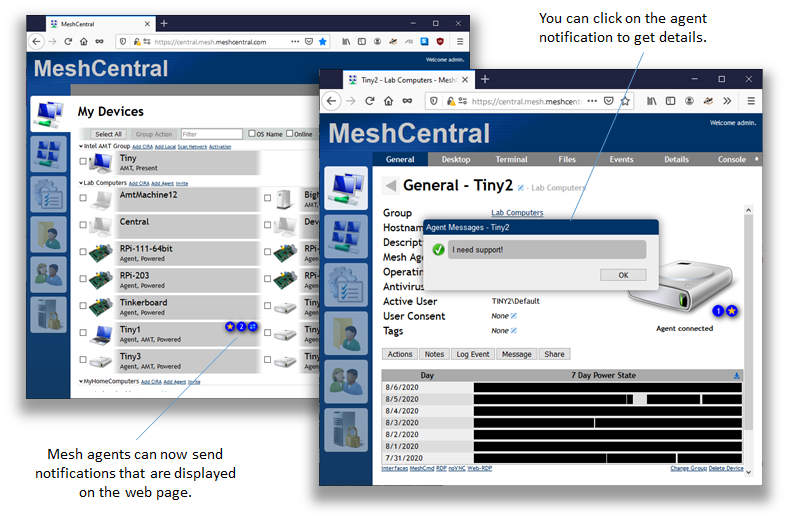
In the past few weeks, we also added a new agent notification system that allows an agent to display messages on the web page. It's not used for anything yet, but it could be used for this purpose.
Ylianst
on 7 Aug 2020
Hi @Ylianst
agent notification system can be a great new feature !
IMO it can be used by a desktop icon or by a systray icon as say in #1631 .
In the meantime is there a way to use the agent notification system by calling the agent with parameters or something or is it just there but not usable yet ?
I think of a desktop icon starting a small batch file that end user can launch when they want assistance until you get time to add such function :)
 Tomatoschewps
on 7 Aug 2020
Tomatoschewps
on 7 Aug 2020
You're right, for example, we use this bat file in the desktop User (Windows 10), and him send us via email the screenshot:
@echo off
echo            =========================================
echo            = DATOS NECESARIOS PARA BRINDAR SOPORTE =
echo            =========================================
echo\
echo  Fecha de hoy: %date%
echo.
echo  Nombre del Equipo: %computername%
echo.
echo\
nslookup -querytype=TXT o-o.myaddr.l.google.com ns1.google.com > ip.txt
echo  Direccion IP Publica:
findstr """ ip.txt
del ip.txt
echo\
echo  El Usuario es: %USERNAME%
echo.
echo\
echo  Presione la tecla "SPACE" para cerrar esta ventana...
pause > nul
Related issues
 penguinthingie
·
4Comments
penguinthingie
·
4Comments
 MailYouLater
·
4Comments
MailYouLater
·
4Comments
 veitw
·
4Comments
veitw
·
4Comments
 haxmachine
·
3Comments
haxmachine
·
3Comments
 hellofaduck
·
3Comments
hellofaduck
·
3Comments
Most helpful comment
Indeed, it would be interesting to be able to file a support ticket directly into MeshCentral. Right now, you can look in the registry and find the NodeID for your own device. You can also type "u:" to filter devices by logged in users.
In the past few weeks, we also added a new agent notification system that allows an agent to display messages on the web page. It's not used for anything yet, but it could be used for this purpose.