Meshcentral: agent-desktop fixup for AZERTY / FR keyboard
Hi,
The following change to node_modules/meshcentral/public/scripts/agent-desktop-0.0.2.js makes AZERTY / FR keyboard fully work when both local and remote (Windows 10) machines are FR keyboard, tested on both firefox 74 and chrome 81 (on linux debian 10 and windows 10). All AltGr stuff works.
        } else {
            // Use this keycode, this works best with "US-EN" keyboards.
            // Older browser support this.
        //console.log("K",event.code,event.key,event.keyCode.toString(16),action);
            var kc = event.keyCode;
        if (event.code=="AltRight" && event.key=="AltGraph") kc=0xA5;
        else if (event.code=="BracketLeft" && event.key=="Dead") kc=0xDD;
        else if (event.code=="Minus") kc=0xDB;
        else if (event.code=="Equal") kc=0xBB;
        else if (event.code=="Quote") kc=0xC0;
        else if (event.code=="Slash") kc=0xDF;
        else if (event.code=="Period") kc=0xBF;
        else if (event.code=="Comma") kc=0xBE;
        else if (event.code=="BracketRight") kc=0xBA;
        else if (event.code=="IntlBackslash") kc=0xE2;
            //if (kc == 0x3B) { kc = 0xBA; } // Fix the ';' key
            //else if (kc == 173) { kc = 189; } // Fix the '-' key for Firefox
            //else if (kc == 61) { kc = 187; } // Fix the '=' key for Firefox
            obj.SendKeyMsgKC(action, kc);
WARNING : I have not tested that it doesn't break US keyboard controlling US keyboard machines (I don't have a US keyboard around so I can't test this configuration right now).
WARNING : when the controlled machine is running linux Azerty/FR it didn't work well before and does not work better after this change. From code reading the linux agent does lots of translation contrary to the windows one which simply pushes the received kc.
I will try to look at fixing MacBook Air FR keyboard controlling Windows FR keyboard in the next few days, then look at the linux agent source code.
References :
https://developer.mozilla.org/en-US/docs/Web/API/KeyboardEvent/keyCode
The deprecated KeyboardEvent.keyCode read-only property (...)
Note: the change above is obviously still using keyCode, but fixup use the non depecrated APIs listed below.
https://w3c.github.io/uievents-code/
This specification defines the values for the KeyboardEvent.code attribute, which is defined as part of the UI Events Specification [UIEvents]. The code value contains information about the key event that can be used to identify the physical key being pressed by the user.
https://www.w3.org/TR/uievents-key/
This specification defines the key attribute values that must be used for the KeyboardEvent.key attribute, which is defined as part of the UI Events Specification [UIEvents].
Keyboard related issues :
https://github.com/Ylianst/MeshCentral/issues/896
Keyboard Mapping Issues with Mismatched Keyboard Layouts
https://github.com/Ylianst/MeshCentral/issues/469
German keyboard
https://github.com/Ylianst/MeshCentral/issues/850
Keyboard Translation
 guerby
All 38 comments
With the following two changes the Azerty FR world works perfectly when using windows/macos/linux firefox/chrome to control windows/linux machines.
I'm (ab)using the SendKeyMsg translation system to emulate what needs to be done on the controlled machine to produce the wanted output so it's not pretty ... As said above I can't test wether I broke Qwerty/US stuff or not.
I doubt we can have one code that works for every local/remote keyboard/OS/browser configuration.
So I think a web UI dropdown (bottom of Desktop view?) "keyboard translations" with a list of proposed "fixups" like the one I'm proposing below is needed.
The resulting "translation" choice would need to be seen by agent-desktop.js which can activate or not a filter function like mine, and also be sent to the agent if my linux_events.c change breaks things when not using Azerty/FR keyboards (probable).
What do you think?
Change to meshcentral/public/scripts/agent-desktop-0.0.2.js
        } else {
            // Use this keycode, this works best with "US-EN" keyboards.
            // Older browser support this.
        console.log("K",event.code,event.key,event.keyCode.toString(16),action);
            var kc = event.keyCode;
        if (event.code=="AltRight" && event.key=="AltGraph") { if(action==1) action=[[2,0x11],[1,0xA5]]; else kc=0xA5; }
        else if (event.code=="BracketLeft" && event.key=="Dead") kc=0xDD;
        else if (event.code=="Minus" && event.key=="}" && (kc==0xDD || kc==0xA9) && action==1) action=[[1,0xA5],[1,0xBB],[2,0xBB],[2,0xA5]];
        else if (event.code=="Minus" && event.key=="}" && (kc==0xDD || kc==0xA9) && action==2) action=[];
        else if (event.code=="Minus" && event.key=="]" && (kc==0xDD || kc==0xA9) && action==1) action=[[2,0x10],[1,0xA5],[1,0xDB],[2,0xDB],[2,0xA5],[1,0x10]];
        else if (event.code=="Minus" && event.key=="]" && (kc==0xDD || kc==0xA9) && action==2) action=[];
        else if (event.code=="Minus") kc=0xDB;
        else if (event.code=="Equal" && event.key=="-") kc=0x36;
        else if (event.code=="Equal" && event.key=="_" && action==1) action=[[2,0x10],[1,0x38],[2,0x38],[1,0x10]];
        else if (event.code=="Equal" && event.key=="_" && action==2) action=[];
        else if (event.code=="Equal") kc=0xBB;
        else if (event.code=="Backslash" && event.key=="Dead" && (kc==0xDC || kc==0xC0) && action==1) action=[[1,0xA5],[1,0x37],[2,0x37],[2,0xA5],[1,0x20],[2,0x20]];
        else if (event.code=="Backslash" && event.key=="Dead" && (kc==0xDC || kc==0xC0) && action==2) action=[];
        else if (event.code=="Backslash" && event.key=="£" && (kc==0xDC || kc==0xC0)) kc = 0xBA;
        else if (event.code=="Quote") kc=0xC0;
        else if (event.code=="Slash" && (event.key=="=" || event.key=="+")) kc=0xBB;
        else if (event.code=="Slash") kc=0xDF;
        else if (event.code=="Period") kc=0xBF;
        else if (event.code=="Comma") kc=0xBE;
        else if (event.code=="BracketRight" && event.key=="*" && (kc==0xDD || kc==0xA4) && action==1) action=[[2,0x10],[1,0xDC],[2,0xDC],[1,0x10]];
        else if (event.code=="BracketRight" && event.key=="*" && (kc==0xDD || kc==0xA4) && action==2) action=[];
        else if (event.code=="BracketRight" && event.key=="€" && (kc==0xDD || kc==0xA4) && action==1) action=[[1,0xA5],[1,0x45],[2,0x45],[2,0xA5]];
            else if (event.code=="BracketRight" && event.key=="€" && (kc==0xDD || kc==0xA4) && action==2) action=[];
        else if (event.code=="BracketRight") kc=0xBA;
        else if (event.code=="IntlBackslash") kc=0xE2;
        else if (event.code=="KeyM" && event.key=="?" && kc==0xBF) kc=0xBC;
        else if (event.code=="KeyL" && event.key=="|" && kc==0x4C && action==1) action=[[2,0x10],[2,0x12],[1,0xA5],[1,0x36],[2,0x36],[2,0xA5]];
        else if (event.code=="KeyL" && event.key=="|" && kc==0x4C && action==2) action=[];
        else if (event.code=="Backquote" && event.key=="@" && (kc==0xC0 || kc==0x40) && action==1) action=[[1,0xA5],[1,0x30],[2,0x30],[2,0xA5]];
        else if (event.code=="Backquote" && event.key=="@" && (kc==0xC0 || kc==0x40) && action==2) action=[];
        else if (event.code=="Backquote" && event.key=="#" && (kc==0xC0 || kc==0x40) && action==1) action=[[2,0x10],[1,0xA5],[1,0x33],[2,0x33],[2,0xA5],[1,0x10]];
        else if (event.code=="Backquote" && event.key=="#" && (kc==0xC0 || kc==0x40) && action==2) action=[];
        else if (event.code=="Digit5" && event.key=="{" && kc==0x35 && action==1) action=[[1,0xA5],[1,0x34],[2,0x34],[2,0xA5]];
        else if (event.code=="Digit5" && event.key=="{" && kc==0x35 && action==2) action=[];
        else if (event.code=="Digit5" && event.key=="[" && kc==0x35 && action==1) action=[[2,0x10],[1,0xA5],[1,0x35],[2,0x35],[2,0xA5],[1,0x10]];
        else if (event.code=="Digit5" && event.key=="[" && kc==0x35 && action==2) action=[];
        else if (event.code=="Digit6" && event.key=="§" && kc==0x36 && action==1) action=[[1,0x10],[1,0xDF],[2,0xDF],[2,0x10]];
        else if (event.code=="Digit6" && event.key=="§" && kc==0x36 && action==2) action=[];
        else if (event.code=="Digit8" && event.key=="!" && kc==0x38 && action==1) kc=0xDF;
        else if (event.code=="Digit8" && event.key=="!" && kc==0x38 && action==2) action=[];
            //if (kc == 0x3B) { kc = 0xBA; } // Fix the ';' key
            //else if (kc == 173) { kc = 189; } // Fix the '-' key for Firefox
            //else if (kc == 61) { kc = 187; } // Fix the '=' key for Firefox
            obj.SendKeyMsgKC(action, kc);
        }
Patch to meshcore/KVM/Linux/linux_events.c
-static const int g_keymapLen = 96; // Modify this when you change anything in g_keymap.
+static const int g_keymapLen = 98; // Modify this when you change anything in g_keymap.
 extern int change_display;
 x11tst_struct *x11tst_exports = NULL;

@@ -100,23 +103,25 @@ static struct keymap_t g_keymap[] = {
        { XK_Control_L,        VK_CONTROL },
        { XK_Control_R,        VK_CONTROL },
        { XK_Alt_L,            VK_MENU },
-       { XK_Alt_R,            VK_MENU },
+       { XK_ISO_Level3_Shift, VK_RMENU },
        { XK_Super_L,          VK_LWIN },
        { XK_Super_R,          VK_RWIN },
        { XK_Menu,             VK_APPS },
        { XK_Kanji,            VK_KANJI },
        { XK_Kana_Shift,       VK_KANA },
-       { XK_colon,                        VK_OEM_1 },
+       { XK_dollar,                       VK_OEM_1 },
        { XK_plus,                         VK_OEM_PLUS },
        { XK_comma,                        VK_OEM_COMMA },
        { XK_minus,                        VK_OEM_MINUS },
        { XK_period,               VK_OEM_PERIOD },
        { XK_slash,            VK_OEM_2  },
-       { XK_grave,                VK_OEM_3 },
-       { XK_bracketleft,          VK_OEM_4 },
-       { XK_backslash,            VK_OEM_5 },
-       { XK_bracketright,         VK_OEM_6 },
-       { XK_apostrophe,           VK_OEM_7 }
+       { XK_ugrave,               VK_OEM_3 },
+       { XK_parenright,           VK_OEM_4 },
+       { XK_asterisk,             VK_OEM_5 },
+       { XK_dead_circumflex,      VK_OEM_6 },
+       { XK_apostrophe,           VK_OEM_7 },
+       { XK_exclam,               VK_OEM_8 },
+       { XK_less,                 VK_OEM_102 }
 };
Forgot : @Ylianst @ryanblenis
guerby
on 6 May 2020
So, the real solution here is to have the MeshAgent send keys to the remote computer that will not use the remote keyboard mapping. My understanding it that any such translations will work for only one remote keyboard mapping. Yes, this needs to be fixed since any remote keyboard mapping other than US-EN will not work right.
 Ylianst
on 6 May 2020
Ylianst
on 6 May 2020
I don't think it will fix the issue: 1/ the web browser doesn't have the real key pressed (event.keycode is deprecated and has never been a real keycode), 2/ firefox and chrome don't always send the same event for the same key on the same machine and OS and 3/ MacOS keyboards are nothing like regular PC keyboard (no AltGr, backquote is not a dead key, ...).
My agent-desktop.js translation has special cases to handle these issues (in the Azerty world).
guerby
on 7 May 2020
One addition to have CapsLock working when controlling a linux machine:
static const int g_keymapLen = 99; // Modify this when you change anything in g_keymap.
...
    { XK_Caps_Lock,            VK_CAPITAL },
Hello, I am evaluating meshcentral to pilot some french windows servers from a linux laptop. Some of the keys don't work (AltGr, : ! ù* etc)
I have tested @guerby 's patch to meshcentral/public/scripts/agent-desktop-0.0.2.js -> it works
Best regards.
 tconstans
on 14 May 2020
tconstans
on 14 May 2020
Two lines two add (before the "Period" one) for handling on MacOS FR keyboards:
            else if (event.code=="Period" && event.key=="\\" && kc==0x3A && action==1 ) action=[[2,0x10],[1,0xA5],[1,0x38],[2,0x38],[2,0xA5]];
            else if (event.code=="Period" && event.key=="\\" && kc==0x3A && action==2 ) action=[];
            else if (event.code=="Period") kc=0xBF;
May I suggest that @guerby creates a fork, with a branch exhibitting the full code, as it isn't easy to follow several patches here. Git would be easer to read, if you're easy with git too ;)
 olberger
on 1 Jun 2020
olberger
on 1 Jun 2020
FWIW, it seems VNC people often have these kind of issues. Maybe this helps: https://github.com/novnc/noVNC/issues/21
olberger
on 1 Jun 2020
@olberger I did not fork yet because the only way to handle multiple keyboards layouts in controlling and controlled machine is to add a keyboard translation menu ie dropdown somewhere in the web UI.
It would also be nice to replace the C translation code (= table) in the Linux X11 meshagent by a javascript/duktape version so all the translation code can be centralized in the server.
When I first looked at the issue it looks like there's about zero js/VNC/remote stuff that works with AZERTY (or non QWERTY). All software I found has open issues for years without solution getting accepted, eg:
https://github.com/xtermjs/xterm.js/issues/2479
My guess is that most original developpers use QWERTY keyboards and think by just transmitting a keycode it will magically work at some point but that's wrong you need to plug a translation function and give the ability to the user to choose the appropriate translation, and for developpers to easily contribute such translation code.
Such a mechanism and mindset is in place for language translation: most software now have user contribution friendly interfaces to translate for non english languages (including meshcentral), but IMHO developpers haven't realized yet we need something similar for keyboard translation in the web VNC/xterm niche.
guerby
on 1 Jun 2020
Hello,
We are evaluating meshcentral solution as our main remote control solution so as to assist our customers (mostly operating under windows OS) but there is indeed an big issue with the specials keys typed from a french keyboard (and the copy/past from the clipboard tool doesn't help since the windows session opening does not accetps it). This issue could result in a No Go adopting the solution here in France. It's a pitty because the rest is working very well (very good job by the way!).
As a workaround , I 've added the piece of script provided here by Guerby and now the special keys are working (I thank him for that).
Unfortunately, that piece of script cannot be a definitive solution (for instance this modification may not survive to an update of the Meshcentral server).
Can we hope for an official update on that issue so as we can at least be able to remap/translate the keys according to our french keyboard type?
Thank you very much.
LG
 LG00999
on 15 Sep 2020
LG00999
on 15 Sep 2020
MeshCentral v0.6.93 was published with correct keyboard handling on Windows. Bryan is working on doing the same for other platforms (Linux, macOS, FreeBSD). Let us know if it works.
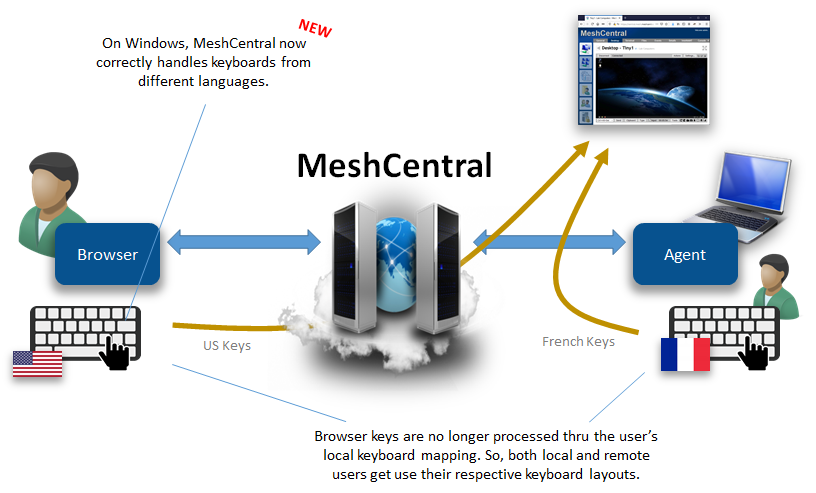
Ylianst
on 18 Nov 2020
Just tested on "type" menu to enter a password on login box :
enter on french keyboard : 32154651$&!
On screen :
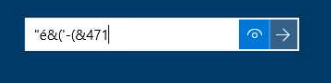
 tranbert
on 18 Nov 2020
tranbert
on 18 Nov 2020
Oh right. I have to fix the "Type" button. Thanks for reporting that.
Ylianst
on 19 Nov 2020
Just published MeshCentral v0.6.94 with a fix for the "Type" button. Let me know if it works.
Ylianst
on 19 Nov 2020
MeshCentral v0.6.95 was just published. This version supports international keyboards on all platforms... Windows, Linux, macOS, and FreeBSD.
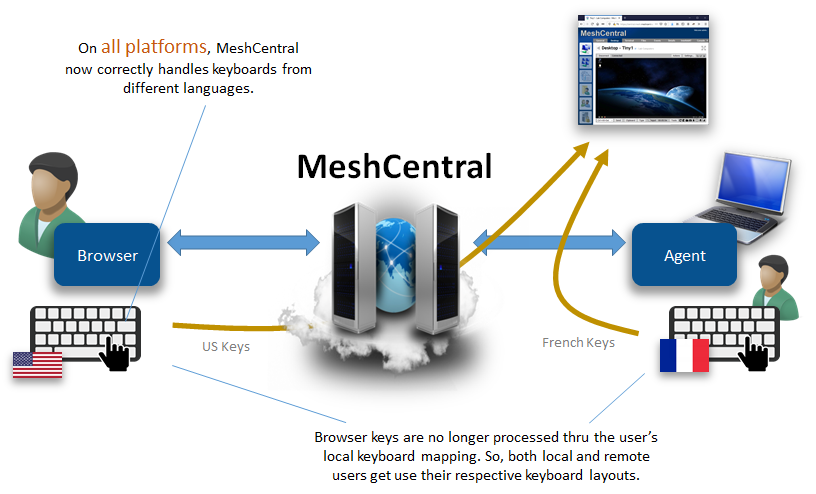
 krayon007
on 19 Nov 2020
krayon007
on 19 Nov 2020
Oh right. I have to fix the "Type" button. Thanks for reporting that.
Yep... working ! Bravo !
tranbert
on 19 Nov 2020
Hi, I updated my test meshcentral installation to 0.6.95 and regular keys are no longer transmitted except Control and a key (like Ctrl-C Ctrl-V). Escape seems to do something too. Mouse works.
Client Debian 10 chrome 87 trying to control ubuntu 20.04.1 and windows 10, all French/AZERTY.
Tried also client Windows 10 chrome 87 control unbuntu 20.04.1 with the same result.
agent on windos says ""compileTime": "23:53:04, Nov 17 2020"" for windows and ""compileTime": "21:16:09, Nov 18 2020"" for ubuntu so probably latest.
I don't know where to look at.
Since this is a test setup I can provide ssh and web admin access.
guerby
on 19 Nov 2020
Did you try a different browser? I tried from Debian 9 / Chromium 73 to Windows 10, and it worked... I'll try some other combinations... If the agents are the latest, it looks like a browser side issue with getting the correct unicode character. @Ylianst?
krayon007
on 19 Nov 2020
I juste tested and same result with firefox 82.
With previous versions I added a console.log somewhere in agent-desktop-0.0.2.js and looked at the trace, is there something I could try with this version?
guerby
on 19 Nov 2020
Wierd... I just tried Chrome 87 from Windows, to a Ubuntu 20.04 LTS client, and it worked too... I noticed the delay between key down and key up was probably slightly too short, which made it so I had to type a little slower for some of the key presses to register, (I just increased the delay), but the keys still went thru...
I'll make sure @Ylianst replies to this thread, he can give you a hand with server side instrumentation. I'll keep trying to reproduce... (You are saying none of the letter keys (a-z) are going across?)
krayon007
on 19 Nov 2020
Yes no key work a-z 0-9 and symbols. But combos like control-C control-V control-Z do work which is quite weird.
I've been updating this test instance for a long time may be something is off.
guerby
on 19 Nov 2020
Server is running on a debian 10 machine
guerby
on 19 Nov 2020
Well the character keys and control sequences are sent differently... The ctrl sequences are sent as virtual key codes (the way we always did it). Non control sequences are interpreted by the browser, and sends a unicode character to the agent, (using a different/new command)...
krayon007
on 19 Nov 2020
can you tell me what the commit hash is, that is shown on -info?
krayon007
on 19 Nov 2020
Windows 10 agent says:
> info
Current Core: MeshCore CRC-4129175553
Agent Time: 2020-11-19 19:45:33.399+01:00.
User Rights: 0xffffffff.
Platform: win32.
Capabilities: 15.
Server URL: xxx
OS: Windows 10 Home - 1909 [18363].
Modules: amt-apfclient, amt-lme, amt-manage, amt-mei, monitor-border, smbios, sysinfo, wifi-scanner-windows, wifi-scanner, win-console, win-info, win-terminal, win-virtual-terminal.
Server Connection: true, State: 1.

> versions
{
  "openssl": "1.1.1g",
  "duktape": "v2.3.0",
  "commitDate": "2020-11-18T07:47:29.000Z",
  "commitHash": "2fc2206eb9c2476bd2079e467d7f621ec2c9acf8",
  "compileTime": "23:53:04, Nov 17 2020"
}
Did you say v0.6.93 works but v0.6.95 does not, with regards to trying to control a Windows machine?
krayon007
on 19 Nov 2020
(I'm asking, becuase the Windows Agent was not changed between v0.6.93 and v.0.6.95, so I'm trying to determine if it's a server issue or an agent issue you are experiencing)
krayon007
on 19 Nov 2020
2002 also no a-z an 0-9 characters possible to type
 petervanv
on 19 Nov 2020
petervanv
on 19 Nov 2020
I don't remember the previous version but it was older than 0.6.93.
(Would be nice on update to log previous and new version :) )
guerby
on 19 Nov 2020
Nov 19 19:13:49 meshcentral node[213]: Starting self upgrade to: 0.6.96
=> add "from x.y.z to x.y.z"
guerby
on 19 Nov 2020
(copied from #2002 )
On 0.6.97 :
I tested all key controlling a Windows machine and they worked fine but with one exception : the ^ circumflex and trema key (right of "p"). On the physical machine if you press circumflex then space it will produce a circumflex character, if you press circumflex then e it will produce ê. It doesn't work through meshcentral.
On Linux on some cases it works great but in some not at all (or very slow random key). In a gnome terminal it works great. But in the password form of the ubuntu lock screen no key appear. Also if you launch firefox 83 and try to type in the URL bar it doesn't work too.
I assume it's more on @krayon007 side.
guerby
on 19 Nov 2020
(copied from #2002 )
On 0.6.97 :
I tested all key controlling a Windows machine and they worked fine but with one exception : the ^ circumflex and trema key (right of "p"). On the physical machine if you press circumflex then space it will produce a circumflex character, if you press circumflex then e it will produce ê. It doesn't work through meshcentral.
On Linux on some cases it works great but in some not at all (or very slow random key). In a gnome terminal it works great. But in the password form of the ubuntu lock screen no key appear. Also if you launch firefox 83 and try to type in the URL bar it doesn't work too.
I assume it's more on @krayon007 side.
If you turn off desktop multiplexor does it work? I tried this with a FR-BE keyboard, and it correctly created the ê character on meshcentral... I wonder if there are still issues in the multiplexor relaying.... (My test server doesn't use multiplexer)
krayon007
on 19 Nov 2020
OK, I can reproduce this on Ubuntu 20.. The ê is laggy, sometimes works sometimes doesnt... But I noticed that older versions of ubuntu or way more responsive... It's just my Ubuntu 20 machine that is acting like this.... I'll do some digging...
krayon007
on 19 Nov 2020
The ê seems to always work for me when controlling windows tho, so Ylian is looking into it as well.
krayon007
on 19 Nov 2020
(copied from #2002 )
On 0.6.97 :
I tested all key controlling a Windows machine and they worked fine but with one exception : the ^ circumflex and trema key (right of "p"). On the physical machine if you press circumflex then space it will produce a circumflex character, if you press circumflex then e it will produce ê. It doesn't work through meshcentral.
On Linux on some cases it works great but in some not at all (or very slow random key). In a gnome terminal it works great. But in the password form of the ubuntu lock screen no key appear. Also if you launch firefox 83 and try to type in the URL bar it doesn't work too.
I assume it's more on @krayon007 side.If you turn off desktop multiplexor does it work? I tried this with a FR-BE keyboard, and it correctly created the ê character on meshcentral... I wonder if there are still issues in the multiplexor relaying.... (My test server doesn't use multiplexer)
"DesktopMultiplex": true or false does not seem to change the situation when controlling an ubuntu machine, in password form or firefox URL if I type 20 keys may be one will appear.
guerby
on 20 Nov 2020
no impact on circumflex when controlling linux or windows, still not working for me.
guerby
on 20 Nov 2020
Hello, i have just updated to latest version 0.7.4
I didnot have to patch agent-desktop.js to have most keys working:
Environment:
MC server is a centos7,
client machine is a fedora 31
target machine: Windows server / desktop
client browser chromium 86 : all fine
client browser Firefox 82 : all fine, except for ^ and "
target and client language and keyboard layout: fr
BTW: thanks a lot for this wonderful piece of software. I am almost done switching from teamviewer.
tconstans
on 28 Nov 2020
Related issues
 LPJon
·
3Comments
LPJon
·
3Comments
 PathfinderNetworks
·
3Comments
petervanv
·
3Comments
PathfinderNetworks
·
3Comments
petervanv
·
3Comments
 MailYouLater
·
3Comments
petervanv
·
3Comments
MailYouLater
·
3Comments
petervanv
·
3Comments
Most helpful comment
Hello, I am evaluating meshcentral to pilot some french windows servers from a linux laptop. Some of the keys don't work (AltGr, : ! ù* etc)
I have tested @guerby 's patch to meshcentral/public/scripts/agent-desktop-0.0.2.js -> it works
Best regards.