Meshcentral: Add virtual machine device icon
How about adding an icon dedicated to VMs? Something like:
- transparent color PNG

- transparent B/W PNG

Super iper very extra low priority, of course.
Thanks
 amenolo
All 38 comments
Seems doable, but requires an accurate way to detect the local agent is running on a VM. I normally use VMWare, so I can probably figure that out for that. But I'll need help with other hypervisor's as I won't be able to work/test on all of them...
 krayon007
on 16 Apr 2020
krayon007
on 16 Apr 2020
i have all my VMs on Proxmox know. if i can help with something, just let me know.
 uldiseihenbergs
on 16 Apr 2020
uldiseihenbergs
on 16 Apr 2020
To be honest I wasn't thinking about self-detection in this case too...but if in some way feasible, why not...
I'm using PVE and ESXi, along with uldiseihenbergs I'm at your disposal for possible checks/tests.
amenolo
on 16 Apr 2020
If you guys go into the details tab, under bios and motherboard, do any of the strings look like it can be used to identify your hypervisor? On mine, windows and most of my Linux distros list VMware as the bios manufacturer. Is this the case with your hypervisors as well?
krayon007
on 16 Apr 2020
not sure what mean motherboard identifier, vendor is a BIOS type(Seabios or OMVF). on PVE i have this for example no my Ubuntu VM:
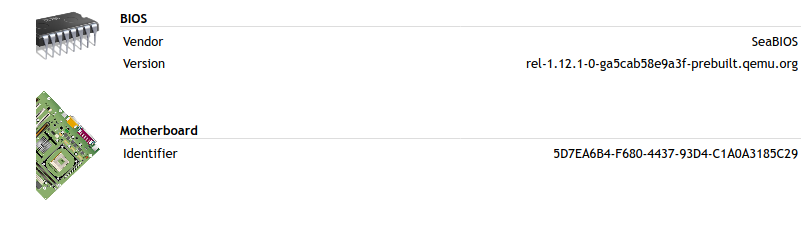
and Windows VM:
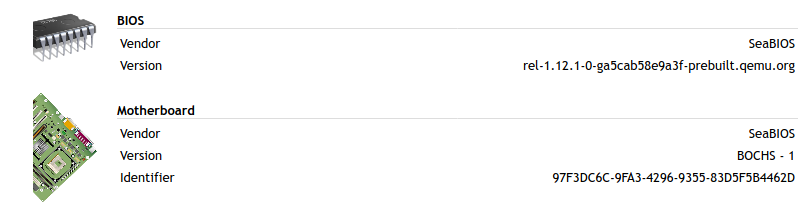
so looks like Bios version is the right field to identify PVE VMs
uldiseihenbergs
on 16 Apr 2020
YEah, I'll have to play around with my VMWare settings... Not sure if this will be usefull... I just rechecked my VMs... Most of my VM's show Phoenix Bios, but many of my ArchLinux based VM's show VMWare... I wonder if VMWare is changing the BIOS virtualization based on what OS/Kernel type you select.
krayon007
on 16 Apr 2020
I think you can detect this using dmidecode -t system and see what manufacturer or the product name. Anyway, we already have smbios.js.
 jsastriawan
on 16 Apr 2020
jsastriawan
on 16 Apr 2020
I like this idea.
 Ylianst
on 16 Apr 2020
Ylianst
on 16 Apr 2020
The details page actually uses dmidecode to fetch those fields already, on Linux.
krayon007
on 16 Apr 2020
I currently only show items that can be gathered from all platforms... But it looks like on my VM's where the BIOS is listed at Phoenix, if I fetch the System Manufacturer name from dmidecode, I still get VMWare, Inc.
krayon007
on 16 Apr 2020
Types of BIOS available under PVE:
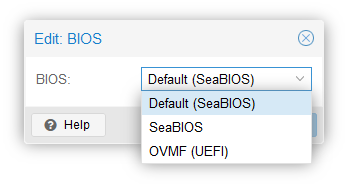
For the record under ESXi 7.0 is the same as under VMware Workstation Pro (of course...)

amenolo
on 16 Apr 2020
if you type 'sysinfo' on the console tab, you'll see the raw dump (parsed) I got from dmidecode.
krayon007
on 16 Apr 2020
- sysinfo VM Linux under ESXi
- sysinfo VM linux under PVE
- sysinfo VM linux under VirtualBox
- sysinfo VM linux under Hyper-V
amenolo
on 16 Apr 2020
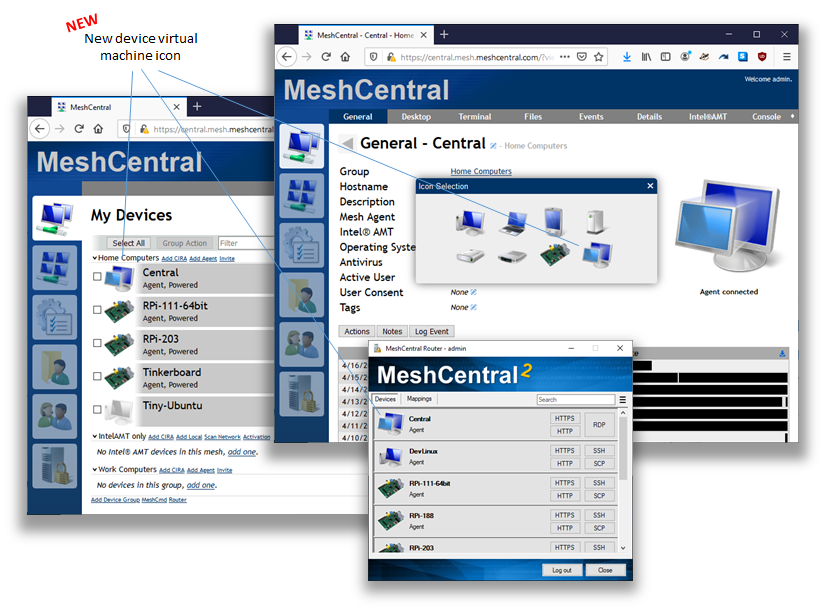
Just published MeshCentral v0.5.1-y that includes the new icon. Note that the mobile web app and MeshCentral router where also updated with the new icon. The new icon is not auto-selected right now, you have to select it yourself. (On top of this, latest release works much better on IE11)
Ylianst
on 16 Apr 2020
The majority of my systems are deployed either in AWS, VirtualBox or on VMware. Does it help to have additional feed back from the first two?
sysinfo VM linux under AWS/Xen
https://pastebin.com/PVb6UP99
 D4V3M0NK
on 17 Apr 2020
D4V3M0NK
on 17 Apr 2020
Going to have to discuss this with Bryan. Currently the icon number is passed to the server in binary command #3, int at position 14, 7 = Raspberry Pi, 8 = Virtual Machine. Problem is, the MeshCore.js is not loaded at this point.
obj.agentInfo.infoVersion = common.ReadInt(msg, 2);
obj.agentInfo.agentId = common.ReadInt(msg, 6);
obj.agentInfo.agentVersion = common.ReadInt(msg, 10);
obj.agentInfo.platformType = common.ReadInt(msg, 14);  <-----
Does anyone have any VMs under Microsoft HyperV? If I can get that, then I should have all the common ones...
krayon007
on 17 Apr 2020
our company pc are using openxt whihch is a local hypervisor installed on pc and on top of this there is the windows vm.
it look like this :
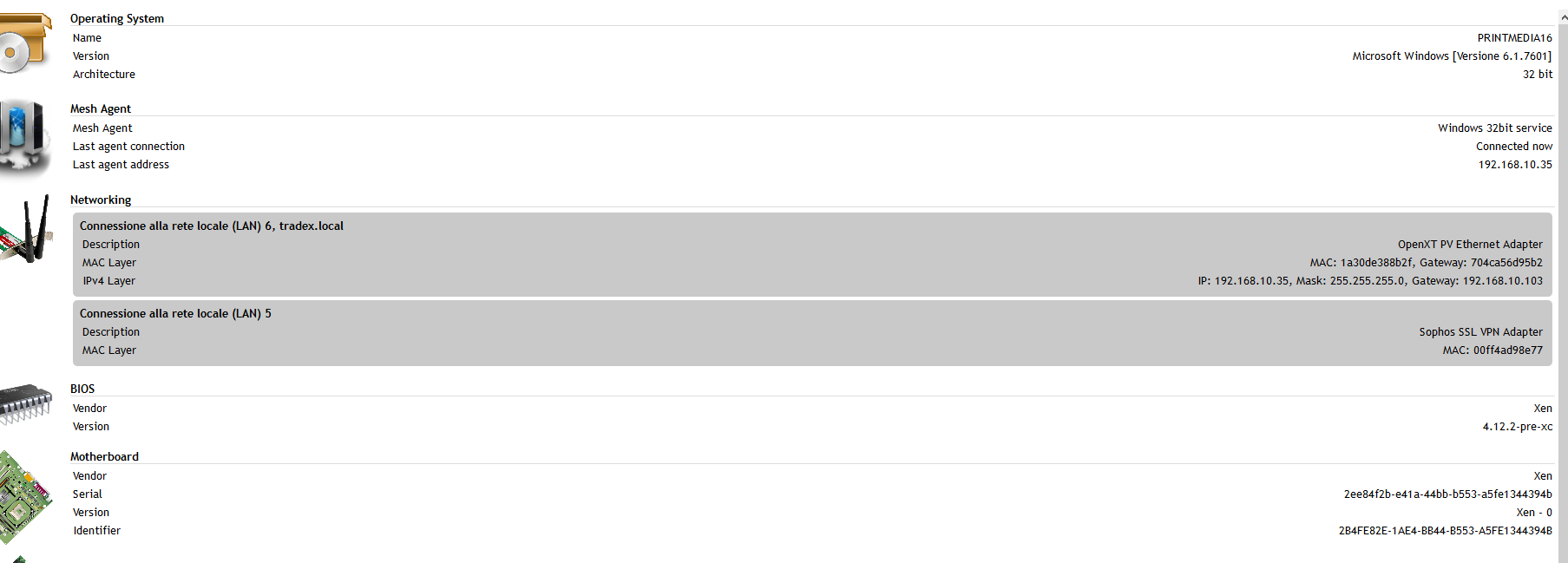
 tradexsrl
on 17 Apr 2020
tradexsrl
on 17 Apr 2020
I am running VMs on HyperV with meshagents installed on them - what needs to be done?
 vitko-bg
on 17 Apr 2020
vitko-bg
on 17 Apr 2020
Does anyone have any VMs under Microsoft HyperV? If I can get that, then I should have all the common ones...
Here's one:
Windows 2012 R2 VM under Windows 2012 R2 Hyper-V
sysinfo
{
"hardware": {
"identifiers": {
"bios_date": "20120523000000.000000+000",
"bios_vendor": "American Megatrends Inc.",
"bios_version": "090006 ",
"board_name": "Virtual Machine",
"board_serial": "6377-7596-2252-9745-6491-1993-22",
"board_vendor": "Microsoft Corporation",
"board_version": "7.0",
"product_uuid": "C7E2B7B2-62E5-4991-BA18-8D2CCBA4C8F1"
}
}
}
 vedran-dobos
on 17 Apr 2020
vedran-dobos
on 17 Apr 2020
Does anyone have any VMs under Microsoft HyperV? If I can get that, then I should have all the common ones...
See my post...or the last ones.
amenolo
on 17 Apr 2020
This is now live in Mesh Central v0.5.14
I used the data you guys posted above, to detect if its running inside a VM. I tested it with Windows, Linux, and macOS, running inside VMware. It should work with zen, hyper-V, etc, based on the data posted above...
I'm adding support for detecting if it's inside a docker container as well... I just got that working, but it didn't make it in time for v0.5.14
As a side note, if the agent has already connected to the server, the icon will not change. You'll need to either do a fresh install, or you just need to delete the device from the group, before the agent connects. But you can test if the detection logic works, separately, as I added a console command, called 'vm'... If you type 'vm' from the console tab, it will tell you if it thinks the agent is running inside a VM or not.
krayon007
on 25 Apr 2020
Bryan,
When in AWS, "vm" reports false.
sysinfo:
sysinfo
{
"hardware": {
"identifiers": {
"bios_date": "08/24/2006",
"bios_vendor": "Xen",
"bios_version": "4.2.amazon",
"product_uuid": "xxxxxxxxxxxxxxxxxxxxxxxxxxxxxxxx"
},
"linux": {
"bios_date": "08/24/2006",
"uevent": "MODALIAS=dmi:bvnXen:bvr4.2.amazon:bd08/24/2006:svnXen:pnHVMdomU:pvr4.2.amazon:cvnXen:ct1:cvr:",
"product_serial": "xxxxxxxxxxxxxxxxxxxxxxxxxxxxxxxxx",
"product_name": "HVM domU",
"chassis_vendor": "Xen",
"chassis_asset_tag": "",
"sys_vendor": "Xen",
"bios_version": "4.2.amazon",
"product_version": "4.2.amazon",
"chassis_version": "",
"chassis_type": "1",
"chassis_serial": "",
"product_family": "",
"product_uuid": "xxxxxxxxxxxxxxxxxxxxxxxxxx",
"bios_vendor": "Xen",
"modalias": "dmi:bvnXen:bvr4.2.amazon:bd08/24/2006:svnXen:pnHVMdomU:pvr4.2.amazon:cvnXen:ct1:cvr:"
}
},
"hash": "xxxxxxxxxxxxxxxxxxxxxxxxxxx"
}
Just added a test system in my development VirtualBox environment, and the icon come up just fine. Nicely done sir.
D4V3M0NK
on 25 Apr 2020
Oops, sorry. I was looking in the wrong field for 'Xen'... I just fixed it. It'll get picked up in the next update.
krayon007
on 25 Apr 2020
Virtual Machine = false in Proxmox Windows guest too (agent reinstalled).
Sysinfo
amenolo
on 25 Apr 2020
Ok, I just fixed it, and let @Ylianst know... Should get picked up in the next update...
krayon007
on 25 Apr 2020
I tested it with Windows, Linux, and macOS, running inside VMware
Oddly enough in my case vm command still returns false in Windows 7 both x86 and x64 clients (fresh installations) under VMware, sysinfo outputs:
https://pastebin.com/as24y0nQ x86
https://pastebin.com/aKy0ib20 x64
amenolo
on 26 Apr 2020
@amenolo , on your VMware configuration, what version do you have your hardware compatibility set to? Mine is currently set to 15.x
According to that dump you posted, none of the fields indicate that it is running on a VM, particularly your bios_vendor, shows Phoenix, while mine says "VMware, Inc"
It's not a windows 7 issue, as I checked my Windows 7 VM... I think its your hardware compatibility setting. It looks like your configuration is not populating any hardware fields with anything indicating it's a VM....
On your Windows guest, can you open a command prompt, and type the following command:
wmic path Win32_VideoController GET Name
And let me know what it says...
That is what I use (in the next version) to fetch the GPU names. If this shows VMmware SVGA, or something similar, I can use that as a fallback...
krayon007
on 26 Apr 2020
Mine is currently set to 15.x
Mine too (the one I set by default)


BTW I just noticed vmx file says virtualHW.version = "16" but I can only assume it's the regular string in VMware 15.x (really never happened to take a look at that field).
Overall I used (as usually) default machine options (except for CPU numbers, RAM amount, HDD size and stuff).
And let me know what it says...
C:\Users\Walter>wmic path Win32_VideoController GET Name
Name
VMware SVGA 3D
Wierd... I can definitely use the VideoController as a fallback...
Do you mind posting the contents of your .vmx file, (or emailing it to me), so I can compare all the fields? I'm really curious why my abstraction is different than yours...
krayon007
on 27 Apr 2020
https://pastebin.com/d87iUUGu x86
https://pastebin.com/beGL6frA x64
BTW same thing in ESXi 7.0 both with

and

For the record in the latter case come out string virtualHW.version = "17" inside vmx file.
(wmic path Win32_VideoController GET Namereturns the same result as well)
amenolo
on 27 Apr 2020
I updated the detection logic, so it will also look at the GPU name as well, so it should at least workaround whatever is causing your machines to have a different BIOS abstraction... Ylian is working on the agent update as we speak...
krayon007
on 27 Apr 2020
The latest changes are live in MeshCentral_v0.5.15, give it a whirl, and let me know if the VM detection works for you now.
krayon007
on 27 Apr 2020
tried the command vm to a virtual machine running into openxt but i get false
MC version = 0.5.14
tradexsrl
on 27 Apr 2020
let me know if the VM detection works for you now.
Affirmative 👍
amenolo
on 27 Apr 2020
@tradexsrl , try v0.5.15.
version 14 was looking in the wrong field for openxt.
krayon007
on 27 Apr 2020
yes it works now
tradexsrl
on 27 Apr 2020
AWS confirmed as working too - nice one Mr Roe, sir
D4V3M0NK
on 27 Apr 2020
Related issues
 petervanv
·
3Comments
petervanv
·
3Comments
 MailYouLater
·
4Comments
MailYouLater
·
4Comments
 veitw
·
4Comments
veitw
·
4Comments
 darryl-h
·
3Comments
darryl-h
·
3Comments
 robclay
·
3Comments
robclay
·
3Comments
Most helpful comment
Just published MeshCentral v0.5.1-y that includes the new icon. Note that the mobile web app and MeshCentral router where also updated with the new icon. The new icon is not auto-selected right now, you have to select it yourself. (On top of this, latest release works much better on IE11)