Meshcentral: HAProxy preventing websocket connections?
Very similar to #32 .
I'm using HAProxy 1.9 as a reverse proxy, server is 0.5.0-n running on Debian Buster, agent is running on Windows 10 Pro.
In My Server -> Trace [Web Socket Relay] I get Relay holding: f8qylhilmcd ([IP Address]) Authenticated and eventually Relay disconnect: f8qylhilmcd ([IP Address]) but never a Relay connected message. The connection status for Desktop, Terminal, or Files in the web interface sits on Setup... for a while, but then goes back to Disconnected. Everything else (including computer information and Console) seems to be working just fine.
How can I troubleshoot this? Is there a way to get debugging information out of the agent?
 RussellAult
All 17 comments
This is certainly odd. Can you try enabling both "relay" and "webrequest" traces and give the output? You should see two web requests come in to meshrelay.ashx. One from the browser and one from the agent.
relay   Relay connected: nhae4lkrbq (192.168.2.136 --> 192.168.2.147)
webrequest  (192.168.2.136) /meshrelay.ashx/.websocket?p=2&nodeid=node//TWTWhJ...&id=nhae4lkrbq&rauth=6pP0Z...
relay   Relay holding: nhae4lkrbq (192.168.2.147) Authenticated
webrequest  (192.168.2.147) /meshrelay.ashx/.websocket?browser=1&p=2&nodeid=node//TWTWhJ...&id=nhae4lkrbq&auth=ibqES8xEWX...
Also, if you have any logs on HAProxy, probably helpful to see if an agent is trying to connect. Lastly, you can try the "wsconnect" command in the agent "console".
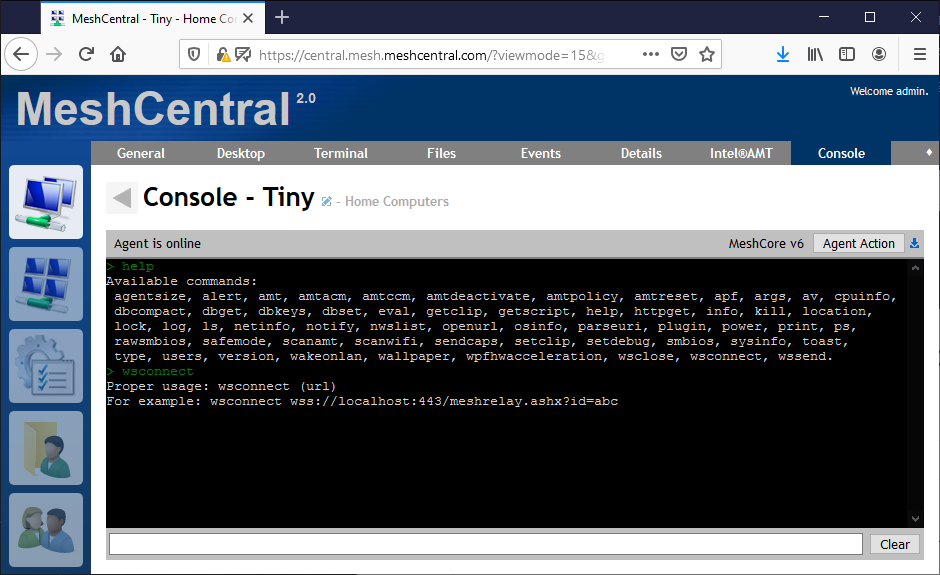
This command allows you to manually cause the agent to initiate a websocket connection to the server. Useful for debugging. If you can use that to see if a relay connection can be setup, that would be great.
 Ylianst
on 20 Mar 2020
Ylianst
on 20 Mar 2020
Ah, okay, here's the Trace when I hit the Desktop -> Connect button:
time, source, message
"8:03:33 PM","relay","Relay disconnect: 8bt6v0zdx73 (IPADDRESS)"
"8:03:03 PM","relay","Relay holding: 8bt6v0zdx73 (IPADDRESS) Authenticated"
"8:03:03 PM","webrequest","(IPADDRESS) /meshrelay.ashx/.websocket?browser=1&p=2&nodeid=node//ke8GmfEjXJM@7splswr9rZNlgVjDQA2lSv4zhfQYuJowh4$UrOo@PjlpWo9bl3gO&id=8bt6v0zdx73&auth=VO07Fq@Bj2zMWuVBtL8PZUq7rTEwbWMFfZEp8Ls2grc4dyVG9cEAq7xuWtKLzT5WyfMW6WqVRPJzBopfYZ@L9D2UDJ$1qls4rfIEzs1l$UsOXyldix1n2I6rUl2QrWWBI$xnoTADSPp8zhg="
so the agent webrequest is not coming in.
When I manually initiated a websocket from the Console I see this:
````
wsconnect wss://meshcentral.EXAMPLE.COM:443/meshrelay.ashx?id=abc
New websocket session #1
```but nothing shows up in theTrace`.
RussellAult
on 20 Mar 2020
It's clear the agent is not getting thru. I have something I want you to try. In the MeshAgent.msh file that is in the same folder as MeshAgent.exe add the following line:
webSocketMaskOverride=1
Then restart the agent and try again. If it works, in the domain section of the MeshCentral config.json, add the following line:
"agentConfig": [ "webSocketMaskOverride=1" ]
Don't forget to add a comma at the end of the line if needed. Then, you can restart the server every new agent you install will have that new line in the .msh file. Let me know if this works.
Ylianst
on 20 Mar 2020
webSocketMaskOverride=1 doesn't seem to have made any difference.
Are there any debugging options on the agent itself?
RussellAult
on 20 Mar 2020
You can run the agent in console mode on Windows like this:
meshagent.exe -run
I would love to see the reverse proxy logs. For debugging on the agent, Bryan would have to step in.
Ylianst
on 20 Mar 2020
Chatted with Bryan, there is no easy way to debug the agent for this type of thing. If you can get HAProxy logs that would indicate a problem, that would be great. Otherwise, I will need to setup HAProxy and give it a try myself.
Ylianst
on 20 Mar 2020
I just setup HAProxy on my Ubuntu box and I got exactly the same result! Debugging now.
Ylianst
on 20 Mar 2020
I'm heartily glad to hear that; I discovered about an hour ago that logging isn't working properly on my HAProxy machine, so now I'm trying to solve that. I'm guessing you'll find the answer before I will!
RussellAult
on 20 Mar 2020
Ok, I see the problem and have a temporary fix for you. In the HTTP header, the browser will sent:
Host: mesh.myserver.com
But the agent will send:
Host: mesh.myserver.com:443
The agent includes the port in the host header. You can fix this by adding the second line:
acl meshcentralhost hdr(host) -i mesh.myserver.com
acl meshcentralhost hdr(host) -i mesh.myserver.com:443
Let me know if that works. I found this by running sudo haproxy -f haproxy.cfg -d, the -d is for debug and it shows everything going on. I will check, but seems like a bug in the agent.
Ylianst
on 20 Mar 2020
Your work-around works! Definitely seems like a bug in the agent (my impression is that the Host header isn't supposed to have the port number in it?
RussellAult
on 20 Mar 2020
I am looking up the port now. According to this, the port is optional, so it may be technically correct. The agent does not put the port in the HOST header when connecting the control channel, so at the very least it's not consistent.
Ylianst
on 20 Mar 2020
That's funny, I was just about to post exactly the same thing.
RussellAult
on 20 Mar 2020
Thanks to your work, I can document HAProxy as supported. This is excellent.
Ylianst
on 20 Mar 2020
This is the authoritative source, RFC7230 section 5.4. Port is optional, so agent is correct. However... section 5.5:
if the connection's incoming TCP port number differs from the default port for the effective request URI's scheme, then a colon (":") and the incoming port number (in decimal form) are appended to the authority component.
It's weak text but would indicate that you only specify the port if it's not default.
Ylianst
on 20 Mar 2020
Wonderful! HAProxy is a great little tool.
As for the optional port, you're definitely right that it's not a bug, per se (although I suppose the inconsistent usage might be, since it causes hard-to-explain behaviour like we just spent the last several hours sorting out). That being said, it'd probably be better to omit it for default ports since that seems to be norm?
RussellAult
on 20 Mar 2020
Agreed. Probably best to remove if it's the default.
Ylianst
on 20 Mar 2020
Thanks again for all your help Ylian! Glad I was able to contribute something back for it.
RussellAult
on 20 Mar 2020
Related issues
 coolwormgit
·
3Comments
coolwormgit
·
3Comments
 LPJon
·
3Comments
LPJon
·
3Comments
 veitw
·
4Comments
veitw
·
4Comments
 M1CK431
·
3Comments
M1CK431
·
3Comments
 Julien-asv
·
3Comments
Julien-asv
·
3Comments