Meshcentral: Suggestion: A clear way to identify which Windows 10 Version is deployed on the details page
The Details page for Windows 10 indicates the Version build number but it's not as clear to know which release it is.
The website: ChangeWindows.org allows you to see all details of the build version.
It would be nice to know the Release Verison like 1809 (Typically YYMM) of the version to know if the version is still supported
Perhaps have a link Icon at the end of the windows version to open a new tab to see more details from ChangeWindows.org
 b8two
b8two
All 13 comments
You can check the Windows Edition and Release ID in the registry:
REG QUERY "HKLM\SOFTWARE\Microsoft\Windows NT\CurrentVersion" /v ProductName
REG QUERY "HKLM\SOFTWARE\Microsoft\Windows NT\CurrentVersion" /v ReleaseID
Output:
HKEY_LOCAL_MACHINE\SOFTWARE\Microsoft\Windows NT\CurrentVersion
    ProductName    REG_SZ    Windows 10 Home

HKEY_LOCAL_MACHINE\SOFTWARE\Microsoft\Windows NT\CurrentVersion
    ReleaseID    REG_SZ    1909
Edit: Could this info also be put in the General tab?
Current:

Maybe something like this:

 MailYouLater
on 21 Feb 2020
MailYouLater
on 21 Feb 2020
Thanks for the tip, I'll add that to the metadata passed to the server
 krayon007
on 21 Feb 2020
krayon007
on 21 Feb 2020
Agreed, this would be great to have. Will work on this with Bryan in the coming weeks.
 Ylianst
on 23 Feb 2020
Ylianst
on 23 Feb 2020
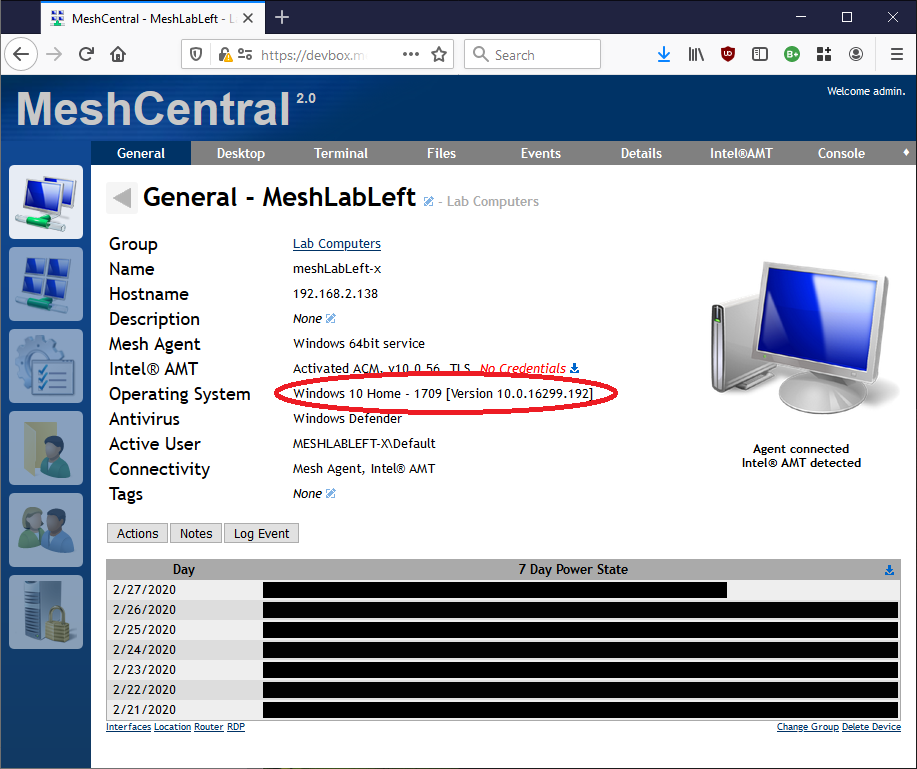
Ok, I got this tested and added in the agent. It will be included in the next agent update. I made it so it checks if those reg keys exist (and are accessible), and if so, will use those, falling back to the old way if it doesn't work.
I found that older versions of windows such as Windows 7 and Server 2008 don't have those reg keys, but newer versions of windows like Server 2019 and Windows 10, have them... So I tested it on a couple different versions of windows to test. The field will get populated like this (on my machine anyways):
Windows 10 Pro - 1903 [Version 10.0.18362.657]
krayon007
on 25 Feb 2020
Just published MeshCentral v0.4.9-m with Bryan's improved OS information. This version of MeshCentral has Bryan's all new MeshAgents on all platforms, so all agents will auto-update and once they reconnect, you should see the new information. Let us know how it works for you.
Ylianst
on 28 Feb 2020
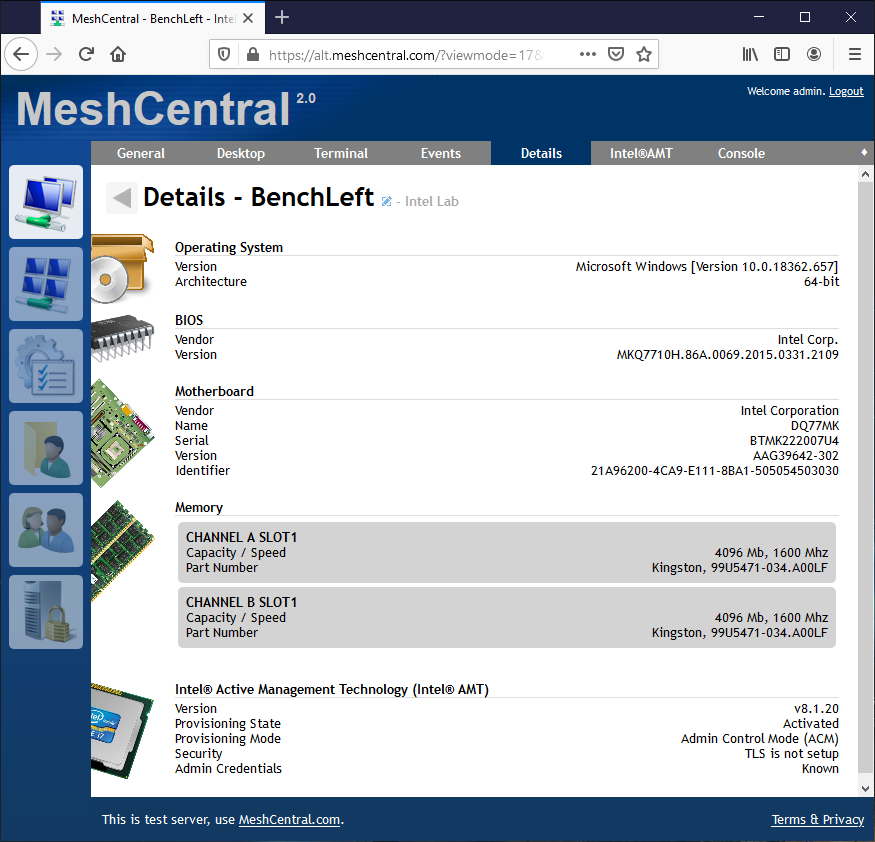
Looks good on the General tab, but I think @b8two's original request to have it shown on the Details page should also be implemented, as the Details page should be _more_ detailed than the General page, not less detailed.
MailYouLater
on 2 Mar 2020
Working on it now :)
Ylianst
on 2 Mar 2020
Just published MeshCentral v0.4.9-r with a better looking device details page. Feedback appreciated.
Ylianst
on 3 Mar 2020
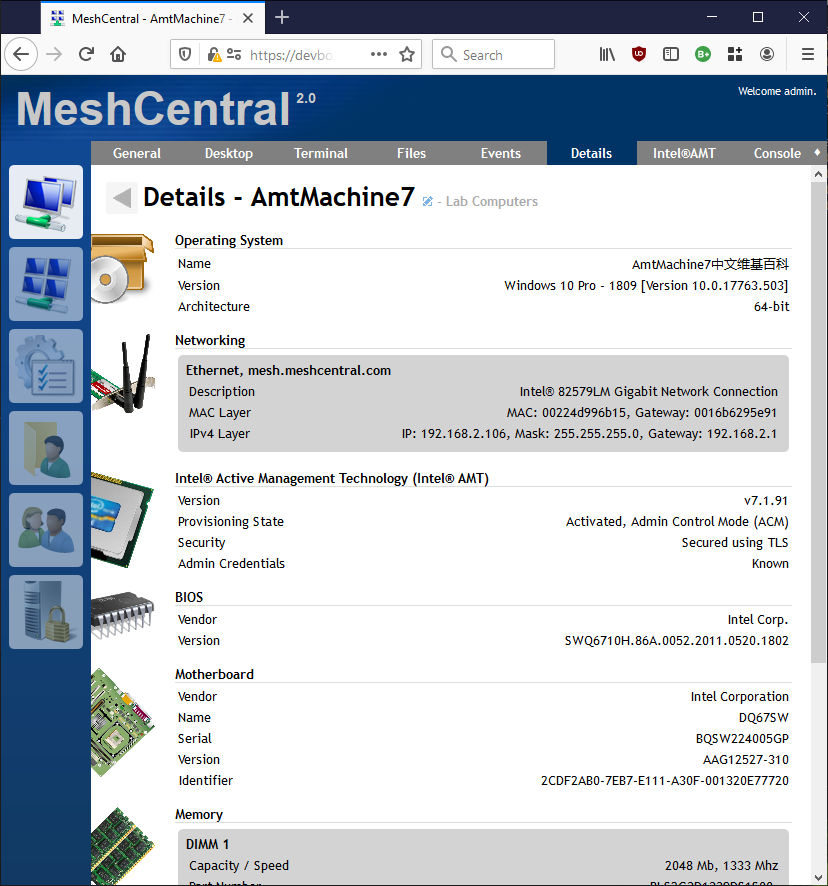
Published MeshCentral v0.4.9-s with network interfaces on the details page.
Ylianst
on 3 Mar 2020
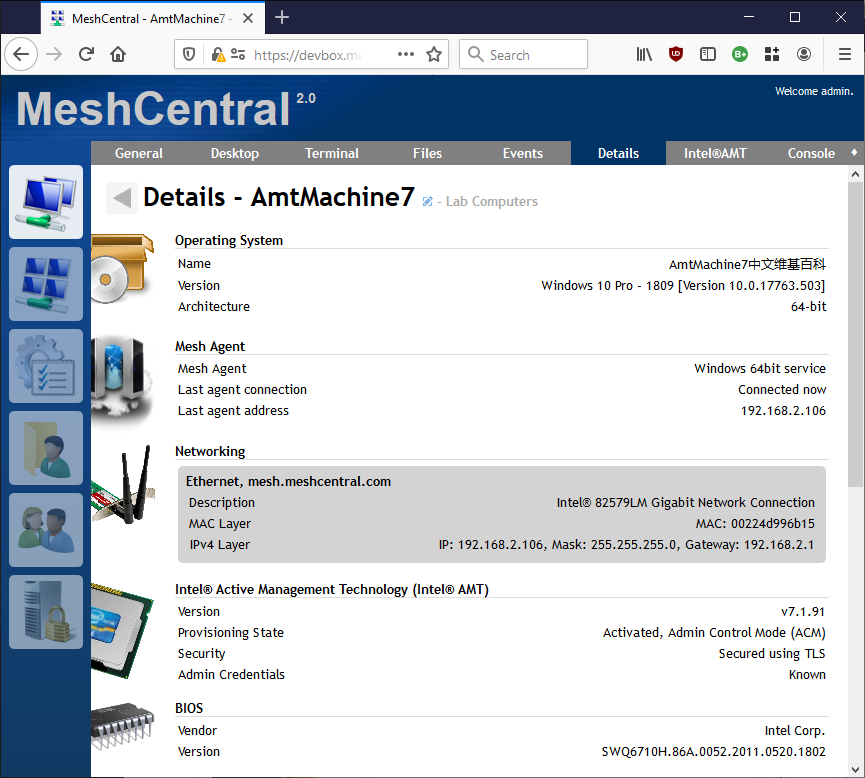
Nice add, as @MailYouLater mentioned with the details page being more detailed, adding the connection gateway/IP (the "Address" on the "List" view page) which shows the agents public IP address would be a good add as well.
Edit: "Last Seen" time would be good here as well.
 ryanblenis
on 3 Mar 2020
ryanblenis
on 3 Mar 2020
nice additions, love it ;-)
 petervanv
on 3 Mar 2020
petervanv
on 3 Mar 2020
@ryanblenis Hold my sugar free root beer... Working on it.
Ylianst
on 3 Mar 2020
MeshCentral v0.4.9-t with agent information.
Ylianst
on 3 Mar 2020
Related issues
 robclay
·
3Comments
MailYouLater
·
4Comments
robclay
·
3Comments
MailYouLater
·
4Comments
 LPJon
·
3Comments
petervanv
·
3Comments
LPJon
·
3Comments
petervanv
·
3Comments
 vish84
·
3Comments
vish84
·
3Comments
Most helpful comment
Just published MeshCentral v0.4.9-r with a better looking device details page. Feedback appreciated.