Meshcentral: Minimum Linux environment requirement for Mesh client?
I have some Linux based modem/routers, I was wondering if it was possible to install the Mesh client on to them.
I've tried the linux install script on one but it failed with a Bash error.
 b8two
b8two
All 12 comments
I'm actually working on updating the installer, to make it uniform across platforms, so that you can do a -fullinstall on any platform.
The install script is a little convoluted because it tries to determine what platform, OS, and cpu you are using, so it can fetch the appropriate binary. But if you already know which binary you need, you'll be able to just run the binary directly to install it. (When I'm done with the update that is)
 krayon007
on 21 Feb 2020
krayon007
on 21 Feb 2020
Do you know what soc your router uses? Was the bash error related to not knowing which soc you have?
krayon007
on 21 Feb 2020
Hi Kryon007,
While you are working on the "meshinstall.sh", the Script is called with wget parameter --no-check-certificate, however internal to the script, this parameter is not used. When I was installing on our Proxmox Linux package (Debian based), I needed to modify the script to add in --no-check-certificate for each wget command.
The two devices we use are NTC-140 and now RUT240.
But I only tried the NTC-140 so far which results with;
2020-02-22 13:49:35 (58.2 KB/s) - './meshinstall.sh' saved [9596/9596]
-sh: sudo: not found
env: can't execute 'bash': No such file or directory
root:~#
Hence the script didn't start to run at all.
b8two
on 22 Feb 2020
You can get a list of the available MeshAgents by going to "/meshagents" on your server. For example you can get the list here: https://meshcentral.com/meshagents. You can see a list of binaries and download links.
Basically, you could try to download the agent that matches the architecture and OS or your device and see if it runs.
If there is no agent that run on your device, the agent will need to be cross-compiled on it.
 Ylianst
on 23 Feb 2020
Ylianst
on 23 Feb 2020
Hi Ylianst,
Thanks for the URL for the MeshAgents, it has moved me a step further.
Hi Kryon007,
I have found that I don't have BASH shell scripting, however SH shell scripting is avaliable. This is using buzybox.
I have an ARMv7 CPU, hence I started testing with the ARMv5 binarary.
After downloading this binrary I was able to launch it, after which I loose control of the shell. On another instance of the shell I check with ps and can see that it is still launched. Disconnecting the first shell also closes the mesh process.
I've tried following the meshinstall.sh manually, however when I try the wget command for meshsettings?id={ID} It throws the error of "Unauthorized". (after also needing the --no-check-certificate switch). (ID taken from the installation script from Mesh)
I repeat this step on my computer after authenticating to the web browser and get the same response. (Mesh 0.4.9-k)
I know the script worked for me on an earlier version of Mesh using a Full Linux x64 install, hence I'm wondering if this issue is due to a step I manually missed or something that changed in the current version.
b8two
on 24 Feb 2020
When you launched the binary directly, were any messages displayed on the terminal? You weren't able to Ctrl-c out of whatever it was doing?
krayon007
on 24 Feb 2020
No Messages, Ctrl-c didn't respond
b8two
on 24 Feb 2020
I tried the following Agents in the ARM7 processor.
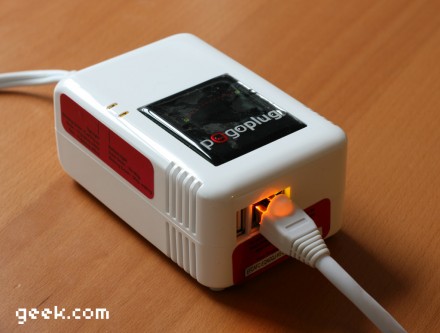
Linux ARM5 & Linux ARM PogoPlug Hang.
Linux ARM - HardFloat & Linux ARMv8-64 throw a scripting error?
b8two
on 3 Mar 2020
What's the scripting error you encountered?
krayon007
on 3 Mar 2020
I have an original Pogo Plug in the lab, I could give the MeshAgent a try.
Ylianst
on 3 Mar 2020
I'm not sure if this belongs here, or if I should file a new issue (_Please let me know!_) our use case is slightly different, but the title of this issue seems fitting.
Problem Description: What supporting libraries or packages are required for the Linux Mesh Agent?
For example, when you are in the GUI and click on the Device Group, then click "Add Agent" and select "Linux / BSD" the resulting command provides a command which calls wget. Additionally we can see that the installer ( https://github.com/Ylianst/MeshCentral/blob/master/agents/meshinstall-linux.sh ) will try and use wget to download the meshagent binary ( https://github.com/Ylianst/MeshCentral/blob/master/agents/meshagent_x86-64 ) in the DownloadAgent() function.
In Linux, are there any other libraries or packages required for the installation or ongoing use of the agent?
Running ldd against the same binary results in the following output:
# ldd meshagent_x86-64
        linux-vdso.so.1 =>  (0x00007ffe6d923000)
        libpthread.so.0 => /lib/x86_64-linux-gnu/libpthread.so.0 (0x00007f3f67dcd000)
        libdl.so.2 => /lib/x86_64-linux-gnu/libdl.so.2 (0x00007f3f67bc9000)
        libutil.so.1 => /lib/x86_64-linux-gnu/libutil.so.1 (0x00007f3f679c6000)
        libm.so.6 => /lib/x86_64-linux-gnu/libm.so.6 (0x00007f3f676bd000)
        librt.so.1 => /lib/x86_64-linux-gnu/librt.so.1 (0x00007f3f674b5000)
        libc.so.6 => /lib/x86_64-linux-gnu/libc.so.6 (0x00007f3f670eb000)
        /lib64/ld-linux-x86-64.so.2 (0x00007f3f67fea000)
readelf results in the following output:
# readelf --dynamic meshagent_x86-64

Dynamic section at offset 0x36fa88 contains 28 entries:
  Tag        Type                         Name/Value
 0x0000000000000001 (NEEDED)             Shared library: [libpthread.so.0]
 0x0000000000000001 (NEEDED)             Shared library: [libdl.so.2]
 0x0000000000000001 (NEEDED)             Shared library: [libutil.so.1]
 0x0000000000000001 (NEEDED)             Shared library: [libm.so.6]
 0x0000000000000001 (NEEDED)             Shared library: [librt.so.1]
 0x0000000000000001 (NEEDED)             Shared library: [libc.so.6]
 0x000000000000000c (INIT)               0x40c308
 0x000000000000000d (FINI)               0x6241d8
 0x0000000000000004 (HASH)               0x400298
 0x000000006ffffef5 (GNU_HASH)           0x401488
 0x0000000000000005 (STRTAB)             0x405b88
 0x0000000000000006 (SYMTAB)             0x402108
 0x000000000000000a (STRSZ)              10028 (bytes)
 0x000000000000000b (SYMENT)             24 (bytes)
 0x0000000000000015 (DEBUG)              0x0
 0x0000000000000003 (PLTGOT)             0x96fc98
 0x0000000000000002 (PLTRELSZ)           5232 (bytes)
 0x0000000000000014 (PLTREL)             RELA
 0x0000000000000017 (JMPREL)             0x40ae98
 0x0000000000000007 (RELA)               0x4088b8
 0x0000000000000008 (RELASZ)             9696 (bytes)
 0x0000000000000009 (RELAENT)            24 (bytes)
 0x0000000000000018 (BIND_NOW)
 0x000000006ffffffb (FLAGS_1)            Flags: NOW
 0x000000006ffffffe (VERNEED)            0x408798
 0x000000006fffffff (VERNEEDNUM)         6
 0x000000006ffffff0 (VERSYM)             0x4082b4
 0x0000000000000000 (NULL)               0x0
Use Case 1: RHEL 7 doesn't come with wget installed by default. Trying to install the MeshAgent fails with
bash: wget: command not found
Use Case 2: We are looking to use the agent in various hardened environments, as such, we would like to know which packages or libraries are absolutely required (All others may be removed). We have looked through the user documentation ( http://info.meshcentral.com/downloads/MeshCentral2/MeshCentral2UserGuide-0.2.7.pdf ) , but are unable to find any software packages/libraries requirements for the agent.
 darryl-h
on 31 Mar 2020
darryl-h
on 31 Mar 2020
Hi @darryl-h
The "Add Agent" and select "Linux / BSD" Provides a link to try with wget and upon failure wget again but with --no-proxy, (removed full URL).
(wget "https://mesh/meshagents?script=1" --no-check-certificate -O ./meshinstall.sh || wget "https://mesh/meshagents?script=1" --no-proxy --no-check-certificate -O ./meshinstall.sh)
However if you download the script https://mesh/meshagents?script=1
you can see that it is written to try wget and upon failure to use curl;
wget $url/meshagents?id=$machineid -O /usr/local/mesh/meshagent || curl -L --output /usr/local/mesh/meshagent $url/meshagents?id=$machineid
@Ylianst I think that both parts of the "Linux / BSD" option need to be modified to help more users make use of this option;
The install link should try using curl, not just wget (This is inconsistant with the script)
(wget "https://mesh/meshagents?script=1" --no-check-certificate -O ./meshinstall.sh || curl ./meshinstall.sh -L -k --output "https://mesh/meshagents?script=1" || wget "https://mesh/meshagents?script=1" --no-proxy --no-check-certificate -O ./meshinstall.sh)
^ I don't know if the 2nd Pipe would work or not. Perhaps have a Web Tick Box regarding the use of a proxy or not, I have not looked up the no proxy option for curl.
The downloaded script should be changed to ignore the certificates; (This is inconsistant with the download link)
wget: --no-check-certificate
curl: -k
wget $url/meshagents?id=$machineid --no-check-certificate -O /usr/local/mesh/meshagent || curl -L -k --output /usr/local/mesh/meshagent $url/meshagents?id=$machineid
Regarding the "Linux / BSD / macOS Binary Installer" option, perhaps it would be suitiable to also have the curl syntax option and both use the ignore the certificates switches.
b8two
on 15 Oct 2020
Related issues
darryl-h
·
3Comments
 petervanv
·
3Comments
petervanv
·
3Comments
 guerby
·
3Comments
petervanv
·
3Comments
guerby
·
3Comments
petervanv
·
3Comments
 penguinthingie
·
4Comments
penguinthingie
·
4Comments