Meshcentral: Help with MeshCentral and fail2ban
This is more a request for help and advices than a real issue.
I would like to combine MeshCentral to fail2ban service in order to ban IP addresses that fail too many times to login from MC web interface. Does anyone has any advice to me please? I can not succeed in finding the answer since I do not fully know how to use fail2ban.
I thank you in advance.
 sylvaincolson
All 10 comments
Fail2ban, will need access to MC log fail, and the MC will need to log those IP's that fail. So that will need to be added to MC, if not already.
You will also need to read over some of fail2ban log actions, they regexp, and create a filter under "filters action jails" service to get everything working.
 techno-express
on 13 Feb 2020
techno-express
on 13 Feb 2020
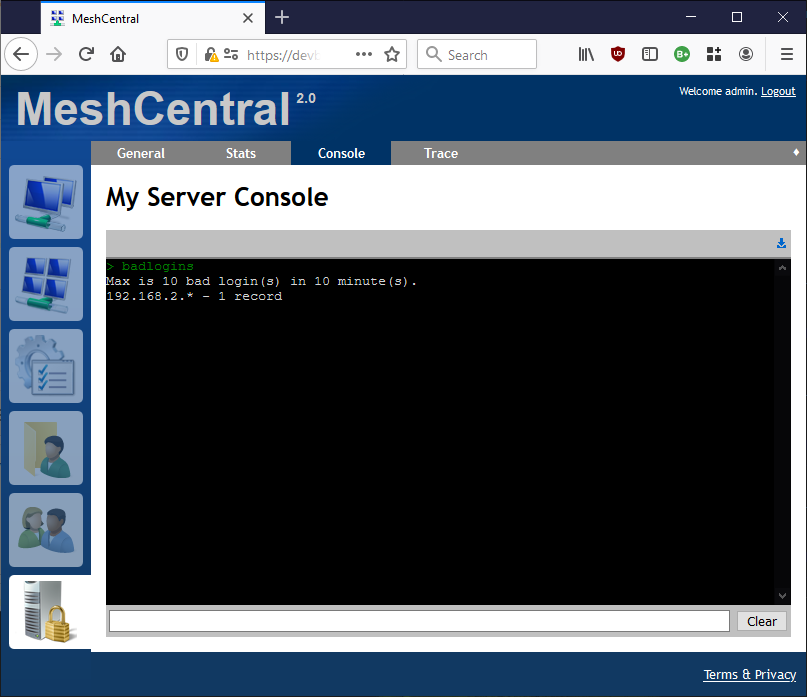
MeshCentral has a built-in system to ban IP addresses that make too many bad login attempts. The current default is 10 tries in 10 minutes for a x.x.x.x/24 address range. You can try it by typing a bad username and password, then going into "My Server"/"Console" and typing "badlogins" (Picture below). This said, if there is a specific request for MeshCentral to generate logs for this use case (along with exactly what logs need to be generated). I am willing to consider it.
 Ylianst
on 14 Feb 2020
Ylianst
on 14 Feb 2020
@Ylianst : the system works perfectly, just like what I wanted. Yet, I would appreciate if there was an entry in the logs that specified the IPs of the machine, whether they enter in the server or they fail to connect. Do you think it could be worth it?
@techno-express : Thank you for your help, depending on Ylianst's answer, I will try to do what you suggest, at least for the challenge and the Fail2ban skill development, at best, for the solution development.
Thank you both for your answers and time, I have the solution to my problem, even if I would appreciate the IPs to appear in a log file.
sylvaincolson
on 17 Feb 2020
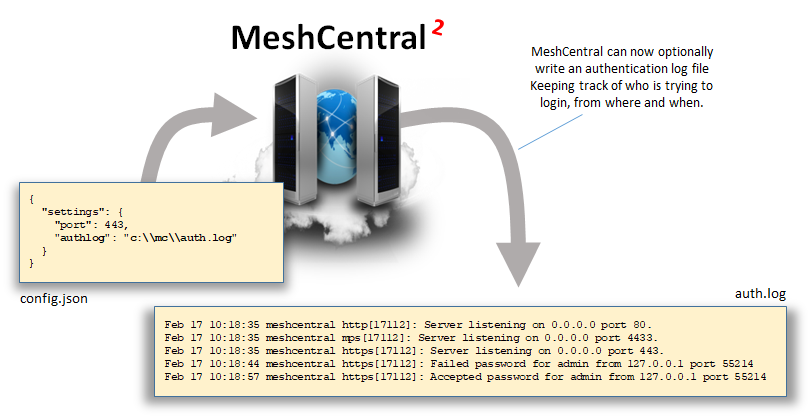
Just published MeshCentral v0.4.9-g with really basic auth.log support. You have to add the line "authlog":"<filename>" in the settings section of config.json and MeshCentral will write the authentication log. Now, I am no expert in this type of log, I just looked at an example only and did something like it. For any changes to how the log is written, please as a specific as possible as to any changes. Let me know if this helps.
Ylianst
on 17 Feb 2020
Thank you Ylianst, I will test that new feature today. May I ask you if you have recommendations on how to disable the MC intern ban system, please? I have done it today, but maybe you do have another suggestion so that I can do it properly?
sylvaincolson
on 18 Feb 2020
In the settings section of config.json, you can add this to make the filter really weak...
"MaxInvalidLogin": {
"time": 10,
"count": 99999,
"coolofftime": 1
}
Or if you update to MeshCentral v0.4.9-j that I just published, you can do this:
"MaxInvalidLogin": false
This will properly disable the bad authentication login filter. Let me know if that works.
Ylianst
on 18 Feb 2020
Also note that I have never tried fail2ban, so I have no idea if it will parse the MeshCentral auth.log log. If you run into issues and can manually fix the log and it works, send over any changes you made and I will do the fix.
Also note that I am on vacation starting tomorrow for a week. So I may not be as responsive for a while.
Ylianst
on 18 Feb 2020
Thank you Ylianst, I will work on Fail2Ban and keep you in touch depending on the success of what I will try.
Have great holidays and enjoy them as much as you deserve. :wave:
sylvaincolson
on 19 Feb 2020
OK, so, apparently, Fail2Ban works perfectly with MeshCentral. For those who do not really know Fail2Ban, it is a framework that protects computer servers from brute-force attacks. It scans files (generally log files) searching for regular expressions (regex) in order to retrieve IP addresses to be banned.
In order to use it,
- Ylianst has integrated the _auth.log_ file generation.
- According to its syntax, I have been able to create first the
meshcentral-filter.conffile, that I have placed inside/etc/fail2ban/filter.d/. It contains:
[Definition]
failregex=^ meshcentral http.*: Failed \S+ for .*? from <HOST> port \d*
ignoreregex=
which can retrieve the IP addresses that failed to log in.
- I then created the file
meshcentrail-jail.confplaced inside/etc/fail2ban/jail.dwhich will contain:
[meshcentral]
enabled = true
port = 8080                                  <---- enter here meshcentral connection port
filter = meshcentral-filter
logpath = /var/log/meshcentral/auth.log      <---- change here for you meshcentral auth.log path
maxretry = 5                                 <---- enter the max number of attempts before banishment
findtime = 600                               <---- enter here the time before banishment in seconds
bantime = 999999                             <---- enter here the bantime in seconds
backend = %(dropbear_backend)s
I tested the interactions between Fail2Ban and meshcentral intern banishment system: there are no problem using the two of them, just note that meshcentral's system is over Fail2Ban which will not be able to detect the connection attempt if meshcentral has banished an IP.
Thank you @Ylianst for providing me the tools to develop my solution.
sylvaincolson
on 19 Feb 2020
Oh my gosh! Thank you for taking the time to write this up, I need to add this to MeshCentral documentation when I get back from vacation.
Ylianst
on 23 Feb 2020
Related issues
 nroach44
·
3Comments
nroach44
·
3Comments
 LPJon
·
3Comments
LPJon
·
3Comments
 hellofaduck
·
3Comments
hellofaduck
·
3Comments
 whalehub
·
3Comments
whalehub
·
3Comments
 petervanv
·
3Comments
petervanv
·
3Comments
Most helpful comment
OK, so, apparently, Fail2Ban works perfectly with MeshCentral. For those who do not really know Fail2Ban, it is a framework that protects computer servers from brute-force attacks. It scans files (generally log files) searching for regular expressions (regex) in order to retrieve IP addresses to be banned.
In order to use it,
meshcentral-filter.conffile, that I have placed inside/etc/fail2ban/filter.d/. It contains:which can retrieve the IP addresses that failed to log in.
meshcentrail-jail.confplaced inside/etc/fail2ban/jail.dwhich will contain:I tested the interactions between Fail2Ban and meshcentral intern banishment system: there are no problem using the two of them, just note that meshcentral's system is over Fail2Ban which will not be able to detect the connection attempt if meshcentral has banished an IP.
Thank you @Ylianst for providing me the tools to develop my solution.