Meshcentral: Meshcommander certificates created in 2020 expire on 1950
We have a project that uses mesh commander, and everything was working fine last year.
The problem, is that as soon as 2020 get started, the certificates created by meshcommander were created with the expiration data as 1950.
Taking a look at the code we noticed that:
At the file "C:Program Files (x86)Open SourceMeshCommandercommander.htm" we have:
Line 49799: cert.validity.notAfter.setFullYear(cert.validity.notAfter.getFullYear() + 30);
This will set the expiration yar as the current yeat + 30, resulting in 2050.
Line 49763: localStorage.setItem('certificates', k + crypted);
At the function "cert_saveCertificates", the certificate is stored at the localStorage.
Line 49739: var certificateStore2 = JSON.parse(dec);
At the function "cert_loadCertificates", the certificate is retrieved from the localStorage, and the value notAfter insyde the string "dec" is 2050, but after the parser, the notAfter var value is 1950 at certificateStore2.
 RafaelRMachado
All 5 comments
Your right, working on this now.
 Ylianst
on 5 Feb 2020
Ylianst
on 5 Feb 2020
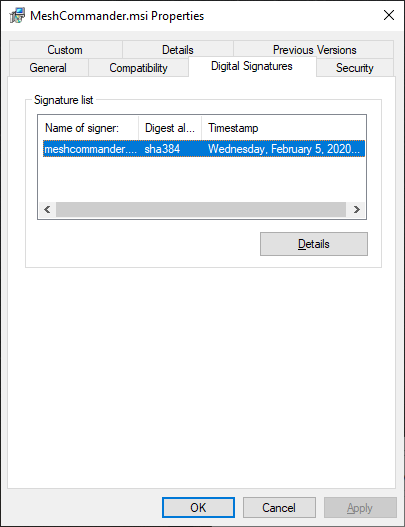
Just did a silent update of MeshCommander v0.8.0, did not change the version number but changed the "+30" to "+20" and it fixed it for the next 10 years. I had this problem with OpenSSL before. You will need to uninstall/download/reinstall. Let me know if this works. When you download the new .msi, you can check the signature date to see if you have the latest one. Let me know if this works.
Ylianst
on 6 Feb 2020
Since OpenSSL only allows dates between 1950 and 2049, I just published a new MeshCommander that will always create certificates with validity set from 2019 to 2049. That way, we are good until 2049 and I imagine that there will be change in OpenSSL when we approach 2049.
Ylianst
on 8 Feb 2020
This works for us. Since the problem is openssl related also we are ok with this temporary fix
Thanks!
RafaelRMachado
on 8 Feb 2020
Note that MeshCommander is now on GitHub.
Ylianst
on 9 Mar 2020
Related issues
 unguzov
·
3Comments
unguzov
·
3Comments
 MailYouLater
·
3Comments
MailYouLater
·
3Comments
 vish84
·
3Comments
vish84
·
3Comments
 guerby
·
3Comments
guerby
·
3Comments
 Julien-asv
·
3Comments
Julien-asv
·
3Comments
Most helpful comment
Note that MeshCommander is now on GitHub.