Meshcentral: Meshagent console "power" command does not work.
Can someone tell me what is the proper way to use power command in meshagent console?
what I tryed on Chrome, Firefox and others, still the same result:
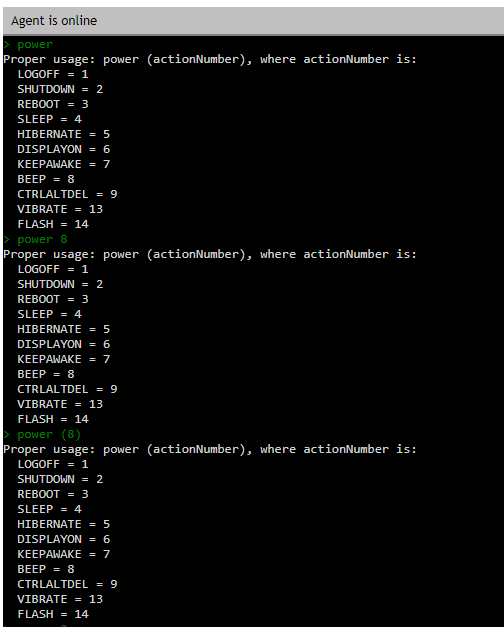
is there any bad command parsing?
 olivier37520
All 6 comments
Looks like it is checking if the number you're inputting is a number on line 2657 of meshcore.js, but it is actually parsed as a string (that contains the number):
if ((args['_'].length == 0) || (typeof args['_'][0] != 'number')) {
 ryanblenis
on 4 Feb 2020
ryanblenis
on 4 Feb 2020
Yes but input is a string and can’t be a number...
Can use in the if condition !isNaN(args['_'][0]) and then args['_'][0] = parseInt(args['_'][0])
olivier37520
on 5 Feb 2020
I've noticed this before but not bothered to look into it at the time. It looks like a bug to me.
I've just dug in a little and it seems that the argument is expected to be a number, but it's coming through as a string. The affected code is here, and I was able to make it work with these changes:
                case 'power': { // Execute a power action on this computer
                    if (mesh.ExecPowerState == undefined) {
                        response = 'Power command not supported on this agent.';
                    } else {
-                        if ((args['_'].length == 0) || (typeof args['_'][0] != 'number')) {
+                        if ((args['_'].length == 0) || isNaN(Number(args['_'][0]))) {
                            response = 'Proper usage: power (actionNumber), where actionNumber is:\r\n  LOGOFF = 1\r\n  SHUTDOWN = 2\r\n  REBOOT = 3\r\n  SLEEP = 4\r\n  HIBERNATE = 5\r\n  DISPLAYON = 6\r\n  KEEPAWAKE = 7\r\n  BEEP = 8\r\n  CTRLALTDEL = 9\r\n  VIBRATE = 13\r\n  FLASH = 14'; // Display correct command usage
                        } else {
-                            var r = mesh.ExecPowerState(args['_'][0], args['_'][1]);
+                            var r = mesh.ExecPowerState(Number(args['_'][0]), Number(args['_'][1]));
                            response = 'Power action executed with return code: ' + r + '.';
                        }
                    }
                    break;
                }
I'd also recommend this change, though it's just for improved readability:
-                            response = 'Proper usage: power (actionNumber), where actionNumber is:\r\n  LOGOFF = 1\r\n  SHUTDOWN = 2\r\n  REBOOT = 3\r\n  SLEEP = 4\r\n  HIBERNATE = 5\r\n  DISPLAYON = 6\r\n  KEEPAWAKE = 7\r\n  BEEP = 8\r\n  CTRLALTDEL = 9\r\n  VIBRATE = 13\r\n  FLASH = 14'; // Display correct command usage
+                            // Display correct command usage
+                            response = 'Proper usage: power (actionNumber), where actionNumber is:\r\n' +
+                                       '  LOGOFF = 1\r\n' +
+                                       '  SHUTDOWN = 2\r\n' +
+                                       '  REBOOT = 3\r\n' +
+                                       '  SLEEP = 4\r\n' +
+                                       '  HIBERNATE = 5\r\n' +
+                                       '  DISPLAYON = 6\r\n' +
+                                       '  KEEPAWAKE = 7\r\n' +
+                                       '  BEEP = 8\r\n' +
+                                       '  CTRLALTDEL = 9\r\n' +
+                                       '  VIBRATE = 13\r\n' +
+                                       '  FLASH = 14';
Edit: I wrote this earlier, edited it a moment ago, posted it, then saw the other comments that came in while I was busy doing other things. 😒
 MailYouLater
on 5 Feb 2020
MailYouLater
on 5 Feb 2020
Wow, that "power" command dates back from the really early days of MeshCentral, the code that implements it is from the v1 agent. I have not tested that, maybe never. In any case, made the @MailYouLater fix, it will be in the next published release. I did just use it and rebooted one of my lab machines.
 Ylianst
on 5 Feb 2020
Ylianst
on 5 Feb 2020
Published MeshCentral v0.4.8-n with fix for this. Let me know if it works.
Ylianst
on 5 Feb 2020
fixed
olivier37520
on 17 Feb 2020
Related issues
 hellofaduck
·
3Comments
hellofaduck
·
3Comments
 coolwormgit
·
3Comments
coolwormgit
·
3Comments
 darryl-h
·
3Comments
darryl-h
·
3Comments
 veitw
·
4Comments
veitw
·
4Comments
 guerby
·
3Comments
guerby
·
3Comments