Meshcentral: Agent tag and display name in UI
Is there a way to use agent tag as display name in meshcentral ui instead of the network name?
Actually i have to perform a manual edit.
I was thinking in something like that :
On first connect if agent tag is defined storing in database agent tag as display name, if not fallback to computer’s network name.
This option should be interesting for mass deploy.
 olivier37520
All 15 comments
If you set agentName in the msh file of the agent, the value you specify for agentName will be sent to the server instead of the computer name by the agent
 krayon007
on 26 Jan 2020
krayon007
on 26 Jan 2020
I’m using a script for silent install with -tag option. I didn’t see a way to add agent name at this moment.
Editing msh file is a bit anoying when deploy on 100+ Computers
olivier37520
on 26 Jan 2020
Ok, I understand your use case now... I will work on this. Give me a few days tho, I need to update how fullinstall works to support this useage.
krayon007
on 26 Jan 2020
Just to be clear, I don't want to change agent name, but I need to apply agent tag as name displayed un meshcentral ui like in screen. a simple UseAgentTagAsName=true in config for domains, and in the part who managed agent connection, check conf file if option enabled, check if agent tag is defined.
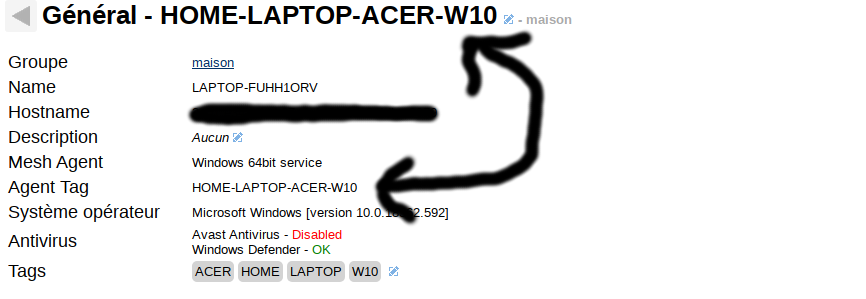
olivier37520
on 26 Jan 2020
Ok, I see. When I'm done, I'll talk to ylian about the necessary server side change to display that.
krayon007
on 26 Jan 2020
i've done some test and find a working solution modifying meshagent.js, function ChangeAgentTag like this :
// Update the mesh agent tab in the database
function ChangeAgentTag(tag) {
        if (obj.agentInfo.capabilities & 0x40) return;
        if (tag.length == 0) { tag = null; }
        // Get the node and change it if needed
        db.Get(obj.dbNodeKey, function (err, nodes) {
            if ((nodes == null) || (nodes.length != 1)) return;
            const device = nodes[0];
            if (device.agent) {
                if (device.agent.tag != tag) {
                    // Do some clean up if needed, these values should not be in the database.
                    if (device.conn != null) { delete device.conn; }
                    if (device.pwr  != null) { delete device.pwr; }
                    if (device.agct != null) { delete device.agct; }
                    if (device.cict != null) { delete device.cict; }

                    // Set the new tag
                    device.agent.tag = tag;

                    // update server-side device name if UseAgentTagAsName: true in domain's config at install time or updating existing agent tag
                    if (domain.useagenttagasname && device.name != tag && tag != null) device.name = tag;
                    db.Set(device);

                    // Event the node change
                    var event = { etype: 'node', action: 'changenode', nodeid: obj.dbNodeKey, domain: domain.id, node: parent.CloneSafeNode(device), nolog: 1 };
                    if (db.changeStream) { event.noact = 1; } // If DB change stream is active, don't use this event to change the node. Another event will come.
                    parent.parent.DispatchEvent(parent.CreateMeshDispatchTargets(device.meshid), obj, event);
                }else if(domain.useagenttagasname && device.name === device.rname && tag != null){
                    // update server-side device name if UseAgentTagAsName: true in domain's config when enabling option after agent install keeping current agent tag
                    device.name = tag;
                    db.Set(device);

                    // Event the node change
                    var event = { etype: 'node', action: 'changenode', nodeid: obj.dbNodeKey, domain: domain.id, node: parent.CloneSafeNode(device), nolog: 1 };
                    if (db.changeStream) { event.noact = 1; } // If DB change stream is active, don't use this event to change the node. Another event will come.
                    parent.parent.DispatchEvent(parent.CreateMeshDispatchTargets(device.meshid), obj, event);
                }
            }
        });
    }
updated add security check change server side name if tag is not null
olivier37520
on 27 Jan 2020
Bryan has an upcoming agent improvements for this, the current MeshCentral v0.4.8-f server supports it, but once the new agent is included, you should be able to set the server-side device name at agent install time.
 Ylianst
on 30 Jan 2020
Ylianst
on 30 Jan 2020
Published MeshCentral v0.4.8-g with the new MeshAgent that supports sending the agent server side name to the server on first run. Bryan will have to provide the details on how to use it.
Ylianst
on 30 Jan 2020
From a quick look at recent commits in the MeshAgent repository, it looks like you can set the agent name in the msh file by adding a line like agentName=<text>, where \-tag=<text> parameter, and for people who aren't automating it, and more inline with the previous time this feature was requested, it would be nice to be able to run the installer/temporary agent, type the name you want it to appear as in a text input, and install/connect using that name without having to edit the msh file, or launch the program with special parameters.
 MailYouLater
on 31 Jan 2020
MailYouLater
on 31 Jan 2020
That's exactly what I'm working on. Currently you can pass any of the msh tags on the command line with a -- switch, like, MeshAgent --agentName="Test Name"
I'm currently updating how the installer works, so you can pass the same at I stall time, like, MeshAgent -fullinstall --agentName="Test Name"
krayon007
on 31 Jan 2020
In order to facilitate it, I'm writing a module that will allow you to add/remove/edit firewall rules. That way I can strip out the current C code that does the service install/uninstall and replace it with JavaScript, becuase the service-manager.js code I wrote a while back, already supports starting/configuring services with runtime parameters. Plus, it will make it so the code to do the service'install/uninstall will be cross platform, becuase service-manager already supports all the supported platforms that the agent runs on, while the current installer in the binary only works on windows.
krayon007
on 31 Jan 2020
Cool. I didn't know you could do that with -- switches.
It would still be nice to get it in the GUI at some point too, preferably along with my suggestion from another issue to have an 'advanced' section which is hidden by default.
MailYouLater
on 31 Jan 2020
The switches thing is new, I just added it in the last release... As for the gui, all in due time :)
I'm getting the plumbing/infrastructure working, so ylian can make the tweaks you mention in the interface.
krayon007
on 31 Jan 2020
Thanks for the update, but, with this you also change local agent name and in my case i need to keep original agentName and perform automation to just change server-side agent name, not both agent and server.
i've updated my meshcentral server and keep my changes in meshagent.js and use agentTag as serverside name.
olivier37520
on 31 Jan 2020
The server behavior should be that we keep both names. The local agent name, and the agent host name. Before it was one or the other, now it's both.
krayon007
on 31 Jan 2020
Related issues
 robclay
·
3Comments
robclay
·
3Comments
 darryl-h
·
3Comments
darryl-h
·
3Comments
 petervanv
·
3Comments
MailYouLater
·
4Comments
petervanv
·
3Comments
petervanv
·
3Comments
MailYouLater
·
4Comments
petervanv
·
3Comments