Meshcentral: Troubleshooting lost connection to remote system
Using MC2 0.4.6-p
Is there a set of troubleshooting procedures that could be published if, for some reason, a system becomes unresponsive to an MC2 server? I've got two systems at a remote site, one of which is just fine, but the other is now unresponsive to router requests (how I first noticed it), but then logging into my MC2 server, I can't access that servers Files or Terminal either. Within the main screen of the MC2 server, I do see that the server is up and running although when I check on its 7 day power state, it appears to have been "down" for the majority of this year (which I know isn't correct as checking the Events, I've been able to remote into it for the last few days).
Fortunately for this customer, I do have another remote access system that I can use to get into the server, but before I do that, I wondered if it would be helpful / advisable to go through some troubleshooting pointers first, just to be sure, and wondered if there was anything published that I could follow that would be useful to diagnose the fault.
Thoughts?
 D4V3M0NK
All 17 comments
Does the console tab still respond to commands, such as 'help'?
 krayon007
on 9 Jan 2020
krayon007
on 9 Jan 2020
Yes Bryan,
Available commands:
amt, amtacm, amtccm, amtdeactivate, amtpolicy, amtreset, apf, args, av, cpuinfo, dbcompact, dbget, dbkeys,
dbset, eval, getclip, getscript, help, httpget, info, kill, location, lock, log, ls, netinfo, notify,
nwslist, openurl, osinfo, parseuri, plugin, power, print, ps, rawsmbios, scanamt, scanwifi, sendcaps,
setclip, setdebug, smbios, sysinfo, toast, type, users, version, wakeonlan, wallpaper, wsclose, wsconnect,
wssend.
D4V3M0NK
on 9 Jan 2020
Interesting.. I'll let @Ylianst know. It sounds like the control channel is still active, but the agent and browser are unable to establish a websocket tunnel, as files/terminal/desktop all will create a data tunnel....
krayon007
on 9 Jan 2020
My first recommendation is to reset the MeshCore.js in the agent, you can do this by going in the devices "Console" tab, hit "Agent Action", select "Clear the core", wait 5 seconds and do it again selecting "Upload default server core". After that, take a look to see if things work.
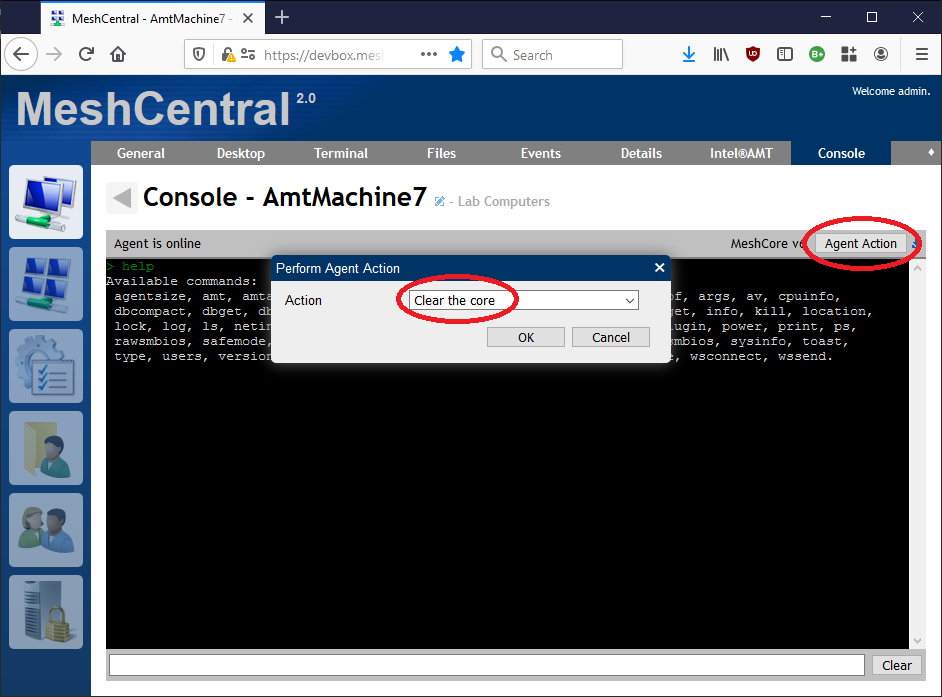
A more risky strategy is to go in the desktop tab, hit "Tools", go in the "Services" tab, find "Mesh Agent background service", click on it and hit "Restart".
This said, there is a chance the problem is not the agent at all. It could be that the agent's second connection to the server that is initiated to do remote desktop is being blocked. If that is the case, I will have a different set of suggestions to debug that.
 Ylianst
on 9 Jan 2020
Ylianst
on 9 Jan 2020
Ok, so I took your recommended procedure:
Console > Agent Action > Clear the core, then
Console > Agent Action > Upload default server core.
Then I selected Terminal > Connect, the status bar briefly shows "Connecting..." and then remains at "Setup..." for some seconds and then (I guess) times out, the Connect button resetting back to it's original state. The same happens with Files > Connect.
Returning back to the Console tab, I see Error{} shown on the screen multiple times (Agent is online).
Additionally, I don't see any Desktop tab for this particular server - it's Ubuntu 16.04.6 headless server, if that makes any difference.
From this point, I'm happy to take whatever course of action is suggested in the interests of seeing if there's an issue here ...
D4V3M0NK
on 9 Jan 2020
Oh!!! You see the string "Error{}" on the console tab when trying to connect? And this is a Linux machine without a desktop? This is interesting, looks like an agent bug in the meshcore.js...
Ylianst
on 9 Jan 2020
Ok, two more things... first (and this is Bryan's excellent suggestion), go in "Agent Action" and select "Upload Recovery Core" and try again. This is a simple agent core with only files & terminal. Let me know if this works.
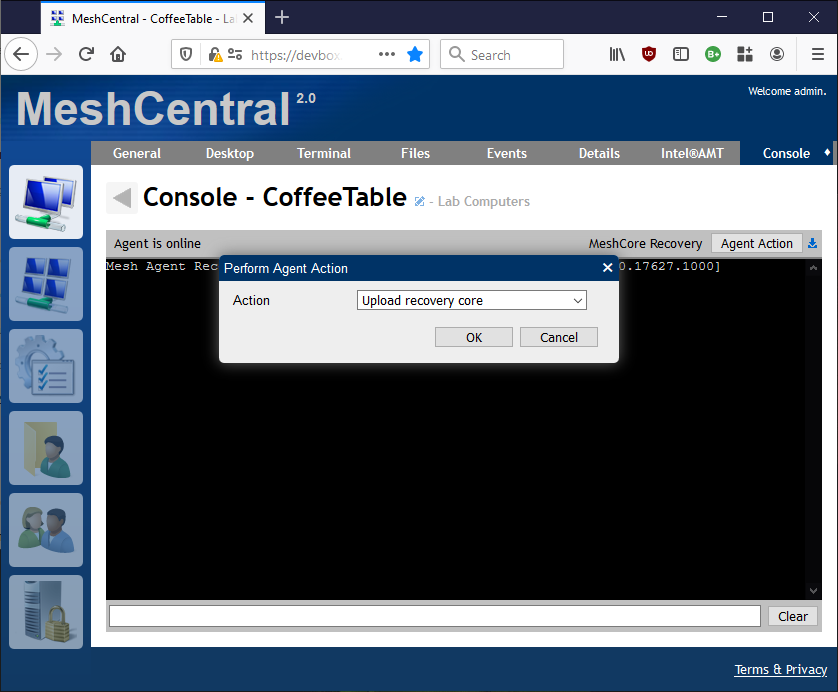
Second, you can also try going in "My Server", "Trace" tab, hit "Tracing" button, check "Web Socket Relay" and ok. When use another browser tab to connect to files or terminal. You should see this:
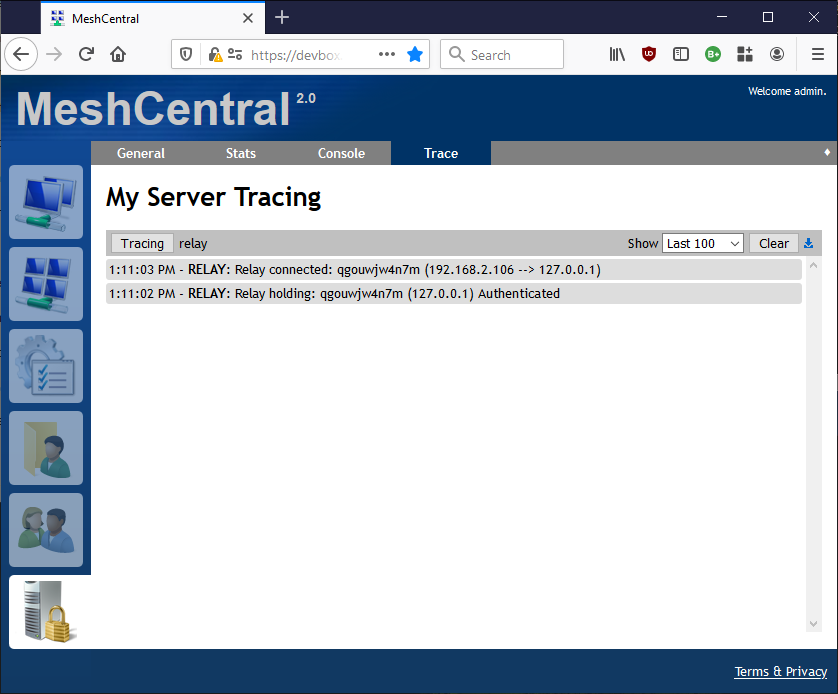
Let me know what you see.
Ylianst
on 9 Jan 2020
Console > Agent Action > Upload recovery core didn't resolve the issue. I left it about 10 seconds before trying the Terminal or Files tab.
My Server > Trace > Tracing > Web Socket Relay was turned on. I opened a new Chrome window (incognito) and logged in to the server, selected the remote system and attempted Terminal > Connect. Reviewing the trace window in the first browser, I see a Relay disconnect, then Relay holding entries
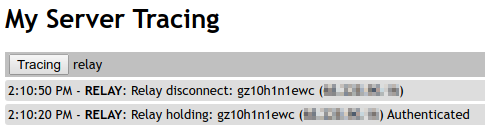
(Note: public IP address in the above screenshot pixelated for security purposes. There was no xxx.xxx.xxx.xxx -> yyy.yyy.yyy.yyy listed, just the public IP address in both entries)
Obviously the difference between what I saw and what you posted @Ylianst is my _Relay disconnect_ entry.
D4V3M0NK
on 9 Jan 2020
For the record, when I now select the Console tab:
Mesh Agent Receovery Console, OS: Ubuntu 16.04.6 LTS
help
Available commands are: osinfo, dbkeys, dbget, dbset, dbcompact, netinfo.
(There's a typo in "Receovery") ... not worthy of another bug, but thought I'd mention it :wink:
D4V3M0NK
on 9 Jan 2020
Ok. It's clear the the agent can't connect the extra websocket to the relay that is needed for desktop/terminal/files. Relay system in the server is only getting the connection from the browser side. You can go in "Agent Action" and push back the default core now, that will re-enable all of the agent commands. I need to figure out a way to debug this non-connection in more detail.
Ylianst
on 9 Jan 2020
Default core back in place.
Shall I turn off the tracing too for the time being, or leave it on?
As mentioned, I do have an alternative connection to the server so bear that in mind if at all helpful.
Additionally (thinking outside the box) it's possible that my client may have made a change to their firewall which is why the one server has suddenly stopped working today whereas the other is just fine (onsite servers are on different VLANs, the one in question being in a DMZ) and so if there are any tests that I could run (through the alternative connection) to test the web socket, just let me know. I see from here that there's a curl command I could run against the MC2 server - but I'd need assistance with the parameters...
D4V3M0NK
on 10 Jan 2020
Yes, you can turn off tracing on the server. I just published MeshCentral v0.4.7-h with with improved error reporting for your case. Instead of "ERROR: {}" you should now see "ERROR: Unable to connect relay tunnel to: wss://xxx:yy/zzz, {}".
Here is my current best theory as to what is going on. When the agent connects to the MeshCentral, it will try to resolve the server's DNS name. If that fails, it will fall back to trying the last known good IP address of the server. This is great because if the DNS server does not work, you still get a connection.
The problem is that we did not implement the same fallback for relay tunnel connections (Desktop/Terminal/Files) and so, these are failing when the DNS does not work. Bryan needs to fix this so that the fallback happens also on tunnel connections.
Let me know if this theory sounds right in your case. Thanks.
Ylianst
on 10 Jan 2020
Ok if I'm following what's happening correctly we're taking the assumption that there's an issue with DNS and as yet, the fallback hasn't been implemented for D/T/F for relay tunnels*) and so...
- When I jump onto my remote system and perform a _ping_ of my MC2 server (using it's FQDN), I get an "unknown host".
- When I perform an _nslookup_ of the FQDN using the configured name servers for that system, I get resolution.
So I'm thinking that the customer has done something to the networking that prevents lookups, which I'll take up with them, however before I do that, I wonder if I can use this unique situation to test your updates? I'm more than happy to update my MC2 server to 4.7-h just to prove that the improved error reporting works as expected, even though it may not (at the moment) give me back the functionality for D/T/F.
Following me so far?
we did not implement the same fallback for relay tunnel connections
*Remember, although I initially saw this through MCR, I can't use the D/T/F functionality when I log into MC2 server either, so I'm not sure your comment (if I'm understanding it correctly) is completely true (ie "just for relay tunnel connections")
D4V3M0NK
on 10 Jan 2020
Interesting, I think we are on to something. So, 4.7-h just has a better error report, no need to update until we implement the fix. If all goes right, no need to change anything on the customer's computer.
I am out traveling next week, but Bryan will probably work on this. So, hopefully soon, we will have a fix for this.
Ylianst
on 10 Jan 2020
Understood. Safe travels :airplane: :beers:
D4V3M0NK
on 10 Jan 2020
Bryan got code to fix this, but it will need a new agent binary update. Got to do a bunch of testing first.
Ylianst
on 11 Jan 2020
FYI : the DNS issues that I was experiencing onsite needed to get fixed, so I'm back up and running and (as expected) D/T/F and MCR are back up and operational. However, I am able to "force" the DNS issue back into play which I'm more than happy to do to check the update as and when it's ready.
D4V3M0NK
on 17 Jan 2020
Related issues
 M1CK431
·
3Comments
M1CK431
·
3Comments
 vish84
·
3Comments
vish84
·
3Comments
 LPJon
·
3Comments
LPJon
·
3Comments
 hellofaduck
·
3Comments
hellofaduck
·
3Comments
 PathfinderNetworks
·
3Comments
PathfinderNetworks
·
3Comments