I have a group called 'remote'.
I have created an agent for that group, that I show on my website as a small download.
Anyone can download it and run it, and they get the standard Agent, choose to either install permanently or run temporarily
Even though there is ONLY four buttons on this agent, I think it is THREE TO MANY
I'd like a 'light' agent that ONLY does one up run temporarily, with the click of a SINGLE BUTTON once someone downloads the agent. (I'm thinking support for not very savy computer users)
Then if I needed a full install, that I could run an installer once I have connected to the client computer, and then change groups assign users etc as normal.
I'm thinking like the 'UVNC Single Click'.
Download, run, agree and press OK.
Easy enough for my elderly parents to do
 OutbackMatt
All 11 comments
I like this idea. Just a one-time run client with no other options. For me, I'd create a special device group just for this agent (so I would know where these one-time devices are going to show up in Mesh and would only be for those types of connections).
 PathfinderNetworks
on 6 Jan 2020
PathfinderNetworks
on 6 Jan 2020
This would be awesome!
 asasin114
on 6 Jan 2020
asasin114
on 6 Jan 2020
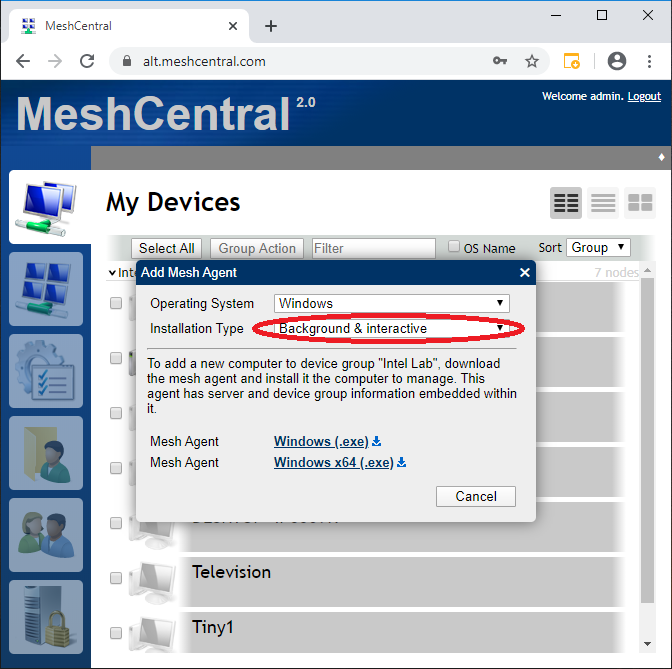
There is already a way to control what buttons are made available. When you check "Add Agent" you can select the installation type: Background, Interactive or Both. If you select interactive, the install/uninstall buttons will not be present, if background only, the "Connect" button will not be present. Can you give this a try and let me know what you think? Thanks.
 Ylianst
on 6 Jan 2020
Ylianst
on 6 Jan 2020
That does help thanks, but it is still too wordy and talks about an install or uninstall button and mesh agents. Way too complex.
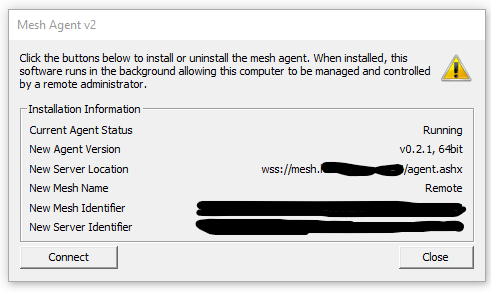
I'd like
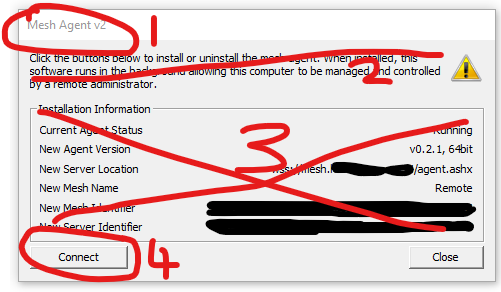
- a custom name shown instead of 'Mesh Agent v2' (unsure if this is possible...)
- and 3. Simple text that says something like 'Allow [MESHNAME] - [Username]' to connect to this computer remotely
- A button that says 'ALLOW REMOTE ACCESS'
OutbackMatt
on 7 Jan 2020
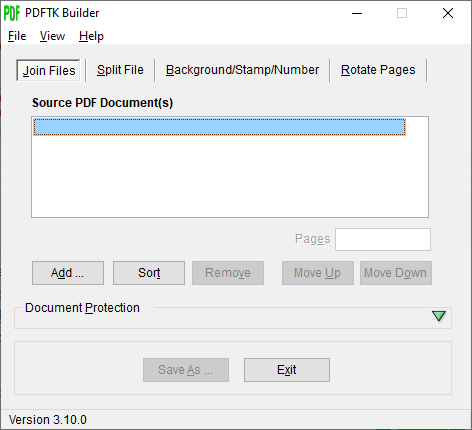
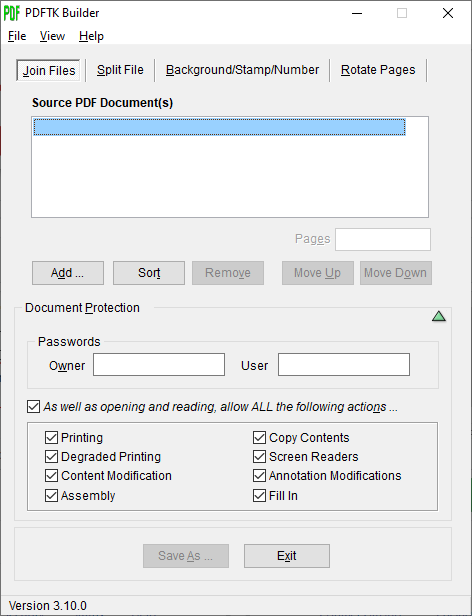
The "Installation Information" section could be helpful for debugging in cases where the agent doesn't connect to the server properly, but perhaps it could be in a 'Details' or 'More Info' section that's hidden by default, similar to PDFTKBuilder's "Document Protection" options.
| PDFTKBuilder with Document Protection options hidden | PDFTKBuilder with Document Protection options visible |
| - | - |
|  |
|  |
|
 MailYouLater
on 7 Jan 2020
MailYouLater
on 7 Jan 2020
I'd really love to see this, possibly with a one time code mechanisim, kind of like teamviewer. Dunno if this is even possible with how MeshCentral is currently written though.
 agottschling
on 8 Jan 2020
agottschling
on 8 Jan 2020
@agottschling: I'm not sure I get how a One Time Password(or Code) would work with this. Perhaps you should write up a separate proposal and post that as a new issue, separate from this one.
MailYouLater
on 8 Jan 2020
For a one-click app, You'd probably want some kind of security. Otherwise, you could run this on someone's machine, and get remote control without needing admin rights on the remote system.
You may be right though, this may need to go into a separate request. Just let me know.
agottschling
on 8 Jan 2020
This request is about simplifying and possibly customizing the UI for the temporary installer. I think requiring a One Time Password to connect should be considered separately from this.
MailYouLater
on 8 Jan 2020
Don't we have a one click app anyway (albeit a much too complex one)
I could simply download the meshagent from my website (2.8Mb) and install.
(In fairness I find that I need to 'run as administrator' to be more secure and stable, but it still works initially as a normal user)
It takes seconds (I've timed it) and it can be set to not leave a trace on the remote machine (the one being watched or controlled), no task bar icon, no connection bar, no user interaction.
It's actually pretty scary how quickly and easily this Mesh system is to implement and use, and then the back door command prompt and file uploads and downloads... and then the remote scripting add-in...
and all on normal web server ports, firewalls wouldn't detect it, and an admin would need to know to look for the mesh agent service.
OutbackMatt
on 8 Jan 2020
Good Point @MailYouLater,
I'll make a separate request for an OTP, I've updated my previous posts.
agottschling
on 8 Jan 2020
Related issues
 LPJon
·
3Comments
LPJon
·
3Comments
 petervanv
·
3Comments
MailYouLater
·
4Comments
petervanv
·
3Comments
petervanv
·
3Comments
MailYouLater
·
4Comments
petervanv
·
3Comments
 M1CK431
·
3Comments
M1CK431
·
3Comments