Meshcentral: Collapsible Device List
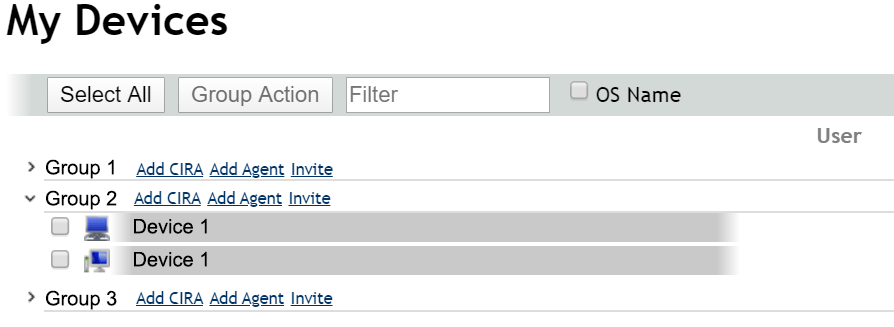
I'm wondering if you could make it so that the device list is collapsible (starts collapsed and then click to expand) or a new type of list display if you want to adjust the device list. I'm thinking if it worked a bit like a directory tree in Windows, If you clicked on the arrow beside the group name or on the group name it would expand. I've added a picture i did up in paint as an example of what I was thinking. The reason is to not have to scroll through many pages of device lists when we have 100+ devices and a dozen groups.
 nickpapag
All 13 comments
As I stated in the other thread where this was mentioned:
I don't think having them [device groups] default to being collapsed is a good idea unless the default is configurable, but I think having a "Collapse All"/"Expand All" button at the top would be a good addition to this request, and would give @nickpapag the functionality they're requesting without potentially confusing people who expect their devices to just be visible, like they are currently.
I suppose this _could_ be added as a new display type, in which case being collapsed by default would be fine, but I feel like an implementation of this request would be enough of an improvement to all of the existing views, and if separated into its own view, it wouldn't be different enough from whichever one it was modeled after to be worth having it as a separate view. Instead, I think this functionality should be added to the existing view(s), with the default being expanded, and an "Expand All"/"Collapse All" button at the top.
 MailYouLater
on 23 Dec 2019
MailYouLater
on 23 Dec 2019
Published MeshCentral v0.4.6-n with a first pass at collapsible device groups. Feedback welcome.
 Ylianst
on 24 Dec 2019
Ylianst
on 24 Dec 2019
It seems to only work on the column view. List and Desktop views throw:
Uncaught TypeError: Cannot read property 'display' of undefined
    at toggleCollapseGroup ((index):3445)
    at HTMLImageElement.onclick ((index):1)
 ryanblenis
on 24 Dec 2019
ryanblenis
on 24 Dec 2019
@ryanblenis Can you explain in more detail how you get to see this error? What do you click on what screen? Thanks.
Ylianst
on 24 Dec 2019
i've seen the same error:
open inspect in google chrome, click on the triangle to fold in / out then you will see the error message appear in the inspecter of chrome
 petervanv
on 24 Dec 2019
petervanv
on 24 Dec 2019
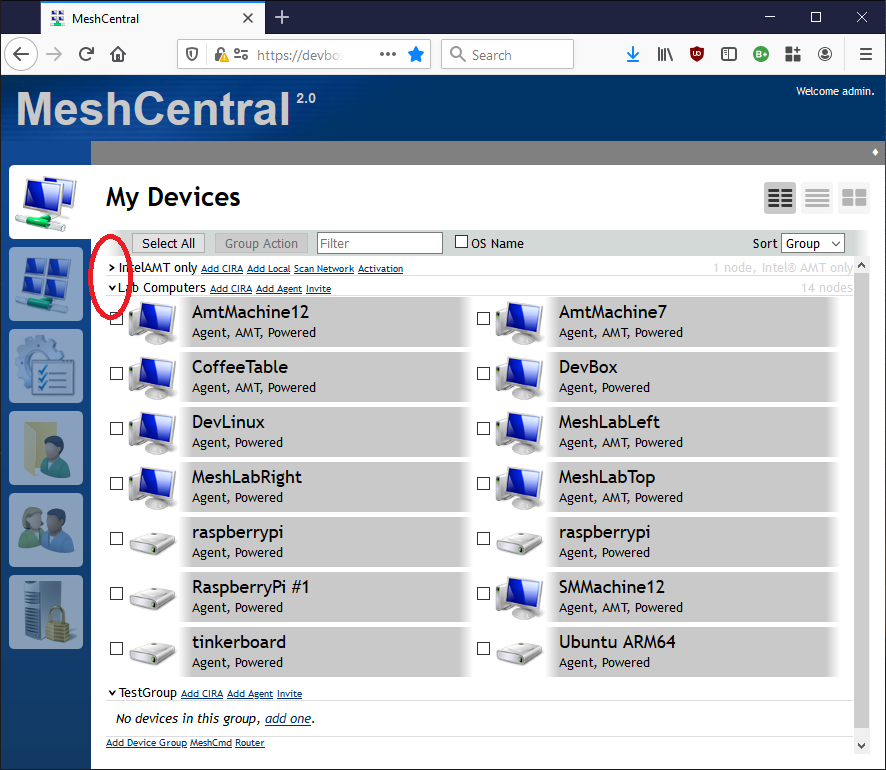
Click My Devices, then in the upper-right be sure you're in either List or Desktop view (Columns, the default view, works fine), then click the new carat (circled in red on your uploaded image) and the group does not collapse/expand, just the error in the console (testing with Chrome 78 currently).
ryanblenis
on 24 Dec 2019
Got it! Just published MeshCentral v0.4.6-o with more improvements for this. The list view does not have collapse in this version because, I need to work on that more. Other views have it and should work even with different sort options and now, the browser will remember the collapsed groups. Feedback appreciated.
Ylianst
on 24 Dec 2019
Looks good so far! Thank you!
ryanblenis
on 24 Dec 2019
Looks great so far, thank you so much! Can't wait for the list view but I know its more complicated from looking at the code :)
nickpapag
on 25 Dec 2019
Thanks. I will try to get the list view done in the next week, also in night mode the open/close arrow is black on black and does not show up. So, got to also fix that.
Ylianst
on 25 Dec 2019
Published MeshCentral v0.4.6-p with the collapse feature completed and working even with list view and night mode. Let me know if you see any issues.
Ylianst
on 26 Dec 2019
@Ylianst - I can confirm that this works really nicely. I love the fact that the state for each individual group is also retained between sessions (not sure if that's a per user state, or across all users on the same system) but each groups' collapse state works flawlessly.
 D4V3M0NK
on 27 Dec 2019
D4V3M0NK
on 27 Dec 2019
@D4V3M0NK Thanks. The collapse state is currently saved in the browser, not server side. Probably ok since if you have many browsers open with different collapse groups, they would stomp on each other.
Going to close this one, feel free to open a new issue if you find any problem.
Ylianst
on 28 Dec 2019
Related issues
 guerby
·
3Comments
guerby
·
3Comments
 vish84
·
3Comments
vish84
·
3Comments
 coolwormgit
·
3Comments
coolwormgit
·
3Comments
 LPJon
·
3Comments
LPJon
·
3Comments
 darryl-h
·
3Comments
darryl-h
·
3Comments
Most helpful comment
Published MeshCentral v0.4.6-p with the collapse feature completed and working even with list view and night mode. Let me know if you see any issues.