Meshcentral: Routing RDP directly to dedicated server?
While using RDP, the framerate of the viewer is great, and is much nicer to use than X2Go for Ubuntu. Unfortunately, Mesh Central's remote desktop is of lower quality, and framerate, than X2Go, never mind Windows 10's RDP.
Is there a way to route RDP through Mesh Central, so that RDP benefits from all the security added by MeshCentral? The login token, the timeout, the failed attempt ban, they're all great. But RDP doesn't have such functionality, while X2Go (Ubuntu only) does via SSH.
 FiftyTifty
All 26 comments
Yes - it's core functionality.
You may need to set the correct parameter in the server config file to enable the link.
Once setup, when clicking on a node you get a raw RDP link:
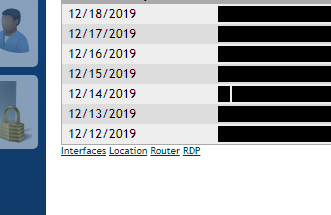
With this you can click it and mesh will set up a suitable routing tunnel. Then RDC will open as normal.
 adsgreen
on 18 Dec 2019
adsgreen
on 18 Dec 2019
Yes, there is generic TCP protocol tunnelling which enable user to tunnel any TCP traffic. I wrote my own utility too for that and my team use it a lot for cross geography/behind NAT device access.
 jsastriawan
on 18 Dec 2019
jsastriawan
on 18 Dec 2019
That's great to hear. Unfortunately, the RDP hyperlink's MeshMiniRouter.application file throws the following error log when I run it on the PC I want to launch the RDP client on:
PLATFORM VERSION INFO
Windows : 10.0.17763.0 (Win32NT)
Common Language Runtime : 4.0.30319.42000
System.Deployment.dll : 4.8.3761.0 built by: NET48REL1
clr.dll : 4.8.4075.0 built by: NET48REL1LAST
dfdll.dll : 4.8.3761.0 built by: NET48REL1
dfshim.dll : 10.0.17763.1 (WinBuild.160101.0800)
SOURCES
Deployment url : file:///C:/Users/ChristianW10L/Desktop/MeshMiniRouter.application
IDENTITIES
Deployment Identity : MeshMiniRouter.application, Version=2.0.0.29, Culture=neutral, PublicKeyToken=2e8c763d6917d840, processorArchitecture=msil
APPLICATION SUMMARY
* Online only application.
* Trust url parameter is set.
ERROR SUMMARY
Below is a summary of the errors, details of these errors are listed later in the log.
* Activation of C:\Users\ChristianW10L\Desktop\MeshMiniRouter.application resulted in exception. Following failure messages were detected:
+ Deployment and application do not have matching security zones.
COMPONENT STORE TRANSACTION FAILURE SUMMARY
No transaction error was detected.
WARNINGS
There were no warnings during this operation.
OPERATION PROGRESS STATUS
* [18/12/2019 18:19:41] : Activation of C:\Users\ChristianW10L\Desktop\MeshMiniRouter.application has started.
* [18/12/2019 18:19:41] : Processing of deployment manifest has successfully completed.
* [18/12/2019 18:19:41] : Installation of the application has started.
ERROR DETAILS
Following errors were detected during this operation.
* [18/12/2019 18:19:41] System.Deployment.Application.InvalidDeploymentException (Zone)
- Deployment and application do not have matching security zones.
- Source: System.Deployment
- Stack trace:
at System.Deployment.Application.DownloadManager.DownloadApplicationManifest(AssemblyManifest deploymentManifest, String targetDir, Uri deploymentUri, IDownloadNotification notification, DownloadOptions options, Uri& appSourceUri, String& appManifestPath)
at System.Deployment.Application.ApplicationActivator.DownloadApplication(SubscriptionState subState, ActivationDescription actDesc, Int64 transactionId, TempDirectory& downloadTemp)
at System.Deployment.Application.ApplicationActivator.InstallApplication(SubscriptionState& subState, ActivationDescription actDesc)
at System.Deployment.Application.ApplicationActivator.PerformDeploymentActivation(Uri activationUri, Boolean isShortcut, String textualSubId, String deploymentProviderUrlFromExtension, BrowserSettings browserSettings, String& errorPageUrl, Uri& deploymentUri)
at System.Deployment.Application.ApplicationActivator.PerformDeploymentActivationWithRetry(Uri activationUri, Boolean isShortcut, String textualSubId, String deploymentProviderUrlFromExtension, BrowserSettings browserSettings, String& errorPageUrl)
--- End of stack trace from previous location where exception was thrown ---
at System.Runtime.ExceptionServices.ExceptionDispatchInfo.Throw()
at System.Deployment.Application.ApplicationActivator.PerformDeploymentActivationWithRetry(Uri activationUri, Boolean isShortcut, String textualSubId, String deploymentProviderUrlFromExtension, BrowserSettings browserSettings, String& errorPageUrl)
at System.Deployment.Application.ApplicationActivator.ActivateDeploymentWorker(Object state)
COMPONENT STORE TRANSACTION DETAILS
No transaction information is available.
Not quite sure what the security zones error means. Any idea?
FiftyTifty
on 18 Dec 2019
What browser?
adsgreen
on 18 Dec 2019
What browser?
I downloaded the .application file through Firefox.
FiftyTifty
on 18 Dec 2019
The "RDP" link uses Microsoft ClickOnce which is supported on IE/Edge but not supported by default on Chome/Firefox. For Chrome & FireFox, you will need to download a ClickOnce add-in to make this work.
Also, if you server is using the default self-signed certificate, FireFox will prompt for you to ignore the warning and connect to the site anyway, but when you hit the "RDP" link, ClickOnce will see the invalid certificate and may not work. If you install a valid TLS certificate on your server or install the root certificate for your server in the browser's trusted certificate store, ClickOnce may start to work.
I would start by using IE/Edge for RDP and see if that works.
Hope it helps,
Ylian
 Ylianst
on 18 Dec 2019
Ylianst
on 18 Dec 2019
Or there is the MeshCentral Router
You can set a map to use RDP and it works a treat (just doesn't save the mapping for next time)
https://github.com/Ylianst/MeshCentral/issues/669
 OutbackMatt
on 19 Dec 2019
OutbackMatt
on 19 Dec 2019
The MeshCentral Router should suffice, but I'd rather get this ClickOnce thing sorted since it's less of a pain to launch all the time.
Is there a guide on sorting out the server's certificate, in order to make Firefox compatible with MeshCentral's ClickOnce?
FiftyTifty
on 19 Dec 2019
Also, I found this Microsoft blog that details how to set up the ClickOnce application in order to be compatible with Firefox: https://blogs.msdn.microsoft.com/saurabh/2006/03/02/clickonce-and-firefox/
It involves work on the developer's side though, rather than the user's side.
FiftyTifty
on 19 Dec 2019
@Ylianst The RDP router works great, but there is a QOL addition that would be fabulous. Currently, when the RDP router is used, previously used settings aren't saved, so you have to readjust the resolution, internet connection speed, image quality, etc.
A way to either keep the settings saved, or have a list of adjustable settings that will be applied to the RDP connection, would be very welcome. It's a pain in the arse to keep changing RDP to use 1080p instead of 1440p.
FiftyTifty
on 27 Dec 2019
Just want to throw it out there, but I added a new RoutePlus Plugin yesterday that maps the ports from the web site. You basically set a computer as "yours" (needs to have an agent on it) then configure ports to any other agent. Then whenever you log into MeshCentral via the web interface it makes sure the ports are mapped on "your" computer to the endpoints you've chosen. It remembers the last port used and only remaps the port if it detects a conflict (e.g. already in use for some reason). That way you can keep an RDP file that always points to localhost:57986 (or some other port) on your computer with your desired settings and use it daily!
 ryanblenis
on 27 Dec 2019
ryanblenis
on 27 Dec 2019
some of my clients change the local rdp port from 3389 to 44400 for example , maybe next to rdp or inside the client add a text box to remap rdp port?
thanks
 coolwormgit
on 31 Dec 2019
coolwormgit
on 31 Dec 2019
Hi @coolwormgit,
Not sure if you're referencing me or someone else in the thread, but if you're referring to the RoutePlus plugin, RDP's default port is 3389. If your users change it, you can simply select "Other" under Protocol and choose any port number you'd like.
ryanblenis
on 31 Dec 2019
ok its working with other port!! great job!! is it possible to embed in clients panel for each one different?? and without to select my computer as localhost? thanks
coolwormgit
on 31 Dec 2019
What is the "clients panel"? Like under the plugins tab in the device view?
A source computer needs to be chosen, are you saying you don't want to select a device to be "My computer" but rather choose a different computer for the mapping to occur on?
ryanblenis
on 31 Dec 2019
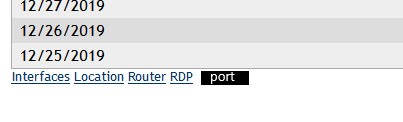
or something like these with embed rdp...
coolwormgit
on 31 Dec 2019
So that "port" placeholder would be a link to download an RDP file connecting to the correct port? Or an input box for a port of the users choosing that would add the mapping?
ryanblenis
on 31 Dec 2019
Hi @coolwormgit,
I've added that functionality and pushed a new version. If you enable it in the RoutePlus settings, a link will appear in the device view. Cheers
ryanblenis
on 31 Dec 2019
thank for quick support! i was thinking to open rdp to correct port :) i cant find how to apply check box
coolwormgit
on 31 Dec 2019
i use meshcentral for customer support and the problem is that i have to create the same mapping for 25 users!
coolwormgit
on 31 Dec 2019
The change to the plugin just takes any existing maps and adds a link to that to the device page. It does not create maps from there. I do have some "magic port" functionality coming in the future that I'm working on that might be of use to you.
As for mapping for 25 users I'm not sure if you mean MeshCentral users or end users for a single MeshCentral user, but given that this is directly related to the plugin functionality versus MeshCentral we should stop trampling on the MeshCentral issue here, if you'd like to make an additional feature request or clarify what you're looking for from the plugin, please feel free to open an issue/feature request over on the projects page (https://github.com/ryanblenis/MeshCentral-RoutePlus ) and we can chat about it there. Thank you and happy new year!
ryanblenis
on 31 Dec 2019
Happy new Year!! the link is working great! as for users im talking about the plugin.. for example if i create a mapping to my user account is only for my account but i need the same mapping that i create to be shared with other accounts
thanks
coolwormgit
on 31 Dec 2019
What am I doing wrong - with current version 0.4.8-e(never tried before with other version):
I downloaded and installed a Click-to-run form Chrome, but when clicking on RDP link, ot shows me the error
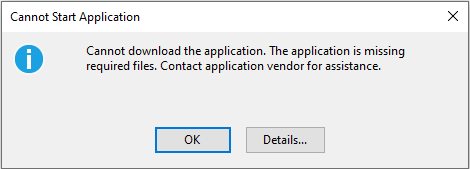
In details looks like I need some file:
LATFORM VERSION INFO
Windows : 10.0.18363.0 (Win32NT)
Common Language Runtime : 4.0.30319.42000
System.Deployment.dll : 4.8.3752.0 built by: NET48REL1
clr.dll : 4.8.4075.0 built by: NET48REL1LAST
dfdll.dll : 4.8.3752.0 built by: NET48REL1
dfshim.dll : 10.0.18362.1 (WinBuild.160101.0800)
Lots of links here *************
+ The remote server returned an error: (404) Not Found.
ERROR DETAILS
Following errors were detected during this operation.
* [29/01/2020 11:42:55] System.Deployment.Application.DeploymentDownloadException (Unknown subtype)
- Source: System.Deployment
- Stack trace:
at System.Deployment.Application.SystemNetDownloader.DownloadSingleFile(DownloadQueueItem next)
at System.Deployment.Application.SystemNetDownloader.DownloadAllFiles()
at System.Deployment.Application.FileDownloader.Download(SubscriptionState subState, X509Certificate2 clientCertificate)
at System.Deployment.Application.DownloadManager.DownloadManifestAsRawFile(Uri& sourceUri, String targetPath, IDownloadNotification notification, DownloadOptions options, ServerInformation& serverInformation)
at System.Deployment.Application.DownloadManager.DownloadDeploymentManifestDirectBypass(SubscriptionStore subStore, Uri& sourceUri, TempFile& tempFile, SubscriptionState& subState, IDownloadNotification notification, DownloadOptions options, ServerInformation& serverInformation)
at System.Deployment.Application.DownloadManager.DownloadDeploymentManifestBypass(SubscriptionStore subStore, Uri& sourceUri, TempFile& tempFile, SubscriptionState& subState, IDownloadNotification notification, DownloadOptions options)
at System.Deployment.Application.ApplicationActivator.PerformDeploymentActivation(Uri activationUri, Boolean isShortcut, String textualSubId, String deploymentProviderUrlFromExtension, BrowserSettings browserSettings, String& errorPageUrl, Uri& deploymentUri)
at System.Deployment.Application.ApplicationActivator.PerformDeploymentActivationWithRetry(Uri activationUri, Boolean isShortcut, String textualSubId, String deploymentProviderUrlFromExtension, BrowserSettings browserSettings, String& errorPageUrl)
--- End of stack trace from previous location where exception was thrown ---
at System.Runtime.ExceptionServices.ExceptionDispatchInfo.Throw()
at System.Deployment.Application.ApplicationActivator.PerformDeploymentActivationWithRetry(Uri activationUri, Boolean isShortcut, String textualSubId, String deploymentProviderUrlFromExtension, BrowserSettings browserSettings, String& errorPageUrl)
at System.Deployment.Application.ApplicationActivator.ActivateDeploymentWorker(Object state)
--- Inner Exception ---
System.Net.WebException
- The remote server returned an error: (404) Not Found.
- Source: System
- Stack trace:
at System.Net.HttpWebRequest.GetResponse()
at System.Deployment.Application.SystemNetDownloader.DownloadSingleFile(DownloadQueueItem next)
COMPONENT STORE TRANSACTION DETAILS
No transaction information is available.
 vitko-bg
on 29 Jan 2020
vitko-bg
on 29 Jan 2020
@vitko-bg did you install the chrome plugin to allow the .NET application to run? Do you get the issue if you try from Internet Explorer?
 penguinthingie
on 29 Jan 2020
penguinthingie
on 29 Jan 2020
In IE result is "The web page cannot be found"
BTW, what do you mean by "allow the .NET app to run"?
vitko-bg
on 2 Feb 2020
Anyone?
vitko-bg
on 3 Feb 2020
Related issues
 haxmachine
·
3Comments
haxmachine
·
3Comments
 unguzov
·
3Comments
unguzov
·
3Comments
 Julien-asv
·
3Comments
Julien-asv
·
3Comments
 petervanv
·
3Comments
petervanv
·
3Comments
 MailYouLater
·
4Comments
MailYouLater
·
4Comments
Most helpful comment
The "RDP" link uses Microsoft ClickOnce which is supported on IE/Edge but not supported by default on Chome/Firefox. For Chrome & FireFox, you will need to download a ClickOnce add-in to make this work.
Also, if you server is using the default self-signed certificate, FireFox will prompt for you to ignore the warning and connect to the site anyway, but when you hit the "RDP" link, ClickOnce will see the invalid certificate and may not work. If you install a valid TLS certificate on your server or install the root certificate for your server in the browser's trusted certificate store, ClickOnce may start to work.
I would start by using IE/Edge for RDP and see if that works.
Hope it helps,
Ylian