Meshcentral: Suggestion - Text edit window customization
MeshCentral's Text editing functionality is a nice thing to have, as you don't have to constantly download, edit, delete, upload, just to make a couple changes to a text file. But the window is a bit awkward. It's extremely wide on my 1440p monitor, but it only shows 15 lines or so, whilst my monitor could fit 45 lines easily. Being able to resize the height would be great.
It also automatically word wraps the text. Having it toggleable would be a nice QoL improvement.
Another wee naggling issue is that the font is really small, which makes it a pain to read on a high resolution monitor. Being able to adjust it would be very welcome, and easier on the eyes.
 FiftyTifty
All 15 comments
All good comments, I will take a quick look tomorrow. Should not be difficult to improve.
 Ylianst
on 12 Dec 2019
Ylianst
on 12 Dec 2019
Just to add to this, while you have the option to edit text files on a remote device's "Files" tab, the "My Files" tab does not offer this same functionality.
 ryanblenis
on 12 Dec 2019
ryanblenis
on 12 Dec 2019
This might be something for later, or even something that would be better as a plugin, but adding rich text editing e.g. with something like Xinha would be cool.
 MailYouLater
on 12 Dec 2019
MailYouLater
on 12 Dec 2019
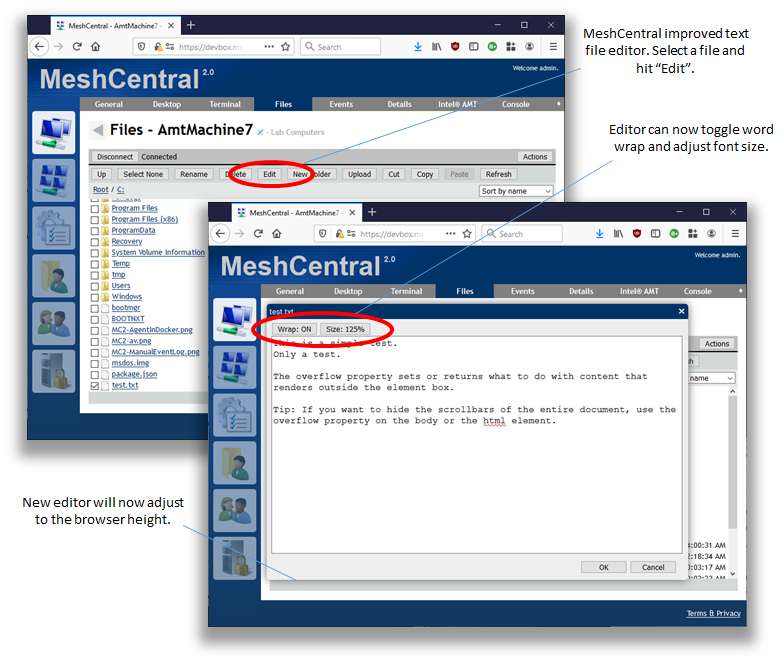
Published MeshCentral v0.4.5-t with an improved file text editor. I will have to add that feature to the "My Files" tab at some point. Feedback welcome.
Ylianst
on 12 Dec 2019
Adjusts to browser height! 🎉 YAY!!!
The odd size not fitting well on my screen has been my biggest issue. I look forward to trying this new version soon. 😃
MailYouLater
on 12 Dec 2019
Nice work. I'll run the server the now and give it a wee whirl.
FiftyTifty
on 13 Dec 2019
Right, gave it a go. I've the following file: C:servers7daysserverconfig.xml And I edited a comment inside it. Clicked OK after editing the .xml file, and everything seemed to work. But the changes didn't save. Opened the text file again, and no changes were saved.
FiftyTifty
on 13 Dec 2019
Oh... correct, something is not right. Checking.
Ylianst
on 13 Dec 2019
Ok, I got a fix for the text editor and it works for real now. Also, if you use the editor, all other dialog boxes after that are messed up, that is also fixed. I am holding the next release until tomorrow for some unrelated issue, but should be published with tomorrow's release.
Ylianst
on 13 Dec 2019
Sweet, nice work. I'll give the new build a try later tomorrow.
FiftyTifty
on 13 Dec 2019
Published MeshCentral v0.4.5-u. Give it a try, should be pretty good.
Ylianst
on 13 Dec 2019
Now this is odd. The text editor saves the changes to the .xml file, but only as far as the file browser's UI. The changes aren't actually saved to the file itself.
These are the steps I took:
- Log into MeshCentral
- Go to my server's File browser
- Connect, tick the box next to the filename for C:servers7daysserverconfig.xml
- Click Edit. Then add the string default to a comment at the beginning of the XML file
- Click OK
- Click Edit again, the change appears to have been saved
- Go to my server's Desktop viewer
- Click Connect, open the .xml file in Notepad++
- The comment is unchanged; the text file was not written to.
- Restarted the server, to see if that would change anything
- Reconnect the Desktop viewer, and opened the .xml again. The change was still not made to the .xml file
- Reconnect the Files viewer, and the change is no longer there either.
So the problem is that the file is not being written to, the Files UI is the only thing that's actually changed.
FiftyTifty
on 14 Dec 2019
Just to add to this, editing ANY file after the original file will show the original file's modified contents.
ryanblenis
on 14 Dec 2019
Note that the text editor was fixed in MeshCentral v0.4.5-u, however, that version was removed because of a different issue. MeshCentral v0.4.5-v is now online and should fix this.
Ylianst
on 16 Dec 2019
Gave it a whirl, and now it works perfectly. Good work.
FiftyTifty
on 18 Dec 2019
Related issues
MailYouLater
·
3Comments
 vish84
·
3Comments
vish84
·
3Comments
 coolwormgit
·
3Comments
coolwormgit
·
3Comments
 nroach44
·
3Comments
nroach44
·
3Comments
 petervanv
·
3Comments
petervanv
·
3Comments
Most helpful comment
Gave it a whirl, and now it works perfectly. Good work.