Meshcentral: Make Remote Privacy Bar Movable
Guys, good morning!
Please, how do I move the remote access bar? I need to translate my text into my language, can you help me?

Sorry for posting this question here, I could not post the image on reddit so I am posting my question here too.
 geanferrani123
All 11 comments
Hi. Right now you can't move the privacy bar, however, Bryan is looking into making it move left-right only on Windows.
What is your language? I can do a machine translation to get started.
 Ylianst
on 10 Dec 2019
Ylianst
on 10 Dec 2019
My language is Portuguese - Brazil, I even sent you the translate.json file of that language via email, remember?
About mobility this would be wonderful, I would even open a topic about it lol ..
geanferrani123
on 10 Dec 2019
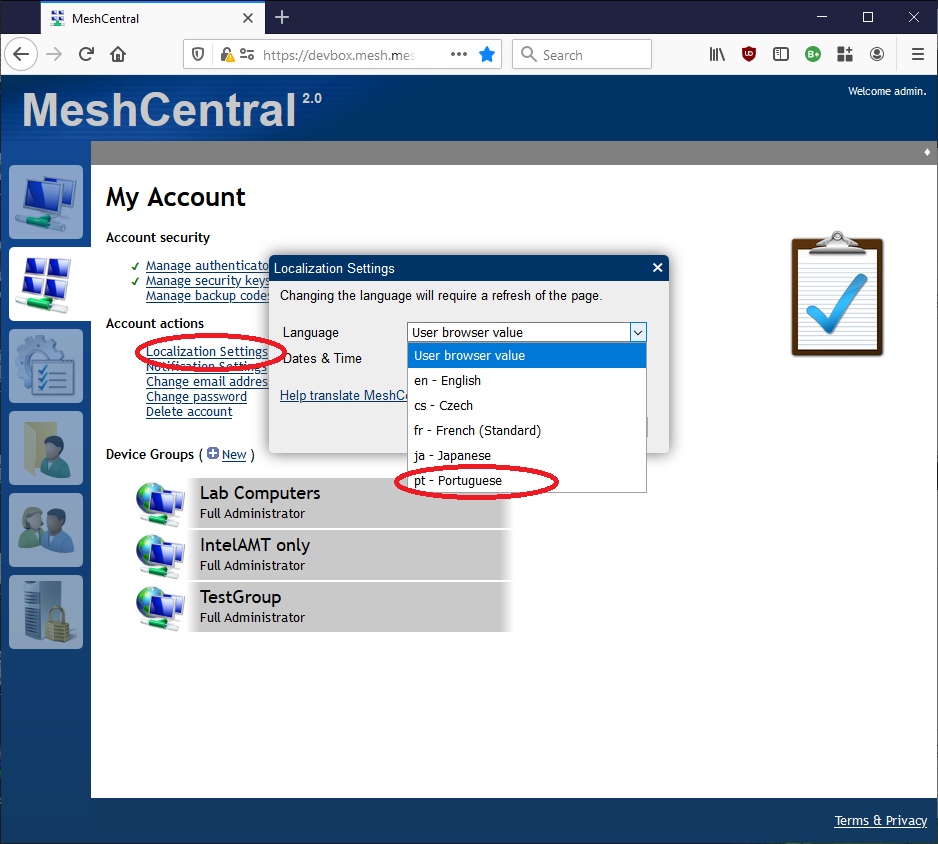
Hi. Oh! Sorry, yes, you did send me the Portuguese translation. Once you update MeshCentral, you can set your browser language to Portuguese or you can go in "My Account" and click "Localization Settings" and select "pt - Portuguese". Then, hit "ok" and refresh the page. You should see the Portuguese MeshCentral. Let me know if it works.
Ylianst
on 10 Dec 2019
I updated the Windows version to allow moving the connection bar along the X-axis within the displayed monitor region. It will be included in the next agent update.
 krayon007
on 10 Dec 2019
krayon007
on 10 Dec 2019
Published MeshCentral v0.4.5-p with Bryan's change to the privacy bar. You can now move it left/right.
Ylianst
on 11 Dec 2019
Related to the privacy bar, I just published MeshCentral v0.4.5-r where can set "desktopPrivacyBarText" in the domain section, for example:
  "domains": {
    "": {
      "title": "Server Title",
      "desktopPrivacyBarText": "This is a test: {0}"
    }
  }
This will be used as the privacy bar text for that domain. The "{0}" is replaced with the comma separated list of user names that have active desktop sessions, but you don't have to include {0} in the string. So you can just set "This desktop is being managed remotely" and that will work.
Feedback appreciated,
Ylian
Ylianst
on 12 Dec 2019
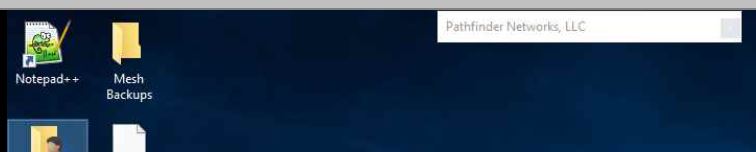
I just updated and implemented this. Both changes (being able to edit the security bar text and moving it) are working correctly on my end.
 PathfinderNetworks
on 12 Dec 2019
PathfinderNetworks
on 12 Dec 2019
I had to pull version v0.4.5-r out because of a bug, but you can keep your config.json file set, I will have that feature back tomorrow.
Ylianst
on 12 Dec 2019
Published MeshCentral v0.4.5-s with this feature back in.
Ylianst
on 12 Dec 2019
This works for me
 OutbackMatt
on 21 Dec 2019
OutbackMatt
on 21 Dec 2019
Thanks for the report. Closing this as the privacy bar can move left and right.
Ylianst
on 22 Dec 2019
Related issues
 petervanv
·
3Comments
petervanv
·
3Comments
 Julien-asv
·
3Comments
Julien-asv
·
3Comments
 MailYouLater
·
4Comments
MailYouLater
·
4Comments
 darryl-h
·
3Comments
darryl-h
·
3Comments
 M1CK431
·
3Comments
M1CK431
·
3Comments
Most helpful comment
I updated the Windows version to allow moving the connection bar along the X-axis within the displayed monitor region. It will be included in the next agent update.