MeshCentral not given permission to use ports 1024 and below.
Hi,
After updating to the latest version of MeshCentral (0.4.5-1), when starting the service, it no longer uses my config.json file placed in meshcentral-data.
Instead it seems like it is using the default configuration, as I have to connect to port 1025, instead of 443, which I set in my config file.
It worked perfectly before updating, so I have no idea what changed!
I thought that I could use the workaround mentioned here and point to the config file:
https://github.com/Ylianst/MeshCentral/issues/160
But the --config argument doesn't seem to be available anymore, as I'm being told that it is invalid.
I've checked the mesherrors.txt for errors in the meshcentral-data folder and nothing shows up there.
 GnaXi
GnaXi
All 11 comments
Hmm.. I just did some testing and if I run "node meshcentral" with sudo instead of the regular user, as I did before the update, it uses the config.json file.
I've checked the permissions of all files and folders and the regular user is owner of everything.
I'm running this on Ubuntu 18.04 LTS btw.
The structure is the following:
Config file: /home/user/meshcentral/meshcentral-data/config.json
node_modules folder, from where I run "node meshcentral" to start it: /home/user/meshcentral/node_modules
GnaXi
on 9 Dec 2019
This is weird. There is nothing in the recent updates that would have obviously caused this. It's possible that the update process itself changed the permissions of files within the "node_modules" folder. I don't run MeshCentral with sudo and generally don't recommend it.
It's super important to keep a backup of "meshcentral-data" since it has all the certificates stuff for your server. Once you have that backed up, feel free to rename the "node_modules" to "node_modules_bak" and do "npm install meshcentral" again. Don't sudo the "npm install meshcentral", so that all the files are created as your normal user.
You can also go in the "My Server" tab, then "Console" and type "showconfig". This will display the current configuration file. It can give you a hint if you have many config.json files around.
Another thing is that sometimes people have many MeshCentral servers installed and the wrong one is running. So double check that there are not more of them running in processes.
I guess I could add a server console command to show current paths... I will do that now. This could be useful for debugging this.
 Ylianst
on 9 Dec 2019
Ylianst
on 9 Dec 2019
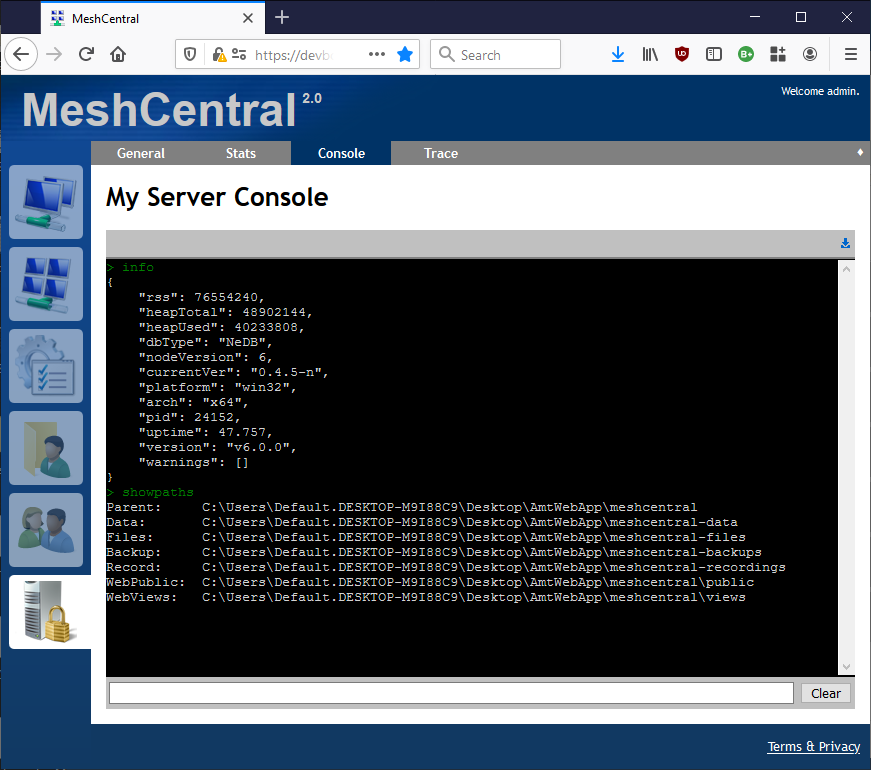
Published MeshCentral 0.4.5-n with improvements to the server console. Improved the "info" command and added the "showpaths" command. If you can try these on your server, would be interesting to see if the paths are the ones you expect.
Ylianst
on 10 Dec 2019
If it's running the server on port 1025 then it's most likely because (some?) Linux distro's disallow non-root apps to listen on ports below 1024. You need to give it permission to bind to ports below 1024 while running as a non-root user by running setcap 'cap_net_bind_service=+ep' /path/to/program. I'm not really sure if "/path/to/program" should be replaced with the path to meshcentral or the path to your node binary, but it should be one of those.
Note: I'm also not 100% certain about this part either, but some places say that the user you run it as has to have permission to run sudo (even though you're not directly using it) and others don't.
See Allowing a user to let listen to a port below 1024 and Bind to ports less than 1024 without root access.
 MailYouLater
on 10 Dec 2019
MailYouLater
on 10 Dec 2019
@MailYouLater Ha yes, you are 100% correct.
Ylianst
on 10 Dec 2019
Thanks for the replies. Highly appreciated! :)
I decided to first rename the old node_modules folder and create a new one by running "npm install meshcentral".
A new node_modules folder was then created, but when then running "node meshcentral" from the new node_modules folder, I was given some errors while it tried to install some of the plugins:
-------- 12/10/2019, 12:07:20 PM ---- 0.4.5-o --------

/home/gnaxi/meshcentral/node_modules/nedb/lib/datastore.js:77
    if (err) { throw err; }
               ^

[Error: EACCES: permission denied, open '/home/gnaxi/meshcentral/meshcentral-data/meshcentral-plugins.db'] {
  errno: -13,
  code: 'EACCES',
  syscall: 'open',
  path: '/home/gnaxi/meshcentral/meshcentral-data/meshcentral-plugins.db'
}
Sure enough, the following files under meshcentral-data had their permissions changed from my regular user to root:
meshcentral-events.db, meshcentral-plguins.db, meshcentral-power.db, meshcentral-smbios.db, meshcentral-stats.db and meshcentral.db
I changed the permissions back for all of the db files to the regular user, ran "node meshcentral" again, but we were back to the original issue, that it doesn't seem to use the ports specified in the config file.
Regarding the suggestion by @MailYouLater, I have my doubts that that should be the issue, as it has worked perfectly fine without being run with sudo, before I updated MeshCentral.
But sure, if we go by the article shared, most people agree that opening up for port 80 for unprivileged users is a bad idea and security concern, but you're saying that running MeshCentral with sudo is a bad idea.
What would you suggest people to do, to run MeshCentral on Linux, using the default HTTP and HTTPS ports, without using sudo?
GnaXi
on 10 Dec 2019
@GnaXi , if you're on Ubuntu 18.04 you shouldn't have been able to run on ports <1025 without some sort of root access that enabled it.
Running
sudo setcap 'cap_net_bind_service=+ep' `which node`
Should do the trick. This allows the node process access to run, regardless of user, on ports < 1025.
EDIT: Note that this allows access to node. If you upgrade your node version, you'll need to re-run this command. Perhaps you ran this sometime previously but node was recently updated on your end, which is how this situation may have occurred.
 ryanblenis
on 10 Dec 2019
ryanblenis
on 10 Dec 2019
This is also covered in section 6 of the MeshCentral Install Guide. You need to give permissions for NodeJS to use ports below 1024. Running MeshCentral as root is not a good solution, you need to use the "sudo setcap" command.
Ylianst
on 10 Dec 2019
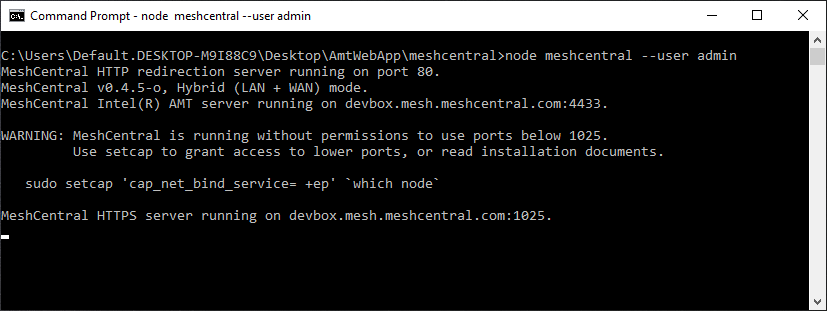
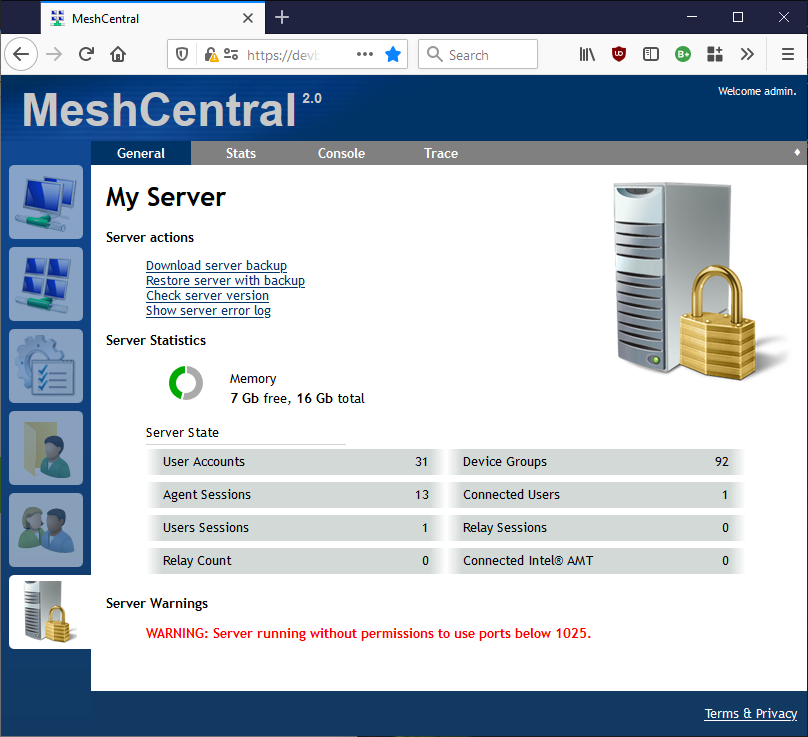
When I publish it next, MeshCentral v0.4.5-p will have the following warnings when port permissions for ports below 1025 is not set. I realize this is a Windows screenshot, but the message will only show up on non-Windows platforms.
Ylianst
on 10 Dec 2019
MeshCentral v0.4.5-p is out.
Ylianst
on 11 Dec 2019
Using the command "sudo setcap cap_net_bind_service=+ep /usr/bin/node" did indeed resolve the issue, and looking at the install guide, I did follow this guide back when I installed it originally, which is why I was probably able to run it without sudo.
How node lost the permissions to listen on ports below 1024 after an update and reboot of the server is another question. I will simply have to wait and see if it happens again :)
Thanks for all the help! =D
GnaXi
on 11 Dec 2019
Related issues
 petervanv
·
3Comments
petervanv
·
3Comments
 PathfinderNetworks
·
3Comments
petervanv
·
3Comments
PathfinderNetworks
·
3Comments
petervanv
·
3Comments
 haxmachine
·
3Comments
haxmachine
·
3Comments
 hellofaduck
·
3Comments
hellofaduck
·
3Comments
Most helpful comment
@GnaXi , if you're on Ubuntu 18.04 you shouldn't have been able to run on ports <1025 without some sort of root access that enabled it.
Running
sudo setcap 'cap_net_bind_service=+ep' `which node`Should do the trick. This allows the node process access to run, regardless of user, on ports < 1025.
EDIT: Note that this allows access to node. If you upgrade your node version, you'll need to re-run this command. Perhaps you ran this sometime previously but node was recently updated on your end, which is how this situation may have occurred.