Meshcentral: 7 Day Power State wrong
We had a machine that was accidentally turned off last night around 22:00 and wasn't powered on until 06:00 this morning.
However for the mesh service is saying there was no interruption and that it was online the whole time.
Is there a away to debug this?
Running mesh 0.4.5.b
 adsgreen
All 15 comments
I see similar results as well with Surfaces when they go into sleep mode, though I don't pay attention to that feature so I haven't looked into it myself.
 ryanblenis
on 4 Dec 2019
ryanblenis
on 4 Dec 2019
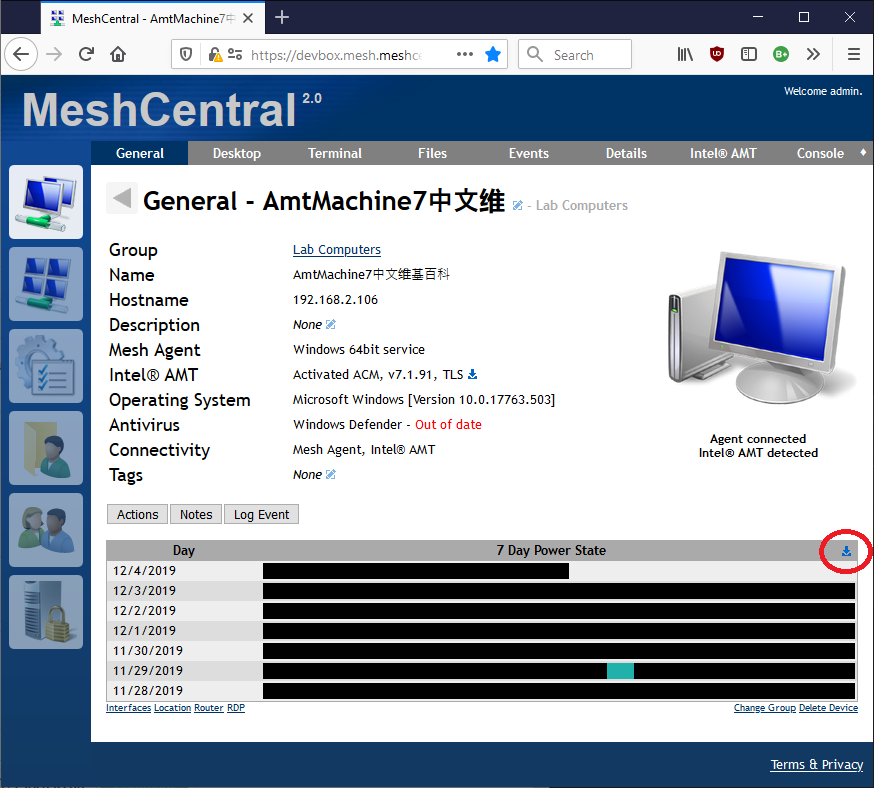
One thing that can help a lot with this is to take a look at the data log and see if the data is ok and it's just the graph that is bad, or if the data is the problem. You can download the raw timeline data using the small icon on the upper right of the timeline graph. Feedback on this would be appreciated.
 Ylianst
on 4 Dec 2019
Ylianst
on 4 Dec 2019
Oddly enough, I just downloaded that export for a machine that has been consistently on all week and it seems to "flicker" for several seconds every now and then. The black bars are consistently on though and should the full time when hovering over them. Perhaps when I restart the MeshCentral server? But that doesn't make sense as it should not affect the actual power state of the machine. (Changed .csv to .log for GitHub compat)
powerevents.log
A small side question: why is the power state generated as black bars instead of a pretty graph like in the server tab using charts.js?
ryanblenis
on 4 Dec 2019
The power state data shows the server's knowledge of the device's state, not the actual device state. So, if you reset the server, you do get a gap in the data. If the gap is small, it's not going to be shown in the graph, but it will be in the data. So, if the server is shutdown for an hour, all devices will have an hour gap. Also, if a device does not have network connectivity for an hour, you also get a gap.
As for the charts looking nice... this is something I can look at at some point. This graph format is a really simple HTML table and can be displayed quickly on all browsers. That said, something I lot more fancy could be built.
Ylianst
on 4 Dec 2019
That makes sense. So this isn't so much about being a "power state" versus being an an "online and able to communicate with the server" state. E.g. the computer could be on, but not connected to the internet, thus would have a gap in the graph. Correct?
ryanblenis
on 4 Dec 2019
Exactly. I guess we could have the agent send the computers uptime when it connects to the server and correct the data. Of course, you would have to trust that the agent information is correct.
Ylianst
on 4 Dec 2019
I actually like online state better. I don't care about when a computer is powered on, I care when it is online. I do, however care about the uptime- but that can be seen pretty easily with a "Last Rebooted" timestamp versus the black bar graph that only spans 7 days.
ryanblenis
on 4 Dec 2019
Got the data and it's not right:
Thu Nov 28 2019 09:39:26 GMT+0000 (Coordinated Universal Time) | 1
Fri Nov 29 2019 09:22:17 GMT+0000 (Coordinated Universal Time) | 0
Fri Nov 29 2019 09:22:22 GMT+0000 (Coordinated Universal Time) | 1
Where as the windows event logs for the machine show the power went off at 3/12 22:00 and was restored at 4/12 06:00
Also the Devices view for the mesh the node as grey and unpowered (that how we noticed it had gone off)
adsgreen
on 5 Dec 2019
Ok, that helps. I may not have recorded that the agent disconnected. I will have to take a look at this.
Ylianst
on 5 Dec 2019
I believe you are on the right track. It appears it's not recording when the agent goes offline. Below is the screen grab from the power state download for a device I installed MeshAgent on this afternoon. (at 1:45pm EST). But I then shut that same device down at about 3pm EST. The power state is not recording when the device was powered off.

 PathfinderNetworks
on 5 Dec 2019
PathfinderNetworks
on 5 Dec 2019
I had a bugreport regarding this issue before. Unfortunately this part of MC still not working :(, I hope we can have an update soon...
 pczolee
on 15 Dec 2019
pczolee
on 15 Dec 2019
"I had a bugreport regarding this issue before"? I don't see an issue about this posted by you, but I do see that you posted a comment on another issue that someone else opened about this.
Anyway, this is a duplicate of #460.
 MailYouLater
on 17 Dec 2019
MailYouLater
on 17 Dec 2019
So, was this issue still not improved?
I also faced with that power state shows powered on even when PC is shut down or when agent process is terminate
 JunHyunPark1210
on 2 Mar 2020
JunHyunPark1210
on 2 Mar 2020
I don't believe it's been resolved. The 7 day power state and Last Seen times still don't seem to match up with what the device is actually experiencing for power state. I have one device I'm looking at now that reports the last seen time as 2;28;20 at 2:03 pm (which may or may not be correct) but the 7 day power state shows it as being connected until 4:29pm on 2/29/20 (which likely is not correct).
PathfinderNetworks
on 2 Mar 2020
This is now fixed. I will close this one, but please open again if needed.
Ylianst
on 8 May 2020
Related issues
PathfinderNetworks
·
3Comments
 Julien-asv
·
3Comments
Julien-asv
·
3Comments
 whalehub
·
3Comments
MailYouLater
·
4Comments
whalehub
·
3Comments
MailYouLater
·
4Comments
 guerby
·
3Comments
guerby
·
3Comments