Meshcentral: Aplicación de servidor de administración para teléfonos inteligentes
Hello, is there currently any way to enter the mesh administrator from some native mobile application? I go from my cell phone to the server page but the image looks small, it cannot be enlarged or right click. I appreciate some information that helps the experience of this user.
 mrkacg1
All 4 comments
Hi. MeshCentral does have a mobile web application (pictures below) but not a native one. Probably not in the cards to build a native application for Android/iOS right now, that would be a huge amount of work. You should be able to bookmark the mobile application as an icon on the desktop and launch it a lot like a native app.
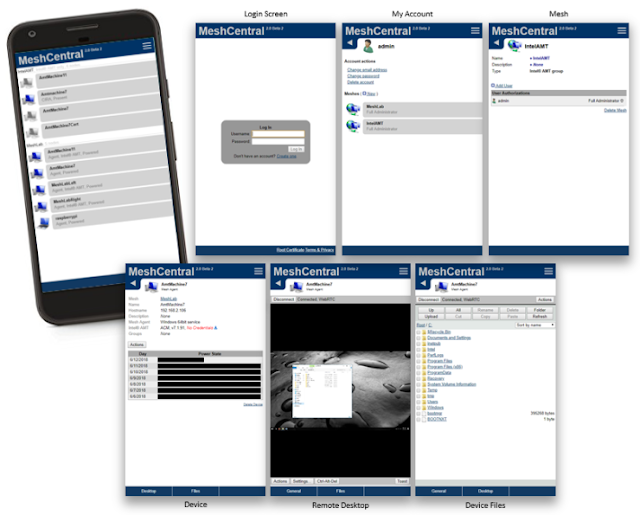
 Ylianst
on 26 Nov 2019
Ylianst
on 26 Nov 2019
@desarrollocdb There are two modes that your phone can enter... one is the mobile mode which has some less features, but if you kick into the desktop mode of the browser like Chrome or Firefox in the options menu for the browser, than you should be able to have pinch functionality. I do this all the time. However know that when you switch from Mobile to Desktop your socket becomes dead, and you have to login again(not to bad considering its quickly done and operational.). Like Ylian stated, this would take many, many iterations and a team much much larger than this current community to keep up with the features, issues, and deployment of such an application... They do awesome with the small staff they have for what this software does in the long run. I get you may call out such applications like GotoMyPC or TeamViewer, but those are companies that are dedicated resource pools working on a for profit margin based software solution. MeshCentral is free, and thus has a zero profit margin and would have to pay lots of money to enter these development application platforms to be signed applications on their respective stores.
 SomeGuru
on 26 Nov 2019
SomeGuru
on 26 Nov 2019
Thanks for the explanation. It is true, it is a very functional tool that relieves the workload in multiple installations (remote support).
My question is, how can you interact for the right click from android? It is the only thing I have not been able to achieve so far. As with the keyboard, I try to type and it disappears.
mrkacg1
on 26 Nov 2019
I can confirm that attempting to bring up the keyboard and type on an Android device (Pixel 2, Android 10) hides the keyboard after the first character is pressed when connected to a remote desktop.
 ryanblenis
on 26 Nov 2019
ryanblenis
on 26 Nov 2019
Related issues
 Julien-asv
·
3Comments
Julien-asv
·
3Comments
 hellofaduck
·
3Comments
hellofaduck
·
3Comments
 PathfinderNetworks
·
3Comments
PathfinderNetworks
·
3Comments
 petervanv
·
3Comments
petervanv
·
3Comments
 MailYouLater
·
4Comments
MailYouLater
·
4Comments
Most helpful comment
I can confirm that attempting to bring up the keyboard and type on an Android device (Pixel 2, Android 10) hides the keyboard after the first character is pressed when connected to a remote desktop.