Meshcentral: Privacy prompt does not always show on top
Guys, good morning!
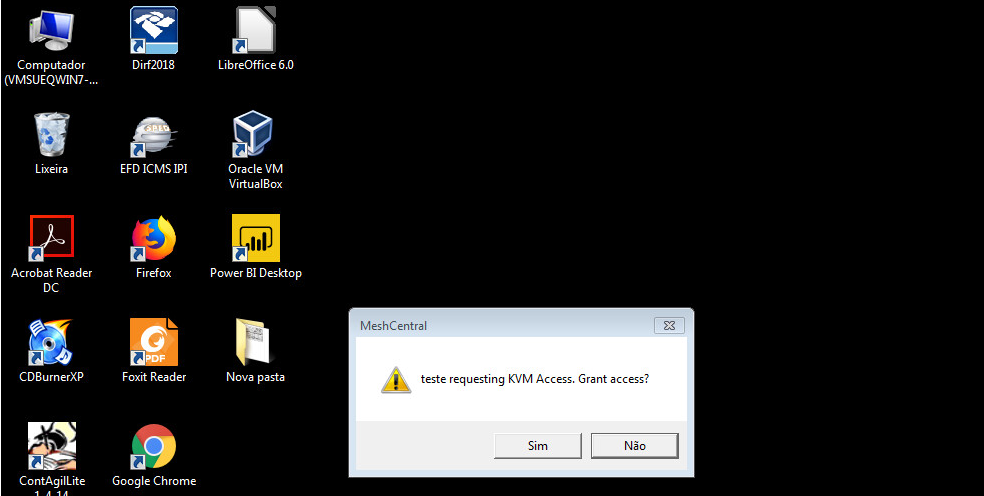
Is it possible to create an option where the meshcentral administrator can enable every remote connection request (be it via desktop, terminal or files) to be overlaid on the user's screen? In this case, the screen similar to the one shown in the print below will be displayed on the user's screen in a "forced" manner, regardless of what it has open.
 geanferrani123
All 8 comments
The next version of the MeshAgent has a new optional "privacy bar" that will show up at the top of the screen (Windows and Linux) when you do a remote desktop/terminal/files. The bar will stay for the duration of the session and the remote using can close the bar to disconnect the remote session. This new agent was supposed to be published this week, but we could not test it all in time so it will be released the second half of November.
 Ylianst
on 30 Oct 2019
Ylianst
on 30 Oct 2019
Ylianst, good afternoon!
I'm sorry but I couldn't understand, you mean this screen I sent you in print will appear at the top? Or are you referring to a bar that I suggested putting to be more transparent to the user who has someone logged in?
geanferrani123
on 30 Oct 2019
I don't know if I could express myself correctly, but what I meant is that this screen (for the user to authorize the connection) appears on the screen "above" any application he has open, so that he knows that Access request has arrived for him.
geanferrani123
on 30 Oct 2019
Ok, I understand now. Yes, this is a bug.
Ylianst
on 30 Oct 2019
Thank you friend, It's because you thought this was happening for all users, but was informed that there were problems that didn't occur, so you suggested an option to enable this screen that appears overlaid by the approving user.
geanferrani123
on 30 Oct 2019
It's a regular issue with Windows that sometimes windows that are _supposed_ to gain focus when appearing, and thus pop up in the foreground sometimes don't. If you guys figure out a way to reliably force a window to appear in the foreground, and gain focus please document how to do it somewhere public.
A workaround if you guys can't get the consent dialog to reliably gain focus and come to the foreground when it pops up, is to set the window to be always on top too. Then even if Windows decides that this time it's not going to give it focus and move it to the front, it should be visible, and accessible by mouse anyway (unless there are other windows in the space where it appears which are also set to be always on top).
 MailYouLater
on 30 Oct 2019
MailYouLater
on 30 Oct 2019
Actually, 'alwaysOnTop' is already set. It seems to work fine when the agent is run as a normal user, but it seems to be broken when the agent is running as a service. I think the reason for this, is that when it creates the dialog, the agent creates a security impersonation token, so that the dialog can be spawned on the users's session. However, the process is still owned by LocalSystem, not the logged in user. I think the alwaysOnTop, is only setting the Z-order for windows owned by the same user...
So I need to play around to see if it works if I spawn the process as the actual logged in user... I was hoping to avoid that, because the mechanism by which I use to do that is convoluted, as I use the task scheduler to do that. It seems the security token that I use otherwise, is always LocalSystem, as it seems I need the logon credentials to actually create an actual primary SecurityToken that can be used to spawn a process owned by a different user.
 krayon007
on 30 Oct 2019
krayon007
on 30 Oct 2019
Well I feel like an idiot. Apparently, I set the foreground bit of the dialog, not the topmost bit... I switched it, and now it appears to be working correctly for LocalSystem now...
krayon007
on 30 Oct 2019
Related issues
 veitw
·
4Comments
veitw
·
4Comments
 petervanv
·
3Comments
petervanv
·
3Comments
 penguinthingie
·
4Comments
penguinthingie
·
4Comments
 guerby
·
3Comments
guerby
·
3Comments
 coolwormgit
·
3Comments
coolwormgit
·
3Comments
Most helpful comment
Well I feel like an idiot. Apparently, I set the foreground bit of the dialog, not the topmost bit... I switched it, and now it appears to be working correctly for LocalSystem now...