Meshcentral: Missing "Connect All" button in multi-desktop view
I noticed this a few days ago but just updated to 0.4.2-t and the problem is still there. The thumbnail view just has Disonnect All and Settings buttons. The Connect All button has gone missing.
Probably unrelated (I can make it a separate issue) - usually the "All Displays" dropdown in the lower right is missing too. I just tried on 3 browsers here and it's just not there. There's just the timer and tools button. I tried on another computer and it did show up, but I've seen it briefly before on my main computer too.
 GoodComputerGuy
All 21 comments
A few days back there was a issue that the "Connect all" button was a liability when you have 100's or 1000's of devices in your account. So, I changed it to only show "Connect All" if you have less than 16 computers connected. I now realize this is too low. Just published MeshCentral v0.4.2-u and the limit is raised to 64. Let me know if that works for you.
I guess an alternative is a "Are you really sure you want to connect to 122 devices?" dialog prompt.
Feedback on this appreciated.
 Ylianst
on 17 Oct 2019
Ylianst
on 17 Oct 2019
On the topic of "Display All" drop down, it should automatically show up if the remote computer has more than one display. Bryan just tested it on his 3 displays computer and it works for him.
Ylianst
on 17 Oct 2019
I have seen it before, but it’s been very inconsistent. I just saw that button when viewing from one computer but it doesn’t show up when viewing from my main computer. I tried three different browsers as well as connecting to several computers, all with multiple monitors.
On Oct 17, 2019, at 1:21 PM, Ylian Saint-Hilaire notifications@github.com wrote:
On the topic of "Display All" drop down, it should automatically show up if the remote computer has more than one display. Bryan just tested it on his 3 displays computer and it works for him.—
You are receiving this because you authored the thread.
Reply to this email directly, view it on GitHub, or unsubscribe.
GoodComputerGuy
on 17 Oct 2019
For "Connect All" are you ok with the 64 computer limit?
For "Display All" drop down, are the remote computers Windows? What version of the OS?
Ylianst
on 17 Oct 2019
I just updated to the latest MeshCentral and Connect All shows up again. I
have just under 64 computers (things are always changing though and that
will go up past 64.) Maybe you could double the limit to 128? A separate
Connect All button for each group would be helpful too.
For Display All - the remote computers are all Windows 10 version 1903. I
just tried again. On my main computer that drop down doesn't show up at
all. But connecting to the same remote computer from a different computer
does show that drop down.
Annnnnd then I tried with some other browsers and the drop down showed up.
And now shows up in Firefox, my usual browser. I swear, it wasn't there a
few minutes ago!! This kind of rings a bell though - I think that may be
what happened previously as well. It seems inconsistent.
From: Ylian Saint-Hilaire notifications@github.com
To: Ylianst/MeshCentral MeshCentral@noreply.github.com
Cc: GoodComputerGuy bill@goodcomputerguy.com, Author
author@noreply.github.com
Date: 10/17/2019 01:49 PM
Subject: Re: [Ylianst/MeshCentral] Missing Connect All button
(#577)
For "Connect All" are you ok with the 64 computer limit?
For "Display All" drop down, are the remote computers Windows? What
version of the OS?
—
You are receiving this because you authored the thread.
Reply to this email directly, view it on GitHub, or unsubscribe.
GoodComputerGuy
on 17 Oct 2019
It doesn't seem to have anything to do with the size of the browser window.
GoodComputerGuy
on 17 Oct 2019
Perhaps, instead of having a limit of 16 or 64 or 128 computers, it should be configurable in the config.json.
 MailYouLater
on 18 Oct 2019
MailYouLater
on 18 Oct 2019
Ok. It will be 128 in the next version, but at some point I will remove this number and add a "Are you really sure you want to connect to 3567 devices?" prompt.
Ylianst
on 19 Oct 2019
Thanks, Ylian - that sounds good! Although if possible, being able to connect just 1 group at a time would also be helpful.
So today I'm back to not having the multiple screen drop down again. Is there anything I can do to help troubleshoot that issue?
GoodComputerGuy
on 21 Oct 2019
Really this should be a separate issue, but regarding the display picker sometimes not appearing when connected via remote desktop, I had this happen recently, and I noticed that if I go to the 'multi-device' view (the one that allows you to see what's on the screen of multiple devices at the same time) and I initiate the remote connection from there, then click the devices name to see just that device's desktop, the display picker is missing, but if I go to the specific device's Desktop page without an active remote desktop connection, then connect, the display picker is there.
MailYouLater
on 27 Oct 2019
@MailYouLater Oh, your right... the display picker is missing when entering from the multi-desktop view. That should be a new open issue.
Ylianst
on 27 Oct 2019
Not always, though! Sometimes it’s there. I can create a new issue tomorrow.
On Oct 27, 2019, at 5:05 PM, Ylian Saint-Hilaire notifications@github.com wrote:
@MailYouLater Oh, your right... the display picker is missing when entering from the multi-desktop view. That should be a new open issue.—
You are receiving this because you authored the thread.
Reply to this email directly, view it on GitHub, or unsubscribe.
GoodComputerGuy
on 27 Oct 2019
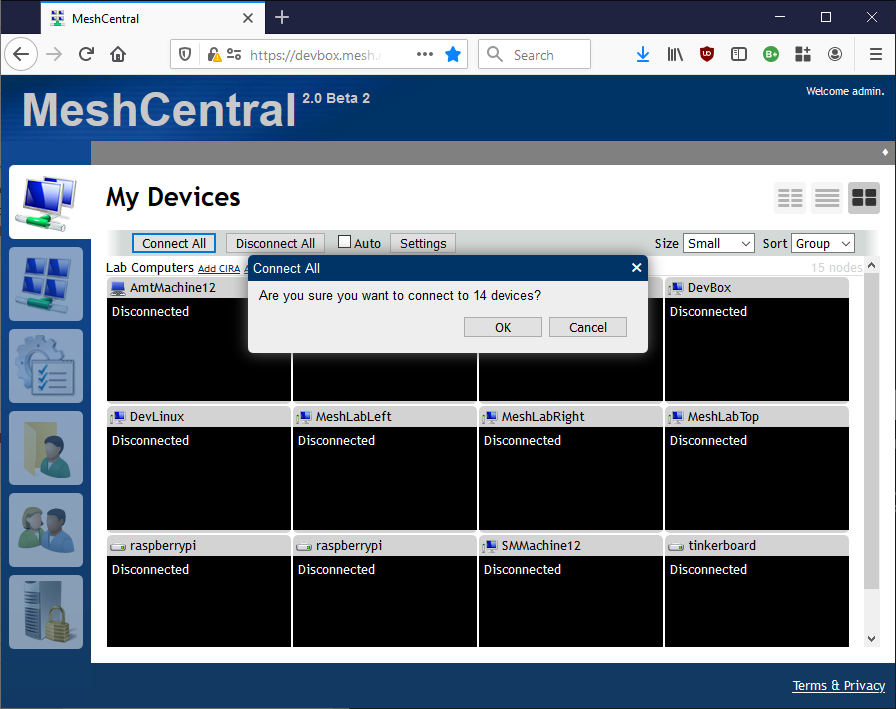
Just published MeshCentral v0.4.3-h with a new prompt if you hit "Connect All" and more than 8 machines will be connected. Also, the "auto" checkbox will gray out and uncheck when over 32 devices are connected. Feedback appreciated.
Ylianst
on 27 Oct 2019
The display picker is not set correctly when entering from the multi-desktop screen. If it was displayed before for a different device, it may still be present, but that is still not good.
Ylianst
on 27 Oct 2019
I'm running 0.4.3-q now. When I hit Connect All I get "Are you sure you
want to connect to 57 devices?" After clicking OK it doesn't connect to
all of them though. It makes it's way slowly through the first 30+ then
seems to quit. Actually the rest say "Setup..." then nothing happens.
GoodComputerGuy
on 30 Oct 2019
I suspect this is a browser limitation. I have noticed that there is a limit on the amount of canvas surface a browser will accept. You can open the browser debug console and if you see any errors show up, take a screen shot and send it over. However, I may not be able to do anything about is with 57 devices.
Ylianst
on 30 Oct 2019
I’ll check that out although it used to work better.
GoodComputerGuy
on 30 Oct 2019
Humm. I just added the prompt, the actual remote desktop code it the same. You may try a different browser.
Ylianst
on 30 Oct 2019
Oh hey look at that. The latest Firefox update is not working well. But 59
machines just connected like lightning on Chrome. And also, as long as I
connect to a machine first from the Columns view, the Display dropdown
then shows up when I connect to any machine from the Desktops view, like
you mentioned previously.
GoodComputerGuy
on 30 Oct 2019
Thanks for the report. Yes, the display drop down is certainly a bug that needs fixing.
Ylianst
on 30 Oct 2019
Yes, but it should really be tracked in its own issue. This issue is for the fact that when you had lots of machines connected, it would hide the 'connect all' button, which is now fixed thanks to Ylianst adding a confirmation dialog when large numbers of computers would be connected instead of removing the button.
This issue should be closed as fixed, and three new issues should be added, one detailing the fact that the display picker is missing when connecting via 'multi-device view' (with the caveat that you can start a single connection first to cause them all to show the display picker), one requesting a 'connect all' button for each device group, and one pointing out that it's very slow to connect to a large number of computers when using whatever version of Firefox you just updated to.
MailYouLater
on 31 Oct 2019
Related issues
MailYouLater
·
4Comments
 petervanv
·
3Comments
petervanv
·
3Comments
 Julien-asv
·
3Comments
petervanv
·
3Comments
Julien-asv
·
3Comments
petervanv
·
3Comments
 LPJon
·
3Comments
LPJon
·
3Comments
Most helpful comment
Ok. It will be 128 in the next version, but at some point I will remove this number and add a "Are you really sure you want to connect to 3567 devices?" prompt.