Meshcentral: Meshcentral server showing black screen during remote access
Guys, good afternoon!
During some remote accesses (not all) it happens that the remote access screen during the session goes black. Time happens to turn black and comes back quickly and time normalizes, how can I solve?
 geanferrani123
All 22 comments
What OS is the remote endpoint running?
 krayon007
on 11 Oct 2019
krayon007
on 11 Oct 2019
Also, does the connection bar say "Setup..." or "Connected"?
 Ylianst
on 12 Oct 2019
Ylianst
on 12 Oct 2019
The cases reported to me were using windows 10 64 bits. Let me try to explain:
The technician is performing remote access, during remote access at random times, the screen goes black and back, in some cases to return the attendant has to disconnect and reconnect, in others the screen reappears quickly, without the need to reconnect.
geanferrani123
on 14 Oct 2019
I have seen this issue happen 90% of the time with end points that are bandwidth constrained and have a higher latency in very remote countries and regions of the world. In my case, totally an endpoint issue rather then the mesh server or agent..
 penguinthingie
on 14 Oct 2019
penguinthingie
on 14 Oct 2019
Amigo, com relação a problema de link, reparei que quando o acesso é feito em um local que temos onde o link é muito fraco, realmente ocorre esse problema, mas em boa parte dos acessos esse problema acontece com conexões em fibra óptica.
geanferrani123
on 14 Oct 2019
Guys, I received the report from the technicians that the black screen appears and lasts approximately 3, 4 seconds
geanferrani123
on 14 Oct 2019
Friends, do you have any idea what it might be?
geanferrani123
on 16 Oct 2019
@krayon007: Is this possibly the MeshAgent's child KVM process crashing, like #551?
That issue says the remote desktop freezes, and this one says it goes black, so maybe they're totally different, but I wonder if maybe something different in the environment (e.g. browser) may make it freeze or go black, and perhaps both are caused by a MeshAgent child process crash?
 MailYouLater
on 16 Oct 2019
MailYouLater
on 16 Oct 2019
I added code to enable core dumps in the child kvm process, which will be in the next agent release, so hopefully we can get to the bottom of this.
krayon007
on 16 Oct 2019
Guys, taking the time to ask me a question please, the agent update is also done through npm install meshcentral?
geanferrani123
on 17 Oct 2019
Thanks Bryan, do you have any idea what the timeline is on the next agent release that has this logging change? I'm noticing this KVM child process crash/issue on nearly every remote session I work in. So it's very annoying, at the least.
 PathfinderNetworks
on 17 Oct 2019
PathfinderNetworks
on 17 Oct 2019
Very soon. Hopefully end of this week or early next. It's already in GIT, if you needed something right away.
krayon007
on 18 Oct 2019
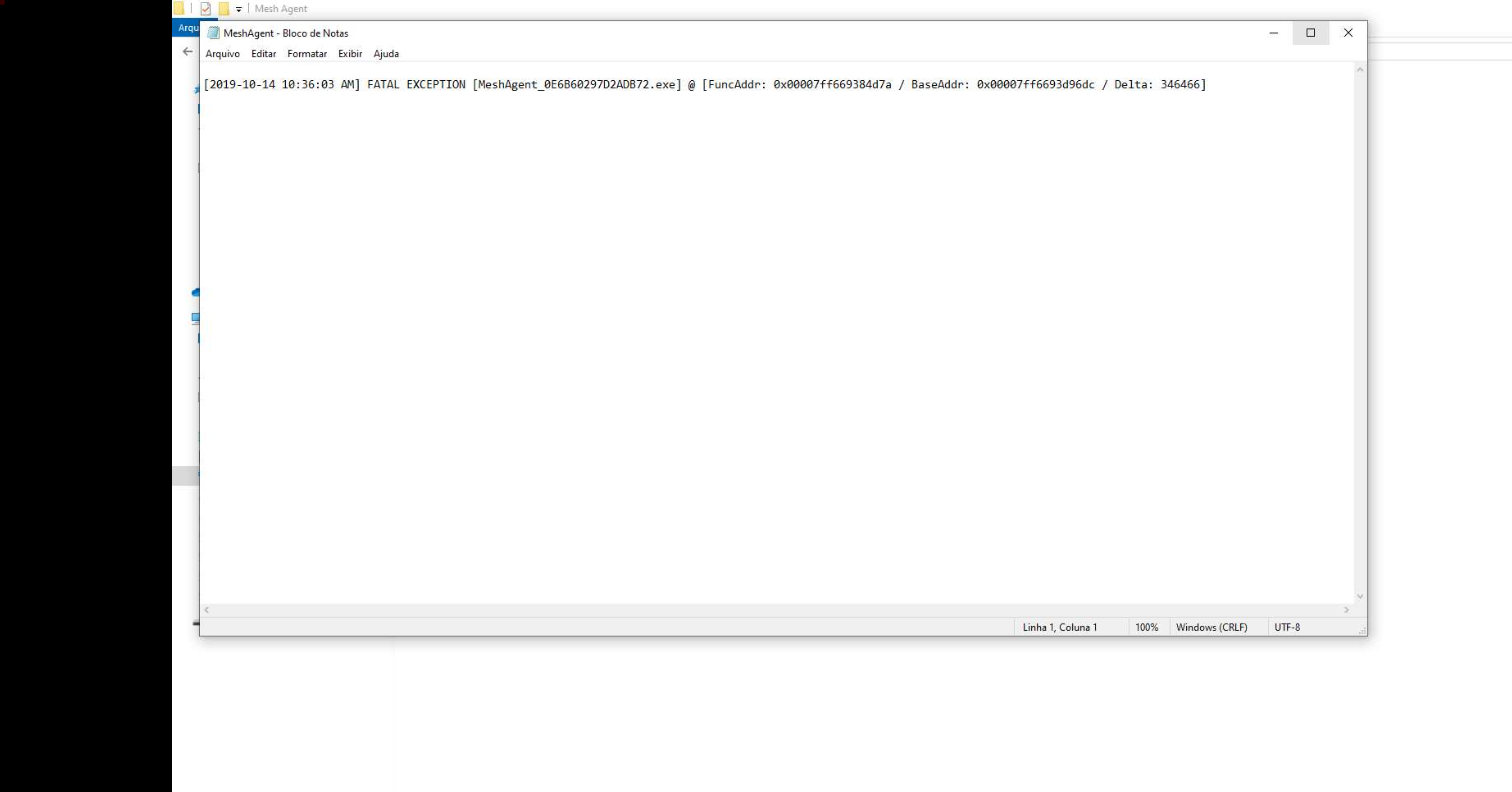
Friends, see the error log of one of the machines that presented this problem today, strange that did not record event of today.
geanferrani123
on 21 Oct 2019
@krayon007 How do I update only the agent?
geanferrani123
on 24 Oct 2019
Friends, good morning!
Sorry for the question but can you help me with the problem at hand?
geanferrani123
on 12 Dec 2019
Hello Guys, good morning!
I managed to generate the .dmp file, how do I send it to you?
geanferrani123
on 18 Dec 2019
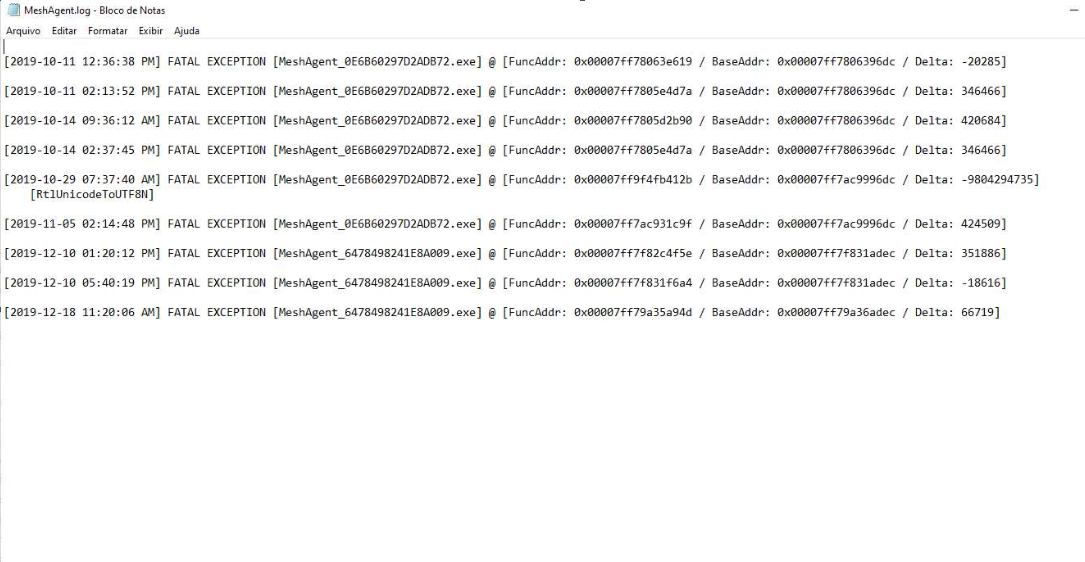
Other error log:
geanferrani123
on 18 Dec 2019
@Ylianst @krayon007
geanferrani123
on 18 Dec 2019
Hi,
Thanks!
I'm currently writing a fix for a separate KVM issue on windows, that may be related/causing this.
If you can upload your dump file somewhere like Google drive or Dropbox or something, or even into the my files/public folder on your mesh server, then email me the link to my email address in my git profile, I can take a look.
Thanks,
Bryan
krayon007
on 18 Dec 2019
Sorry, ignore my comment about the dump file, that was for a different thread...
Bryan
krayon007
on 18 Dec 2019
Bryan @krayon007 , What do you want me to do? need me to send?
geanferrani123
on 18 Dec 2019
@krayon007 @Ylianst I just sent you the email containing my dump files to try to fix this bug I reported in this topic.
geanferrani123
on 2 Jan 2020
Related issues
MailYouLater
·
3Comments
penguinthingie
·
4Comments
 veitw
·
4Comments
veitw
·
4Comments
 haxmachine
·
3Comments
haxmachine
·
3Comments
 unguzov
·
3Comments
unguzov
·
3Comments