Meshcentral: Cannot control Mac from desktop connection
When I connect to a Mac I have no mouse control through the agent which means I have very limited control of a Mac computer.
 asasin114
All 68 comments
What version of MacOS are you running?
 krayon007
on 7 Oct 2019
krayon007
on 7 Oct 2019
Mojave. Did a little more digging and discovered #473. I think I fixed that issue but will have to test later. The other issue I ran into was that one of my Macs would disconnect its desktop session right after I initialized it. This is caused by ProPresenter for whatever reason. Not much I can do about that by the looks of it.
asasin114
on 7 Oct 2019
Currently getting the "black screen" issue (just black screen, no controls work) as well on High Sierra.
Noting for reference that I'm running MeshCentral within a Docker container on that machine- just in case there is some sort of loopback protection causing this.
 ryanblenis
on 7 Oct 2019
ryanblenis
on 7 Oct 2019
@ryanblenis , the remote Mac OS machine is logged in, and not sitting at the logon screen?
krayon007
on 9 Oct 2019
@krayon007 Correct. The OS X machine is on and not locked / logged out / etc.
Also, please disregard my previous note regarding the MeshCentral server running on a Docker container within that machine.
I spun up a public/cloud instance to join it to and replicated the same issue without the "odd" network scenario. It simply just shows a black screen when attempting to connect to the desktop. Remote terminal and file system viewing appear to work as intended.
ryanblenis
on 10 Oct 2019
@krayon007 Same issues as reported also in #377
 hunter-nl
on 18 Oct 2019
hunter-nl
on 18 Oct 2019
Noting here that I've just tried another time on another High Sierra machine (4th separate High Sierra machine I've tested) and still only get a black screen for the desktop, with no ability to control it.
Also noting that this time I'm not running from the same machine or the server via Docker, it is a Ubuntu 18.04 server in prod/testing with valid SSL.
Anyone perusing these issues actually have a High Sierra machine that they CAN connect to?
ryanblenis
on 25 Feb 2020
This is really wierd. I have Sierra, Mojave, and Catalina systems, and it KVM appears to work ok. Do you have any other remote-management software running on your mac?
krayon007
on 26 Feb 2020
Just to note (not sure if you were short-handing it), but this is High Sierra, not Sierra. Yes, Kaseya and TeamViewer work as expected. I've been meaning to test Remotely as well, but haven't set up a server yet. I'm actually running an upgrade to Catalina right now to see if there's a difference on my personal machine (7 minutes left on the download).
ryanblenis
on 26 Feb 2020
Yeah, I wasn't short-handing it, I don't have High Sierra, I went straight from Sierra to Mojave... I'm wondering if TeamViewer installs a custom video driver on macOS like it does on Linux (but not Windows apparently), that is interfering with how we are scraping the display.
krayon007
on 26 Feb 2020
After upgrading to Catalina, the issue remains. However now when I try to connect for the first time I am prompted on the Mac to grant accessibility features. After granting them (and also manually granting full disk access and screen recording) I still only get a black screen.
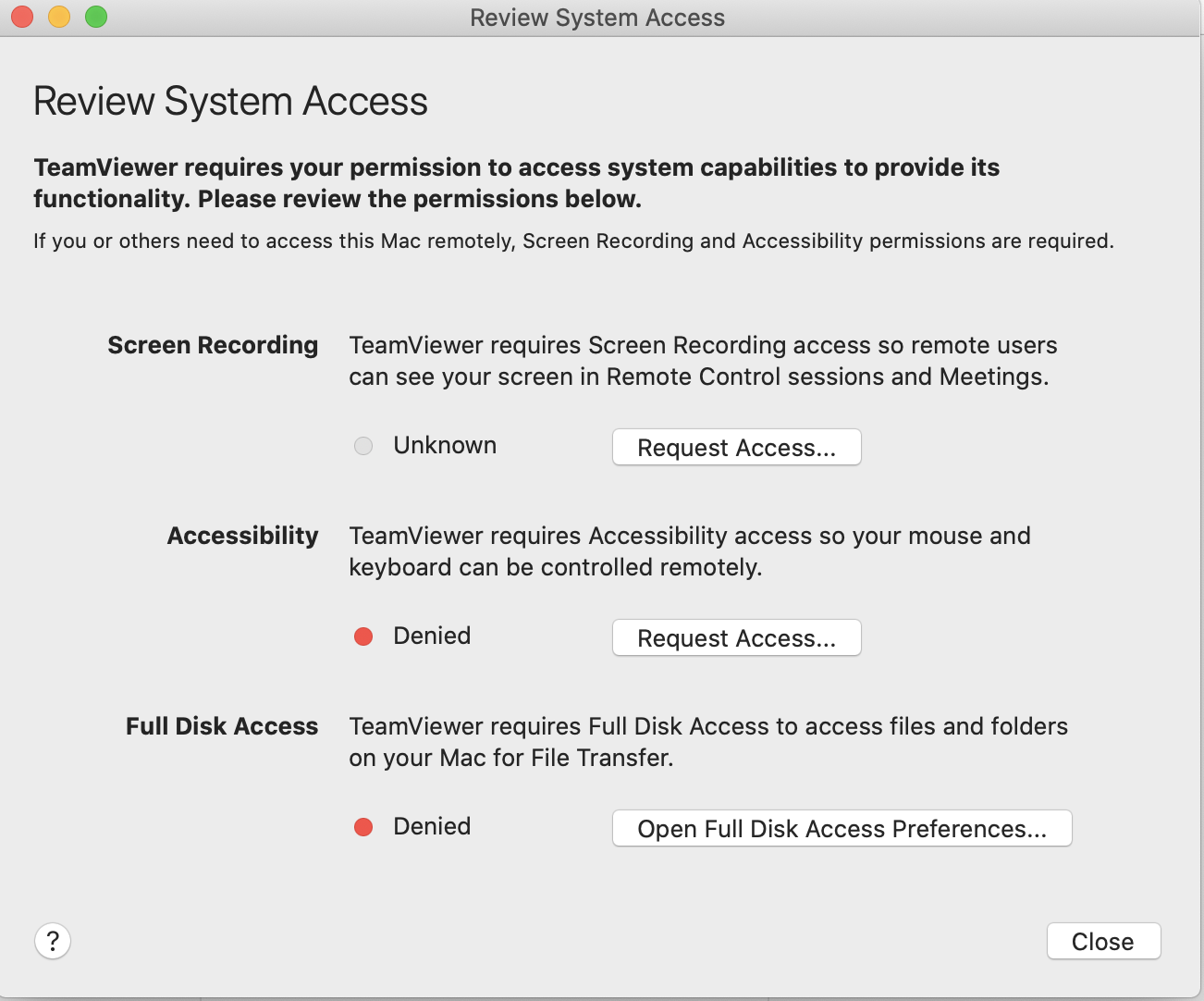
Kaseya and TeamViewer were removed completely from the machine, tccutil reset Accessibility and the meshagent restarted, permissions regranted, and still only get a black screen when trying to remote in to the desktop. I then re-installed TeamViewer to see what would happen and will include the following for reference (pops up immediately after the install) something like this would be good for the MeshAgent so the user isn't randomly prompted when an admin needs to access it the first time (you know, assuming the black screen issue can be identified and fixed =D )
ryanblenis
on 26 Feb 2020
For me, I had to reboot my Catalina machine after granting access before KVM worked. I didn't have to do that for Mojave. Not sure if that is your issue tho. I had to do a clean install of Catalina, because when I attempted to upgrade from Mojave, it bricked my machine.
krayon007
on 26 Feb 2020
Just tried rebooting, and the black screen persists. I'd rather not try a clean install on my personal machine if I don't have to!
ryanblenis
on 26 Feb 2020
I do get a bunch of errors in the console window while trying to connect/disconnect many times on the desktop screen:
uncaughtException1: Error:  => EventEmitter.emit(): Event dispatch for 'Command' on 'MeshAgent' threw an exception: TypeError: undefined not callable (property 'write' of [object Object]) in method 'handleServerCommand()'
uncaughtException1: Error:  => EventEmitter.emit(): Event dispatch for 'Command' on 'MeshAgent' threw an exception: TypeError: undefined not callable (property 'write' of [object Object]) in method 'handleServerCommand()'
uncaughtException1: Error:  => EventEmitter.emit(): Event dispatch for 'Command' on 'MeshAgent' threw an exception: TypeError: undefined not callable (property 'write' of [object Object]) in method 'handleServerCommand()'
uncaughtException1: Error:  => EventEmitter.emit(): Event dispatch for 'Command' on 'MeshAgent' threw an exception: TypeError: undefined not callable (property 'write' of [object Object]) in method 'handleServerCommand()'
uncaughtException1: Error:  => EventEmitter.emit(): Event dispatch for 'Command' on 'MeshAgent' threw an exception: TypeError: undefined not callable (property 'write' of [object Object]) in method 'handleServerCommand()'
uncaughtException1: Error:  => EventEmitter.emit(): Event dispatch for 'Command' on 'MeshAgent' threw an exception: TypeError: undefined not callable (property 'write' of [object Object]) in method 'handleServerCommand()'
uncaughtException1: Error:  => EventEmitter.emit(): Event dispatch for 'Command' on 'MeshAgent' threw an exception: TypeError: undefined not callable (property 'write' of [object Object]) in method 'handleServerCommand()'
uncaughtException1: Error:  => EventEmitter.emit(): Event dispatch for 'Command' on 'MeshAgent' threw an exception: TypeError: undefined not callable (property 'write' of [object Object]) in method 'handleServerCommand()'
uncaughtException1: Error:  => EventEmitter.emit(): Event dispatch for 'Command' on 'MeshAgent' threw an exception: TypeError: undefined not callable (property 'write' of [object Object]) in method 'handleServerCommand()'
uncaughtException1: Error:  => EventEmitter.emit(): Event dispatch for 'Command' on 'MeshAgent' threw an exception: TypeError: undefined not callable (property 'write' of [object Object]) in method 'handleServerCommand()'
uncaughtException1: Error: timers.onElapsed() callback handler on 'sendNetworkUpdate()'  => TypeError: cannot read property 'split' of undefined
Establishing IPC-x-Connection to LoginWindow for KVM
Closing IPC Socket
uncaughtException1: Error:  => EventEmitter.emit(): Event dispatch for 'Command' on 'MeshAgent' threw an exception: TypeError: undefined not callable (property 'write' of [object Object]) in method 'handleServerCommand()'
uncaughtException1: Error:  => EventEmitter.emit(): Event dispatch for 'Command' on 'MeshAgent' threw an exception: TypeError: undefined not callable (property 'write' of [object Object]) in method 'handleServerCommand()'
uncaughtException1: Error:  => EventEmitter.emit(): Event dispatch for 'Command' on 'MeshAgent' threw an exception: TypeError: undefined not callable (property 'write' of [object Object]) in method 'handleServerCommand()'
uncaughtException1: Error:  => EventEmitter.emit(): Event dispatch for 'Command' on 'MeshAgent' threw an exception: TypeError: undefined not callable (property 'write' of [object Object]) in method 'handleServerCommand()'
uncaughtException1: Error:  => EventEmitter.emit(): Event dispatch for 'Command' on 'MeshAgent' threw an exception: TypeError: undefined not callable (property 'write' of [object Object]) in method 'handleServerCommand()'
uncaughtException1: Error:  => EventEmitter.emit(): Event dispatch for 'Command' on 'MeshAgent' threw an exception: TypeError: undefined not callable (property 'write' of [object Object]) in method 'handleServerCommand()'
I also noticed that the PID of the meshagent process changes rapidly during this time, which I believe means it is crashing. A few times the meshagent never came back and needed to be manually started again, but could not define a definitive pattern where I could replicate it successfully in all cases.
Do you recommend, and if so, what is the best way to enable a helpful debug on the agent for some additional data? Unlike the Windows agent, I don't see a log entry every time a crash occurs.
ryanblenis
on 26 Feb 2020
Interesting... I'll take a look tomorrow. It could be the child KVM process is crashing, rather than the main agent process.
krayon007
on 26 Feb 2020
After updating to the latest (0.4.9-o) attempting remote desktop on Catalina re-prompted for access, however still a black screen. If there is any debugging I can do to assist in fixing this, just let me know.
ryanblenis
on 2 Mar 2020
I started toying around with this, and see that a subprocess is spun up for the kvm with the meshagent64 path and a -kvm0 param.
When I run meshagent64 -kvm0 from a terminal I get a segfault 11, which appears to be on this line:
cbBytesRead = read(KVM_AGENT_FD == -1 ? STDIN_FILENO: KVM_AGENT_FD, pchRequest2 + len, 30000 - len);
of mac_kvm.c
ryanblenis
on 3 Mar 2020
That's because you can't run that from a terminal. It's supposed to be forked with redirected STD descriptors. If you launch it manually, it's probably crashing trying to parse stdin, which is not a KVM input packet in that case.
Tomorrow, I'll add logging to the child process. I have it for Linux, but I need to double check if it works on MacOS.
krayon007
on 3 Mar 2020
Thanks @krayon007, I figured that was part of my problem with this test. Nice to have confirmation though!
ryanblenis
on 3 Mar 2020
I'm going to set up a VM and see if I can get it working there, then proceed to install some programs I have or have had on my system to see where it breaks. Will report back with findings.
ryanblenis
on 4 Mar 2020
VM Seems to run fine, even through installing and removing several apps I thought might interfere, such as TeamViewer, etc. I think I'll need to wait for the additional logging you mentioned for the child process to get more info that will be (hopefully) be helpful in tracking this down. Patiently awaiting @krayon007 's C skills on this one.
ryanblenis
on 9 Mar 2020
Update: I believe I've narrowed down the issue to this line. Apparently MacOS has some issues with setuid in some circumstances. Processing basically stops here when creating the process. Currently testing solutions / workarounds.
ryanblenis
on 11 Mar 2020
That is really unfortunate if true, that is such a basic feature/use case. If that is really the case, I may have a work around.... The way I currently implement notifications on MacOS does that... I found the security policies on macOS to be really stupid sometimes. The utility I use to display the notification cannot be accessed from root using setuid, which the documentation said was on purpose, because it was a security issue... So I made it so I created a one time launch agent, that is installed by root, then I forced it to launch immediately, which causes it to spawn as the user I specified, which then worked fine... So basically the mechanism to prevent root from doing it didn't really prevent root from doing it, becuase root can still install launch agents.
But anyways, I can pull in that code, and use that to spawn the child kvm process via a launch agent instead of setuid.... It's pretty convoluted, but if it works....
krayon007
on 11 Mar 2020
The only thing I can't grasp (aside of the stupidity of that not working in general) is why it works on a freshly made VM, but not the machine I'm testing on. I wonder if having upgraded from previous versions of macOS have left something rotten going on there...
If that works and you can do that I'd be psyched- if you can't tell, I've been banging my head against the wall on this for some time now.
ryanblenis
on 11 Mar 2020
That was my original thought as well. But in my case I couldn't even upgrade my MacBook from Mojave to Catalina, because it bricked itself when it did, so I was forced to do a clean install...
krayon007
on 12 Mar 2020
Update... this isn't entirely environmental. A test program for setuid/seteuid runs fine on the same system without freezing the whole program... So there's a difference in the code somewhere that's causing it. Good news is this means it's setuid'ing is allowed. Bad news is the bug still has to be found!
Test program:
#include <errno.h>
#include <sys/types.h>
#include <unistd.h>
#include <stdlib.h>

void printstat()
{
    printf("uid: %d, euid: %d\n",getuid(),geteuid());
}

int main(int argc, char** argv)
{
    if (argc < 2)
    {
            return -1;
    }
    int m_targetUid = atoi(argv[1]);
    printstat();
    uid_t realUID = getuid();
    printf("Setting effective uid to %d\n",m_targetUid);
    seteuid(m_targetUid);
    printstat();
    printf("Setting effective uid to 0\n");
    seteuid(0);
    printstat();
    if (m_targetUid != realUID)
    {
            printf("Setting real uid to %d\n",m_targetUid);
            int res = setuid(m_targetUid);
            printf("setuid(%d) returned: %d\n",m_targetUid,res);
            if (0 > setuid(m_targetUid))
            {
                    printf("setuid(%d) failed: %d, getuid() returned %d, geteuid returned     %d\n",m_targetUid,errno,realUID,geteuid());
                    exit(-1);
            }
    }
    printstat();
}
Your test program doesn't appear to do a fork or vfork before the setuid. That is required for our usage.
krayon007
on 14 Mar 2020
I was getting there to build a test file back up to it. I'm a dolt anyway. At some point I deleted the log file I was logging to for debugging. It got recreated without write permissions for my user... So guess what it looked like in the log once setuid ran? Like the program stopped working because the setuid user didn't have rights to it. So I'm starting my testing over again- setuid might not be the issue.
ryanblenis
on 14 Mar 2020
Found at least one issue so far. Line 386 of mac_tile.c:
width_padding_size = (adjust_screen_size(SCREEN_WIDTH) - width) * 3;
evaluates to a negative number on my test system (-4992). So the loop on line 445 is infinite.
Currently toying around with what that number really means for the screen grab, but figured I'd post here to get your thoughts as you are obviously more intimately familiar and may know exactly how that's affecting things so far. A simple abs() around the width_padding_size didn't just make it work (just a shot in the dark as now it is presumably padding something it probably shouldn't, but thought I'd at least end the loop and see what happened).
EDIT: height_padding_size is also negative and creating an infinite loop
ryanblenis
on 15 Mar 2020
Changing width_padding_size and height_padding_size to int's (instead of unsigned ints) and testing for > 0 instead of != 0 loads up a picture, it's just mangled (see below). I also tried running through the loop in reverse to the negative number while setting *output-- = 0; instead of *output++ = 0; but it was still mangled. I'm not sure what that might be padding in a negative outcome. Hope you can offer some insight. I can move the mouse around the area and it moves around on the remote desktop at the appropriate locations.
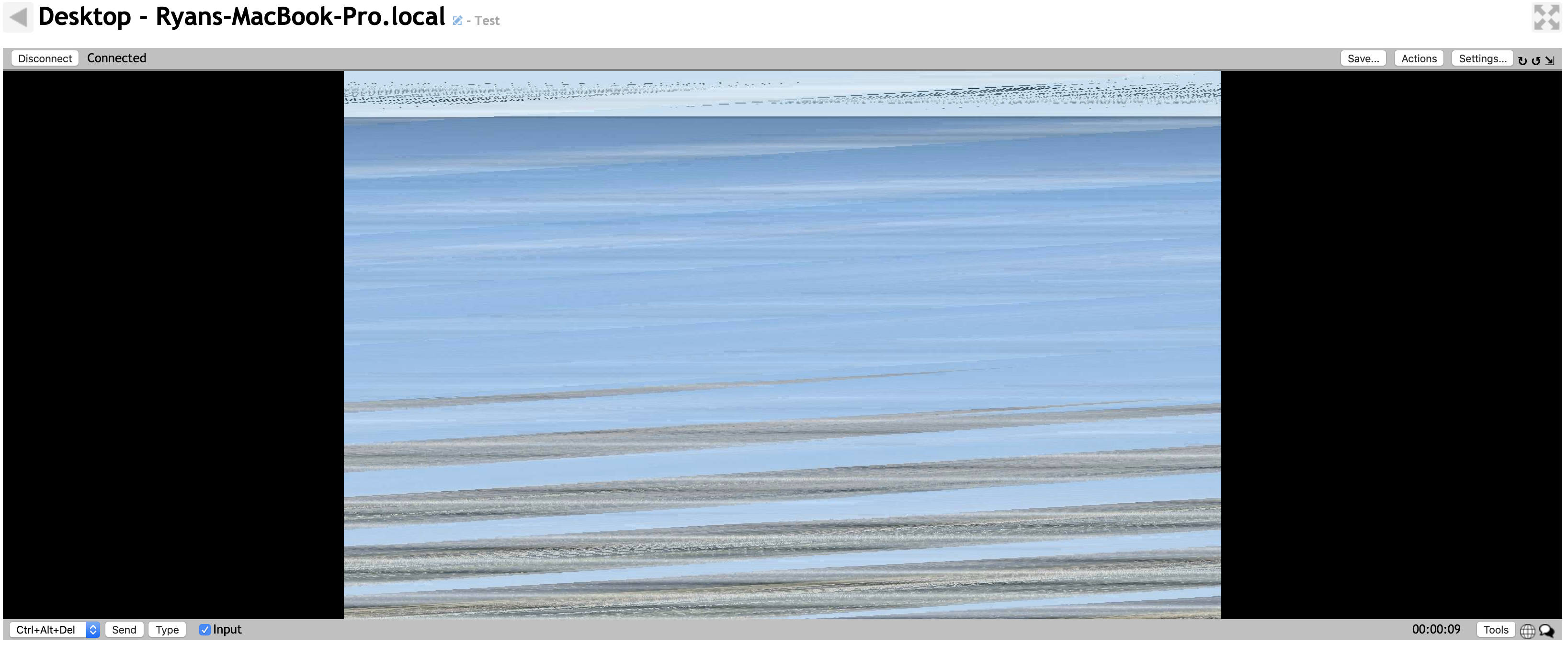
EDIT: Looks like this is caused because of Retina displays. And for some reason the width is the Retina width in the file, but getting the image width and height is half of what the apparent resolution is. You can detect this type of display with the following command:
system_profiler SPDisplaysDataType | grep Resolution
EDIT:
Setting the following variables in mac_kvm.c send the image as expected for Retina displays, however the pointer clicks need adjustment still:
SCREEN_HEIGHT = CGDisplayPixelsHigh(SCREEN_NUM) * 2;
SCREEN_WIDTH = CGDisplayPixelsWide(SCREEN_NUM) * 2;
screen_height = CGDisplayPixelsHigh(screen_num) * 2;
screen_width = CGDisplayPixelsWide(screen_num) * 2;
What is your actual screen size? IIRC, the padding was required by the JPEG encoder.
krayon007
on 15 Mar 2020
2880 x 1800, but the CGImageGetHeight and width returns are half that. Something about how the Retina display works I suppose.
ryanblenis
on 15 Mar 2020
Pull request submitted on the MeshAgent project to fix the issue is here: https://github.com/Ylianst/MeshAgent/pull/42
ryanblenis
on 16 Mar 2020
I merged in the pull request, and did testing with several MacOS flavors going back to Yosemite, cranking the resolution up to 2880 * 1800, and enabling/disabling HiDPI. Seems to work nice. When the agent gets updated, this will be included.
krayon007
on 19 Mar 2020
I saw the new agents get uploaded. Works great in my local dev test environment.
However (sad sigh) running from a live server over the internet (same server version, same client machine, just switching servers via running the associated install package) I get a quick flash of the screen loading (where I can see about 25%-75% of the screen each time), then get disconnected from the Remote Desktop and the "Connect" button reappears.
I've switched back and forth multiple times between local dev server and internet server with the same results, and verified the meshagent_osx64 file is the same when connected to both servers via md5 hash checking.
Thoughts on what the new, internet-only problem could be, or where to start debugging this one?
ryanblenis
on 4 Apr 2020
Not sure if it helps, but I enabled &debug=1 on each and posted the console logs here if it helps (local dev server was only run for a few seconds before manually stopping. Internet server stopped on its own):
Internet server:
CMD7 at X=1680 Y=1050
ScreenSize: 1680 x 1050
CMD7 at X=1680 Y=1050
ScreenSize: 1680 x 1050
CMD7 at X=3360 Y=2100
ScreenSize: 3360 x 2100
CMD3 at X=0 Y=192
CMD3 at X=0 Y=416
CMD3 at X=0 Y=640
stop 1
stop undefined
Local Dev Server:
CMD7 at X=1680 Y=1050
ScreenSize: 1680 x 1050
CMD7 at X=1680 Y=1050
ScreenSize: 1680 x 1050
CMD7 at X=3360 Y=2100
ScreenSize: 3360 x 2100
CMD3 at X=0 Y=0
CMD3 at X=0 Y=192
CMD3 at X=0 Y=416
CMD3 at X=0 Y=640
CMD3 at X=0 Y=864
CMD3 at X=0 Y=1088
CMD3 at X=0 Y=1312
CMD3 at X=0 Y=1536
CMD3 at X=0 Y=1760
CMD3 at X=0 Y=1984
CMD3 at X=1376 Y=608
CMD3 at X=1376 Y=704
CMD3 at X=1888 Y=704
CMD3 at X=1440 Y=736
CMD3 at X=0 Y=1312
CMD3 at X=32 Y=1408
CMD3 at X=2912 Y=1408
CMD3 at X=0 Y=1440
CMD3 at X=352 Y=1440
CMD3 at X=3264 Y=1440
CMD3 at X=32 Y=1600
CMD3 at X=0 Y=1632
CMD3 at X=288 Y=1632
CMD3 at X=3264 Y=1632
CMD3 at X=1600 Y=672
CMD3 at X=1376 Y=768
CMD3 at X=0 Y=1216
CMD3 at X=32 Y=1408
CMD3 at X=2912 Y=1408
CMD3 at X=3296 Y=1408
CMD3 at X=0 Y=1440
CMD3 at X=352 Y=1440
CMD3 at X=3264 Y=1440
CMD3 at X=32 Y=1600
CMD3 at X=0 Y=1632
CMD3 at X=288 Y=1632
CMD3 at X=3264 Y=1632
CMD3 at X=0 Y=1824
CMD3 at X=288 Y=1824
CMD3 at X=3264 Y=1824
CMD3 at X=1600 Y=704
CMD3 at X=1376 Y=800
CMD3 at X=1408 Y=864
CMD3 at X=2944 Y=928
CMD3 at X=64 Y=1216
CMD3 at X=160 Y=1216
CMD3 at X=32 Y=1248
CMD3 at X=128 Y=1248
CMD3 at X=3200 Y=1248
CMD3 at X=3296 Y=1248
CMD3 at X=32 Y=1408
CMD3 at X=128 Y=1408
CMD3 at X=3200 Y=1408
CMD3 at X=160 Y=1440
CMD3 at X=224 Y=1536
CMD3 at X=160 Y=1568
CMD3 at X=288 Y=1568
CMD3 at X=320 Y=1600
CMD3 at X=160 Y=1664
CMD3 at X=288 Y=1664
CMD3 at X=320 Y=1696
CMD3 at X=160 Y=1824
CMD3 at X=288 Y=1824
CMD3 at X=1600 Y=704
CMD3 at X=1376 Y=768
CMD3 at X=1696 Y=768
CMD3 at X=1824 Y=864
CMD3 at X=1888 Y=896
CMD3 at X=160 Y=1216
CMD3 at X=320 Y=1248
CMD3 at X=320 Y=1376
CMD3 at X=320 Y=1504
CMD3 at X=3296 Y=1504
CMD3 at X=320 Y=1600
CMD3 at X=224 Y=1632
CMD3 at X=192 Y=1664
CMD3 at X=288 Y=1664
CMD3 at X=160 Y=1696
CMD3 at X=320 Y=1696
CMD3 at X=160 Y=1824
CMD3 at X=256 Y=1824
CMD3 at X=1376 Y=832
CMD3 at X=1888 Y=832
CMD3 at X=160 Y=1216
CMD3 at X=320 Y=1248
CMD3 at X=320 Y=1376
CMD3 at X=256 Y=1408
CMD3 at X=160 Y=1440
CMD3 at X=320 Y=1440
CMD3 at X=320 Y=1600
CMD3 at X=3296 Y=1600
CMD3 at X=320 Y=1696
CMD3 at X=192 Y=1728
CMD3 at X=224 Y=1792
CMD3 at X=160 Y=1824
CMD3 at X=256 Y=1824
CMD3 at X=1600 Y=704
CMD3 at X=1408 Y=736
CMD3 at X=1824 Y=736
CMD3 at X=1504 Y=768
CMD3 at X=1888 Y=768
CMD3 at X=1408 Y=800
CMD3 at X=3040 Y=928
CMD3 at X=160 Y=1216
CMD3 at X=256 Y=1216
CMD3 at X=320 Y=1248
CMD3 at X=160 Y=1280
CMD3 at X=192 Y=1408
CMD3 at X=320 Y=1408
CMD3 at X=160 Y=1440
CMD3 at X=320 Y=1600
CMD3 at X=3296 Y=1632
CMD3 at X=320 Y=1728
CMD3 at X=192 Y=1824
CMD3 at X=1408 Y=736
CMD3 at X=1504 Y=768
CMD3 at X=1888 Y=768
CMD3 at X=1408 Y=800
CMD3 at X=160 Y=1216
CMD3 at X=320 Y=1248
CMD3 at X=160 Y=1376
CMD3 at X=256 Y=1376
CMD3 at X=192 Y=1408
CMD3 at X=320 Y=1408
CMD3 at X=160 Y=1440
CMD3 at X=192 Y=1568
CMD3 at X=224 Y=1600
CMD3 at X=160 Y=1632
CMD3 at X=3296 Y=1696
CMD3 at X=224 Y=1792
CMD3 at X=1600 Y=704
CMD3 at X=1408 Y=736
CMD3 at X=1440 Y=768
CMD3 at X=192 Y=1216
CMD3 at X=160 Y=1248
CMD3 at X=192 Y=1376
CMD3 at X=256 Y=1376
CMD3 at X=160 Y=1408
CMD3 at X=224 Y=1408
CMD3 at X=320 Y=1408
CMD3 at X=160 Y=1472
CMD3 at X=320 Y=1568
CMD3 at X=224 Y=1600
CMD3 at X=160 Y=1632
CMD3 at X=160 Y=1696
CMD3 at X=3296 Y=1728
CMD3 at X=1440 Y=800
CMD3 at X=1408 Y=832
CMD3 at X=1888 Y=832
CMD3 at X=160 Y=1216
CMD3 at X=192 Y=1248
CMD3 at X=160 Y=1280
CMD3 at X=288 Y=1312
CMD3 at X=160 Y=1408
CMD3 at X=256 Y=1408
CMD3 at X=160 Y=1472
CMD3 at X=224 Y=1568
CMD3 at X=320 Y=1568
CMD3 at X=192 Y=1664
CMD3 at X=160 Y=1696
CMD3 at X=288 Y=1696
CMD3 at X=3296 Y=1760
CMD3 at X=160 Y=1824
CMD3 at X=1600 Y=736
CMD3 at X=1408 Y=768
CMD3 at X=1888 Y=832
CMD3 at X=3040 Y=928
CMD3 at X=128 Y=1088
CMD3 at X=192 Y=1216
CMD3 at X=160 Y=1248
CMD3 at X=160 Y=1408
CMD3 at X=256 Y=1408
CMD3 at X=224 Y=1440
CMD3 at X=192 Y=1568
CMD3 at X=320 Y=1568
CMD3 at X=192 Y=1632
CMD3 at X=160 Y=1696
CMD3 at X=3296 Y=1760
CMD3 at X=224 Y=1792
CMD3 at X=320 Y=1792
CMD3 at X=160 Y=1824
CMD3 at X=1600 Y=704
CMD3 at X=1408 Y=736
CMD3 at X=1408 Y=864
CMD3 at X=128 Y=1088
CMD3 at X=288 Y=1184
CMD3 at X=96 Y=1216
CMD3 at X=160 Y=1280
CMD3 at X=256 Y=1280
CMD3 at X=160 Y=1376
CMD3 at X=224 Y=1440
CMD3 at X=320 Y=1504
CMD3 at X=160 Y=1600
CMD3 at X=192 Y=1632
CMD3 at X=160 Y=1696
stop undefined
stop undefined
stop 1
Interesting... Most all my testing is with an internet server, tho my Catalina system isn't setup with a HiDPI display... I'll do some testing tomorrow with a HiDPI setup and see if I can reproduce this.
krayon007
on 4 Apr 2020
@krayon007 I happened to see you mentioning you installing Catalina for a separate FileVault issue and figured I'd ping you on if you had a chance to look at this one yet.
ryanblenis
on 7 Apr 2020
Not yet, but now that I have a spare Catalina system built, I can take a look at it :)
krayon007
on 7 Apr 2020
Ok, I can confirm I see this behavior, if use a really high resolution display... Might take a while to root cause this, but at least I can reproduce this on my system.
krayon007
on 8 Apr 2020
Yay for reproducibility! Boo for not a quick fix.
ryanblenis
on 8 Apr 2020
Ok, we just released MeshCentral_v0.5.1-k. Try this version. I fixed some things with how the desktop bitmap is tiled, and it seems to have fixed it on my Catalina system with a 4k display. Let me know if this resolves the issue for you.
krayon007
on 9 Apr 2020
I saw that commit and was about to try it before release, but you beat me to releasing it.
Unfortunately, I see the same results. It works on a local testing server, but flickers quickly and disconnects via internet server.
ryanblenis
on 9 Apr 2020
Ok, some interesting findings here.
I wanted to start trying to track down the issue, so I started by adding a simple logging function to output to a text file, which I added in various spots around mac_tile.c. It wasn't until I introduced a logging call within the util_crc's for loop. All of a sudden, I could see my screen via an internet connected server.
Now, the logging function I made opens a file, writes to it, then closes it. Still pretty quick in C, but slower than optimal. Seeing as how I only added logging calls and didn't modify code, I tried a few variations of usleep with the values 10, 20, 100, and 1000 placed immediately before the return of the util_crc function.
At 10 usec, the Remote Desktop still flickers and disappears ~95% of the time
At 20 usec, the Remote Desktop still flickers and disappears ~90% of the time
At 100 usec, the Remote Desktop still flickers and disappears <0.5% of the time, and is pretty darn slow.
At 1000 usec, the Remote Desktop still flickers and disappears ~0% of the time, but is unbearably slow.
The other percentage of the time, Remote Desktop works!
Not sure if that jogs anything in your memory (as you obviously have more familiarity with the inner-workings here than I do) but it seems like it would be failing due to being too fast!
Supplementary comment that I'll note during this experiment: Mouse movement worked fine, and fairly instantaneously, however clicking, double clicking, dragging, etc. had no effect. But I'll leave that until after the primary issue is discovered.
Side note: since your previous fix was to remove the compression settings, I'm wondering if that was even more optimal, yet faster, and removing it was just enough to slow your test machine down to reach these same types of limits.
EDIT: The usleep(100) call, when placed only after the util_crc call on line 257, seems to have the effect of making it work better without running every single time the crc function is run, but still a pretty slow experience.
ryanblenis
on 9 Apr 2020
Can you retry with server version 0.5.1-m? The change logs for openssl listed a bunch of bugs that were fixed, and I noticed that the behavior for me was much improved with the latest openssl... I undid my changes to the tiling algorithm, but I added larger packet support (to match how windows always was, and recently linux).
I made a compile flag to specify the KVM packet size cap. This version of the agent in 0.5.1-m caps it at 200k. In conjunction with openssl/1.1.1f, it seems to be very much imporoved on my Catalina/4k system. Crossing my fingers it works for you too...
krayon007
on 11 Apr 2020
I've got some people still using relays on my live server so I can't update it yet, but I recompiled the latest version locally on my machine and sad to say it doesn't work. (I didn't see any corresponding server changes to match any agent changes so I assume this test will suffice, but I can test again with an updated server later and report back).
I no longer get the "flicker" of a partial screen before it forces the disconnect either (except on the first load, when Catalina re-prompts me to allow the Screen Recording permission).
Seems much faster on the local test server and works like a dream there. I also noted that the aforementioned "usleep" hack no longer makes it work with the new version.
I am curious, do the updates you made work on your internet server-based test with Catalina/HiDPI ?
ryanblenis
on 11 Apr 2020
YEah, I did all my testing with a server running on AWS in the cloud. Only 0.5.1-L had a new macOS agent. The M update only updated the linux agents, because ylian accidentally checked in the old openssl libraries for linux, instead of the rebuilt ones.
If you compiled the agent yourself, try going into the makefile, and search for:
-DJPEGMAXBUF=200000
and try making it smaller. The default value before was 65500.
What's wierd is that I put some debug statements in, and can verify I correctly get all the data from the screen scraper in the child process, and it's only when I put it into the upstream datastream that i get a disconnect (at least when I was using the older openssl).
What's strange, is that from this point in the code, the code path between linux, mac, and windows are identical. (Especially between mac and linux) But it was only my mac experiencing these issues...
I'll keep trying to see if I can figure something out.
krayon007
on 11 Apr 2020
Sorry, accidentally hit close...
krayon007
on 11 Apr 2020
Thanks. I tried it at various values from 10,000 to 10,000,00 with similar results.
I'd love to know how you're debugging some of this stuff, if you have any additional hints on where to look or what to log I'd be glad to help dev/test! Until then, I'll be poking around learning more and more of what you've got here, hopefully stumbling on gold along the way! Thank you as always!
ryanblenis
on 11 Apr 2020
In my tests, I found that it was openssl that was disconnecting the socket. I have no idea why.
Take a look at line 4024 in microscript/ILibDuktape_HttpStream.c.
In that code block (you'll see my comment), I found that when running older linux distros on older hardware, I found that openssl was corrupting the TLS packet if you called it with a big buffer. The corrupt TLS packet, caused the browser to disconnect the socket. What was strange, was that I would just call the exact same openssl call, with the exact same buffer, but I would call it multiple times on fragments of the buffer, and it resolved the corruption. I haven't tweaked this further, but I suspect something similar is going on right now, becuase the symptoms look eerily similar.
krayon007
on 11 Apr 2020
Interesting, thanks. I'm going to take a look into that now and play around.
That description does sound familiar from what you did on the http issue from a while ago. Any chance something similar is happening here? I checked my local (self-signed) cert and my live server (LE cert), and they both support TLS 1.3, so I'm guessing no- but figured I'd ask!
ryanblenis
on 11 Apr 2020
I think I root caused the issue! I found a very specific edge case that caused me to corrupt the TLS packet. It should be a simple fix, but it's such a core section of the code, I need to make sure i don't screw it up, and do a lot of testing... But it looks like this issue is also the root cause of the other linux issue I mentioned earlier...
krayon007
on 12 Apr 2020
Beautiful! I'll be sure to keep an eye on the MeshAgent project and test along with you (and learn something in the process)! Awesome, thank you!
ryanblenis
on 12 Apr 2020
Not sure if the fixes are complete or just partial so far, but I compiled 9aaef73 on my end and the initial screen loads fine (99% of the time). I can see the changes very well if I hover over icons in the dock (where the names hover above the icons) and all seems well. If I make a major screen change on the client, like switching to TextEdit or any other program, or moving the current window a few pixels to the left or right, the MC user disconnects. Kind of like any medium to large change to the screen contents kills the data stream.
ryanblenis
on 12 Apr 2020
That's so wierd... I was just doing testing, where I was moving windows around, minimizing and maximizing windows... Maybe I need to see if I can insert a bandwidth limiter on the server, and see if I can reproduce this... What's wierd, is that in that commit, I disabled the packet size limiter in the makefile, so the initial draw is for the entire desktop... Moving a window will only send the rectangles that changed, so it will be a smaller rectangle than the initial draw. Strange that the latter is the one that disconnets rather than the former.
Can you edit the makefile, and set -DJPEGMAXBUF=200000 instead of 0?
krayon007
on 13 Apr 2020
And just to add, when I set -DJPEGMAXBUF=0, before my fixes, that worked correctly 0% of the time on my Catalina system, but after the fixes, it seemed to work 100% of the time.
If you want to look at some of the verbose debug messages I added, add the following to the flags in the makefile (you can just insert it next to the MAXJPEGBUF
-D_TLSLOG
If you define that, then run the agent in console mode. If you do that, you'll see a bunch of text that shows when it does an SSL_Write, and when it actually sends data on the socket, as well as when it buffers and drains...
Before the fix, when I sent the initial large jpeg, it sent a partial TLS frame, then it deleted the buffer instead of draining it completely, and sent the next TLS frame, which ended up corrupting the TLS packet, causing the browser to disconnect.
After the fix, you should see whenever it is forced to buffer the data, you should see it drain it completely (may take a couple sends), before it sends any new data... If it doesn't drain completely, it will result in a corrupt TLS stream.
krayon007
on 13 Apr 2020
In case you were curious, how this bug initially got introduced, is that when openssl went from 1.1.1b to 1.1.1c (may have been a to b, I can't remember), they changed the way the membuf worked without documenting the changes. The new changes made it impossible for me to interact with the membuf the way I was before, becuase they changed how it worked. So I had to modify how I accessed it...
krayon007
on 13 Apr 2020
Thanks for the info!
JPEGMAXBUF=200000 Results: Back to flickering/disconnecting right away.
Attached is the log with JPEGMAXBUF=0. I let the screen load initially, then hover over a couple of the Dock icons, then I just pull down the bookmarks menu, which takes up about half the screen and is what kills the connection. I tried to kill the process logging ASAP once that happened.
testlog.log
I don't see a smoking gun, but I haven't stepped through the process you're logging yet, so maybe something here will jump out at you.
ryanblenis
on 13 Apr 2020
Ok, I managed to write a test case to force this issue to popup... I modifed the KVM to alway send all the tiles, insted of just the dirty tiles. If I do that, it made the disconnect issue show-itself... I'll see if I can track this down. It looks like it's a separate issue from the one I just fixed... Looks like your internet bandwidth between your client/server is lower than mine, so yours buffers/drains differently than mine. I'll try and get to the bottom of this.
krayon007
on 13 Apr 2020
Yeah, the client has 100Mbps link on it, but wireless plus other devices and network congestion with ISP's, I realistically get ~40Mbps on the client/user admin side. The server being used for the internet connection is several states away, but has a large pipe on it, so latency and speed can definitely be a factor (it's not 3rd world or anything but I'd assume many people are going to be using these on ~20mbps connections, 3G, 4G, etc. which should still support remote desktop viewing fairly well). Definitely glad we're flushing out all these issues though, it should be great for the stability of the agents in the long run! Thank you!
ryanblenis
on 13 Apr 2020
FYI, just pulled your latest and it's working! Had it connected for several minutes and no issues, connects every time without issue!
ryanblenis
on 14 Apr 2020
Does this mean it's working now!?
From: ryanblenis notifications@github.com
Sent: Monday, April 13, 2020 10:02:45 PM
To: Ylianst/MeshCentral MeshCentral@noreply.github.com
Cc: Taylor Bornyk taylor@insighthosting.com; Author author@noreply.github.com
Subject: Re: [Ylianst/MeshCentral] Cannot control Mac from desktop connection (#533)
FYI, just pulled your latest
—
You are receiving this because you authored the thread.
Reply to this email directly, view it on GitHubhttps://github.com/Ylianst/MeshCentral/issues/533#issuecomment-613213732, or unsubscribehttps://github.com/notifications/unsubscribe-auth/AADFZ3RICYIIEDLID7LCOF3RMPN6LANCNFSM4I56BEAQ.
asasin114
on 14 Apr 2020
I pulled the new code from the agent repo for a local test on my machine. The agent likely won't be released for a couple days while they test across platforms to make sure nothing stopped working that was previously working- but it's looking promising.
Of course, as far as Mac's go, we'll still have to talk users through allowing the process in the security preference pane for accessibility, disk access, and screen recording (yay, Apple).
ryanblenis
on 14 Apr 2020
Yay! I wrote an extensive test, to test all the different edge cases. Using some new compile switches, I made it so the KVM will send all tiles all the time instead of just the dirty ones. I made it so net.send() will fragment the send into two separate sends, to force the underlying TLS stack to buffer the data.. When I did this, I was able to tend all the boundary conditions...
Remember how I said when openssl went from 1.1.1b to 1.1.1c, they changed the implemention of the BIOBUFFER? Well, it turns out, that if two successive blocks are sent, and the first is big enough that it causes the underlying stack needs to buffer the data, because it couldn't all be sent, and when that block drains, the second buffered block is sufficiently large enough that it can only be partially sent, it corrupted the TLS packet... It corrupted the TLS packet, because in this edge case, I used the wrong pointer when buffering the rest of the buffer. (I needed to buffer the data here, because openssl/1.1.1c does not allow me to move the pointer, so I had to copy it out to a different buffer. But when copying it out, I supplied the wrong pointer (ie, the old definition) so it was reading/copying junk.
But it is fixed now. And with the instrumentation I added, I was able to verify each branch of the buffering algorithm. Apparently, with how the planets aligned, and how fast your uplink to you internet server was, compared to my uplink to my test AWS server, you hit this edge case while I did not. In my testing, before I added the extra switches, on my machine, it was always able to completely drain the buffered block on the first retry, so did not need to copy memory out of the BIOBUFFER, so never ran the part of the code that corrupted the TLS packet.
krayon007
on 14 Apr 2020
And about those macs... Yes, it's very annoying... Apparently, the security policy goes by the hash of the binary, but the UI does not... But I found on, Catalina at least, when I go to the security settings, I can uncheck then recheck the binary name, then it will work. On Mojave, I don't think that even worked, I had to delete the entries, and let it re-add.
krayon007
on 14 Apr 2020
There was another bug filed a while back, where the KVM would disconnect if you were connected on very congested wifi link... It is likely that this bug, was actually the cause of the KVM issues on bad wifi connections...
krayon007
on 14 Apr 2020
Unchecking and re-checking does indeed work on Catalina, can't say about Mojave though.
I'm so glad this is fixed (and more bugs than planned were squashed)! Thank you so much for taking the time to go through all this with me (and explain along the way)!
ryanblenis
on 14 Apr 2020
We published MeshCentral_v0.5.1-t, that includes this fix... Since you guys already verified it works, when you pulled the agent repo, I'll go ahead and close the issue tomorrow.
krayon007
on 14 Apr 2020
Related issues
 MailYouLater
·
4Comments
MailYouLater
·
4Comments
 robclay
·
3Comments
robclay
·
3Comments
 unguzov
·
3Comments
unguzov
·
3Comments
 petervanv
·
3Comments
MailYouLater
·
3Comments
petervanv
·
3Comments
MailYouLater
·
3Comments
Most helpful comment
I merged in the pull request, and did testing with several MacOS flavors going back to Yosemite, cranking the resolution up to 2880 * 1800, and enabling/disabling HiDPI. Seems to work nice. When the agent gets updated, this will be included.