Guys, good afternoon!
How do I install an SSL certificate on meshcentral?
 geanferrani123
All 9 comments
Easy way is to change the "webserver-cert-private.key" and "webserver-cert-public.crt" files in "meshcentral-data" and restart the server. You can also look at enabling Let's Encrypt, it's in the MeshCentral User's Guide.
 Ylianst
on 20 Sep 2019
Ylianst
on 20 Sep 2019
Closing this one. If there are more question, feel free to post here and/or re-open.
Ylianst
on 23 Sep 2019
Hi, I have not managed to configure letsencrypt.
I have a server with apache and sites running. I configure the site with the address to obtain the certificate with certboot but I do not understand how I can make the meshcentral server obtain this certificate, I have waited up to 2 days and it has not worked. What steps should I verify to correctly install letsencrypt certificates? Thank you
 mrkacg1
on 10 Nov 2019
mrkacg1
on 10 Nov 2019
... Are you using Apache as a reverse proxy? If so, you should probably be using TLS offloading so MeshCentral retrieves the cert from the Apache instead of the built-in letsencrypt support. Take a look at #317, and if that isn't related to your issue, you may want to consider creating a new issue. (Not many people bother to look at old issues that have already been closed.)
 MailYouLater
on 13 Nov 2019
MailYouLater
on 13 Nov 2019
Before posting, first investigate this problem. I have no reverse proxy (as far as I know). I have managed to activate the SSL certificate with certbot with the site in apache but I can't find a way to activate and meshcentral recognize the certificate.
mrkacg1
on 13 Nov 2019
You can't use apache and meshcentral at the same time on the same port(s) on the same server unless one is acting as a reverse proxy for the other. Meshcentral doesn't support acting as a reverse proxy for other services, so I can surmise that you're not using meshcentral as a reverse proxy for apache. Therefore if you have both apache and meshcentral operating on the same ports on the same server at the same time, then you're using apache as a reverse proxy.
If you're not using apache as a reverse proxy, then the answer to my question "Are you using Apache as a reverse proxy?" is "No, I'm not using Apache as a reverse proxy." not "Before posting, first investigate the problem.", as one can't investigate a problem when you haven't supplied enough information about it.
Anyway, why are you trying to use apache to get your certificate from lets encrypt? Meshcentral has built-in letsencrypt support, and if configured correctly, should be able to acquire a letsencrypt certificate without any help from you (other than that you have to add the required letsencrypt details to your config.json file). If you're having issues using the built-in letsencrypt support, then check out #629 and #645 to see if either of them relates to your issue.
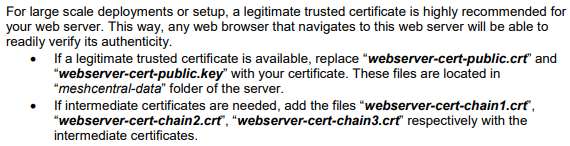
If you can't or won't use the built-in letsencrypt support for some reason and are trying to manually introduce a valid certificate that you acquired manually by some other means, then you should replace the webserver-cert-public.crt and webserver-cert-public.key files in the meshcentral-data folder, as described in section 5 of the MeshCentral UserGuide:
If you're still having issues, please open a new issue describing the steps you've taken, what you expected to happen, and what actually happened.
MailYouLater
on 14 Nov 2019
@MailYouLater is correct, you can't run both Apache web server and MeshCentral on the same ports at the same time. We probably need more information on your setup, but make sure to look at the Install Guide and User Guide.
Ylianst
on 14 Nov 2019
Looks like I was right to begin with, and @desarrollocdb was able to find help in issue #317.
MailYouLater
on 14 Nov 2019
webserver-cert-public.crt
change the webserver-cert-private.key and webserver-cert-public.crt, but it will also have to be changed in the config.json right? I have a wilcard certificate, in my mesh installation on Debian, I don't understand well and I can't find what parameters should be changed in config.json, help?
Thank you
 novell1974
on 8 May 2020
novell1974
on 8 May 2020
Related issues
MailYouLater
·
3Comments
 unguzov
·
3Comments
unguzov
·
3Comments
 robclay
·
3Comments
robclay
·
3Comments
 LPJon
·
3Comments
LPJon
·
3Comments
 nroach44
·
3Comments
nroach44
·
3Comments
Most helpful comment
You can't use apache and meshcentral at the same time on the same port(s) on the same server unless one is acting as a reverse proxy for the other. Meshcentral doesn't support acting as a reverse proxy for other services, so I can surmise that you're not using meshcentral as a reverse proxy for apache. Therefore if you have both apache and meshcentral operating on the same ports on the same server at the same time, then you're using apache as a reverse proxy.
If you're not using apache as a reverse proxy, then the answer to my question "Are you using Apache as a reverse proxy?" is "No, I'm not using Apache as a reverse proxy." not "Before posting, first investigate the problem.", as one can't investigate a problem when you haven't supplied enough information about it.
Anyway, why are you trying to use apache to get your certificate from lets encrypt? Meshcentral has built-in letsencrypt support, and if configured correctly, should be able to acquire a letsencrypt certificate without any help from you (other than that you have to add the required letsencrypt details to your
config.jsonfile). If you're having issues using the built-in letsencrypt support, then check out #629 and #645 to see if either of them relates to your issue.If you can't or won't use the built-in letsencrypt support for some reason and are trying to manually introduce a valid certificate that you acquired manually by some other means, then you should replace the

webserver-cert-public.crtandwebserver-cert-public.keyfiles in themeshcentral-datafolder, as described in section 5 of the MeshCentral UserGuide:If you're still having issues, please open a new issue describing the steps you've taken, what you expected to happen, and what actually happened.