Meshcentral: issue with chat option
Hi,
I was wondering if someone else has had issue with the chat, i open it but it says on waiting for user to accept but never appears a popup or nothing any ideas?
Thank you
 killmasta93
All 18 comments
 johnczer
on 21 Aug 2019
johnczer
on 21 Aug 2019
I too have been unable to use the chat feature. #305 indicates that it works for installed mesh agents (running as LOCAL SERVICE), but not for temporary mesh agents (running as current user), but I haven't seen it work at all ... ever.
@johnczer: Is it still working for you on installed agents? If so, were there any special steps or configuration options you had to go through to get it working? If not, do you know what the last version that worked was?
 MailYouLater
on 21 Aug 2019
MailYouLater
on 21 Aug 2019
I have not tried it on the 0.4.0-b as of yet but on 0.3.x versions it worked on installed agents but just not the temp agent. I didn’t have to do anything special to get it to work. I believe it has to do with the way the temp agent runs under a different security context and Brian was looking into a fix.
johnczer
on 21 Aug 2019
same here as running local service or temp mesh agents neither works :(
killmasta93
on 21 Aug 2019
I think this is related to the remote browser/chat window not opening in the local user context. Bryan has a fix (I think).
A note on how the chat works. The server will generate a URL and have the admin and remote machine open new browser tabs to this URL. The URL should look like: "https://server/messenger?id=meshmessenger/node....". Once both browsers open the URL, the chat session is established. So really, the MeshAgent only needs to open a browser on the remote machine with the right URL, however this is more difficult than it may seem.
So, if you see the chat box show up on your side, but not on the other side, that is the problem. If the remote machine does open the browser, but with wrong proxy settings, etc. That will also not work.
 Ylianst
on 23 Aug 2019
Ylianst
on 23 Aug 2019
Interesting, so I've verified that it does work if I copy the URL from the window that opened on my end, then use the remote desktop feature to open a browser on the remote computer set the remote clipboard via the clipboard set functionality, then paste the URL in the browser.
I also tried using the openurl mesh agent console command, as well as clicking on the globe, pasting in the "Open Page on Device" input and clicking OK, to see if these would open the chat window on the remote machine, but instead I'm asked which browser to open it with.
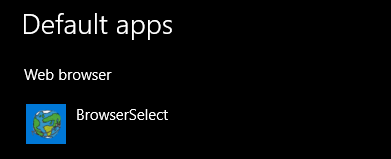
Why these options not open in the program I have set as my default browser?
Instead it opens this:
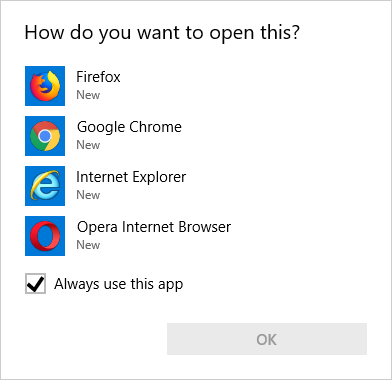
It doesn't even list the program I have set as my default browser as an option:
MailYouLater
on 23 Aug 2019
so what i did is open the chrome or browser and then click on type and send the URL and the user gets connected to the chat. The only thing odd is that maybe around every 1min or so shows this
not sure if its the NGINX or the node
And out of curiosity, would it possible to save the conversations? and i saw that there is an option to upload does it save it temporary or does it store on the server?
Connection closed.
Waiting for other user...
Connected.
Connection closed.
Waiting for other user...
Connected.
Connection closed.
Waiting for other user...
Connected.
killmasta93
on 25 Aug 2019
FYI. In the last week, there has been improvements to how the chat window is open by the MeshAgent. It used to open using the SYSTEM account which was not correct. It now opens under the currently logged in user and so, should fix a bunch of issues.
Ylianst
on 27 Sep 2019
Thanks for the heads up! I’ve been pretty good about staying up with the latest updates and this is one of the first things I check but I’ll check this again and let you know.
johnczer
on 27 Sep 2019
I had a chance to test this on version 0.4.1-v and the chat did not work when trying on temporary connect method. I updated to the latest 0.4.2-i and same result. I thought I would try to see if chat still worked with permanent connection and it does not work anymore. When I tried to open a web address on remote PC when in permanent connection mode the remote system blue screened. This was tested on a remote Windows 7/64bit PC and everything did work before with exception to trying these things over the temporary connect method. Thanks
johnczer
on 14 Oct 2019
What Service Pack is your Win7 machine? I can probably at least get the temporary agent mode to work, because I can detect if the current session ID to check if we are running as LocalSytem or a user. Currently, it uses the Task Scheduler to have the OS spawn the default browser in the user session. I can change it, so if we're already running as a user, to just spawn the default browser, without using the system task scheduler. Not sure why the Task Scheduler would blue screen tho, but I can certainly test in on my Windows 7 SP1 test machine.
 krayon007
on 14 Oct 2019
krayon007
on 14 Oct 2019
Hey Brian, It is Windows 7 SP1 and tried on two different PCs. I also went back to trying the chat on permanent connected agent and this does not work for some strange reason now. I tried several things like rolling back to previous MeshCentral versions because I know that at least the permanent connected method with chat worked at one point-just not ever with temp connected agent. The same holds true when trying to type a url and launch the browser-no dice.
johnczer
on 14 Oct 2019
Just for grins and giggles, can you run this command on your Windows 7 machine, to see if it blue screens? This is the command I use to spawn the browser into the correct session. (Just substitute USERNAME with the actual username, and make sure the System32 folder is the correct path)
(Each command should be all on a single line)
The first command will create the task, the second will forces it to launch, and the third deletes it.
SCHTASKS /CREATE /F /TN TempTask /SC ONCE /ST 00:00 /RU USERNAME /TR "C:windowssystem32cmd.exe /C START http://www.google.com"
SCHTASKS /RUN /TN TempTask
SCHTASKS /DELETE /F /TN TempTask
krayon007
on 14 Oct 2019
Sure thing Brian, doing that now and trying something else. I am logged into this one PC with Domain Admin account which has local Admin privileges. I ran those commands up to the second one and looked to see if the task itself had any errors and it does. "The operation being requested was not performed because the user has not logged on to the network. The specified service does not exist." I am wondering if this would work under local admin user account, so that's what I was going to try next. While I'm trying this here are the command outputs in general:
1st CMD: WARNING: Task may not run because /ST is earlier than current time.
SUCCESS: The scheduled task "temtask" has successfully been created.
2nd CMD: Attempted to run the scheduled task "temptask"
...but then my discovery when looking at actual task result. Let me know if you need me to try anything else!
johnczer
on 14 Oct 2019
OK, so running the command as DOMAINAdministrator works which is the same account I am logged in to when trying this over the agent.
I just logged off of this PC as Domain Admin and logged in to it as local admin and everything seems to be working while connected with temporary agent. Hmmmm....
johnczer
on 14 Oct 2019
Just verified that it works over permanent connected agent as well; all under local admin account. Going back to logging in as domain user account, which of course has local admin privileges. This would be the scenario for most of my customer computers that i connect to and use the chat over temporary agent.
johnczer
on 14 Oct 2019
I'm getting ready to head to another site Brian, just in case there was something else you wanted me to try. From what I gather so far with some quick testing is that the chat doesn't like the domain logged in account because of the way it's launched. It's something quite simple I'm sure (it always is!) and I am sure you will have an answer. Thanks Brian!
johnczer
on 14 Oct 2019
Hey Bryan, I was just checking to see if you had any luck with this.
johnczer
on 19 Oct 2019
Related issues
 nroach44
·
3Comments
nroach44
·
3Comments
 M1CK431
·
3Comments
M1CK431
·
3Comments
 Julien-asv
·
3Comments
Julien-asv
·
3Comments
 PathfinderNetworks
·
3Comments
MailYouLater
·
4Comments
PathfinderNetworks
·
3Comments
MailYouLater
·
4Comments