Meshcentral: Non-English characters in computers and users names
In one of the latest MeshCentral versions the problem with displaying processes and services containing non-English characters in the name was fixed (Thank you, it helps a lot!).
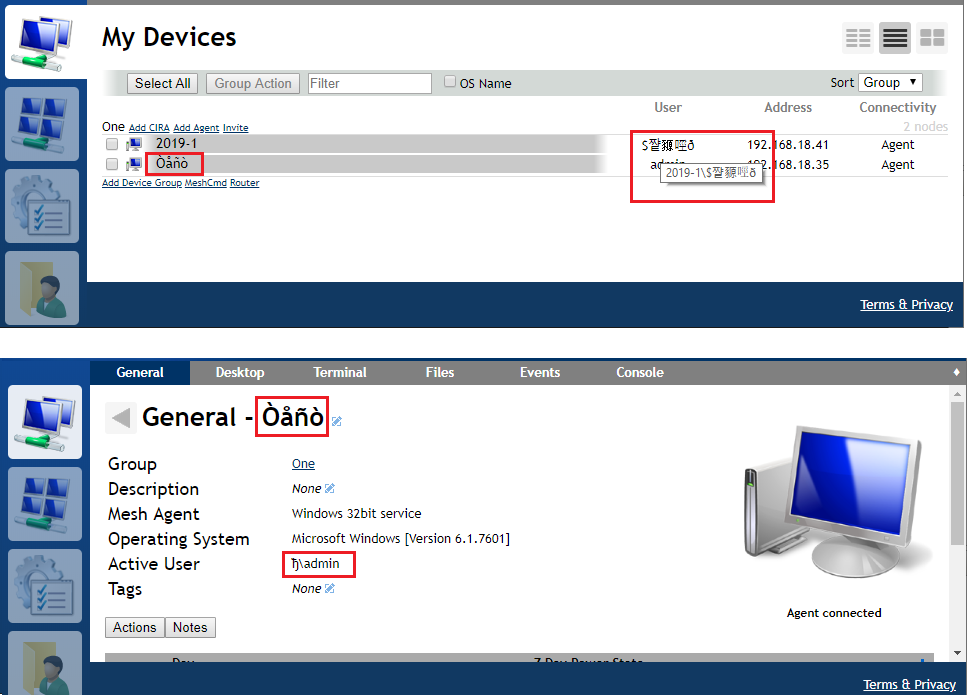
Can the same method correct the incorrect display of computer names and user names in the interface?
 TitovLab
All 17 comments
Yes, this is a very good request. Note that I am on vacation next week, so I expect MeshCentral releases to slow down.
 Ylianst
on 14 Aug 2019
Ylianst
on 14 Aug 2019
Hi. Bryan just took a quick look at this. For non-English characters in the computer name and user names, you need Windows 8.1 or higher. It will not work on anything older. From the screen above, the machine is running Windows 6.1.7601 which is Windows 7. There is nothing we can do except to update your operating system.
You can still edit the computer name on the server side and enter a name with non-English characters.
Hope that helps,
Ylian
Ylianst
on 2 Dec 2019
Why? What is the technical reason why it won't work on Windows versions older than 8.1?
Perhaps if enough details are provided, someone in the community could find a workaround?
 MailYouLater
on 2 Dec 2019
MailYouLater
on 2 Dec 2019
The Win32 system call to fetch the unicode hostname does not exist on Windows versions prior to 8.1. In my case, I was using GetHostNameW. From my testing, not only are the APIs missing, the system dialogs to set/fetch the hostname did not support non-english characters. It would display incorrectly in the dialog, and the system would throw a warning saying that use of non-standard characters in the hostname may not function correctly. I was going to try to use GetComputerNameExW, but I couldn't even get Windows to display the hostname properly in it's own system dialogs, on these older versions of windows.
I'd be happy to add support, if someone could figure out how to correctly set/fetch the hostname on these older versions of windows.
 krayon007
on 3 Dec 2019
krayon007
on 3 Dec 2019
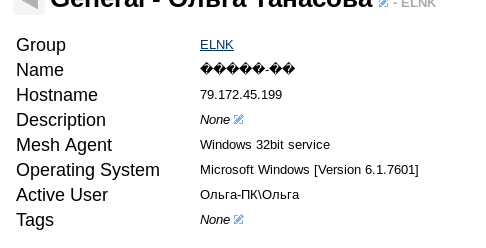
On my version (0.4.4-s), user names are displayed normally. The hostname is displayed normally before the "\" symbol in the active user name, but the hostname is not displayed correctly in the special field.
 Ilia1
on 3 Dec 2019
Ilia1
on 3 Dec 2019
Checked on version 0.4.7-j:
Windows 10 and 8.1 - the username and computer name are displayed correctly everywhere.
Windows 7 - the username is displayed correctly (including the name of the computer before the slash). The computer name is not displayed correctly.
Such a case is rare here and Windows 7 is being removed from support.
Although Windows 7 itself and other programs show the computer name correctly.
TitovLab
on 18 Jan 2020
What version of Windows 7 are you running? On my test system, I'm running the US version, but I installed the foreign language packs... In my case, if I try to set the computer name to be chinese characters, the system dialog says that non english characters are not supported... If I force it to accept anyways, all the chinese characters are switched to "_" characters everywhere. So when I call the system call to fetch the user list, the portion before the username, does not show correctly. It shows as "_____\user"
krayon007
on 22 Jan 2020
Windows 7 32bit Russian SP1 with updates.
Allows you to set computer name in Russian, issues a warning, but after that the name is displayed without errors in the Windows dialogs.
TitovLab
on 22 Jan 2020
Interesting... I just tried with Russian, and got the same results on my windows... Maybe I'll create a VM with a different region's Windows, and try again... If I can get the system dialogs to work correctly, maybe I can get the computer name to show up correctly, by reading it from somewhere else.
krayon007
on 22 Jan 2020
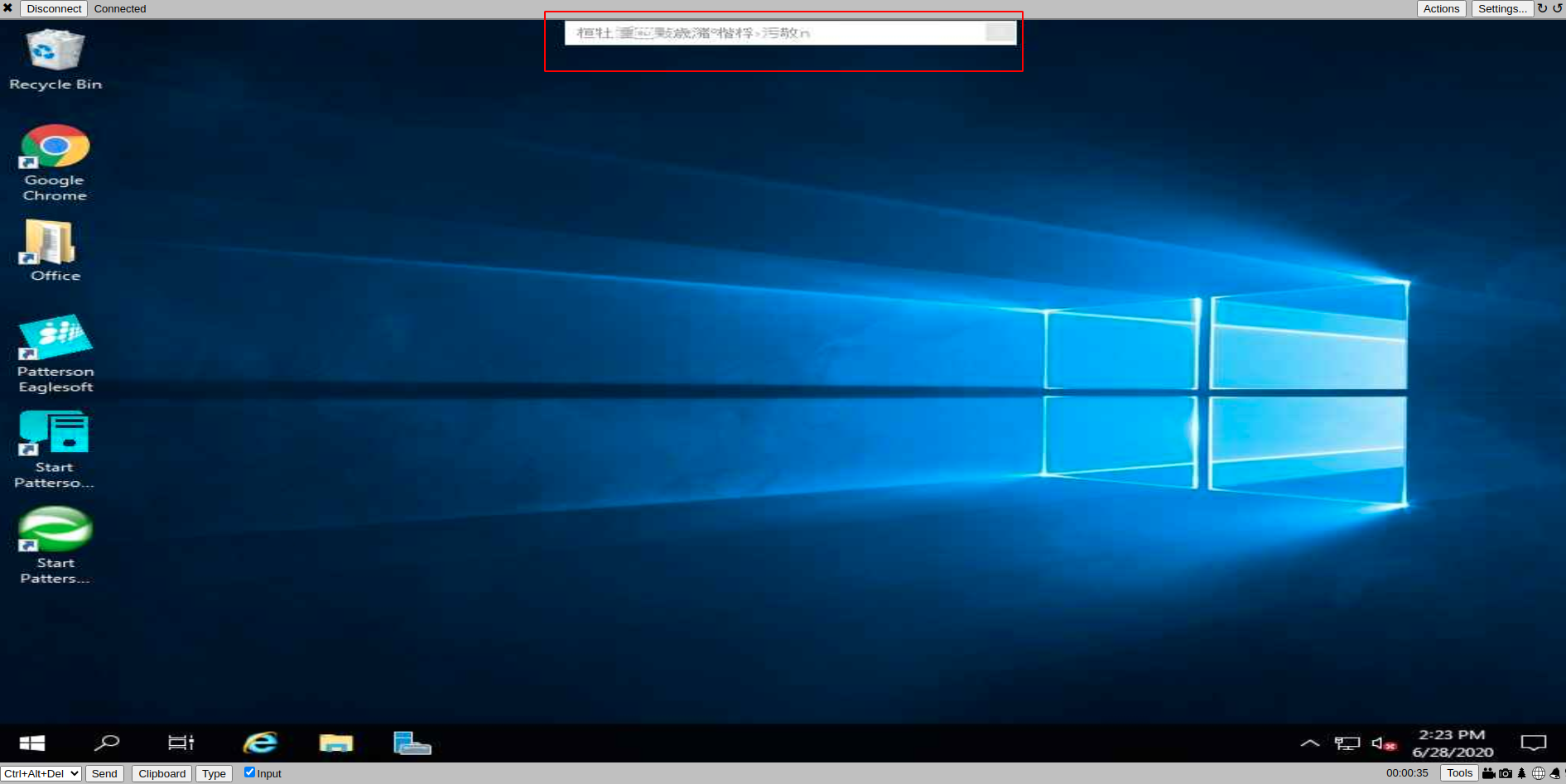
We are getting the characters when we remote into users computers. It's caused quite a issue as users are wondering about hacking.
 CCWTech
on 28 Jun 2020
CCWTech
on 28 Jun 2020
Are you saying you are getting Chinese characters on the privacy bar instead of a different language? What is it supposed to be displaying, so I can test?
krayon007
on 28 Jun 2020
Krayon - Not sure if by 'you' you mean me or not, but this is on the bar that is on the top that shows that the computer is being controlled by (Username of techs remoting in)
CCWTech
on 29 Jun 2020
Krayon - Not sure if by 'you' you mean me or not, but this is on the bar that is on the top that shows that the computer is being controlled by (Username of techs remoting in)
What I meant, was in the image you posted, what is the bar supposed to display?
krayon007
on 29 Jun 2020
It displays the names of those who are remoted into the machine.
Please do not send a new request for help to this email, the response may be delayed.
Need support? Please email mailto:[email protected] for a faster response.
Need a simple, effective & advanced Veterinary Clinical Management Platform? http://www.vetastic.com
Paying too much for bad phone service? We now offer VOIP phone services.
Allen Crist, CEO
CCW Technology I.T. Services
Veterinary I.T. Specialists
Serving Small and Medium Business since 2008
(801)410-0203 x5002
http://www.facebook.com/CCWTechnology
---- On Sun, 28 Jun 2020 22:26:58 -0600 Bryan Roe notifications@github.com wrote ----
Krayon - Not sure if by 'you' you mean me or not, but this is on the bar that is on the top that shows that the computer is being controlled by (Username of techs remoting in)
What I meant, was in the image you posted, what is the bar supposed to display?
—
You are receiving this because you commented.
Reply to this email directly, https://github.com/Ylianst/MeshCentral/issues/432#issuecomment-650897605, or https://github.com/notifications/unsubscribe-auth/ABJ2TJ3BNYCJCDPVIWQKBHLRZAJZFANCNFSM4ILWSCFA.
CCWTech
on 29 Jun 2020
@CCWTech , your issue is the same as #1559 . It was because there was one change I hadn't commited to the repository yet. But it is fixed now, and will release the update soon.
krayon007
on 29 Jun 2020
Thanks!
Please do not send a new request for help to this email, the response may be delayed.
Need support? Please email mailto:[email protected] for a faster response.
Need a simple, effective & advanced Veterinary Clinical Management Platform? http://www.vetastic.com
Paying too much for bad phone service? We now offer VOIP phone services.
Allen Crist, CEO
CCW Technology I.T. Services
Veterinary I.T. Specialists
Serving Small and Medium Business since 2008
(801)410-0203 x5002
http://www.facebook.com/CCWTechnology
---- On Mon, 29 Jun 2020 12:17:59 -0600 Bryan Roe notifications@github.com wrote ----
https://github.com/CCWTech , your issue is the same as https://github.com/Ylianst/MeshCentral/issues/1559 . It was because there was one change I hadn't commited to the repository yet. But it is fixed now, and will release the update soon.
—
You are receiving this because you were mentioned.
Reply to this email directly, https://github.com/Ylianst/MeshCentral/issues/432#issuecomment-651281269, or https://github.com/notifications/unsubscribe-auth/ABJ2TJ2QAZCP4QDSNCYE22TRZDLFPANCNFSM4ILWSCFA.
CCWTech
on 29 Jun 2020
Update is live in MeshCentral_v0.5.76
krayon007
on 29 Jun 2020
Related issues
 robclay
·
3Comments
robclay
·
3Comments
 coolwormgit
·
3Comments
MailYouLater
·
3Comments
coolwormgit
·
3Comments
MailYouLater
·
3Comments
 darryl-h
·
3Comments
darryl-h
·
3Comments
 whalehub
·
3Comments
whalehub
·
3Comments
Most helpful comment
The Win32 system call to fetch the unicode hostname does not exist on Windows versions prior to 8.1. In my case, I was using GetHostNameW. From my testing, not only are the APIs missing, the system dialogs to set/fetch the hostname did not support non-english characters. It would display incorrectly in the dialog, and the system would throw a warning saying that use of non-standard characters in the hostname may not function correctly. I was going to try to use GetComputerNameExW, but I couldn't even get Windows to display the hostname properly in it's own system dialogs, on these older versions of windows.
I'd be happy to add support, if someone could figure out how to correctly set/fetch the hostname on these older versions of windows.