Meshcentral: Add SSO Support (openid connect, cas, saml)
It would be usefull to add full web sso support, such as openid connect, especially in cases where ldap is not available directly.
 cromra
All 44 comments
Would be nice to have a more specific request. I would also need to see if I can support 2 factor authentication along with OpenID. Would this be to login using your Google/Facebook account?
 Ylianst
on 25 Apr 2019
Ylianst
on 25 Apr 2019
The idea would be to fully delegate authentication (and additionnaly get groups through specific claims or attributes) to an openid idp or cas server (i know less of saml).
It may be public (such as facebook or google), or for my case private (such as keycloak, lemonldap-ng or ADFS on premise or azure...).
The use of a 2nd factor would be the idp choice.
openidconnect (or CAS) seem to be implemented usually in nodejs with passport.
cromra
on 25 Apr 2019
I saw Passport, looks impressive. I would need to learn more about it, but that does seem like the right solution. I don't expect to work on this soon, I got lots going on, but will try to get to it.
Ylianst
on 25 Apr 2019
I'm going to vote this one up. SAML2.0 authentication would be great. No need to worry about 2FA with it - usually the IDP handles it.
I can assist on nailing down specifics, but basically it looks like this:
You setup a role in MC and manage permissions in MC.
1) Attempt to login, MC sends user to IDP (Identity Provider).
2) IDP authenticates user via authentication database. This is likely AD in most cases (Not MC's responsibility to handle)
3) IDP passes along needed attributes (Username, Group Name) to MC in the claim.
4) SP (Service Provider) matches the group attribute to MC group.
User is logged in and happy.
 MordyT
on 11 Dec 2019
MordyT
on 11 Dec 2019
SAML would be great indeed but it should not replace the native 2FA that is currently available as default. We have entities that do not have SSO platforms but knowing they are atleast registered under 2FA allows us a major sense of relief.
 penguinthingie
on 11 Dec 2019
penguinthingie
on 11 Dec 2019
I am working on a cas option now which we are using internally. I will hopefully have a pull request soon (unless @Ylianst is already working on it)
 yakatz
on 11 Dec 2019
yakatz
on 11 Dec 2019
I have not been working on that, a pull request on that would be wonderful!
Ylianst
on 12 Dec 2019
I'm very excited to see https://github.com/Ylianst/MeshCentral/commit/5c999192502459096dbbd4f6eff1fe6def9fa546 which adds SAML.
Is there any guide on setup with ADFS?
MordyT
on 22 May 2020
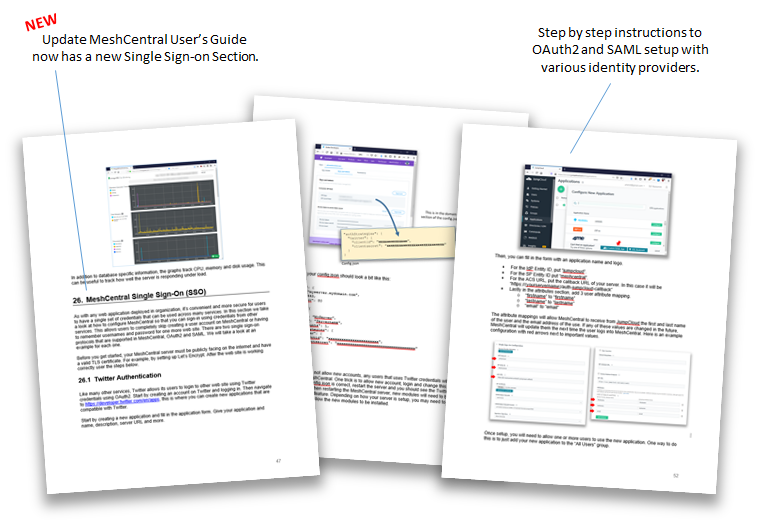
Just published an updated MeshCentral User's Guide 2.8 with a new section on Single Sign-On (SSO) with OAuth2 and SAML example configurations. Feedback appreciated.
Ylianst
on 24 May 2020
@Ylianst
Thanks for the updated guide. I've spent some time trying to get this working in my environment without luck...
I'm getting the following error when hitting the SAML button:
TypeError: Cannot read property 'authenticate' of undefined
    at C:\Program Files\Open Source\MeshCentral\node_modules\meshcentral\webserver.js:4298:49
    at Layer.handle [as handle_request] (C:\Program Files\Open Source\MeshCentral\node_modules\express\lib\router\layer.js:95:5)
    at next (C:\Program Files\Open Source\MeshCentral\node_modules\express\lib\router\route.js:137:13)
    at Route.dispatch (C:\Program Files\Open Source\MeshCentral\node_modules\express\lib\router\route.js:112:3)
    at Layer.handle [as handle_request] (C:\Program Files\Open Source\MeshCentral\node_modules\express\lib\router\layer.js:95:5)
    at C:\Program Files\Open Source\MeshCentral\node_modules\express\lib\router\index.js:281:22
    at Function.process_params (C:\Program Files\Open Source\MeshCentral\node_modules\express\lib\router\index.js:335:12)
    at next (C:\Program Files\Open Source\MeshCentral\node_modules\express\lib\router\index.js:275:10)
    at initialize (C:\Program Files\Open Source\MeshCentral\node_modules\passport\lib\middleware\initialize.js:53:5)
    at Layer.handle [as handle_request] (C:\Program Files\Open Source\MeshCentral\node_modules\express\lib\router\layer.js:95:5)
I've done some digging. It appears that you are using Passport with "Passport-SAML" strategy.
These URLs may be helpful:
https://github.com/bergie/passport-saml
https://github.com/bergie/passport-saml/blob/master/docs/adfs/README.md
(and http://www.passportjs.org/packages/passport-saml/)
I've also done some Googling and I think the issue is on the mesh side: this post is similar:
https://stackoverflow.com/questions/29838952/how-to-fix-typeerror-cannot-read-property-authenticate-of-undefined-passportj#29839003
Any help you can shed on this would be appreciated. I'll of course do a full write up of this once I get it working myself. I've confirmed that both the passport and passport-saml node modules did get installed. Also my auth-saml-callback URL shows a 404.
MordyT
on 24 May 2020
Do you happen to have multiple domains setup on your MeshCentral server? I think I see the problem. Current code only works if you have only the default domain setup. Working on a fix.
Ylianst
on 25 May 2020
Do you happen to have multiple domains setup on your MeshCentral server? I think I see the problem. Current code only works if you have only the default domain setup. Working on a fix.
Yeah, I have like 10 other domains
MordyT
on 25 May 2020
Just published MeshCentral v0.5.43 with single sign-on working for multi-domain MeshCentral servers. The problem was present regardless if you used OAuth or SAML, so this will fix it all. It should start working just after you upgrade. Let me know if it works.
Ylianst
on 25 May 2020
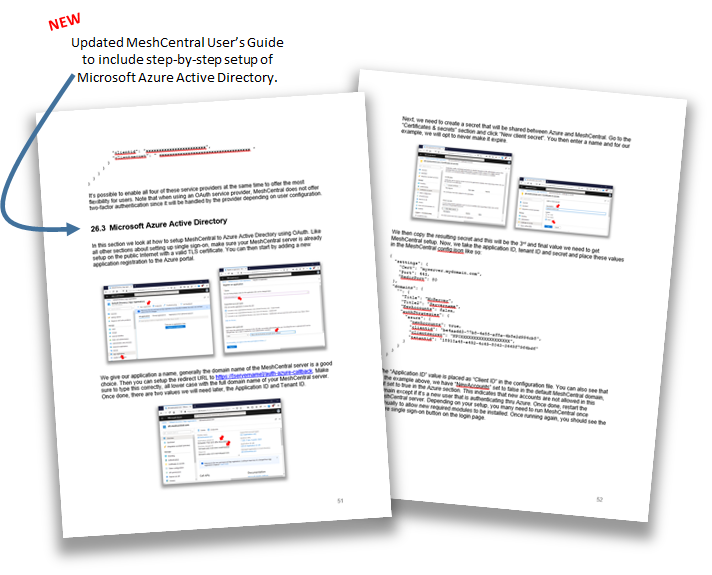
FYI. I added a new section in the MeshCentral User's Guide for step-by-step setup of Azure Active Directory. Not sure if you had seen that yet.
Ylianst
on 25 May 2020
@Ylianst
Just updated and the button now sends me to the IDP to authenticate. Unfortunately, when I get sent back to mesh, it throws this error:
TypeError: Cannot read property 'saml' of undefined
    at Strategy._verify (C:\Program Files\Open Source\MeshCentral\node_modules\meshcentral\webserver.js:4373:63)
    at validateCallback (C:\Program Files\Open Source\MeshCentral\node_modules\passport-saml\lib\passport-saml\strategy.js:69:14)
    at C:\Program Files\Open Source\MeshCentral\node_modules\passport-saml\lib\passport-saml\saml.js:1045:5
    at _fulfilled (C:\Program Files\Open Source\MeshCentral\node_modules\q\q.js:854:54)
    at C:\Program Files\Open Source\MeshCentral\node_modules\q\q.js:883:30
    at Promise.promise.promiseDispatch (C:\Program Files\Open Source\MeshCentral\node_modules\q\q.js:816:13)
    at C:\Program Files\Open Source\MeshCentral\node_modules\q\q.js:624:44
    at runSingle (C:\Program Files\Open Source\MeshCentral\node_modules\q\q.js:137:13)
    at flush (C:\Program Files\Open Source\MeshCentral\node_modules\q\q.js:125:13)
    at processTicksAndRejections (internal/process/task_queues.js:79:11)
It's possible that I'm not sending back the correct attributes. I'm returning email address (also transforming email address to NameID format), First name as firstname and Last name as lastname.
However, I suspect this isn't an attribute issue because the IDP doesn't have it in logs (it did initially when I wasn't doing a transform for NameID)
The Azure section is great, but because it's OAuth instead of SAML it doesn't tie over so well. JumpCloud section is SAML and I'm keeping it in mind.
Here's whats in Mesh config:

MordyT
on 25 May 2020
Ha... Ok, this is more multi-domain issue. I got one more fix to make. I do appreciate your detailed error reports, I can see exactly what the problem is. Let me see how I can fix this...
Ylianst
on 25 May 2020
Running tests on my development server now. If it works, I should have a fix published in 10 to 15 minutes.
Ylianst
on 25 May 2020
MeshCentral v0.5.44 is out! Let me know if that works. Also, if there is any problems, you can run the server with --debug web or use the "My Server"/"Trace" panel to trace "web" and see SAML/OAuth2 login information. Tracing "web" should show what profile was received from the IDP and if MeshCentral is decoding it right.
Ylianst
on 25 May 2020
Great work. I was able to login with IDP no problem!
However...
1) IDP needs new accounts setting turned on, which allows someone to make a new account bypassing the IDP. Even if I turn on domain restrictions, I prefer them not to be able to make an account that doesn't exist in the IDP. I normally have it off.
2) I can't seem to delete the account I made. Although the email address is the same as my standard mesh account, it made it as a separate account. I want to clean that up/delete the IDP account. Actually, I can't delete anything about that account. I can't remove it from a group, etc.
3) Can I set a default group for new users from IDP?
4) Will MeshRouter support IDP login?
5) The User Identifier just shows: ~http:. Not sure if this is why "ManageAllDeviceGroups isn't working for that user or something else.
in mesherrors.txt:
`-------- 5/25/2020, 12:35:38 AM ---- 0.5.44 --------
(node:5888) Warning: Accessing non-existent property 'count' of module exports inside circular dependency
(Use node --trace-warnings ... to show where the warning was created)
(node:5888) Warning: Accessing non-existent property 'findOne' of module exports inside circular dependency
(node:5888) Warning: Accessing non-existent property 'remove' of module exports inside circular dependency
(node:5888) Warning: Accessing non-existent property 'updateOne' of module exports inside circular dependency`

MordyT
on 25 May 2020
Nice.
- You can leave "newaccount" to false and add this:
        "saml": {
          "newAccounts": true,    <----------
          "entityid": "meshcentral",
          "idpurl": "https://server/saml2",
          "cert": "saml.pem"
        }
It will only allow new accounts when login using SAML.
- I will check this.
- No, but good ask.
- Nop... humm... oh dear. How will I do this!?!?!
- That could be bad, the user identifier should be
~[IDP-ID]:[UserUniqueId], so, it should be something unique for each user. If not, take a look at the "web" trace and let me know what the profile looks like, I will fix the code to read the profile correctly.
Ylianst
on 25 May 2020
Oh, your issuer string is a long URL, I had not expected this. It's going to cause all sorts of issues. Grab a text editor, edit node_modules/meshcentral/webserver.js, look for the line
var user = { sid: '~' + profile.issuer + ':' + profile.nameID, name: profile.nameID, strategy: 'saml' };
Change it to:
var user = { sid: '~saml:' + profile.nameID, name: profile.nameID, strategy: 'saml' };
Should be line number 4375. I will fix this on my side too, so the new update will have this. Restart the server when done. Your user identifiers will be ~saml:[nameID].
This may explain why user delete does not work.
Ylianst
on 25 May 2020
newAccounts": true in the saml section works as expected.
That code change fixed a couple issues.
The new user made has ~saml:myemail as expected. I can also delete them as expected.
Still need help to remove the ~http one
MordyT
on 25 May 2020
Do you use MongoDB? You can manually delete it in the DB. Otherwise, i will need to provide you with a way to delete that.
Ylianst
on 25 May 2020
You can do node meshcentral --listuserids to show all users identifiers. I realize now, I have a node meshcentral --createaccount, but not one to remove an account.
If you know how to use MongoDB Compass, it's one single record and should be pretty easy to do, you will find it in the "meshcentral" collection. Look for _id equal to "user/[domain]/~http...`
Ylianst
on 25 May 2020
I have Compass, but I'm a MSSQL and MySQL guy and am working my through figuring this out.
Then I will pull, update, and submit a PR for setting this up with ADFS
MordyT
on 25 May 2020
By the way, thank you for being willing to test this, it's very appreciated. I had to lean all about most of the Single Sign-on topic over the last week (OAuth, SAML, Azure, CloudJump, Passport.js...).
Ylianst
on 25 May 2020
I'm happy to help. A few more items...
1) I can't add a SAML user to a group: It shows in the autocomplete when you do so, but then says "Device Group: User xxx not found"
If I add the user to a group from the user (instead of from the group) it works.
2) I can't figure out how to add this user to "ManageAllDeviceGroups" - what string to use. Normally it's the username, which should be Firstname Lastname if I'm reading this correctly.
I'm also seeing this in the errors:
ERR: (node:5552) Warning: Accessing non-existent property 'count' of module exports inside circular dependency
(Use
node --trace-warnings ...to show where the warning was created)
(node:5552) Warning: Accessing non-existent property 'findOne' of module exports inside circular dependency
(node:5552) Warning: Accessing non-existent property 'remove' of module exports inside circular dependency
(node:5552) Warning: Accessing non-existent property 'updateOne' of module exports inside circular dependency
3) It appears that "NewAccountsRights": [ "nonewgroups", "notools" ], isn't respected for accounts from SAML, even when I put it in the section of SAML.
MordyT
on 25 May 2020
It's late today, but I will work on these in the next few days. All the problems you mention impact any of the single sign-on strategies, so pretty important to fix them all.
Ylianst
on 25 May 2020
I'm trying to use the generic saml setup with my idp (lemonldap).
This software usually uses the metadata generated by the SP, after providing the needed certificate, and does not generate it by itself.
Is there an endpoint in meshcentral which provides such metadata ?
Is there also a generic openid setup configuration ?
cromra
on 25 May 2020
@Ylianst Thanks again! Do you want me to report SSO issues like this here or do you want me to open new issues for each one?
@cromra same thing with ADFS (prefers metadata), but I'm able to manually configure and get it to work. All I needed was the identifier (meshcentral by default, set by entityid) and the consume URL (the callback url). I'll be publishing a picture walk trough for ADFS later today - it might help.
MordyT
on 25 May 2020
Yes, feel free to create separate issues. It's a lot better since I can keep track of what is open and what I closed.
- I can't add a SAML user to a group - Yes, this is a known problem. I want to fix it this week.
- For "ManageAllDeviceGroups", add "user/[domain]/~saml:userid", that should work. You can also do
node node_modules/meshcentral -listuseridsto see all user identifiers and cut & paste the right one. - "NewAccountsRights", fixing that now. Will be in next version.
For the error, I found this link. Looks like a problem with MongoDB and Node14 not related to any of this. Seems like the mongodb module will need to be updated.
Ylianst
on 25 May 2020
@Ylianst I will break out all open SSO issues from this thread into separate issues now. The original issues is now resolved and this can be marked fixed (I can't do it).
MordyT
on 26 May 2020
Hi @Ylianst , Awesome work on the SSO feature. Thank you for getting this enabled and documented.
I am trying to enable this for my platform and I believe I have it mostly working but I have few pieces of the puzzle that I am not sure I am doing it right or misunderstanding.
Currently, I only create accounts for specific users who should be able to access the system as needed and then have them reset their passwords once they receive their welcome email from the system. In terms of the SSO functionality, specifically using Azure, how would I go about inviting someone who I would like to authenticate using the Azure SSO that is now enabled? Would i create them an account as usual in the system? How would that match to the user if they are coming from the iDP? I have "newaccount" variable set to false so we don't have random users be able to create account to the system just because they can authenticate with Azure.
Second, I have my current Mesh platform setup for 2factor requirement. With the user coming from SSO, would they still be required to setup 2fa as well? The reason I ask is because Azure already does the 2fa verification as the iDP for the users authenticating.
Here is my relevant config settings:
"azure": {
          "_callbackurl": "https://xxxxxxxxxx/auth-azure-callback",
          "newAccounts": false,
          "newAccountsRights": [ "nonewgroups", "notools" ],
          "_newAccountsUserGroups": [ "ugrp//xxxxxxxxxxxxxxxxx" ],
          "clientid": "xxxxxx",
          "clientsecret": "xxxxxx",
          "tenantid": "xxxx"
Look forward to your thoughts. Thank you!
 intranceitrust
on 5 Jun 2020
intranceitrust
on 5 Jun 2020
@intranceitrust
Typically, when using a SSO provider, you can select a group of users that are allowed to access that application. The SSO provider acts as the gatekeeper. So you would not pre-stage these users in Mesh - rather you would have them hit the SSO button and it would make them a new account on the spot.
As for new accounts being off...
See this: https://github.com/Ylianst/MeshCentral/issues/198#issuecomment-633407669
Basically you can have it off but allow new accounts from SSO.
As for 2FA - same deal. Typically, when using a SSO provider, the MFA is done on the SSO provider option.
If using Azure, you have a lot of options. You can get fancy and say these users can access from this time to this time, from these IPs don't need MFA but the rest do, etc. Use Azure MFA and more.
Hope this helps.
MordyT
on 5 Jun 2020
Hi @MordyT Thanks for providing some guidance. I was able to get the user access restrictions in place as needed through the Azure AD->Enterprise Apps->Assign Users and Permissions page. Also needed API Permissions enabled for the entire Org as well for it all to work correctly with the callback/reply URL.
For the 2FA, I already do MFA with my users on the Azure AD side and that's why the question about how to disable the 2FA verification for the SSO users only while keeping 2FA still a requirement for users that are not coming from SSO.
@Ylianst is there a setting that can be placed within the SSO configurations portion that can instruct to not do further 2FA verification or is it already available in someway to activate now?
Thank you!
intranceitrust
on 7 Jun 2020
Hi All,
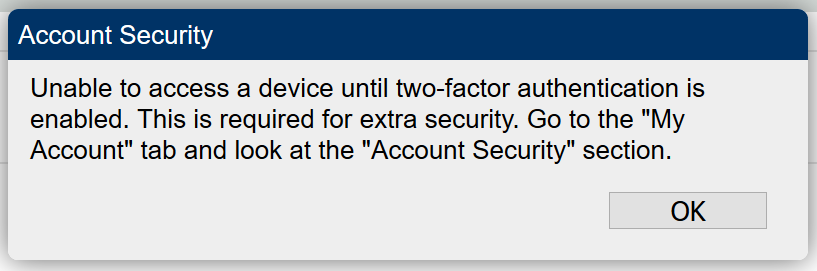
As I had mentioned earlier that i was able to get SSO working but the SSO user is limited in terms of being able to do much once signed in. When attempting to connect to a device, the 2FA window is popping up as shown below:
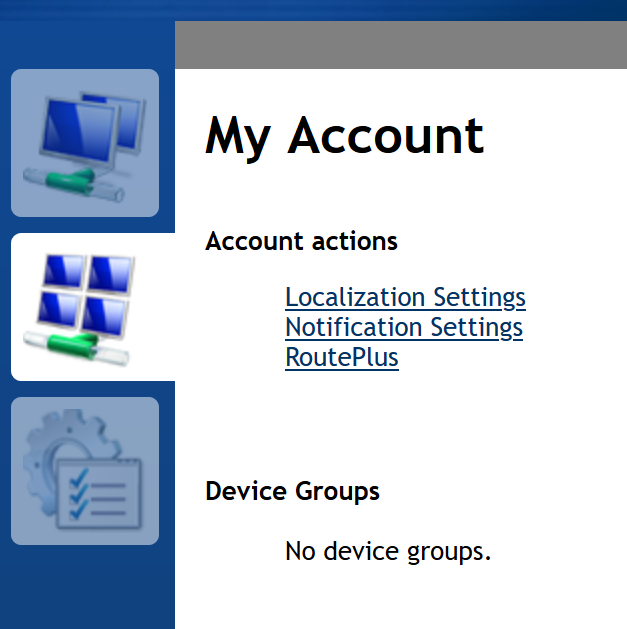
Unfortunately, the user does not get an option to select "Account Security" under "My Account" as that option does not show up as shown below:
As i had mentioned earlier, the SSO user is already doing MFA through the idP, so if there is a way to disable the need for additional security for just the SSO users, that would be awesome. Is that possible? If not, how can we get the 2FA option for the SSO user within "My Account"?
Thanks for your help as always!
intranceitrust
on 15 Jun 2020
Hi. In the domain section of your config.json, do you happen to have "force2factor" set to true?
      "PasswordRequirements": {
        "force2factor": true
      }
If so, you can turn it off, if not, let me know. You are correct that when using SSO, you can't setup 2 factor authentication.
Ylianst
on 15 Jun 2020
HI @Ylianst yes, i have 2factor enabled and would like to keep non-SSO users to continue going through 2FA for security purposes. Any way we can have 2FA still apply for non-SSO users but SSO users "not" get prompted for 2FA?
I imagine even with SSO enabled environments, there will be plenty of situations with users who may need to setup directly within the normal user accounts and 2FA would be a desired state of security for them if possible. Thanks for looking into this!
intranceitrust
on 15 Jun 2020
Ok, got it. I will work on this.
Ylianst
on 15 Jun 2020
I just checked in a fix for this, it will be in MeshCentral v0.5.64 when it's next published.
Ylianst
on 15 Jun 2020
Thats Awesome @Ylianst !!!! Look forward to testing it out once released! :)
Thank you!!!
intranceitrust
on 15 Jun 2020
Just published MeshCentral v0.5.64. Let me know if it works.
Ylianst
on 15 Jun 2020
@Ylianst It is working perfectly as needed! SSO Users no longer get the 2FA prompt and the regular local accounts continue to require 2FA that's enabled! Thank you so much for the quick turnaround on this awesome feature! Cheers!! 💯
intranceitrust
on 16 Jun 2020
Great work, now is the original issue resolved to the regards? Can we close this ticket?
 SomeGuru
on 1 Jul 2020
SomeGuru
on 1 Jul 2020
Related issues
 petervanv
·
3Comments
petervanv
·
3Comments
 vish84
·
3Comments
vish84
·
3Comments
 PathfinderNetworks
·
3Comments
PathfinderNetworks
·
3Comments
 MailYouLater
·
4Comments
MailYouLater
·
3Comments
MailYouLater
·
4Comments
MailYouLater
·
3Comments
Most helpful comment
I am working on a cas option now which we are using internally. I will hopefully have a pull request soon (unless @Ylianst is already working on it)