Mentorship-android: Bottom navigation moves up
Describe the bug
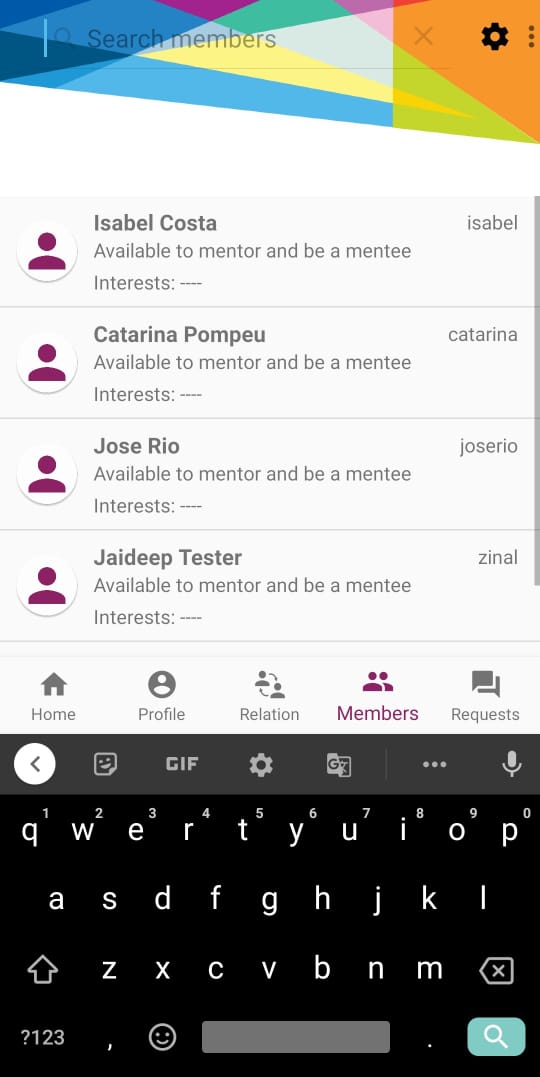
In Members fragment, bottom navigation bar moves up when soft-keyboard is shown while searching for members. The bottom navigation bar shouldn't have moved up.
To Reproduce
Steps to reproduce the behavior:
- Go to Members Fragment
- Click on Click on search bar on the top
- Observe that bottom navigation bar moves up
Expected behavior
The bottom navigation bar shouldn't have moved up when keyboad is shown
Screenshots
Smartphone (please complete the following information):
- Xiaomi PocoF1
- Android 10
- Version: 29
 devansh-299
All 19 comments
@devansh-299 what solution would you like to say for this issue?If the bottom nav bar doesnt move up it will be hidden behind the keyboard as an alternative should the search open a new page?
 vj-codes
on 11 Jun 2020
vj-codes
on 11 Jun 2020
@devansh-299 what solution would you like to say for this issue?If the bottom nav bar doesnt move up it will be hidden behind the keyboard as an alternative should the search open a new page?
@vj-codes I guess bottom nav being hidden should be no problem. I have never seen bottom navigation getting moved up because of soft keyboard in any application
devansh-299
on 11 Jun 2020
@devansh-299 same issue occurs when a user tries to enter password in login screen , the contents are shifted upward.
Can you add it in this issue or shall I create another one?
vj-codes
on 16 Jun 2020
@devansh-299 same issue occurs when a user tries to enter password in login screen , the contents are shifted upward.
Can you add it in this issue or shall I create another one?
@vj-codes I cannot reproduce the issue you pointed out. Also, in my opinion, shifting of elements other than bottom navigation bar shouldn't be an issue
devansh-299
on 20 Jun 2020
Anyone working on this issue?
 devptyagi
on 21 Jun 2020
devptyagi
on 21 Jun 2020
Describe the bug
InMembersfragment, bottom navigation bar moves up when soft-keyboard is shown while searching for members. The bottom navigation bar shouldn't have moved up.To Reproduce
Steps to reproduce the behavior:
- Go to Members Fragment
- Click on Click on search bar on the top
- Observe that bottom navigation bar moves up
Expected behavior
The bottom navigation bar shouldn't have moved up when keyboad is shownScreenshots
Smartphone (please complete the following information):
- Xiaomi PocoF1
- Android 10
- Version: 29
@devansh-299 you're right you have a point here. The navigation bar being shifted like that isn't so user friendly but I also don't think hiding it behind the keyboard would be the best solution actually most applications open a new popup for the search functionality. I'm not sure if that's the recommended way but that' what I've observed. you can check the search in google play app for example.
 MariamKotob
on 22 Jun 2020
MariamKotob
on 22 Jun 2020
@devansh-299 same issue occurs when a user tries to enter password in login screen , the contents are shifted upward.
Can you add it in this issue or shall I create another one?
As Devansh said I can't reproduce this either. Are you sure that it's still an issue in the current version? If yes please upload a GIF so we can understand.
MariamKotob
on 22 Jun 2020
Anyone working on this issue?
Up to now, it's still in discussion. Let me check if @devansh-299 wants to work on it first. Else I'll assign it to you. Please, be patient.
MariamKotob
on 22 Jun 2020
@devansh-299 you're right you have a point here. The navigation bar being shifted like that isn't so user friendly but I also don't think hiding it behind the keyboard would be the best solution actually most applications open a new popup for the search functionality. I'm not sure if that's the recommended way but that' what I've observed. you can check the search in google play app for example.
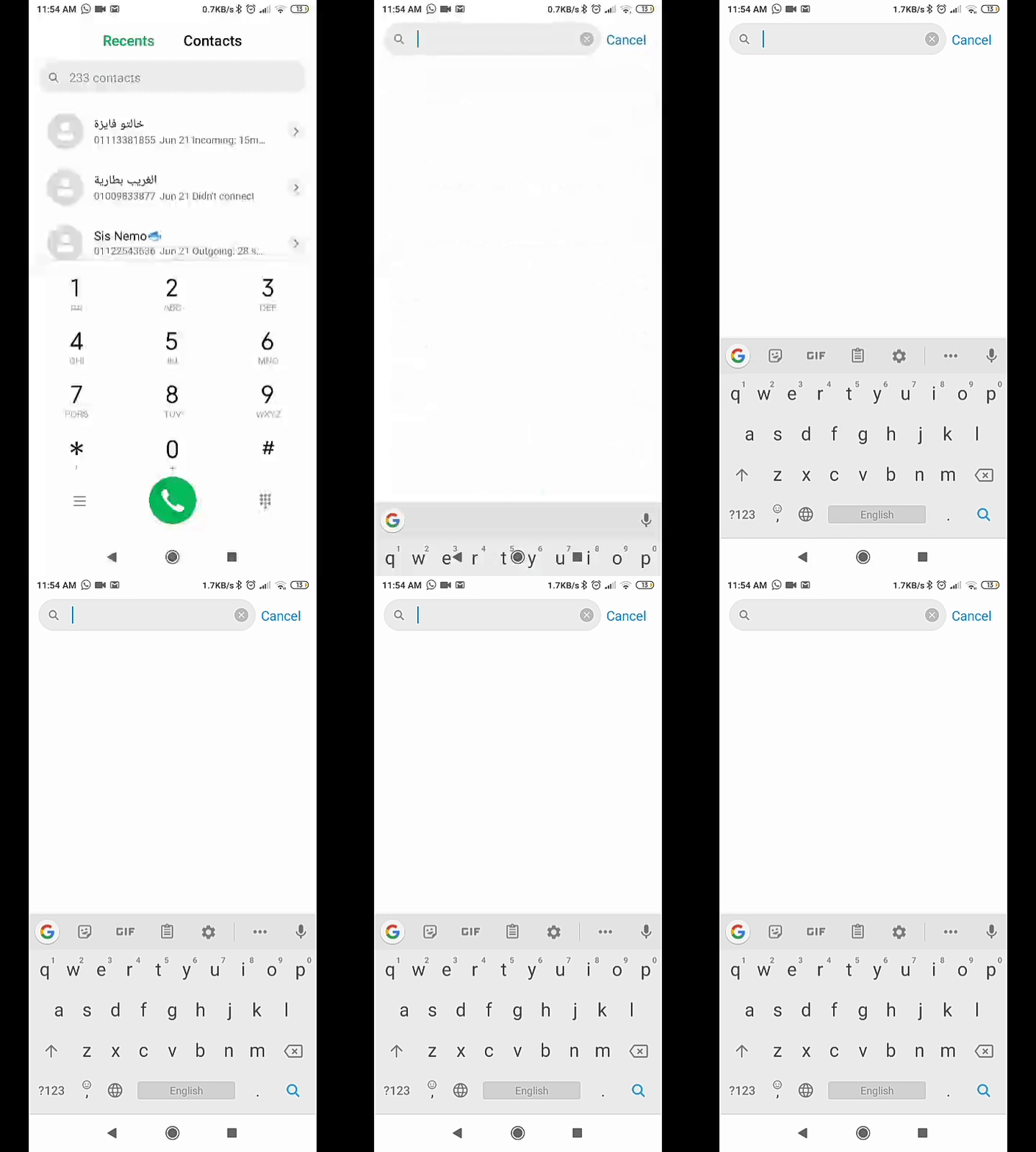
For more clarification; what I meant is this emty view appears after tapping search bar on the contacts app.
MariamKotob
on 22 Jun 2020
@MariamKotob Okay sure! No Problem. :)
devptyagi
on 22 Jun 2020
@MariamKotob Okay sure! No Problem. :)
@devptyagi you can work on this issue
devansh-299
on 22 Jun 2020
Describe the bug
InMembersfragment, bottom navigation bar moves up when soft-keyboard is shown while searching for members. The bottom navigation bar shouldn't have moved up.
To Reproduce
Steps to reproduce the behavior:
- Go to Members Fragment
- Click on Click on search bar on the top
- Observe that bottom navigation bar moves up
Expected behavior
The bottom navigation bar shouldn't have moved up when keyboad is shown
Screenshots
Smartphone (please complete the following information):
- Xiaomi PocoF1
- Android 10
- Version: 29
@devansh-299 you're right you have a point here. The navigation bar being shifted like that isn't so user friendly but I also don't think hiding it behind the keyboard would be the best solution actually most applications open a new popup for the search functionality. I'm not sure if that's the recommended way but that' what I've observed. you can check the search in google play app for example.
@MariamKotob yeah that's also a good approach, but I think we should discuss this with the community before going with this approach
devansh-299
on 22 Jun 2020
@devansh-299 you're right you have a point here. The navigation bar being shifted like that isn't so user friendly but I also don't think hiding it behind the keyboard would be the best solution actually most applications open a new popup for the search functionality. I'm not sure if that's the recommended way but that' what I've observed. you can check the search in google play app for example.
For more clarification; what I meant is this emty view appears after tapping search bar on the contacts app.
Thanks
devansh-299
on 22 Jun 2020
@MariamKotob yeah that's also a good approach, but I think we should discuss this with the community before going with this approach
Sure let's move this discussion to Zulip.
MariamKotob
on 23 Jun 2020
I would prefer a new empty view @MariamKotob @devansh-299
vj-codes
on 28 Jun 2020
Even I do prefer a separate view for search feature.
 HaripriyaB
on 29 Jun 2020
HaripriyaB
on 29 Jun 2020
It seems that the new window approach is the one to proceed with. So should I modify the existing issue or open a new one and close this?
devansh-299
on 1 Jul 2020
It seems that the new window approach is the one to proceed with. So should I modify the existing issue or open a new one and close this?
I guess it would be too vague for others if you modify this issue. I'd prefer you to open a new one.
MariamKotob
on 2 Jul 2020
Closing this as #732 addresses the updated problem
devansh-299
on 2 Jul 2020
Related issues
 epicadk
·
5Comments
epicadk
·
5Comments
 isabelcosta
·
4Comments
isabelcosta
·
4Comments
 annabauza
·
8Comments
annabauza
·
8Comments
 vaishnavi-29
·
3Comments
vaishnavi-29
·
3Comments
 jddeep
·
6Comments
jddeep
·
6Comments
Most helpful comment
I would prefer a new empty view @MariamKotob @devansh-299